SmallCoder Review: A Local AI Coding Agent with Zero API Costs

SmallCoder is an open-source coding agent optimized for local small models, solving context window limits with a smart planning mechanism.
SmallCoder is a coding agent tool built specifically for local open-source models, filling the gap left by mainstream tools like Claude Code that weren't designed for small, locally-run models. Its core problems to solve: existing tools have bloated system prompts (~34,000 tokens) that overwhelm 128K-window local models, and require tedious configuration with no auto-detection of Ollama/LM Studio models. SmallCoder addresses these with a leaner system prompt, optimized toolset, and a task planning mechanism that lets the agent re-check its to-do list after each context compression event to stay on track. It supports terminal and web interfaces, three-tier permission control, and works best with Qwen3. For complex projects, the recommended strategy is "large model for planning, small model for execution."
Why Existing Tools Don't Work Well with Local Models
In the coding agent space, tools like Claude Code, OpenCode, and DeepSeekAd Harness are already quite mature — but they share a long-overlooked problem: they're almost exclusively designed for cloud-hosted flagship models, with no real optimization for free, locally-run open-source models.
This tension shows up most clearly in context window constraints. Open-weight models like Qwen3, even when hardware allows for more, typically offer context windows of only 128K to 256K tokens. When running a local model inside something like Claude Code, the tool itself consumes roughly 34,000 tokens before you've typed a single instruction. If your entire context is 128K, system overhead alone eats up nearly a quarter of your available space — and that's devastating for smaller models.
The more practical pain point is configuration overhead. Plugging a local model into these tools usually requires significant technical setup. The author's original wish was simple: open a new conversation, select a model, and have the tool automatically detect every model deployed via Ollama or LM Studio on the machine — no extra configuration, works out of the box. SmallCoder was born from this need: open-source, free, and rebuilt from the ground up — system prompt, toolset, and compression mechanism all optimized specifically for local models.
Context Window refers to the maximum number of tokens a model can process in a single inference pass, including the prompt, conversation history, tool outputs, and generated content. Tokens don't map directly to characters or words — Chinese text typically runs 1–2 tokens per character, while English words average roughly 1–1.5 tokens each. When cumulative content exceeds the window limit, tools usually trigger a "compression" operation — discarding or summarizing earlier conversation — which can cause the model to "forget" task context and produce errors or redundant work. The System Prompt is an instruction set injected before the actual conversation begins, defining the model's role, available tools, and behavioral rules. It's typically populated automatically by the tool framework and invisible to the user. Tools like Claude Code use large system prompts to support rich functionality — a significant resource drain on local small models with already-limited context space.
Installation and Model Setup
Installing SmallCoder is nearly frictionless. Open a terminal (PowerShell works too) and run a single command:
npm install -g smallcoder@latest
The @latest tag ensures you always get the most recent version.
The real preparation work is getting your local model ready. There are two mainstream options: Ollama and LM Studio. For Ollama, visit the official website, download the installer for your OS, and you'll have access to a wide selection of models.
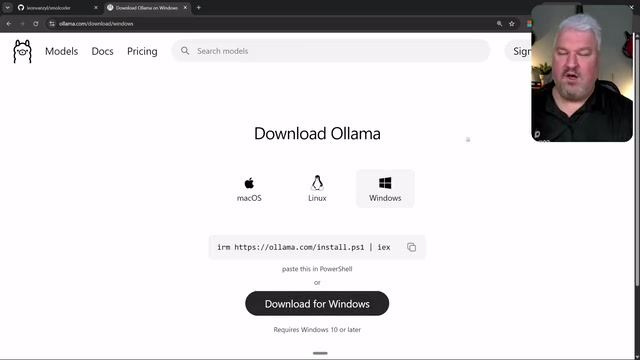
The author recommends Qwen3 as the top free model choice for coding tasks — it's around 18GB and requires approximately 16GB of VRAM (or unified memory on Mac). Downloading is as simple as running ollama pull <model-name>, then verifying with ollama run <model-name>. The first load will be slow since the model has to be read into memory, but sending a message afterward lets you see the inference process and response.
One detail worth noting: Ollama dynamically allocates context window size based on available VRAM. So even if a model nominally supports 256K, you might only get 131K in practice — and that number shrinks further when background apps like screen recording software consume additional VRAM.
Two Ways to Use It: Terminal and Web View
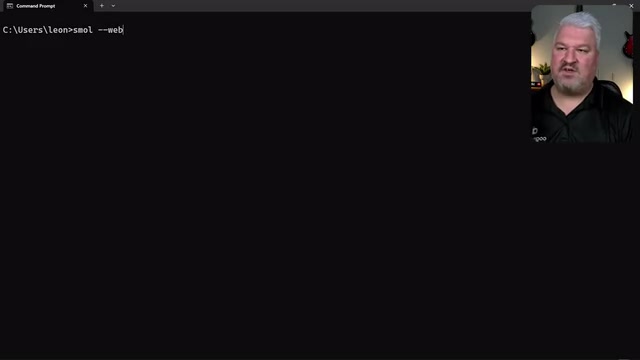
SmallCoder offers both a terminal and a web interface. For terminal mode, it's best to open it inside a specific project folder and run small to enter the interface. When selecting a model via /model, it automatically detects models running on Ollama and LM Studio — whether they're running in Docker containers or directly on the host.
Permission control is a notable design choice. Holding Shift and pressing Tab cycles through three modes: read-only mode, where the agent can only read files; edit mode, where it can modify files but needs permission to run commands; and bypass mode, where it can freely edit files and execute commands. This tiered permission system is particularly useful for local automation scenarios.
The web version launches with small --web, which generates a standalone URL.
The experience closely resembles Claude Desktop or the ChatGPT app, with a left sidebar showing all projects and sessions. The web view also displays real-time context window usage — in the author's demo it showed roughly 1% usage with a 131,000-token window — and you can adjust the model and inference effort at any time.
Both Ollama and LM Studio expose model capabilities by running a local HTTP server compatible with the OpenAI API format — Ollama defaults to
http://localhost:11434and LM Studio tohttp://localhost:1234. SmallCoder achieves its "detect local models without any configuration" experience by automatically probing these two ports. In Docker scenarios, port mapping rules remain the same, so detection works just as well. This standard API protocol design also means that, in theory, any local inference backend compatible with the OpenAI interface (such as llama.cpp's server mode or vLLM) can be connected — just point the service address to the corresponding port.
Core Optimization: Planning Mechanism and Staying on Track After Compression
What makes SmallCoder most impressive is its engineering work around the inherent limitation of small models: constrained context windows.
When the agent starts a task, it generates a plan — similar to Claude Code — but SmallCoder's plan serves an additional purpose. Because local models have smaller context windows, compression is triggered frequently. After each compression, the agent re-reads the plan, checks off completed tasks, and identifies the next step. This "to-do list" mechanism keeps the agent on track even after repeated compression events, preventing it from losing its place when context gets truncated.
The author tested this with a multiplayer tic-tac-toe game — the only instruction was "create a multiplayer tic-tac-toe game that runs in the browser."
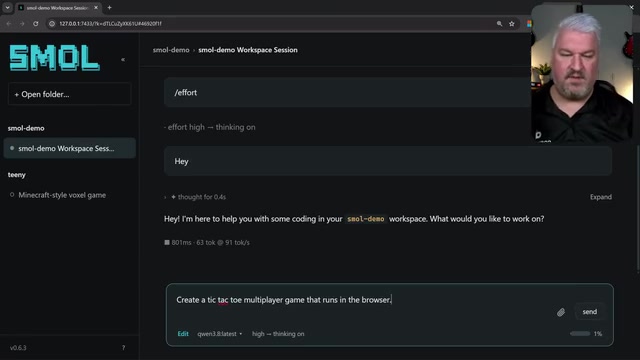
The agent completed the code quickly and, once granted edit mode permissions, launched a dev server. Since SmallCoder doesn't have a built-in browser engine but does provide a built-in browser view, the author pasted the local URL in and saw a working game — the whole process was "absurdly optimized."
Context Compression is a critical mechanism for coding agents to maintain continuity during long tasks. Common compression strategies include: truncating the earliest conversation turns, using a smaller model to summarize historical content and replace the original text, or retaining only tool call inputs and outputs while discarding intermediate reasoning. Compression inevitably causes information loss — especially dangerous is losing state information like "what approaches have already been tried" and "which subtask we're currently on," causing the model to backtrack or repeat mistakes after compression. SmallCoder's planning mechanism is essentially a form of external state persistence — writing task progress into a separate document rather than relying entirely on conversation history, allowing the model to quickly restore context by reading the plan file after compression, without needing to retain a full conversation history within the limited token budget.
The Right Approach for Complex Projects
Small models handle targeted edits just fine, but planning a complex project from scratch is often beyond them. The author's practical rule of thumb: use a smarter model (even the free tier of ChatGPT) for initial planning to generate a clear specification, then hand that spec to the local small model for execution.
He demonstrated this workflow with a Minecraft clone project (Voxel Mini): first having a larger model generate a spec using HTML/CSS/JavaScript, Three.js, with basic AI animals and a simple crafting system, then pasting the complete spec into SmallCoder.
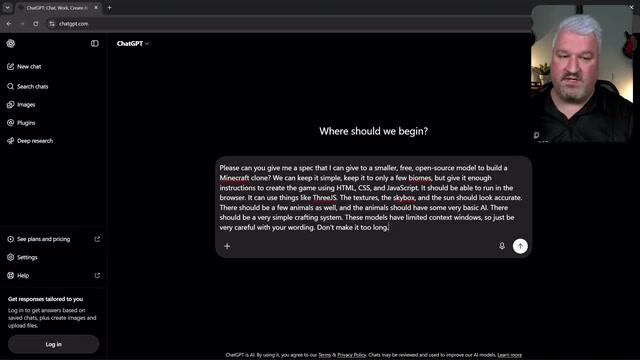
The key is wording — small models have limited context, so the spec must be clear but not verbose. The entire build ran for about 20 minutes without interruption. The author specifically noted that anyone who has used local models knows they tend to crash or need manual "nudging" to continue, whereas SmallCoder keeps the agent working through to completion without restarts or repeated prompting.
After completion, the game had a texture bug. The author's approach here is worth noting: screenshot the problem, drag the screenshot directly into SmallCoder, and describe the issue. One caveat: vision functionality depends on the model itself supporting it — Qwen3 supports vision, tool calling, and thinking tags simultaneously, so just make sure your chosen model has tool and vision capabilities. After refreshing, the texture issue was fixed, and the entire world, animals, and basic interactions all worked correctly.
Conclusion
For developers who want to run a coding agent entirely locally, offline, and at zero API cost, SmallCoder fills a genuine gap. Its value isn't in making local models perform like Claude — the author openly acknowledges that small models will never match flagship model quality — but rather in pulling the practical usability of local small models up to a level worth trying, through targeted optimizations to system prompts, toolsets, compression, and the planning mechanism. The "large model for planning, small model for execution" division of labor, combined with iterative screenshot-based debugging, is the realistic path to squeezing the most out of these models in a local environment.
Related articles

Chain of Thought Isn't Just for AI: How Humans Can Use CoT to Improve Thinking Quality
Chain of Thought isn't just a prompt trick for large models. Starting from a Hacker News discussion, this article analyzes why CoT works for human thinking too, breaks down actionable ways to transfer it, and highlights the key differences between human CoT and machine CoT.
Cloudflare Teams Up with OpenAI: Closi…
Cloudflare Teams Up with OpenAI: Closing the Loop from Vulnerability Discovery to Defense with AI
Cloudflare uses OpenAI Daybreak to investigate security vulnerabilities and generate reviewable remediation plans, while developers use Codex to boost coding efficiency and quality.

Orca Multi-Agent Orchestration in Practice: A Guide to Parallel Collaboration with Claude and Codex
Orca is Stable AI's free open-source agent workbench supporting 34 agents like Claude Code and Codex in parallel. Learn its Git worktree isolation, multi-model orchestration, and mobile management.