SmartPause: Precise Media Key Control for the App Actually Playing Audio on macOS

SmartPause fixes macOS media keys so they control the app actually playing audio, not the last one the system remembered.
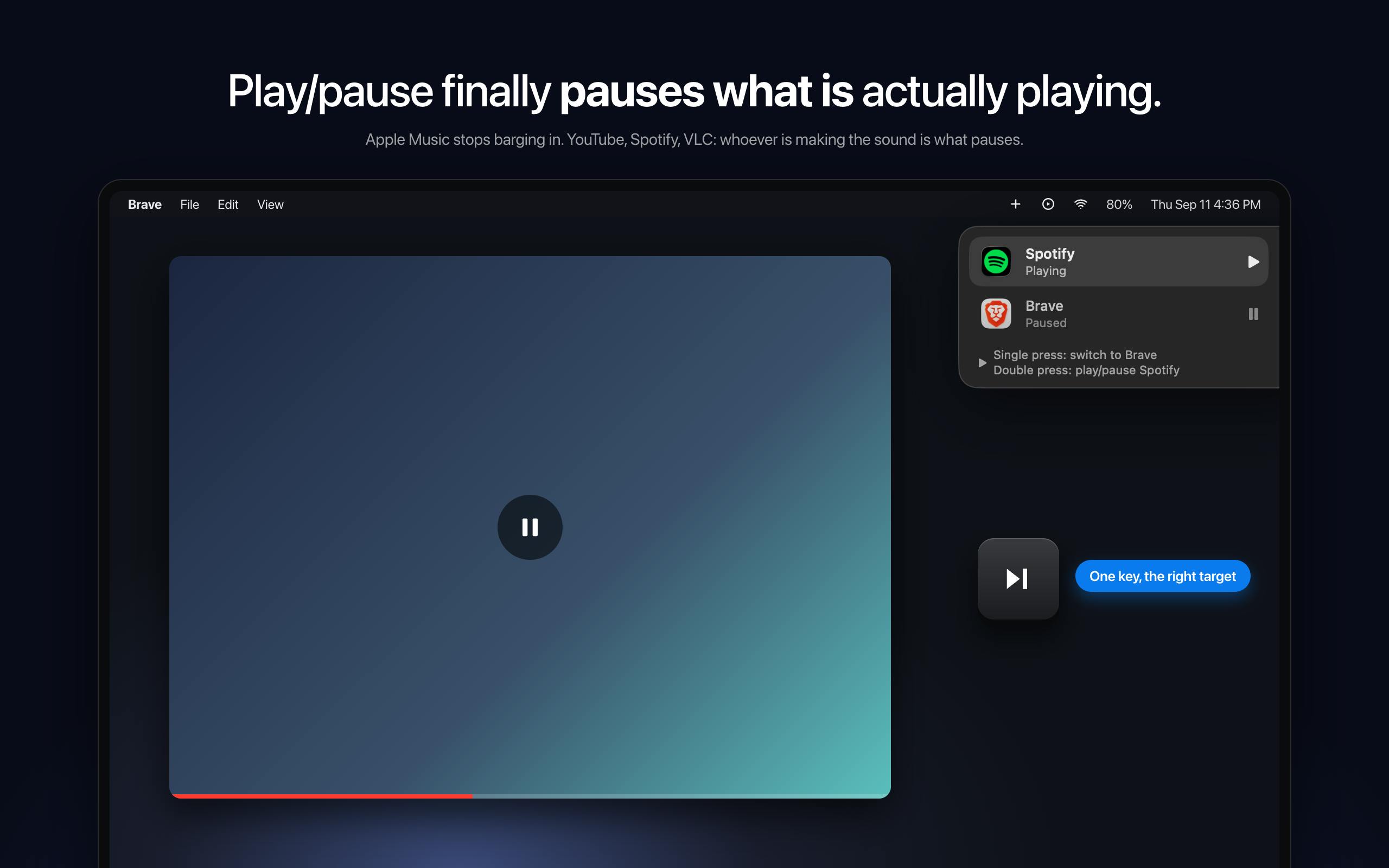
SmartPause targets a persistent macOS media key routing flaw — the system sends play/pause commands to the "last remembered" app rather than whatever is actually outputting audio, causing keystrokes to accidentally wake Apple Music instead of pausing a YouTube video. Built by indie developer Yasin Özmen, this open-source menubar tool actively detects the current audio-outputting app and routes commands to it. It also handles two-app scenarios with single-click (switch target) and double-click (play/pause) logic. Free, open source, and menubar-only, it fills an OS experience gap at minimal cost, reaching No. 13 on Product Hunt.
A Long-Ignored macOS Pain Point
If you're a heavy macOS user, you've almost certainly run into this frustration: you press the play/pause key to pause a YouTube video, and instead of doing that, the system launches Apple Music while YouTube keeps playing. This isn't an isolated glitch — it's a fundamental design limitation in macOS's media key routing. The system sends media key commands to the app it "last remembered," not the one actually producing audio right now.
The open-source tool SmartPause was built specifically to address this everyday annoyance. Its purpose is razor-focused: a free, open-source menubar utility that solves the single question of "which app should the play key actually control." It earned 64 upvotes on Product Hunt, landing at No. 13 for the day — not a viral hit, but a precise solution to a quietly felt need among Mac users.
macOS's media key routing is built on a "most recently activated app" model: the system maintains a Remote Command Center queue and routes key events to whichever app last registered for media control. Native or deeply integrated apps like Apple Music and Spotify actively claim this control slot, while browser-based video (YouTube, etc.) typically relies on the Media Session API to intercept control — but at a lower priority than local music apps. The classic conflict: you're watching a video in the browser, but Apple Music has "remembered" ownership in the background, so your keypress lands in the wrong place. This mechanism works fine in single-app scenarios but shows its age in modern multitasking workflows.
What SmartPause Actually Does
The core logic is straightforward: instead of relying on the system's memory, SmartPause actively detects which app is currently outputting audio and routes the play/pause command to that app — and only that app.
In practice, this means pressing pause while watching YouTube actually pauses the browser video, without inexplicably waking up Apple Music. For anyone who regularly switches between multiple audio sources, this "what you hear is what you control" experience eliminates a long-accumulated source of minor frustration.
Handling the Two-App Scenario
SmartPause also accounts for more complex situations. When two apps are playing audio simultaneously, it offers differentiated key behavior:
- Single click: Switch the control target between the two actively playing apps
- Double click: Execute play/pause
This design sidesteps the confusion of "which one do I actually control when two things are playing," covering edge cases at minimal interaction cost. For users who keep a podcast running while occasionally jumping into a video call or switching to music, this kind of thoughtfulness goes a long way.
Why Small Tools Like This Deserve Attention
SmartPause's value isn't in technical complexity — it's in what you might call a "gap-filling" product philosophy: the OS's default behavior doesn't always match user intuition, and third-party developers build lightweight tools to bridge those experience gaps.
A few characteristics make it feel restrained and genuinely useful:
- Free: No subscription, no in-app purchases
- Open source: Code is public, friendly to privacy-conscious users who want to verify what it does
- Menubar only: No Dock icon, no pop-ups, quietly lives in the background
For the macOS community, tools that "solve one specific problem and then stay out of the way" tend to be far more appreciated than bloated feature suites. Built by independent developer Yasin Özmen, it continues the Mac open-source community's tradition of small, purposeful software.
From a technical standpoint, accurately detecting "which app is currently outputting audio" requires SmartPause to use macOS's CoreAudio framework or related APIs to enumerate audio stream states across processes. This kind of system-level audio monitoring isn't trivial under macOS's sandboxing model. The fact that the code is open source lets users verify that the tool only reads necessary audio routing information, without accessing audio content itself — which is a key reason the author chose to open-source it. For a tool that requires system-level permissions, transparency is its own form of trustworthiness.
Who Should Use It
A quick self-check: if you regularly switch between browser video, streaming music, podcasts, and other audio sources, and you've been burned by misdirected media key commands, SmartPause is a near-zero-cost fix. On the other hand, if you stick to a single playback app, the system's default behavior is probably sufficient.
As an open-source project, it also gives users added peace of mind — you can inspect exactly how it detects audio output and sends commands, with no need to wonder what's happening behind the scenes.
In Summary
SmartPause isn't the kind of software that transforms your workflow. But it precisely fixes a long-standing rough edge in the macOS experience. Free, open source, and living quietly in your menubar — it's an efficiency patch with almost no adoption cost. For Mac users who value smooth, intuitive control, a tool that makes the play key actually respond to what's playing is well worth trying.
Related articles

Python 3.15 New Feature: Is the sentinel Type Better Than None?
Python 3.15 adds the sentinel type, using named unique sentinel objects to replace None and bare object(), resolving confusion among missing values, explicit emptiness, and invalid input while avoiding type hint failures.

Deep Learning's Three Architectures and the Universal Approximation Theorem: A Complete Guide to MLPs, CNNs, and Transformers
Explaining the inductive bias differences among MLP, CNN, and Transformer, the existence meaning of the Universal Approximation Theorem (UAT), and the role of Taylor expansion in approximation analysis, while clearing up common misconceptions.

GitLab Emergency Patch Release: Analysis of Critical Security Fixes
GitLab releases critical patch 19.5.1, sparking 355 points of discussion on Hacker News. This article analyzes the background, upgrade steps for self-hosted instances, and verification points to help DevOps teams respond quickly to security updates.