Software Selection Guide: Build, Buy, or Go No-Code? A Full Cost Breakdown of All Three Options

Buy, build, or outsource? Use three questions to find the best software strategy for your team.
Every growing company faces the same choice: buy off-the-shelf SaaS, build with AI tools, or hire someone for custom development. This article breaks down the real costs and hidden risks of all three. Off-the-shelf is fast and cheap upfront but can scale exponentially in cost and lacks flexibility. AI-assisted self-builds are free but carry heavy infrastructure maintenance burdens. Custom development fits your workflows perfectly but demands a significant upfront investment. A three-question framework — how many users, how unique is the process, who maintains it — helps teams find the right balance between budget and long-term efficiency.
Every growing company eventually hits the same critical decision: you need a piece of software — do you buy something off the shelf, build it yourself, or pay someone to build it for you? Each path has its trade-offs, and choosing the wrong one can waste your budget and slow your business down. Based on the Fusion team's hands-on experience, this article breaks down the real costs and long-term implications of all three approaches.
There Are Only Three Ways to Get Software
When it comes down to it, there are only three ways to get a working piece of software: buy an existing product, build it yourself (increasingly with AI tools), or hire someone to build it for you (a freelancer or an outsourced team).
The key is that the right choice isn't a gut feeling — it depends on three variables: your company's current stage of growth, your team's makeup, and the complexity of your software needs. The optimal CRM for a three-person startup looks completely different from the one that's right for a hundred-person sales team. Let's break down how each option plays out in the short and long term.
Option 1: Buy Off-the-Shelf Software
If your needs are highly standardized — think bookkeeping, invoicing, expense tracking — buying off-the-shelf software is almost always the safest bet. These processes have been validated by countless businesses already; there's no need to reinvent the wheel. Standard CRMs also work well for teams with a well-defined, predictable sales process.

The advantages are clear: you're up and running the next day, and startup costs are low. Say you're just getting started with three users — at $20 per user per month for a CRM, that's $60 total. Totally reasonable.
But the hidden trap is in the cost curve. A key warning worth taking seriously: subscription fees often don't grow linearly — they can scale exponentially. As your team expands, employees will demand more advanced features and pricier tiers, and costs can spike fast. Before you buy, make sure to ask yourself: what will my team look like in two, five, or ten years?
The second — and arguably bigger — cost is poor customizability. Off-the-shelf CRMs are designed around the "average sales process." If your sales process is actually a core part of your competitive edge, trying to force it into standard software is painful. You'll likely end up sacrificing the unique workflow that gives you your advantage. This is considered a pretty serious downside.
Off-the-shelf software is typically delivered as SaaS (Software as a Service), where users pay a monthly or annual subscription without needing to manage their own servers. Classic examples include Salesforce, HubSpot, and QuickBooks. These products commonly charge on a per-seat basis — every additional user adds another line item to your bill. Many also use feature tiers, where the base plan is limited and unlocking advanced capabilities requires upgrading to a more expensive package — which is the primary driver of that non-linear cost curve. When a team grows from 5 to 50 people, you're not just paying 10x the seat count; you may simultaneously hit a tier upgrade threshold, causing the actual bill to balloon far beyond what you'd expect. When evaluating long-term costs, it's worth building a spreadsheet that models "seats × projected headcount" alongside "tier upgrade thresholds" — not just your current monthly invoice.
Option 2: Build It Yourself
AI has made self-building faster and cheaper than ever. You no longer need a big budget — just your own time and an AI platform to spin up a fully customized application that fits your exact needs.

But here's a truth that's easy to overlook: what AI typically generates is just the "interface" — the UI pages. Underneath those pages lies a substantial amount of infrastructure and connection logic that requires ongoing maintenance: authentication, databases, storage, server-side workflows, security. If you built it yourself, all of that falls on your shoulders.
So the real question worth asking is: once the app is live and running, do you have the capacity to maintain it? If something breaks six months later and you can't fix it, you'll end up hiring an outside contractor to rescue you — and at that point, the "cheapest" option has become the most expensive one.
The current landscape of AI-assisted development includes "vibe coding" platforms like Cursor, Lovable, and Bolt, as well as code completion tools like GitHub Copilot. These tools can rapidly generate frontend pages and basic business logic — but there's a concept in software engineering that often gets overlooked: technical debt. This refers to shortcuts taken to ship features quickly that will need to be "repaid" later with extra time and effort. AI-generated code tends to carry high technical debt because it prioritizes "works now" over "maintainable later." Authentication, databases, storage, server-side workflows, and security — exactly the layers mentioned above — are where technical debt accumulates most heavily. For teams without a dedicated engineer, every post-launch incident can turn into an exhausting firefighting exercise.
Option 3: Hire Someone to Build It
The third path is hiring a freelancer or an outsourced development team. This approach effectively addresses the pain points of both previous options: it's fully customized to your workflows, integrates seamlessly with your existing tools, and the people who built it are responsible for ongoing maintenance — handling the underlying infrastructure, security, databases, and storage.

The one — and largest — trade-off is cost. This is often the most expensive of the three options, with upfront investments that can run into the tens of thousands of dollars.
When choosing between freelancers and outsourced agencies, costs vary widely — the core variables are the developer's geography and tech stack. Freelancers in North America or Western Europe typically charge $80–$200/hour; Eastern Europe and Latin America fall in the middle; Southeast Asia and South Asia tend to be lower. A moderately complex business system (with a database, API integrations, and access control) often requires 200–500 hours of development time — which explains why upfront costs routinely reach the tens of thousands. Beyond the one-time development fee, you should also negotiate clear Maintenance & Support terms in the contract: bug fix response times, how feature additions are priced, and who owns the source code. If the contract doesn't explicitly state that the client owns the source code, you risk being locked in if you ever want to switch developers — a form of lock-in similar in nature to SaaS vendor lock-in, just in a different form.
A Three-Question Framework for Making the Decision
Faced with three options, here's a clean decision framework built around three core questions:
Question 1: How Many People Will Use It?
If it's just a handful of people, buying off-the-shelf is almost always the safest bet. If you're looking at dozens of users, it's worth exploring a freelancer or outsourced team for a custom build.
Question 2: How Unique Is Your Process?
If it's a standard workflow — accounting, payroll, email — buy something pre-built. If the process is unusual or complex, choose between building it yourself or having it built for you.
Question 3: Who Fixes It When Something Breaks?
Does your team have someone who can manage infrastructure and security? If yes, self-building with their support is a viable option. If not, don't hesitate — hire someone to do it.
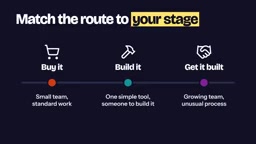
Three guiding principles: small team + standard process → buy off the shelf; simple process + someone who can maintain it → build it yourself; fast-growing team + complex or unique processes → hire someone to build it.
Final Thoughts
There's no universal answer to software selection. The key is to factor in both where you are today and where you're heading. Off-the-shelf software wins on speed and low startup cost, but customizability and long-term cost are real risks. Self-building wins on flexibility and upfront savings, but the maintenance burden shouldn't be underestimated. Custom development is the most hands-off and comprehensive option, but it carries the highest upfront investment. Think clearly across three dimensions — user scale, process uniqueness, and maintenance capacity — and the right answer will become obvious.
Related articles

How Big Can Stars Really Get? The Physical Limits of the Largest Stars
Red supergiants are the largest stars by volume, with radii up to 2,000 times the Sun, engulfing the inner solar system. But there is no precise upper limit on stellar size—models predict up to 15,000 solar radii. The most massive blue stars are far smaller than red supergiants—biggest and heaviest are two different things.

Apple HomeView Smart Display Full Feature Breakdown: Wall-Mount or Desktop, $299
Apple launches HomeView, a $299 smart display with wall-mount and desktop options, 12MP camera for facial recognition, smart home control, music playback, and recipe step-by-step cooking. Full breakdown of watch faces, apps, privacy, and cooking integration.

Where Did the Promised New Studio Go? Craft Computing Answers After Five Years
Craft Computing's host responds to viewer questions: the new studio promised five years ago was shelved as construction costs soared from $30,000 to $75,000, and was replaced by a 168-square-foot garage conversion.