Sony's Official PS2 Linux Kit: A Hardcore Tinkering Chronicle, 24 Years Later

A 2026 revival chronicle of Sony's official 2002 PS2 Linux Kit: from region locks to hard drive authentication, every step a thrill.
This article documents an attempt to rerun Sony's official 2002 PS2 Linux Kit in 2026. The author clarifies it wasn't for tax avoidance but to cultivate game developers. Obstacles piled up: region locking forced FreeDVDBoot workarounds, the ISO needed ESR patching to disguise as video, video output used old Sync on Green RGB, and most fatally, PS2 firmware authenticated drives via proprietary ATA commands, failing over a dozen third-party drives until an official one was used. Inside, the Kondara MNU Linux interface was ancient, networking nearly unusable due to outdated SSL, and games were rough. The article notes PS2 Linux's real value was cheap computing clusters, not game development, contrasting it with PS3 Linux's removal and compensation.
A Forgotten Official Project
In 2002, Sony released an official product—the PS2 Linux Kit—that allowed players to install a full Linux operating system on the PlayStation 2. This wasn't a grassroots project from the hacking community, but an officially released development toolkit from Sony, aimed at programmers who wanted to develop games for the PS2.
Recently, someone dug out this long-buried kit and attempted to get it running again in 2026. The whole process was full of frustration, yet unexpectedly entertaining.
Why Did Sony Release a Linux Kit?
Myth Busting: It Wasn't for Tax Avoidance
The most widely circulated claim about the PS2 Linux Kit's motivation is that Sony wanted to classify the console as a "programmable computer" to dodge EU tariffs. But it turns out this claim is inaccurate.
Sony did try to circumvent tariffs, but the method they used was bundling a YA Basic program into a demo disc shipped with European PS2 consoles. The EU didn't buy it, and tariffs were collected as usual. The Linux Kit had nothing to do with tax avoidance—Sony genuinely wanted to cultivate the next generation of game developers at the time, and the PS1 had a similar development toolkit disc.
A Development-Oriented Product Philosophy
This toolkit let developers write and test code on PS2 hardware, and in theory even develop complete games. But as described below, the actual experience was far from rosy.
Layers of Lockdown: From Region Locking to Hard Drive Authentication
Stuck at Step One
On the first attempt, an unmodified North American PS2 couldn't run this Japanese Linux Kit—Sony had region-locked the disc. Locking regions even for Linux was a genuinely puzzling decision.
The solution was to use the FreeDVDBoot tool to burn a bootable DVD, then install FreeMCBoot from a memory card. But the old fat-model PS2 couldn't unlock region restrictions the way most slim models could, because the fat model carried a rather decent security chip.
After switching to a slim model, a new problem emerged: most slim models don't support hard drives. Anti-piracy protection once again punished legitimate users.
FreeDVDBoot is a softmod tool that exploits a vulnerability in the PS2 DVD player, triggering a buffer overflow through a carefully crafted DVD video file to execute arbitrary code on an unmodded console. FreeMCBoot, on the other hand, is a homebrew boot environment installed on a memory card that allows the console to load unofficial programs from the memory card at startup. Combined, the two can bypass Sony's official region locking and signature verification, letting players run homebrew software or import games from other regions on a PS2 without a modchip. However, compatibility varies by console model—fat models, with their stricter security chips, are far harder to exploit than later slim models, which is one reason the author was forced to switch to a slim.
The Absurd Logic of ISO Patching
Unable to use a legitimate Japanese disc, the author ultimately had to download the PS2 Linux ISO from a ROM site. Even though it's free and open-source software, downloading it from a "sketchy site" still felt a bit off.
What's more absurd is that the PS2 Linux ISO can't run directly on the PS2. The stock PS2 can only read movie content from burned DVDs, so you need the ESR patching tool to modify certain bytes in the ISO, making it masquerade as a movie, and then after booting, "swap in" the Linux boot code.
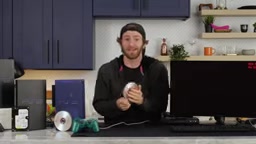
The ESR (Enhanced Street Racer) patch works by exploiting the difference in how the PS2 optical drive distinguishes DVD video discs from game discs. When reading a burned disc, the PS2 drive first checks whether the disc contains a specific video identifier; if it does, it boots in video disc mode. The ESR tool modifies the identifier bytes embedded in the ISO image, tricking the system into misidentifying it as a video disc and allowing it to boot, after which the bootloader hijacks the execution flow to load the actual Linux kernel. This method relies entirely on the behavior characteristics of the optical drive firmware, so it has strict requirements for burn quality, disc type, and console model.
The Video Output Pitfall
After successfully entering Linux mode, composite video output was disabled, requiring a switch to VGA or component. But after switching, it turned out to actually use an old-school RGB signal, with the sync signal on the green channel. Either find an old monitor that supports Sync on Green, or spend $40 on an adapter, or use a RetroTink (much more expensive but more capable).
The Hard Drive Is the Final Boss
After switching to a PS2 with a working optical drive, the installer finally ran—but after the second disc swap, it was a black screen again. After extensive digging through archive sites, the problem pointed to the hard drive.
Over a dozen hard drives were tried, all failed. Formatted with special tools, reset, reinstalled repeatedly—nothing worked. Eventually an official hard drive was bought on eBay, and it worked immediately.
The reason is that the PS2 firmware sends a proprietary ATA command to the hard drive, and if the drive's response doesn't meet expectations, it gets rejected. The official hard drive knows how to respond correctly; third-party drives don't. There are modification methods to bypass this restriction, but no one was willing to operate on a borrowed Japanese PS2.
The ATA command set is the standard protocol for early hard drives to communicate with hosts. The PS2 hard drive adapter sends a non-standard ATA command (generally believed to be a Sony-custom identification command) to the drive during initialization, and only the official hard drive's firmware can respond correctly and return the expected data. Third-party drives, due to different firmware, often return error codes or time out, causing the PS2 firmware to refuse recognition. The community has developed methods to bypass this by modifying the console firmware or using specific drive models, but the barrier to entry is extremely high and requires soldering or flashing, which is too risky for a borrowed console.
After Entering the System: Nostalgia and Disappointment Coexist
Installation Experience: A Trip Back in Time
PS2 Linux is based on Kondara MNU Linux—a Japanese distribution based on Red Hat, adapted for the MIPS platform. The installation interface is very familiar to anyone who has installed early Red Hat.
The whole process was almost entirely default settings, eventually reaching a graphical interface. The desktop environment looks like something from the xFree86 era, and using it requires a bit of patience.
Internet? Barely
Firefox actually launched and rendered pages, but performance was predictable. The bigger problem was that many modern websites couldn't be accessed—the certificate system from 25 years ago is completely incompatible with today's SSL standards. Even LTT's own store couldn't connect, because the security protocol isn't supported.
Classic open-source software like GIMP did work. There was also a calculator—operating a calculator with a game controller, pressing "1, 3, 3, 7"—that experience alone is surreal enough.
Games: Breakout Compiled from Source
Source code was downloaded from an archived homebrew game community, compiled from source on the PS2, hosted on a local server, then downloaded to the PS2 hard drive to run—all just to play a Breakout clone.
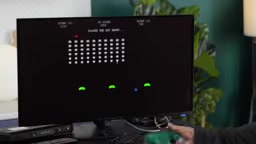
The game is called Bleak Out, and the name is quite honest. No level differentiation, no lives, extremely poor aiming granularity. Pressure-sensitive buttons mean the harder you press, the faster you move, but the actual control experience is hard to describe.
Another game that looked more polished had a two-player mode, but the so-called two-player mode was just taking turns—you die, then it's my turn.
The Real Purpose of PS2 Linux: Not Gaming
Developing games with PS2 Linux has a fundamental contradiction: what you develop can't be distributed as a regular PS2 game, and the audience can only be other PS2 Linux users. And in fact, a significant portion of this user base isn't interested in game development at all—what they value is the cheap computing power of an unlocked PS2.
The National Center for Supercomputing Applications (NCSA) once built a computing cluster with 70 PS2s. There are also rumors that Saddam's regime imported about 4,000 PS2s for similar purposes, though this was never confirmed.
Linux also came to the PS3, and the US Air Force built an even larger cluster with PS3s. But later Sony, worried it provided a path to piracy, removed the "Other OS" feature through a mandatory update, and ultimately paid users nearly $4 million in total in a class-action lawsuit. The Linux features on PS2 and PS1 were never removed—judging from the actual experience, there probably wasn't any need.
The Point of Tinkering
This official Linux Kit's practical usability is extremely low, but as a piece of tech history, it records a brief period when Sony genuinely cared about open source and the developer community. From region locking to proprietary hard drive commands, Sony's wavering between openness and control runs throughout.
If all this sounds interesting to you—channels to buy this Linux Kit do exist, but you'd better first confirm whether your patience and hands-on skills are sufficient.
One-line Summary
A 2026 revival chronicle of Sony's official 2002 PS2 Linux Kit: from region locks to hard drive authentication, every step a thrill.
Paragraph Summary
This article documents the full process of attempting to rerun Sony's official PS2 Linux Kit, released in 2002, in 2026. The author first clarifies that the kit was not launched for tax avoidance, but as Sony's move to cultivate game developers. In practice, obstacles piled up layer by layer: the Japanese disc's region lock forced the use of tools like FreeDVDBoot to bypass it; the ISO needed an ESR patch to disguise itself as a video disc; video output used an old-school Sync on Green RGB signal; and most fatally, the PS2 firmware authenticated hard drives via a proprietary ATA command, causing over a dozen third-party drives to all fail, with only the official drive passing. After entering the system, the interface based on Kondara MNU Linux was ancient, network functionality was almost unusable due to outdated SSL certificates, and the gaming experience was extremely rough. The article points out that PS2 Linux's real value lay in cheap computing clusters, not game development, and contrasts it with the PS3 Linux removal and compensation outcome, arguing that PS2 Linux was retained precisely because its usability was so low.
Related articles

MCP Protocol in 60 Seconds: A Real Session, Message by Message
Dissecting a real MCP session message by message: how an Agent dynamically discovers tools, forwards call requests, and has an MCP server execute them — all in just 9 JSON messages, with the model and reasoning loop untouched.

n8n 40-Minute Masterclass: Build Your First AI Automation Workflow from Scratch
Distilled from a 40-minute n8n masterclass: the core differences between automation, AI, and AI Agents, a comparison of n8n's four deployment methods, and a complete guide from dashboard to your first workflow.

Why Does a 35GB Quantized Model Blow Up an 80GB GPU? The Truth About KV Cache VRAM
Why does a 35GB 4-bit quantized LLM still blow up an 80GB GPU? This article breaks down the four components of inference VRAM, provides precise KV Cache formulas, compares GQA vs DeepSeek MLA memory, and offers production-grade OOM prevention like FP8 KV Cache.