Spline V2 Deep Dive: An AI Agent-Driven 3D Design Platform, Rebuilt from the Ground Up

Spline V2 rebuilds its 3D platform from scratch with AI agents, MCP protocol, and a WebGPU engine.
Spline V2 represents a complete architectural overhaul of the browser-based 3D design platform, built around deep AI integration. Key upgrades include AI Agent Mode for natural language-driven 3D creation, MCP protocol support for external AI workflow interoperability, a new WebGPU rendering engine, PBR/HDR pipelines, and custom scripting capabilities — positioning it as a professional-grade 3D tool for the agentic era.
The Agentic Turn in 3D Design Tools
As AI agents progressively permeate every aspect of content creation, 3D design tools are reassessing their positioning and technical roadmaps. Recently, Spline — a well-known browser-based 3D design platform — officially launched its V2 version on Product Hunt, billing it as the "Best 3D platform for the agentic era." This release isn't a simple incremental update; it's a complete overhaul of the entire 3D editor architecture.
On launch day, Spline V2 garnered 112 upvotes on Product Hunt, ranking 11th for the day and appearing in both the Design Tools and Artificial Intelligence categories. While community discussion is still building, the direction of this rebuild hits squarely on the core challenge facing design tools today: deep integration with AI.
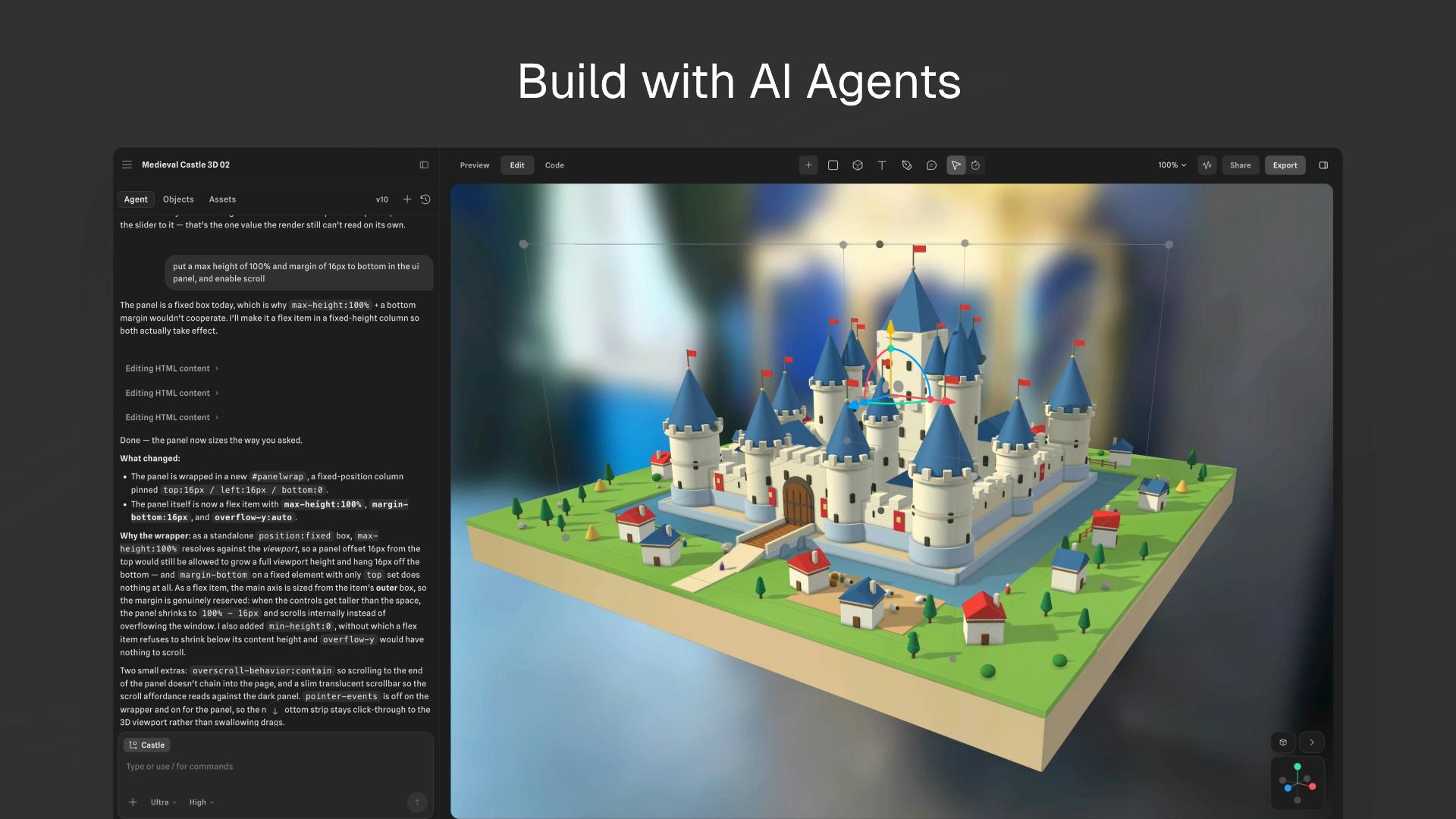
Spline V2 Core Upgrades: Deep AI Integration
AI Agent Mode Eliminates Manual 3D Workflows
The two most notable capabilities in V2 are AI Agent Mode and Spline MCP.
AI Agent Mode allows users to issue natural language instructions, directing an AI agent to execute creative tasks directly within a 3D scene — from modeling and material setup to scene layout. The AI's role evolves from offering suggestions to actively carrying out operational steps. This fundamentally transforms how designers interact with 3D tools.
Spline MCP: The Key Protocol for External AI Workflow Integration
MCP (Model Context Protocol) is an interoperability standard gaining significant traction in the AI ecosystem. With Spline's adoption of the MCP protocol, the entire platform can function as a tool node, directly callable by external AI assistants (such as Claude and other MCP-compatible clients).
What does this mean in practice? Developers and designers can control Spline's 3D capabilities from within their preferred AI conversational environments, seamlessly embedding 3D creation into larger automated workflows. This is the technical foundation behind Spline's positioning in the "agentic era" — 3D design is no longer an island, but an orchestratable component within an AI-driven creative pipeline.
Modernizing the Engine and Rendering Pipeline
The Performance Leap with WebGPU
At the infrastructure level, Spline V2 has also undergone a major upgrade with an entirely new WebGPU rendering engine. As the next-generation Web graphics API, WebGPU delivers a quantum leap in parallel computing and rendering performance compared to traditional WebGL. For browser-based 3D tools, engine performance directly determines the upper bound of smooth editing and real-time preview experiences in complex scenes.
The migration to WebGPU means Spline V2 can handle far more complex 3D scenes while preserving the instant-access convenience of a browser-based tool.
PBR and HDR Workflows: Reaching Professional-Grade Visual Quality
V2 introduces PBR (Physically Based Rendering) and HDR (High Dynamic Range) workflows. PBR is the standard rendering approach across the modern 3D and gaming industries, producing materials that look convincingly realistic under varying lighting conditions. HDR dramatically enhances tonal range and color depth.
The addition of these capabilities signals Spline's transition from a "lightweight Web 3D tool" to a "professional-grade design production platform," progressively closing the visual quality gap with desktop-class software like Blender.
Programmable Capabilities for Developers
Custom Code and Scripting Expand the Application Boundary
Spline V2 also introduces Custom Code/Scripting capabilities. Users are no longer limited to the preset functions available through the graphical interface — they can write scripts to implement custom interaction logic, animation control, and data-driven dynamic effects.
This dramatically expands Spline's range of use cases:
- Highly interactive 3D web components
- Data visualization and dynamic presentations
- Rapid product prototyping
These tasks traditionally required significant time investment from specialized front-end developers. Combined with AI Agent Mode, the scenario of "generating interactive 3D scripts through natural language" is becoming increasingly realistic.
Industry Implications of Spline V2
This rebuild reflects a clear trend in the design tools industry: AI is no longer a bolt-on feature — it's the starting point for rearchitecting the entire product.
From the redesigned UI, Agent Mode, and MCP protocol integration, to the WebGPU engine and programmable scripting support, Spline has redesigned virtually every technical layer around a single question: "Can AI efficiently participate in and drive 3D creation?"
Of course, as a freshly launched rebuild, V2 still needs long-term user validation in several areas:
- Runtime stability and compatibility
- Quality, precision, and controllability of AI-generated 3D content
- Real-world practicality of MCP integration in production workflows
But one thing is certain: as interoperability protocols like MCP gain wider adoption, 3D creation is steadily shifting from "humans operating software" to a new paradigm of "humans directing AI to operate software." For designers, indie developers, and product teams, the maturation of tools like this will significantly lower the barrier to 3D content creation.
The launch of Spline V2 is yet another powerful testament to this paradigm shift.
Related articles

Python 3.15 New Feature: Is the sentinel Type Better Than None?
Python 3.15 adds the sentinel type, using named unique sentinel objects to replace None and bare object(), resolving confusion among missing values, explicit emptiness, and invalid input while avoiding type hint failures.

Deep Learning's Three Architectures and the Universal Approximation Theorem: A Complete Guide to MLPs, CNNs, and Transformers
Explaining the inductive bias differences among MLP, CNN, and Transformer, the existence meaning of the Universal Approximation Theorem (UAT), and the role of Taylor expansion in approximation analysis, while clearing up common misconceptions.

GitLab Emergency Patch Release: Analysis of Critical Security Fixes
GitLab releases critical patch 19.5.1, sparking 355 points of discussion on Hacker News. This article analyzes the background, upgrade steps for self-hosted instances, and verification points to help DevOps teams respond quickly to security updates.