Spring AI 2.0 in Practice: Building an AI-Powered OA System with Cursor

Spring AI 2.0 enterprise OA system with RAG, smart form filling, and LLM tool calling built using Cursor AI.
This article covers a hands-on AI agent project for enterprise office automation, built with Spring Boot + Vue 3/Vite and powered by Spring AI 2.0. The system delivers three core AI capabilities: RAG-based knowledge base Q&A (documents chunked into Redis vector store for accurate private knowledge retrieval), natural language smart form filling (converting "take Thursday off" into structured form data), and LLM tool calling (letting AI directly query business data like reimbursement records). The underlying business logic is complete, with multi-role permissions and amount-threshold-based multi-level approval workflows. The entire project was developed using Cursor AI. Six free lessons are available; the full 23-lesson course is paid.
An AI Agent Project Built for Enterprise Office Scenarios
Bilibili creator Fengge (Cao Fang) recently released a hands-on project series for an AI-powered office automation (OA) system built on Spring AI 2.0. The core idea is to embed large language model (LLM) capabilities into traditional OA workflows — making everyday tasks like leave requests, expense reimbursements, approvals, and knowledge retrieval intelligent and automated.
The tech stack is fairly mainstream: the backend runs on Spring Boot, the frontend is built with Vue 3 + Vite, and the LLM integration uses the Bailian cloud platform API (compatible with versions 3.6 or 3.8), with Text Embedding V4 as the embedding model. The entire development process was assisted by Cursor AI — from project scaffolding and architecture planning to feature implementation and bug fixes.
Notably, the author positions Spring AI 2.0 as the go-to framework for building AI agents in the Java ecosystem. This reflects a broader trend: LLM application development used to be almost exclusively Python territory, but the maturation of Spring AI now gives Java backend engineers a smooth path to building agent-based applications.
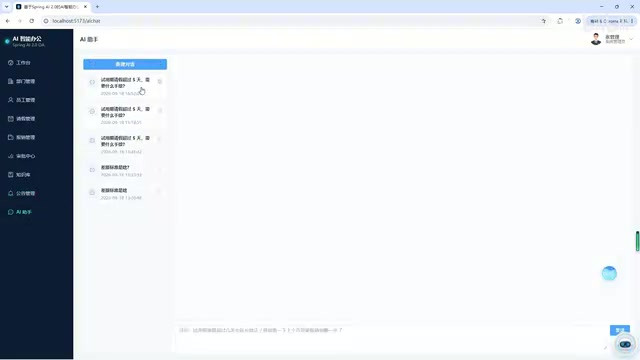
RAG-Enhanced Retrieval: The Core of Knowledge Base Q&A
The most fundamental — and representative — capability of this system is knowledge base Q&A powered by RAG (Retrieval-Augmented Generation). In the demo, the author asks about "travel expense standards," and the processing pipeline is clearly visible: the system first retrieves relevant content from a vector store, then passes both the retrieved content and the user's question to the LLM, which generates an accurate response.
On the implementation side, knowledge base documents are chunked and then stored in a Redis vector database. This approach has practical advantages for small-to-medium enterprise knowledge bases — it reuses existing Redis infrastructure and avoids the operational overhead of introducing a dedicated vector database.
The demo shows the system accurately retrieving specific values like "travel standard 500/350," which suggests the chunking granularity and retrieval strategy are working well. This is exactly where RAG delivers value: it prevents LLMs from "hallucinating" answers when querying private enterprise knowledge, grounding responses in verifiable source material.
A note on RAG: RAG (Retrieval-Augmented Generation) is the dominant architectural pattern for enterprise LLM applications. The core problem it solves: LLMs have a training data cutoff and have no access to internal company documents, so direct questions often yield incorrect or fabricated answers (the "hallucination" problem). RAG's solution is to insert a "look it up" step before generating an answer — enterprise documents are chunked and stored as vectors; when a user asks a question, it's converted to a vector and used for semantic similarity search; the retrieved text fragments are injected into the prompt, and the LLM answers based on that real content. This shifts the model's role from "answering from memory" to "reading materials and then answering," dramatically improving accuracy and traceability. Chunk size is a critical tuning parameter for RAG quality: chunks that are too small lose contextual meaning, while chunks that are too large introduce retrieval noise. In practice, this usually requires iterative tuning based on document type.
AI Smart Form Filling and Tool Calling
Beyond Q&A, the system demonstrates two more advanced capability areas.
AI Smart Form Filling
In the leave request scenario, a user simply types something like "I'd like to take a personal day next Thursday" in natural language — and the system automatically calculates the specific date (e.g., the 24th), identifies the leave type, and fills out the form. This is a classic natural language to structured data conversion, eliminating the tedium of manually filling in each field. This kind of capability often delivers more immediate productivity value than standalone Q&A.
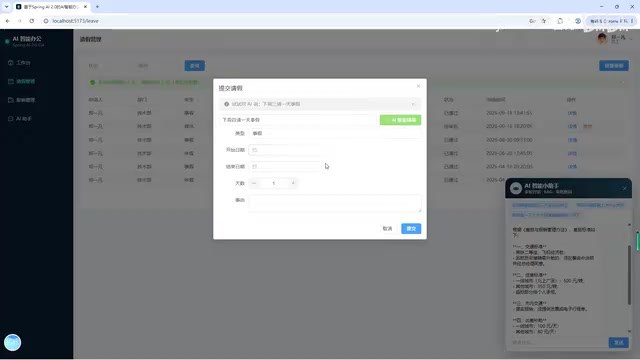
LLM Tool Calling (AI Tools)
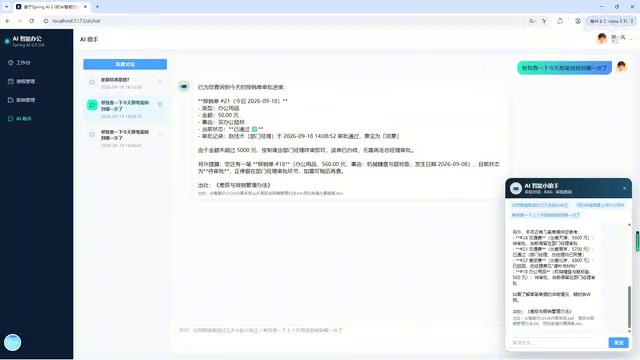
The author notes that three callable tools are registered for the LLM — a key focus of the course. In the demo, when a user asks "what about that reimbursement today," the system invokes the appropriate query method and accurately returns multiple reimbursement records for that day along with their approval statuses. This captures the essence of Function Calling / Tool Use: the LLM doesn't just talk — it acts, completing real business queries and operations by calling backend methods.
A note on Function Calling: Function Calling is the key mechanism that gives LLMs "action capability." Here's how it works: developers pre-register a set of callable functions with the LLM, describing each function's name, parameter format, and purpose. When a user's question requires data retrieval or an operation, the LLM doesn't answer directly — instead, it outputs a structured JSON specifying "which function to call and with what parameters." The application layer receives this, actually executes the function, passes the result back to the LLM, and the LLM composes a natural language response for the user. This mechanism connects the LLM's semantic understanding with backend business logic, and it's the foundation that allows AI agents to complete real tasks (rather than just chat). Spring AI 2.0 provides standardized abstractions for Function Calling — developers simply annotate tool methods, and the framework handles description generation and call routing automatically, significantly reducing integration effort.
A Complete Approval Workflow Loop
This system isn't just a demo with an AI veneer — the underlying business logic is fairly complete. The system implements a multi-role permission model: admin accounts have full access to manage departments, employees, leave requests, reimbursements, the knowledge base, and announcements; regular employee accounts only see their own to-dos, leave/reimbursement requests, and personal profile.
The approval workflow supports multi-level approval rules. In the demo, a reimbursement exceeding 5,000 yuan automatically escalates to the CEO for approval; after the department manager approves it, the CEO must still provide a second-level sign-off. Approvers can choose to approve, reject, or request additional materials (such as uploading receipt images). This amount-threshold-based tiered approval is a common requirement in real enterprise expense workflows.
The dashboard also provides data panels covering headcount, department count, pending approvals, reimbursement amounts over the past six months, and leave type distribution — ensuring the OA system retains its traditional management functionality alongside its AI capabilities.
Cursor AI Throughout the Entire Development Workflow
Another highlight of this project is the development approach itself. The author used Cursor for AI-assisted programming throughout, and the publicly available free portion covers six lessons across the complete development pipeline:
- Scaffolding the frontend and backend projects (Spring Boot + Vite)
- Using Cursor AI's Plan mode to discuss and plan the project architecture
- Generating project code with Cursor
- Using Cursor Agent to fix bugs and complete features

This "use AI to build AI applications" approach offers useful reference material for developers looking to get started with AI-assisted programming — it shows how much AI tooling can participate in a real project, from requirements planning to production code. That said, the author is clear that learners need a foundation in Spring Boot and frontend development. AI programming is an accelerator, not a shortcut for beginners starting from zero.
A note on Cursor: Cursor is an AI programming IDE built as a deep fork of VS Code, with LLMs integrated into the core editing workflow rather than bolted on as a completion plugin. Plan mode lets developers describe requirements in natural language; Cursor outputs a complete implementation plan for review before writing any code — ideal for the system design phase. Agent mode can autonomously execute multi-step operations across files, including reading/writing code, running terminal commands, parsing errors, and iteratively fixing them — closer to a collaborator that can independently handle subtasks. For projects like "use AI to build AI applications," Cursor's primary value lies in reducing boilerplate code and rapidly validating integration approaches. However, it requires users to be able to review the generated code logic — developers unfamiliar with the Spring Boot framework will struggle to judge whether the Agent's output is correct, which is exactly why the author emphasizes that prior foundational knowledge is necessary.
Summary and Recommendations
Overall, this is a well-scoped Java + LLM hands-on project: built around Spring AI 2.0 as its core, it brings RAG retrieval, smart form filling, and tool calling into real OA business workflows. For engineers who want to practice AI agent development within the Java ecosystem, it provides a fairly complete reference implementation.
A few things worth noting: this article is based on the author's project demo video, which is a single source. The free portion consists of six lessons, while the complete course is 23 lessons behind a paywall. Readers evaluating this resource should factor in their own background and business needs, with particular attention to the RAG chunking and retrieval details, vector store selection rationale, and the concrete implementation of LLM tool calling.
Related articles

Chain of Thought Isn't Just for AI: How Humans Can Use CoT to Improve Thinking Quality
Chain of Thought isn't just a prompt trick for large models. Starting from a Hacker News discussion, this article analyzes why CoT works for human thinking too, breaks down actionable ways to transfer it, and highlights the key differences between human CoT and machine CoT.
Cloudflare Teams Up with OpenAI: Closi…
Cloudflare Teams Up with OpenAI: Closing the Loop from Vulnerability Discovery to Defense with AI
Cloudflare uses OpenAI Daybreak to investigate security vulnerabilities and generate reviewable remediation plans, while developers use Codex to boost coding efficiency and quality.

Orca Multi-Agent Orchestration in Practice: A Guide to Parallel Collaboration with Claude and Codex
Orca is Stable AI's free open-source agent workbench supporting 34 agents like Claude Code and Codex in parallel. Learn its Git worktree isolation, multi-model orchestration, and mobile management.