Stable Diffusion All-in-One Package Tested: Run AI Art Generation Locally for Free

A hands-on guide to running Stable Diffusion locally for free with an all-in-one package.
This article provides a comprehensive hands-on review of a Stable Diffusion all-in-one package for local AI art generation. It covers hardware requirements (even a GTX 1060 works for basic tasks), a simple three-step installation process, 330+ pre-installed models and plugins with Chinese annotations, and the important distinction between Checkpoint and LoRA models. The guide also addresses practical tips, licensing considerations, and sets realistic expectations for local deployment.
Why Locally Deployed Stable Diffusion Deserves Your Attention
In the AI art generation space, most mainstream online tools use paid subscriptions, credit consumption, or queue-based models—costs that add up quickly for high-frequency creators. Local all-in-one packages based on the open-source Stable Diffusion model offer an alternative path: running the entire generation engine on your own computer.
Stable Diffusion was first released by Stability AI in August 2022 as a text-to-image generation model based on the Latent Diffusion Model (LDM) architecture. Unlike its contemporaries DALL·E 2 and Midjourney, Stable Diffusion took a fully open-source approach, with model weights and code publicly available on GitHub and Hugging Face. This decision profoundly reshaped the AI art ecosystem—anyone can run, fine-tune, or even redistribute these models on local hardware, spawning a massive community ecosystem and tens of thousands of derivative models.
According to hands-on demonstrations by Chinese Bilibili content creators, the biggest advantage of these all-in-one packages is completely local offline operation—no internet connection needed, no VPN required, no content moderation restrictions, and absolutely no per-use or monthly fees. For users who want to produce AI art frequently and long-term, the one-time setup with unlimited use model is genuinely appealing.
It's worth emphasizing that Stable Diffusion itself is an open-source project, and local deployment is perfectly legal. What all-in-one packages do is pre-bundle the complex Python environment, dependency libraries, and model files to lower the barrier to entry for regular users.
Hardware Requirements and Performance
Many people's first reaction to running AI art locally is "the GPU requirements must be too high." But based on actual testing, even entry-level GPUs like the GTX 1060 can smoothly handle basic image generation tasks. That said, let's be objective:
- For generating static images, older GPUs can manage, though speed will be relatively slow;
- For AI video generation or high-resolution, complex workflows, VRAM and compute requirements increase significantly, and entry-level cards will struggle noticeably.
To understand this difference from a technical perspective: GPU VRAM is the core bottleneck for local AI art generation. The GTX 1060 typically has 6GB of VRAM, which is generally sufficient for generating 512×512 resolution images, but may cause out-of-memory errors at higher resolutions (like 1024×1024). Modern optimization techniques such as xFormers attention optimization, half-precision (FP16) inference, and tiled VAE decoding can effectively reduce VRAM usage. AI video generation (such as AnimateDiff, SVD, etc.) requires processing temporal information across multiple frames simultaneously, often demanding several times the VRAM of static images—8GB or more is generally recommended for a decent experience.
The reason Stable Diffusion can run on consumer-grade GPUs lies in its Latent Diffusion Model (LDM) architecture: instead of performing the denoising process directly in pixel space, it first compresses the image into a low-dimensional latent space via a Variational Autoencoder (VAE), performs the diffusion and denoising iterations in latent space, and then decodes back to pixel images. The latent space dimensions are typically only 1/48 to 1/64 of the original pixel space, dramatically reducing computational requirements so that consumer GPUs can handle complex image generation tasks.
Therefore, the claim "one GPU lets you generate AI video for free" is better understood as "entry-level hardware can provide the experience" rather than "any configuration can produce results efficiently." Users should set reasonable expectations.
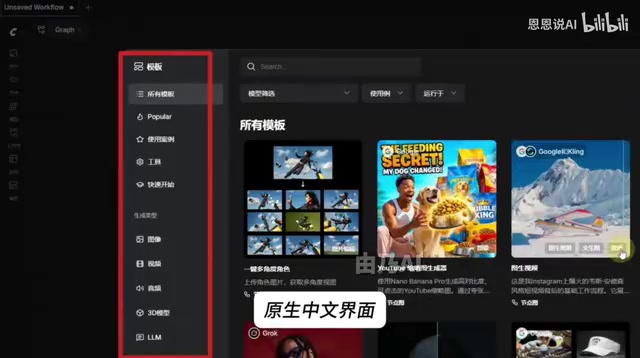
Built-in Plugins and Model Ecosystem
The all-in-one package comes with 330+ commonly used plugins and models, which is its core convenience advantage over a bare Stable Diffusion installation. The native Stable Diffusion WebUI interface isn't beginner-friendly—models are often displayed as long strings of English code, making it difficult to distinguish styles. All-in-one solutions typically:
- Add Chinese annotations and preview images to models, letting users see sample images and Chinese names directly in the interface;
- Pre-install commonly used plugins for ControlNet, upscaling, face restoration, etc., eliminating the hassle of installing and configuring them one by one.
Among these, ControlNet is a neural network architecture proposed by Lvmin Zhang et al. from Stanford University in 2023. It allows users to precisely control the composition and pose of generated images through additional spatial conditions (such as edge detection maps, depth maps, human pose skeletons, semantic segmentation maps, etc.). Its principle involves creating a "trainable copy" alongside the pre-trained diffusion model's encoder, injecting conditional information into the main network through zero-convolution layers, achieving fine-grained control without compromising the original model's capabilities. This technology dramatically improves the controllability of AI art, serving as a critical tool in the transition from "random generation" to "precise creation."
This "what you see is what you get" model management approach genuinely reduces selection costs for enthusiasts unfamiliar with English and technical details.
Three Steps to Get Started: Stable Diffusion Installation Process
The all-in-one package focuses on a "extract and use" foolproof experience. The tested installation process requires only three steps:
- Download the all-in-one package;
- Extract the files (Note: the extraction path must use English-only characters—Chinese directory names will cause program errors);
- Double-click the launcher to open.
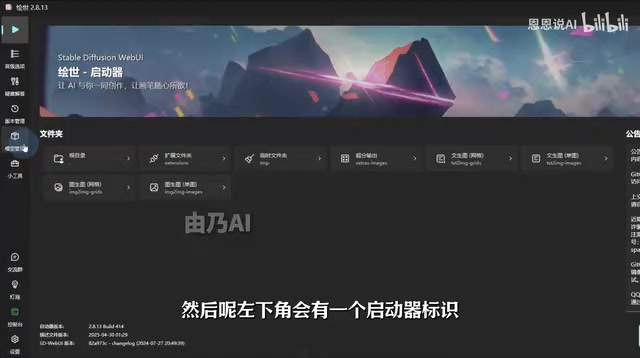
In practice, after extraction, no additional software installation is needed. Find the pink-icon launcher, double-click to open it, and click the "One-Click Start" button. The first launch will take a few minutes for environment deployment—be patient—after which you'll enter the Stable Diffusion interface.
Here's a practical tip: Paths containing Chinese characters or special symbols are one of the most common causes of errors in local deployment. Stable Diffusion WebUI runs on Python, with underlying dependencies on numerous third-party libraries (such as PyTorch, Transformers, Gradio, etc.) that have compatibility issues with non-ASCII characters (including Chinese, Japanese, special symbols, etc.) in file paths on Windows. Specifically, certain Python modules use the system's default encoding when parsing paths, and the default GBK encoding in Chinese Windows conflicts with the UTF-8 encoding expected by many libraries, causing model loading failures or plugin errors. The community universally recommends running the package from a pure English path (e.g., D:\SD\webui), which avoids the vast majority of startup failures.
Model Selection: From "Bare Bones" to "Fully Furnished"
The testing included an apt metaphor: a freshly deployed Stable Diffusion is like a "bare-bones apartment"—the engine is running, but with only a single base model, you can't actually do much. AI art quality is highly dependent on Checkpoint and LoRA selection, with different models corresponding to entirely different styles like photorealism, anime, or illustration.
Understanding the distinction between these two concepts is important: A Checkpoint is a complete Stable Diffusion model weights file, typically 2-7GB in size, defining the model's overall style and generation capabilities—for example, a Checkpoint focused on realistic portraits and one focused on anime style will produce completely different images. LoRA (Low-Rank Adaptation) is a lightweight fine-tuning technique proposed by Microsoft Research. Its principle involves injecting low-rank matrices into the attention layers of pre-trained models to learn specific styles or characters, with files typically only tens to hundreds of MB. Users can stack multiple LoRAs on a single base Checkpoint, flexibly combining different art styles, characters, or scene effects. This modular design philosophy—large models set the tone, small models adjust the details—is a key reason why the Stable Diffusion community model ecosystem is so thriving.
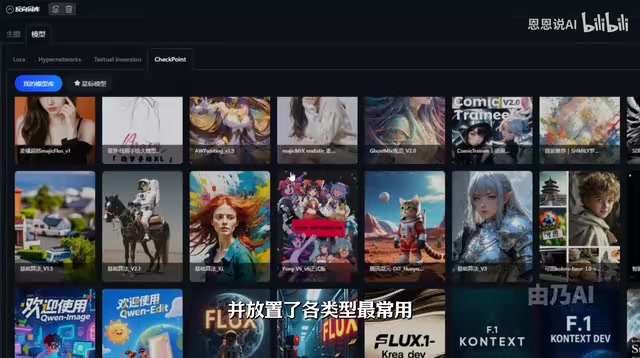
Therefore, a truly useful all-in-one solution needs more than just the engine itself—it also requires a curated model library, prompt reference library, and workflow examples. This package includes commonly used models of various types, with Chinese annotations and preview images, which is precisely the key supplement that bridges the gap from "it runs" to "it's actually useful."
An Objective View: Convenience and Risks Coexist
Finally, a few rational reminders are needed. While all-in-one packages lower the barrier to entry, there are aspects that require attention:
- Source trustworthiness: Packages from unknown sources may bundle unknown programs. It's recommended to obtain them from trusted communities, or for those with the ability, to set up the official WebUI themselves;
- The double-edged sword of no content moderation: Local operation is indeed unrestricted, but this also means users must bear responsibility for content compliance themselves;
- Model licensing: Some models and LoRAs have their own usage licenses—confirm the license terms before commercial use. Different versions of Stable Diffusion use different open-source licenses; for example, SD 1.5 uses the CreativeML Open RAIL-M license, which allows commercial use but prohibits generating harmful content. Community fine-tuned models have varying license terms—some allow full commercial use while others are restricted to non-commercial purposes. Always check the corresponding model's license statement on Civitai or Hugging Face before use.
Overall, locally deploying a Stable Diffusion all-in-one package is a high-value choice for AI art enthusiasts: one-time setup, permanently free, offline and controllable. But it's not a "one-click magic" solution—hardware, models, and usage skills equally determine the quality of the final output. Reasonable expectations and compliant use are what truly unlock the value of this open-source toolset.
Key Takeaways
Related articles

DeepCell: One-Click AI Generation of Documents, Spreadsheets, and Slides
DeepCell tops Product Hunt with one-click generation of documents, spreadsheets, and slides, using the .deepcell format for linked updates, designed for System 2 tasks like modeling and sales reviews.

Doneas: 15-Minute Daily Accountability Calls That Keep Indie Developers From Procrastinating
Doneas is a daily accountability tool for indie developers: plan tasks on Monday, join a 15-minute call with five builders each day, and log deliveries on a public progress page. This article analyzes its core mechanics, effectiveness, and potential issues around retention and matching.

Fastlane 2.0: Fully Automated AI Ad Campaigns, From Creative to Optimization
Fastlane 2.0 is an AI ad automation tool: enter your website and it learns your brand, generates video and image ads, and runs and optimizes them on Meta, TikTok, Instagram, and YouTube.