Step-by-Step Guide: Connecting DeepSeek to Claude Code Desktop

A full walkthrough for connecting DeepSeek to Claude Code Desktop for low-cost AI coding.
This guide walks through the complete process of setting up Claude Code Desktop with DeepSeek integration. It covers five key objectives: straightforward installation, account-free usage via Developer Mode, connecting DeepSeek models through CC Switch middleware, applying Chinese localization patches, and installing custom Skills. The approach lets developers in China enjoy Claude Code's powerful coding experience at a fraction of the cost by routing requests to DeepSeek's affordable API.
Introduction: Why You Need This Guide
Claude Code, the official AI programming tool from Anthropic, has won over developers with its powerful code comprehension and generation capabilities. Anthropic was founded in 2021 by former OpenAI Research VP Dario Amodei and others, with a focus on AI safety research. Its Claude model series excels in code generation, logical reasoning, and long-context understanding. While Claude Code ranks alongside GitHub Copilot and Cursor in the top tier of AI coding tools, its differentiating advantage lies in its holistic understanding of complex codebases and multi-step task orchestration — performing exceptionally well in large-scale project refactoring and cross-file editing scenarios. However, for users in China, using Claude's official models directly requires an overseas account, and the steep API costs deter many.
This article is based on a hands-on demonstration by a Bilibili creator, systematically covering the complete workflow from installing Claude Code Desktop to connecting domestic models. The five core objectives are: installing the desktop version, using it without an account, Chinese localization, connecting the DeepSeekAd model, and using custom Skills. The greatest value of this entire setup is that by connecting to DeepSeek, you can retain Claude Code's excellent interactive experience while dramatically reducing usage costs.
Claude Code Desktop Installation Guide
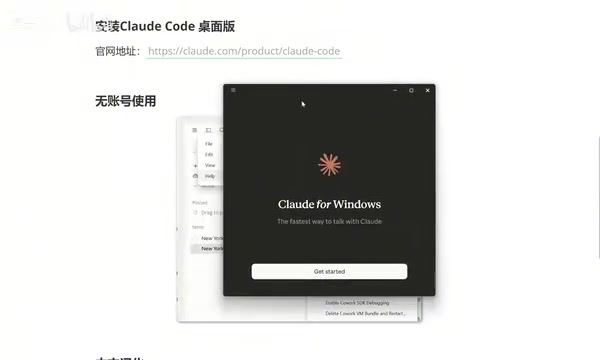
Visit the official Claude website. On the access page, you'll see multiple usage options — Desktop is listed first and is the focus of this article. After clicking, the page automatically matches the download version to your operating system. Windows users will receive the corresponding executable installer.
The installation process is completely straightforward — just wait for it to finish. When the login screen appears, the official version offers multiple sign-in methods including Google accounts, but this tutorial completely skips the account step by using a no-account approach, which is especially convenient for users in China.
Enabling Developer Mode for Account-Free Usage
The key to using Claude Code without an account is Developer Mode. Here's the exact path: click the hamburger menu (three horizontal lines) in the top-left corner → select "Help" → find the third option "Enable Developer Mode." Once enabled, the system will ask whether to restart — choose to restart immediately and wait for Claude Code to relaunch.
Developer Mode essentially unlocks the application's extension configuration interface, allowing users to customize API endpoints and model routing. In standard mode, Claude Code only communicates with Anthropic's official API. After enabling Developer Mode, the application exposes configurable proxy interfaces, enabling middleware like CC Switch to intercept requests and forward them to other model services compatible with the OpenAI API format. This design is technically similar to a reverse proxy, laying the foundation for connecting third-party models.
Installing CC Switch to Switch Models
To use DeepSeek with Claude Code, you need a tool called CC Switch. It's positioned as a "unified AI tool workflow manager" — in simple terms, it helps you freely switch between different models. CC Switch launches a local routing service that repackages API requests from Claude Code and forwards them to third-party model API endpoints like DeepSeek, achieving seamless model substitution.
There's a critical version requirement here: you must use version 3.15.0 or higher. Older versions of CC Switch don't include the configuration options for Claude Code Desktop, so if you've previously installed an older version, make sure to update first.
Installation is equally straightforward. After installing and opening it, you'll notice that in addition to the command-line option at the top, there's now a "Desktop" option with a small computer icon — this confirms that CC Switch has correctly detected Claude Code Desktop.
Configuring Local Routing and Models
The configuration sequence in CC Switch is as follows:
- Click the settings button on the left and navigate to "Routing"
- Find "Local Routing" and click the down arrow to enable it
- Go back and select "Desktop," then click the add button on the right
- Select DeepSeek from the model list and confirm the desktop version again
Detailed Steps for Connecting the DeepSeek Model
DeepSeek is an AI company incubated by High-Flyer, a leading Chinese quantitative hedge fund. Its models, including DeepSeek-V3 and DeepSeek-R1, have achieved performance comparable to GPT-4 and Claude 3.5 on multiple benchmarks, yet their API pricing is only a fraction — sometimes as low as one-tenth — of international competitors. For example, DeepSeek-V3's input price is approximately 1 RMB per million tokens, compared to Claude 3.5 Sonnet's pricing of $3 per million tokens — a massive cost advantage. DeepSeek employs a MoE (Mixture of Experts) architecture that uses sparse activation mechanisms to dramatically reduce inference costs while maintaining model capability — this is the technical foundation behind its low-price strategy.
After selecting the model, the most critical step is entering the API Key. An API Key is an identity credential for accessing AI model services, functioning similarly to a password. Go to the DeepSeek official website, navigate to the Key management page in the API documentation, create a new Key (naming it something like "CodeDesktop" is recommended for easy identification later), then copy and paste it into the corresponding field in CC Switch.
Regarding security management, keep these principles in mind: never hardcode API Keys in your code or upload them to public repositories like GitHub; create separate Keys for different purposes to track usage and enable precise revocation in case of leaks; regularly check for abnormal call volumes; and consider setting a reasonable monthly budget cap in the DeepSeek console to prevent unexpected charges.
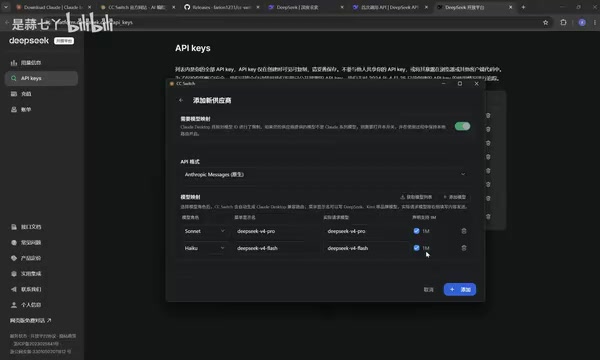
At the bottom of the configuration interface, there are two optional settings. One involves extending the context size — when checked, Claude Code's context can be expanded to the 1M (one million) level. The context window is the maximum number of tokens a large language model can process in a single conversation. Traditional models like GPT-3.5 had only a 4K token context, GPT-4 extended this to 128K, and the 1M level means the model can "see" approximately 750,000 English words or tens of thousands of lines of code at once. For coding scenarios, developers can load the entire codebase of a small-to-medium project into the model in one go, enabling it to understand the project's complete architecture and dependencies, resulting in more accurate code modification suggestions. It's recommended to enable this option for a better experience.
After completing the configuration, click "Add," then make sure to click "Start" — the configuration only takes effect when it's running. Once started, you can minimize CC Switch to run in the background.
Applying the Configuration in Claude Code
Return to Claude Code and click the hamburger menu in the top-left corner. You'll now see a new "Developer" option containing "Configure Third-party." When you enter this interface, all information has been automatically filled in by CC Switch — no manual input needed. Simply click Apply and restart.
After restarting, you'll be in Claude Code connected to DeepSeek. The model list will show flash, pro, and 1M context versions. Select the flash version for a test conversation — although the model may introduce itself as Claude (this is normal behavior since CC Switch preserves Claude Code's frontend interface while the actual inference is handled by DeepSeek), as long as it responds normally and completes tasks, the configuration is successful.
Chinese Localization for Claude Code
After completing the basic setup, the all-English interface still isn't ideal for Chinese users. The localization package is available for both Windows and Mac. Regular users only need to download the Windows Simplified Chinese version.
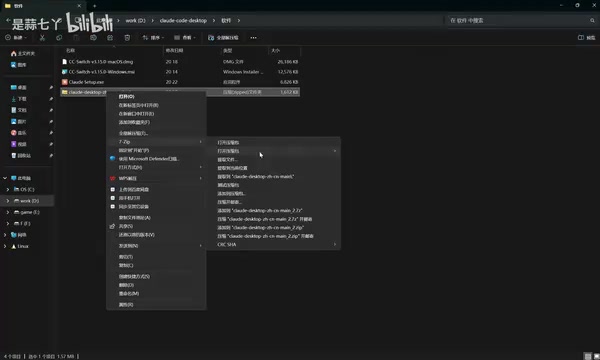
The localization process is very simple: after extracting the archive, find the .bat file and double-click to run it. The program presents five options:
- 1: Install Simplified Chinese
- 2: Install Traditional Chinese
- 3: Install Traditional Chinese (Hong Kong version)
- 4: Restore original / Uninstall patch
- 5: Exit
Type 1 and press Enter. During localization, the program will automatically close and restart Claude Code (even if you haven't closed it manually, it will handle this on its own — so it's recommended to close the application manually beforehand to avoid issues). After restarting, the interface will be in Chinese, with menus like "New Task," "Projects," "Scheduled Tasks," and "Customize" fully localized, and all conversation history preserved.
Installing and Using Custom Skills
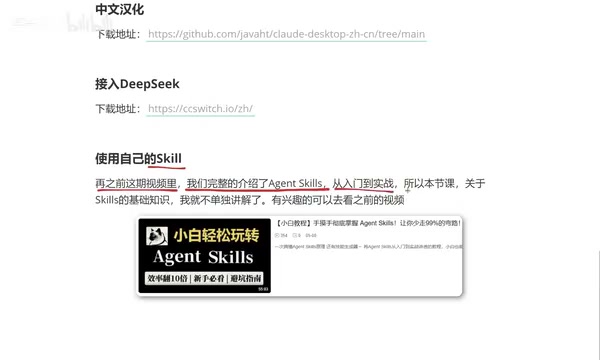
The way Skills work in Claude Code Desktop differs significantly from the traditional CLI approach. In CLI mode, you simply place skill files in the skills folder under the Claude directory; in the desktop version, Skills must be installed as compressed packages.
The Skill system in Claude Code is essentially a structured Prompt Engineering framework. Each Skill file (typically in Markdown format) defines system prompts, output format requirements, Chain of Thought guidance, and constraints for specific task scenarios. This design encapsulates complex prompts into reusable, shareable modules, lowering the barrier for users to write high-quality prompts. Similar to GPTs (OpenAI's custom GPTs) or Cursor Rules, the Skill system represents the current trend of AI tools evolving from general conversation toward specialized vertical scenarios. The desktop version uses compressed package installation rather than CLI folder placement primarily for sandbox security and version management considerations.
The specific workflow is: New Task → click the plus icon → enter "Skills" → "Manage Skills" → "Add Skill" → "Upload Skill." Three file formats are supported for upload: md files, compressed archives, or .skill files.
Using the EvanCreative creativity skill from the demonstration as an example, compress the skill folder and drag it into the upload area to complete installation. To use it, type a forward slash (/) in the chat box and select the corresponding skill. For instance, calling EvanCreative to generate "creative ideas for free weekend beer" will produce output following that Skill's logic, confirming that custom skills work in the desktop version.
Conclusion
This setup fully establishes a localized workflow for Claude Code Desktop, achieving all five objectives: easy installation, account-free login, DeepSeek integration, Chinese localization, and custom Skills.
For developers in China, the core value lies in accessing Claude Code's programming experience at extremely low cost (DeepSeek API fees are far lower than Claude's official pricing). Key points to remember: CC Switch must be version 3.15.0 or above, local routing must be manually enabled, you must click Start after configuration, and it's recommended to close the application before applying localization patches. Once you've mastered this workflow, even complete beginners can quickly set up their own AI coding workstation.
It's worth noting that this middleware-based model substitution approach offers excellent extensibility — if a better or more cost-effective domestic model emerges in the future, you only need to switch the configuration in CC Switch without learning a new programming tool. This truly achieves a flexible "tool-model decoupled" architecture.
Related articles

Chain of Thought Isn't Just for AI: How Humans Can Use CoT to Improve Thinking Quality
Chain of Thought isn't just a prompt trick for large models. Starting from a Hacker News discussion, this article analyzes why CoT works for human thinking too, breaks down actionable ways to transfer it, and highlights the key differences between human CoT and machine CoT.
Cloudflare Teams Up with OpenAI: Closi…
Cloudflare Teams Up with OpenAI: Closing the Loop from Vulnerability Discovery to Defense with AI
Cloudflare uses OpenAI Daybreak to investigate security vulnerabilities and generate reviewable remediation plans, while developers use Codex to boost coding efficiency and quality.

Orca Multi-Agent Orchestration in Practice: A Guide to Parallel Collaboration with Claude and Codex
Orca is Stable AI's free open-source agent workbench supporting 34 agents like Claude Code and Codex in parallel. Learn its Git worktree isolation, multi-model orchestration, and mobile management.