StepGrab: A One-Click Tool That Turns Mac Operations into Visual Step-by-Step Guides

StepGrab auto-converts Mac screen actions into annotated step-by-step guides with multi-format export.
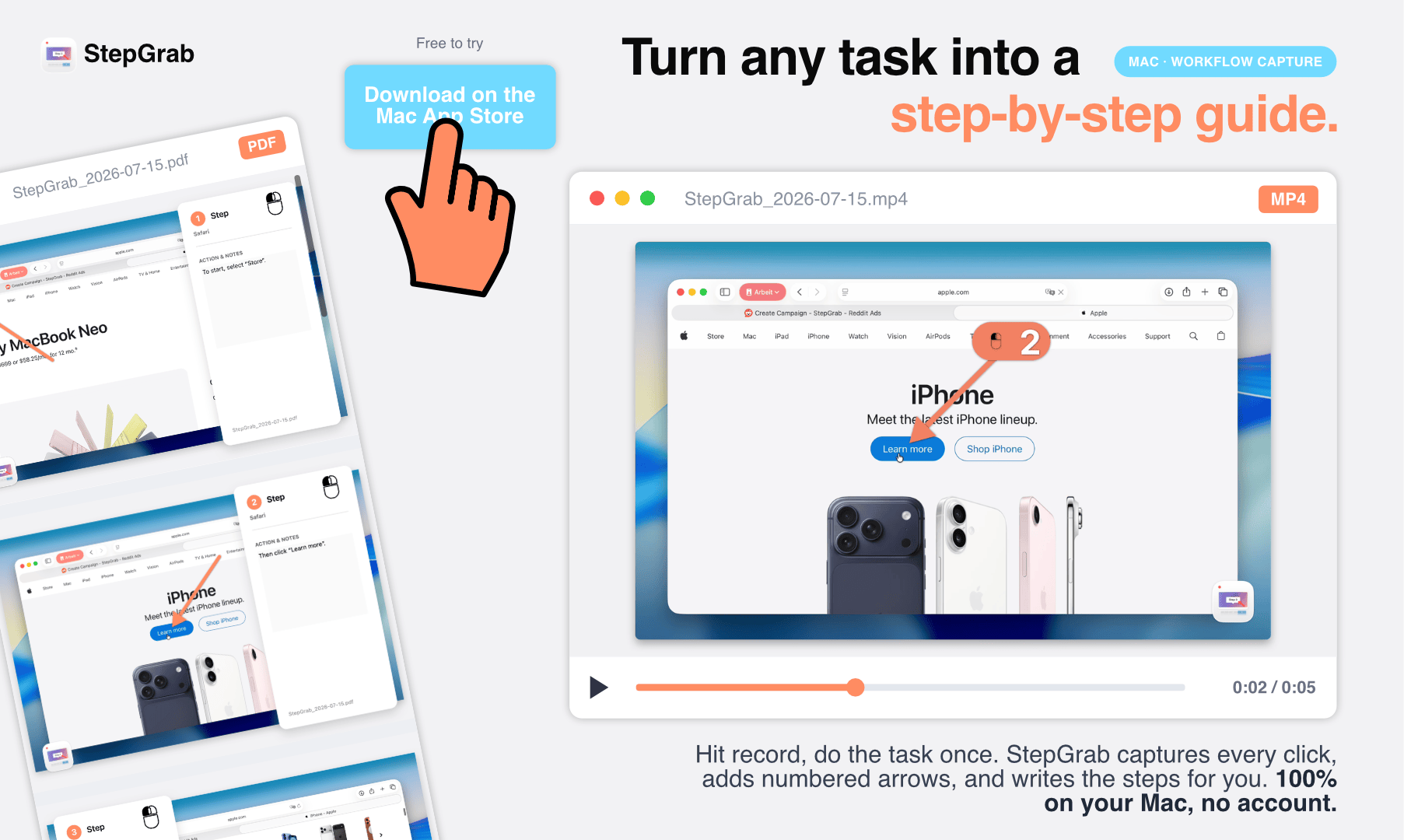
StepGrab is a native macOS menu bar tool that automatically captures every click during recording and generates annotated screenshots with text descriptions, producing complete step-by-step tutorials. It runs entirely on-device for data privacy, supports export to GIF, PDF, MP4, HTML, Markdown, and vertical video, and offers freemium pricing with a $44.99 one-time purchase option.
From Tedious to Automatic: The Pain Points of Creating How-To Documentation
For product managers, tech support staff, teachers, or anyone who needs to write operational guides, creating a clear step-by-step tutorial often means a string of tedious, mechanical work: taking screenshots, cropping, drawing arrows, and writing descriptions for each step. A workflow with a dozen steps can easily take several times longer to document than to actually perform.
This is far from an isolated issue. According to Panopto's research, employees spend an average of 5.3 hours per week waiting for colleagues to provide operational guidance or searching for internal process documentation. Against the backdrop of rapid SaaS product iteration, frequent UI changes multiply documentation maintenance costs. Traditional documentation tools like Snagit, or the screenshot-plus-Word combination, fundamentally separate "performing" from "recording" into two distinct steps — and that's exactly where efficiency is lost.
The macOS tool StepGrab, recently launched on Product Hunt, targets precisely this pain point. Its core concept is simple and direct — just hit record, perform the task as you normally would, and the software handles all the organizing. On its launch day, it received 96 upvotes and ranked #11, demonstrating the sustained demand for this type of productivity tool in the maker community.
How StepGrab Works: Recording Is Documentation
Your Actions Become Records — Auto-Generated Visual Steps
StepGrab's logic is "record once, get documentation." Once recording starts, every click you make on your Mac is automatically captured as an annotated screenshot, and the system automatically generates a text description for that step. In other words, the moment you finish your operation, a fully illustrated step-by-step guide is simultaneously generated — eliminating all manual screenshot-taking and caption-writing.
This "action-as-documentation" model is fundamentally different from traditional screen recording software. Screen recording produces a video that viewers must watch in its entirety, while StepGrab outputs structured, searchable, editable step-by-step documents — far more suitable for use as knowledge bases, SOPs (Standard Operating Procedures), or help documentation.
SOP (Standard Operating Procedure) is a foundational document type in quality management systems, originally widely used in manufacturing and healthcare. With digital transformation, the SOP concept has expanded to IT operations, customer support, employee onboarding, and other scenarios. A qualified SOP must satisfy three core requirements: atomic steps (each step contains only one action), visual annotations (clearly indicating where to perform the action), and reproducibility (anyone following the steps achieves the same result). StepGrab's automated capture mechanism corresponds precisely to these three requirements — each click is automatically segmented into an independent step, screenshots are automatically annotated, and text descriptions ensure reproducibility.
Fully Local Processing — Data Privacy Guaranteed
It's worth emphasizing that StepGrab is a native Mac menu bar app, with all processing done entirely on-device. It doesn't require account registration and never uploads any content to the cloud. For enterprise users who frequently work with internal systems and sensitive data, this is particularly important — no need to worry about confidential information in operation screenshots being uploaded to third-party servers.
From a technical implementation perspective, macOS has deeply integrated the Core ML framework and Vision framework since Ventura, enabling text recognition (OCR), image analysis, and natural language processing to be performed entirely on-device without network connectivity. At WWDC 2023, Apple further introduced enhanced VisionKit capabilities, allowing third-party apps to directly call system-level visual recognition functions. StepGrab's "auto-generated text descriptions" feature is likely built on these system-level APIs, combined with macOS's Accessibility API to obtain UI element information (such as button names and menu item text), thereby generating semantically accurate step descriptions. This also explains why the tool is macOS-exclusive — it deeply depends on Apple ecosystem's underlying capabilities.
In an era where AI tools overwhelmingly rely on cloud processing, a purely local design serves as both a privacy selling point and reduces dependence on network conditions.
Multi-Format Export: One Recording, Multiple Delivery Methods
Another major highlight of StepGrab is its rich export capabilities. Content from a single recording session can be exported in various formats as needed:
- GIF: Ideal for quickly demonstrating dynamic operations in chat or web pages
- PDF: Suitable for formal document archiving and printing
- MP4: Standard video format
- Clickable HTML: Perfect for embedding in online help centers
- Markdown: Easy to integrate into technical documentation or Wiki systems
- Vertical video: Tailored for short-form video and social media sharing
Additionally, exported content supports custom brand colors, keeping documentation visually consistent with team or product identity. This "record once, distribute across multiple channels" capability makes StepGrab not just a personal productivity tool but also valuable for team collaboration and content marketing.
StepGrab Pricing: A Genuinely Usable Free Tier
For its business model, developer Julian Belting adopted a freemium approach, specifically emphasizing that the "Free tier is real" — implying the free features aren't a severely crippled version hidden behind marketing spin.
The paid Pro version offers three options:
- Monthly: $2.99/month
- Annual: $12.99/year
- One-time purchase: $44.99
For a standalone tool, this pricing is quite affordable. The one-time purchase option is particularly attractive to users weary of subscriptions — under $45 for permanent ownership, offering better long-term value compared to similar subscription-based tools.
It's worth noting that "Subscription Fatigue" is becoming a widespread consumer sentiment. According to a 2023 Kearney survey, 40% of consumers feel they have too many subscriptions. In the indie developer community, the one-time purchase model is making a comeback — the success of tools like Sketch and Sublime Text proves that for utility software, a buy-once model effectively lowers the decision threshold and builds brand loyalty. By offering monthly, annual, and one-time purchase options simultaneously, StepGrab essentially covers cash flow needs through subscriptions while attracting cost-sensitive core users with the buy-once option.
StepGrab vs. Competitors: Differentiation Analysis
StepGrab doesn't operate in an empty market. Notable automated documentation tools like Scribe and Tango already exist, mostly in the form of browser extensions or cloud services.
Specifically, Scribe (formerly Scribehow), founded in 2019, has raised over $25 million in funding. Its product primarily takes the form of a Chrome extension that captures user clicks within the browser to automatically generate operational documentation, supporting team collaboration and permission management, with pricing ranging from free to enterprise tiers ($23/user/month). Tango secured $20 million in Series A funding in 2022 and similarly adopts a browser extension model. Both products share common characteristics: cloud-dependent processing, enterprise team focus, and collaboration as a core selling point. However, their limitations are also apparent — they can only capture in-browser operations and cannot record desktop application interactions (such as Finder file management, terminal command-line operations, design software workflows, etc.).
StepGrab's differentiation lies in: native Mac app + fully local processing + one-time purchase option. As a system-level desktop application, it can capture operations across any application on macOS — this is the most fundamental capability difference from browser extension competitors.
This combination precisely targets users who value the native Mac experience while being sensitive to data privacy and subscription costs. Of course, being purely local also means it may lack cloud collaboration and multi-user sharing features — making it more of a "personal and small team first" tool.
For users who frequently need to write tutorials, SOPs, or product documentation, StepGrab offers a clear path to handing repetitive labor off to software and reserving mental energy for the content itself. As productivity tools increasingly emphasize "automating the last mile," applications that directly convert everyday operations into deliverable outputs deserve continued attention.
Key Takeaways
Related articles

Chain of Thought Isn't Just for AI: How Humans Can Use CoT to Improve Thinking Quality
Chain of Thought isn't just a prompt trick for large models. Starting from a Hacker News discussion, this article analyzes why CoT works for human thinking too, breaks down actionable ways to transfer it, and highlights the key differences between human CoT and machine CoT.
Cloudflare Teams Up with OpenAI: Closi…
Cloudflare Teams Up with OpenAI: Closing the Loop from Vulnerability Discovery to Defense with AI
Cloudflare uses OpenAI Daybreak to investigate security vulnerabilities and generate reviewable remediation plans, while developers use Codex to boost coding efficiency and quality.

Orca Multi-Agent Orchestration in Practice: A Guide to Parallel Collaboration with Claude and Codex
Orca is Stable AI's free open-source agent workbench supporting 34 agents like Claude Code and Codex in parallel. Learn its Git worktree isolation, multi-model orchestration, and mobile management.