Strata Launcher: One-Click Deployment of Qwen3.8 Flash Next with Free Unlimited Tokens

A 50KB launcher uses domestic mirrors to one-click deploy Strata and a quantized Qwen model, lowering network barriers but not hardware ones.
The article introduces Strata Launcher, a ~50KB bootstrap tool built by a Bilibili creator to simplify local deployment of the open-source Strata project. It addresses the core pain point for users in China—unstable access to GitHub and Hugging Face—by pulling weights from ModelScope, routing dependencies through domestic mirrors, and fetching source code automatically. The workflow covers five steps: source download, hardware detection and model selection, KV Cache quantization plus multimodal/LAN configuration, engine and weight download, and launch with VRAM reserve. Testing on a Tesla T4 cloud PC with 32GB RAM, the creator chose the smaller quantized Coder model and notes that Agent tools need 64K+ context, 8-bit KV Cache is recommended, and at least 100GB of disk space should be reserved. It runs, but small quantized models have limited text quality—best suited for low-cost experimentation and Agent token supply.
Recently, a project called Strata has been gaining a lot of attention in developer circles—it lets users call large models locally, for free and without limits. But deploying Strata is no walk in the park: pulling the source from GitHub, setting up the Python environment, downloading model weights… every step can trip up newcomers. A Bilibili creator has built a launcher tool called Strata Launcher, billed as a "one-click" solution for deploying Strata along with the Qwen3.8 Flash Next model. This article, based on that video, walks through the actual workflow and key details of this approach.
What Pain Points Does Strata Launcher Solve?
Strata itself is an open-source project, but its installation process is not friendly to users in China. In the video, the creator points out that many people fail at the very first step—pulling the source code—because Strata's code is hosted on GitHub, which some network environments can't reach.
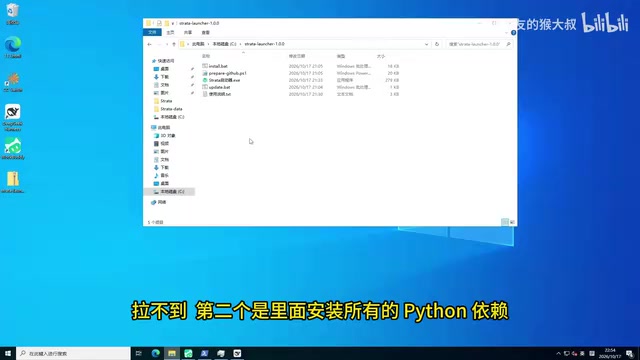
That's exactly where Strata Launcher comes in. The compressed package is only about 50KB and contains no source code or weight files—it's purely a bootstrap tool. It does three things for the user:
- Pulls model weights from the domestic ModelScope community, avoiding unstable connections to Hugging Face;
- Routes all Python dependencies through domestic mirrors, reducing installation failures caused by network issues;
- Automatically fetches the Strata source code and organizes it in a local directory, so users never have to touch GitHub manually.
In other words, it neutralizes the most discouraging part of Strata deployment—network access—using domestic mirrors and automated workflows.
Deployment Workflow: From Hardware Detection to Model Launch
Using the launcher is straightforward: unzip it and run the executable. On first launch, it reads the configuration file in the current directory and enters the installation wizard.
Step 1: Automatic Download of Source and Dependencies
After clicking "Install/Modify," the launcher automatically downloads the Strata source code. The creator notes that download speed depends on your network, so be patient. Once the source is in place, the program moves to the next step automatically—no manual confirmation needed.
Step 2: Hardware Detection and Model Selection
The launcher detects the current machine's GPU and memory. The creator uses a Tesla T4 GPU (on a cloud PC rented from Tencent Cloud) with 32GB of RAM. After detection, it moves to the model selection screen. Strata officially recommends the highest-quality model, but the creator couldn't run it locally, so he chose the smaller Coder model—specifically, the quantized version of Qwen3.8 Flash Next mentioned in the video title.
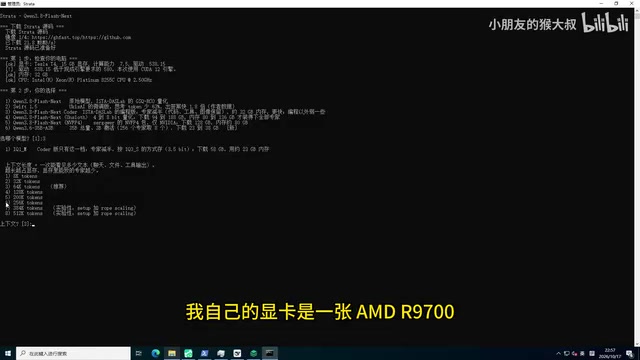
There's an important limitation here: on another machine with an AMD 9700, 32GB of VRAM, and 64GB of RAM, the creator tested and could run 56K context. But if you want to connect Agent tools like WorkBuddyAd, the context length must be at least 64K, because WorkBuddy's own prompt is already over 32K tokens. If you pick too small a context, the Agent simply won't work.
Context Length refers to the total number of tokens a model can "see" at once during a single inference, including the system prompt, conversation history, and current input. It determines how long a conversation the model can remember and how long a document it can process, and it directly affects VRAM usage—the size of the KV Cache is proportional to context length. Agent tools require 64K+ because their system prompts, tool descriptions, and multi-turn intermediate results consume a large number of tokens on their own. If the context window is insufficient, historical information gets truncated, and the Agent's planning and tool-calling break down. That's why context length is often more critical than parameter count when choosing a model.
Step 3: Quantization and Cache Configuration
The quantization bit-width of the KV Cache directly affects conversation quality. The creator recommends 8-bit, because 4-bit quantization compresses too aggressively and noticeably degrades conversation quality. But due to insufficient VRAM, he had to choose 4-bit himself.
Multimodal functionality is off by default; enabling it downloads an additional ~0.9B model. LAN access and API Key depend on your use case: if you're only using it locally, leave them off; if you enable LAN access, be sure to also enable the API Key, otherwise anyone on the same network can access your service.
KV Cache caches the Key and Value tensors of already-generated tokens in each layer's attention during Transformer inference, avoiding redundant computation and keeping token-by-token generation efficient. Its VRAM usage grows linearly with context length, number of layers, attention heads, and batch size—and in long-context scenarios it can even exceed the model weights themselves. Quantizing the KV Cache (e.g., 8-bit or 4-bit) can significantly compress this VRAM footprint, at the cost of errors in attention computation. The lower the bit-width, the more obvious the loss of detail and semantic drift in long conversations. This is why the article recommends 8-bit and cautions against 4-bit.
Step 4: Downloading the Engine and Model Weights
The launcher first downloads the numcpp source, then Strata's inference engine (about 200+ MB). The creator emphasizes: reserve at least 100GB of disk space, or the model weight download will fail. Weight files are pulled from ModelScope; if weights already exist locally, the launcher detects them and skips the download.
Model Weights are the neural network parameter files saved after training, typically distributed in formats like safetensors or GGUF. Their size depends on both parameter count and precision: a 7B-parameter model needs about 14GB in FP16, and can be compressed to around 4GB at 4-bit quantization. Downloaded weights must be fully written to disk before loading; if disk space runs out, the write fails midway—and writing large files is especially slow on mechanical hard drives. ModelScope is a domestic model hosting platform that mirrors mainstream open-source models, circumventing Hugging Face access issues—which is why the launcher chose it as the weight source.
Step 5: Launch and VRAM Reserve
When the model starts, it loads weights into VRAM and RAM, and the whole computer becomes very sluggish—mechanical hard drives are especially slow to read. Once launched successfully, Strata's web monitoring page pops up automatically. Because of his low-spec machine, the creator had to manually adjust a VRAM reserve parameter, leaving 3GB of VRAM for subsequent conversations—otherwise VRAM would overflow as soon as he started chatting.
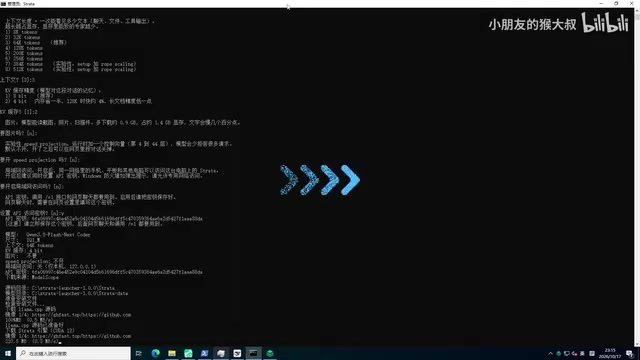
VRAM Reserve is a portion of VRAM deliberately left unallocated after loading weights, for use by the KV Cache, activations, and temporary tensors during inference. If the weights nearly fill VRAM, allocating the KV Cache on the first conversation triggers out-of-memory (OOM), manifesting as a service crash or failed requests. The reserve amount should be estimated based on context length and concurrency: longer context and higher concurrency require a larger reserve. Manually lowering the reserve lets a larger model barely load, but at the cost of compressed usable conversation length—slightly longer input will overflow VRAM.
Hands-On Experience: It Runs, But Don't Expect Too Much
The creator connected the deployed model to tools like DeepSafe, Hanis, and Codex. On the Strata monitoring page, you can see the inference status: the prefill (V-top) phase isn't fast, while the token generation phase outputs continuously.
But he also candidly notes that because this model is heavily quantized and is the smallest Coder model, "it's still a bit lacking in text quality." In other words, this setup suits users who want a low-cost way to try local LLMs or need a free token source for Agent tools—but if you're after high-quality text generation, a small quantized model has limited performance.
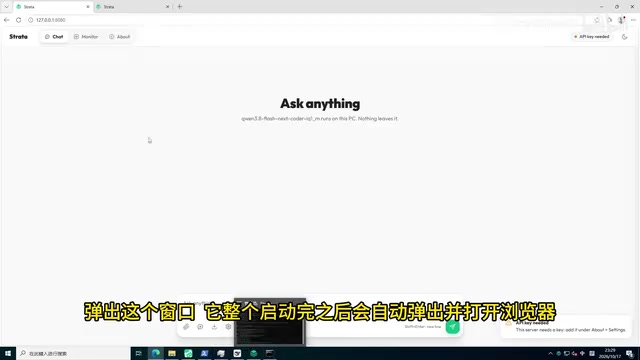
For subsequent use, users can start the Strata service directly from the launcher page, copy the API key and model endpoint, or reinstall, modify configuration, or update the Strata version. The launcher supports minimizing to the system tray and keeping running in the background.
Who Is This For?
The core audience is clear: developers with local or cloud GPU resources who want to bypass network obstacles to get Strata running quickly, and who need a free, unlimited token source. If you have enough VRAM and RAM, you can choose larger context and higher quantization precision for a much better experience; if your hardware is limited, you'll need to trade off between model size, context length, and quantization bit-width. Strata Launcher lowers the deployment barrier to "a few mouse clicks," but the hardware barrier remains—and the video doesn't shy away from that.
Related articles

Kimi K3.1 Hands-On Test: Open-Source Model Nears Opus, Video Generation Steals the Show
Kimi K3.1 completed motion graphics, 3D rendering, mini-games, and video generation in a live test. Analysis of its 2.8T MoE architecture, gap vs Opus/GPT, and hidden video generation.

Sam Altman: Why Life's Biggest Advice Should Still Come from Humans
OpenAI CEO Sam Altman on the limits of AI advice: AI can talk you out of an impulsive email, but life's biggest advice should still come from humans.

"Black October": Did AI Uncover 3% of All Critical Vulnerabilities Ever?
A Reddit post claims 3% of all critical software vulnerabilities ever were found in the past month, dubbed 'Black October.' We break down the statistical issues, how AI-assisted code auditing accelerates discovery, and how developers should respond.