SubtitleGenerator: Review of a Free In-Browser AI Subtitle Generation and Translation Tool

SubtitleGenerator delivers free, privacy-first AI subtitle generation and translation entirely within your browser.
SubtitleGenerator is a browser-based AI subtitle tool that debuted in 3rd place on Product Hunt. It offers 60 free one-minute videos per month with no registration required, integrating subtitle generation, AI-powered proofreading (with its unique Fix feature), translation, style design, and multi-format export into a single editor. Videos are processed locally in the browser, ensuring privacy and compliance with data protection regulations.
From Video to Finished Subtitles: One Browser Handles the Entire Workflow
In the era of exploding video content, subtitles are no longer an optional add-on — they're a critical element that determines content reach and accessibility. However, most creators face the same dilemma when producing subtitles: inaccurate transcription requires line-by-line editing, translation needs a separate tool, export formats are limited, and there's always the privacy concern of uploading videos to the cloud.
Before SubtitleGenerator, a creator's typical subtitle workflow often involved chaining together 3-5 separate tools: first using Whisper, Otter.ai, or CapCut for initial speech recognition, then exporting SRT files to professional software like Subtitle Edit or Aegisub for line-by-line proofreading, translation might require DeepL or Google Translate, style design relies on After Effects or Premiere Pro subtitle templates, and finally returning to editing software for hard-coding and export. Every tool switch in this chain means potential errors in format conversion, subtle timeline shifts, and loss of context. According to Rev.com's 2023 industry survey, professional subtitle proofreading takes an average of 5-10 times the video's duration, with approximately 40% of that time spent on switching between tools and format debugging rather than actual content proofreading.
SubtitleGenerator, which recently debuted in 3rd place on Product Hunt, attempts to solve these pain points with an "all-in-one in-browser" approach.
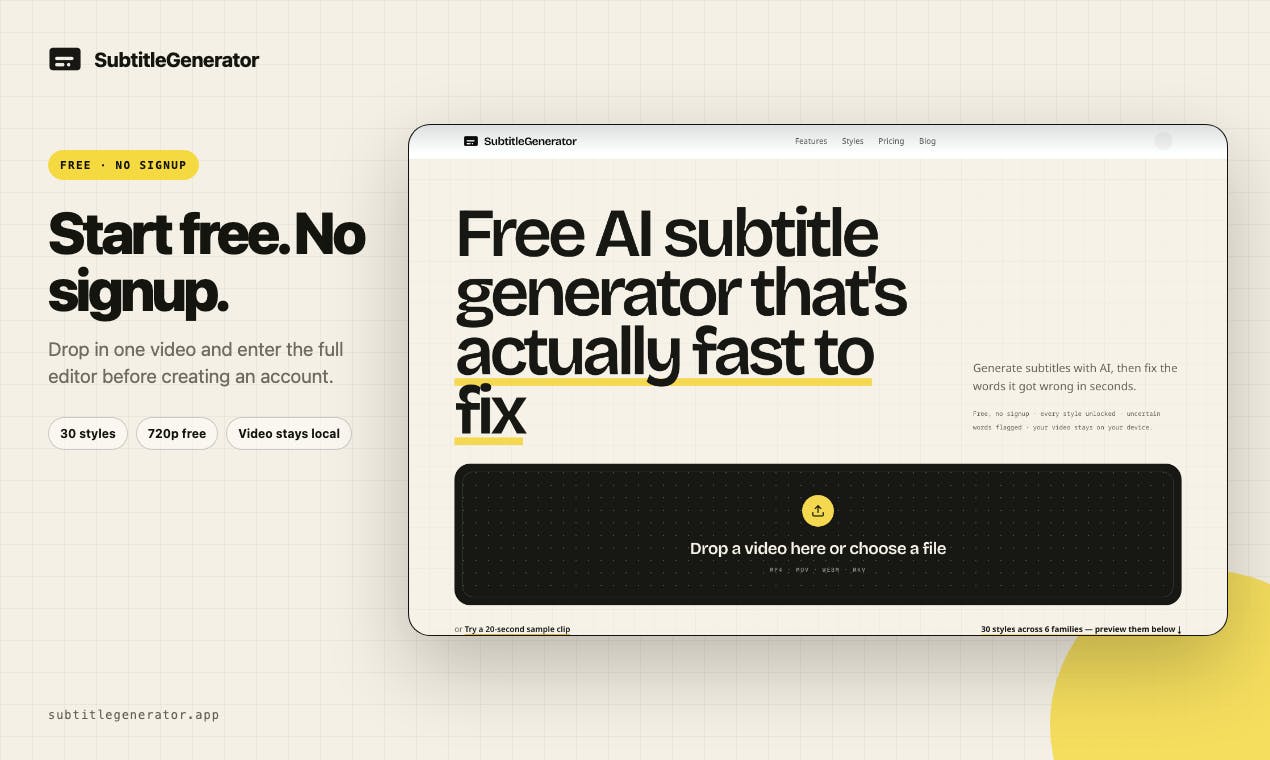
Its core positioning is crystal clear: from video import to publish-ready AI subtitles, everything is completed within the browser. Generation, correction, translation, style design, and export — these five stages are integrated into a single editor, eliminating the fragmented experience of switching between multiple tools.
SubtitleGenerator's Free Tier and Product Logic
For casual users on the fence, SubtitleGenerator offers a genuinely generous free plan: 60 one-minute videos per month, no registration required. This means users can drag in a video and start generating subtitles without any account commitment.
What you might not have noticed is that the product offers "all 30 subtitle styles free" as a differentiating selling point. In many similar AI subtitle tools, styles are typically the most common bait behind the paywall, but SubtitleGenerator chose to give free users full visual expressiveness. This significantly lowers the barrier to entry for creators and reflects a product strategy of trading experience for word-of-mouth.
The Fix Feature: Giving AI Subtitle Proofreading a Clear Endpoint
The product team particularly emphasizes a feature called Fix, which is a key design element that distinguishes it from most subtitle generation tools.
In traditional workflows, AI-generated subtitles always contain some words with uncertain recognition, and users often need to "search for needles in a haystack, line by line" — time-consuming and prone to oversights. SubtitleGenerator's approach is: proactively marking all words that the AI judges as uncertain, and providing a countdown-style progress indicator until it displays "All clear."
The technical foundation of this feature lies in modern Automatic Speech Recognition (ASR) systems' ability to output confidence scores. Modern ASR models actually calculate a probability distribution when decoding each word — the more confident the model is about a recognition result, the closer that word's confidence score approaches 1.0. When confidence falls below a certain threshold (e.g., 0.7), the word can be flagged as "uncertain." This mechanism is particularly mature in Transformer-architecture models like Whisper, since the attention mechanism naturally outputs softmax probabilities for each token. Traditional subtitle tools, even when using the same ASR engine, typically only display the final text while discarding confidence information, forcing users to review every word manually. SubtitleGenerator explicitly exposes these low-confidence words to users, essentially converting the model's "internal uncertainty" into an actionable proofreading task list.
The elegance of this design lies in giving proofreading work a clear "finish line." Psychologically, visible completion progress significantly reduces task fatigue and anxiety. For content creators processing large volumes of video daily, knowing "just a few more spots to finish" is far more efficient than repeatedly checking through boundless text.
Pro and Max Versions: Advanced Capabilities for Professional Creators
The free version covers basic subtitle needs, while the paid Pro and Max versions target professional creators and team scenarios, primarily adding the following capabilities:
- Full-track translation: Rather than fragmented single-sentence translation, complete subtitle tracks are translated into multiple languages, suitable for content going global that needs multilingual publishing.
- Watermark-free HD export: The watermark limitation common to free tools is removed, with output closer to production quality.
- Eight subtitle formats: Meeting export needs for SRT, VTT, and other platforms, with stronger compatibility.
- Custom fonts: Breaking beyond preset styles to accommodate brand visual guidelines.
- Saved brand styles: Teams can reuse unified subtitle styles, ensuring consistency across videos.
It's worth elaborating on the industry background of subtitle formats here. SRT (SubRip Text) originated in the DVD era with an extremely simple structure — each subtitle consists of three lines: a sequence number, timestamp, and text. Nearly all video players and editing software can import it directly. VTT (WebVTT) is the standard developed by W3C for HTML5 video, adding style tags, positioning information, and chapter markers on top of SRT, and serves as the native subtitle format for platforms like YouTube and Coursera. Beyond these, the professional film and television industry also commonly uses ASS/SSA (supporting complex effects and animation), TTML (broadcast television standard), SCC (US television closed caption standard), and other formats. Different platforms have vastly different format requirements, which is why multi-format export capability is so important for creators.
From this feature division, SubtitleGenerator's business model logic is clear — attracting individual users with free credits and full style access, while charging professional users for "productivity essentials" like translation, watermark-free export, and brand consistency.
Privacy First: Videos Always Remain in the Browser for Local Processing
In an era where AI tools overwhelmingly rely on cloud processing, SubtitleGenerator emphasizes an increasingly valued selling point: your video always stays in your browser.
This promise relies on browser-based AI inference technology that has developed rapidly in recent years. The core driving forces come from two standards: WebAssembly (Wasm) and WebGPU. WebAssembly allows high-performance code written in C/C++ to be compiled into a binary format executable by browsers, with efficiency approaching native applications; WebGPU is the next-generation replacement for WebGL, capable of directly accessing device GPUs for parallel computation, making it possible to run speech recognition models like Whisper in the browser. OpenAI's Whisper model itself has multiple community versions ported to frameworks like ONNX Runtime Web and Transformers.js, enabling client-side speech-to-text processing. However, browser-based inference also has clear limitations: models need to be downloaded to local cache on first use (typically tens to hundreds of MB), are constrained by device memory and computing power, and long audio processing speeds are far inferior to cloud GPU clusters.
This means video files don't need to be uploaded to remote servers for processing — for creators working with unreleased content, trade secrets, or personal privacy, this is a tangible security guarantee.
From a compliance perspective, this architectural choice also responds to increasingly strict data protection regulations worldwide. The EU's GDPR (General Data Protection Regulation) requires data processors to have a legal basis for transmitting and processing user data, with violation fines reaching 4% of global annual revenue; China's Personal Information Protection Law and Data Security Law similarly impose strict restrictions on cross-border data transfers. For enterprise users, uploading unreleased video content to third-party cloud servers may trigger compliance processes like Data Processing Agreement (DPA) signing requirements and cross-border data transfer assessments. Browser-based local processing architecturally bypasses these issues — data never leaves the user's device, so there's naturally no compliance risk of "data transfer" or "third-party processing." This is also why tools like Notion and Figma have been exploring edge computing capabilities in recent years — "local-first" is evolving from a privacy selling point into a compliance necessity.
Usage Experience Summary and Applicable Scenarios
SubtitleGenerator's product design reveals a deep understanding of creators' real workflows. It doesn't pile on flashy features but instead focuses on the "generate — proofread — translate — style — export" pipeline, minimizing friction at every stage. The Fix feature's visualization of the "proofreading endpoint" is an easily overlooked yet highly humanized detail innovation.
Of course, as a browser-based tool, it also faces some potential challenges: local processing places certain demands on device performance, and long videos or high-resolution videos may be limited by the browser's computational capabilities; the free tier is calculated in "one-minute videos," which long-form video creators may exhaust quickly. These limitations are essentially shared constraints of browser-based AI inference technology at its current stage — as the WebGPU standard becomes more widely adopted and device-side computing power continues to improve, these bottlenecks are expected to gradually ease in the future.
Overall, for short-video creators, educational content producers, and international teams needing multilingual subtitles, SubtitleGenerator provides a low-barrier, high-completion, privacy-focused subtitle solution that's well worth trying.
Key Takeaways
Related articles

Cursor Can Now Control Your Computer: AI Agents Can Drive Desktop Apps for Testing
Cursor adds desktop control: AI agents can drive desktop apps like the iOS Simulator to test their own features. We analyze the impact on dev workflows, possible technical approaches, and reliability concerns.

Vibecoding a Custom Inference Engine: High Hopes, Harsh Reality
A Reddit developer shares the real experience of vibecoding a custom inference engine: running GGUF Q4 models in the browser with WebGL2 and GLSL, only to fall into tokenizer debugging hell. This article analyzes the engineering challenges of browser-side LLM inference and why cloning llama.cpp is the more rational choice.

How High Are Anthropic's Early Investor Paper Returns Ahead of IPO?
Anthropic's early investor paper returns draw attention ahead of IPO. This article analyzes sources of book gains, capital structure, pre-IPO games and risks, and implications for the AI startup ecosystem.