Superpowers Skills in Action: One Prompt to Run the Entire Development Workflow with AI

Superpowers encodes 14 Skills into a full dev workflow, guiding AI from requirements to self-tested code delivery.
Superpowers is a Skill collection for AI coding tools like Claude Code and Cursor that encodes senior engineering habits — requirements clarification, Git isolation, planning, execution, review, and merge — into mandatory workflow rules rather than just speeding up code generation. Installation takes three steps: git clone, symlink to the Agent's recognized directory, and hook injection (the critical step). In a live demo, the Agent methodically interviewed the user like a product manager, auto-generated an API contract and architecture, then spent about an hour building a working library management system — including autonomous browser-based end-to-end testing.
The capability ceiling of AI coding assistants keeps getting redefined. From early autocomplete to understanding requirements and writing code, the tools themselves have evolved — but the core frustration hasn't changed: AI-generated code often lacks engineering rigor, missing the kind of full workflow discipline that keeps a project on track.
A Bilibili creator shared a Skill collection called Superpowers on their AI lab channel, and it targets exactly this problem. The goal isn't to make AI "write faster" — it's to make AI "follow the complete development workflow by the book." This set of 14 Skills works with mainstream AI coding tools like Claude Code and Cursor, with one central objective: let the AI autonomously handle everything from requirement discussions to code delivery, with fewer bugs.
The Core Mechanism: A Complete Software Development Methodology
Unlike a simple code generation plugin, Superpowers is fundamentally an implementation of a software development methodology. Once installed, the AI assistant follows a structured main workflow through the entire project, rather than immediately piling up code the moment it receives a request.
As broken down by the creator, this main workflow includes several key stages:
- Requirements interrogation: A dedicated Skill probes and clarifies, gradually turning vague requirements into concrete specs
- Git isolated workspace: Establishes a clean working branch to isolate changes before anything else
- Write plans: Translates requirements into an executable development plan
- Agent execution: The Agent implements the plan step by step
- Task review: Code review after execution is complete
- Merge and commit: Merges the code after confirmation
The value of this workflow is that it encodes the habits of senior engineers — think before you act, isolate changes, self-test after writing, review before merging — into rules the AI must follow. The creator emphasized that precisely because of this workflow constraint, "after discussing requirements in a single conversation, it can write out the entire project completely."
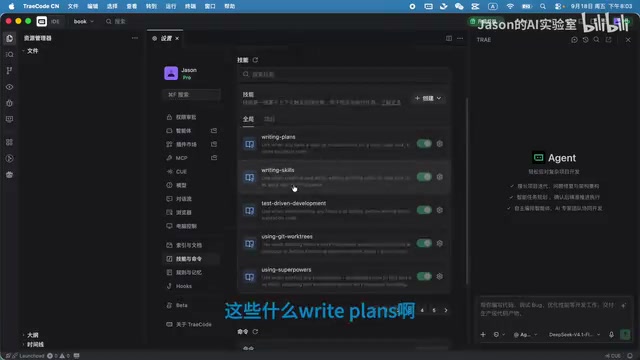
Three-Step Installation: Symlinks + Hook Injection Are Critical
Installation involves three steps, and the hook injection step is the most commonly overlooked — yet it directly determines whether the Skills will actually work.
Step one: Get the Skills. Claude Code users can install directly using the plus command, but the creator recommends a more universal approach — git cloning the entire Skill set to a local directory.
Step two: Create a symlink. Link the cloned directory to the directory that the Agent recognizes, using a symbolic link. The creator points out that nearly all mainstream Agents honor this convention directory, and different tools (Claude Code, Cursor, Chad, etc.) each support their own specific locations.
Step three: Hook injection — this is the critical step. Having the Skill files in place doesn't mean the Agent knows to use them. You must use a "hook" to tell the Agent this capability set exists. There are two approaches:
- Automatic Hook injection: Write the configuration into the tool's hook settings so the Agent loads it automatically. This is the creator's preferred approach.
- Write to a rules file: If the IDE doesn't support hooks, fall back to writing the instructions into a rules file — for example,
agents.mdin the current directory, or the tool-specific rules config file (Cursor and Chad each have different paths).
The creator's recommendation is clear: use hooks whenever possible; rules files are the fallback. Uninstalling is straightforward — just delete the corresponding files.
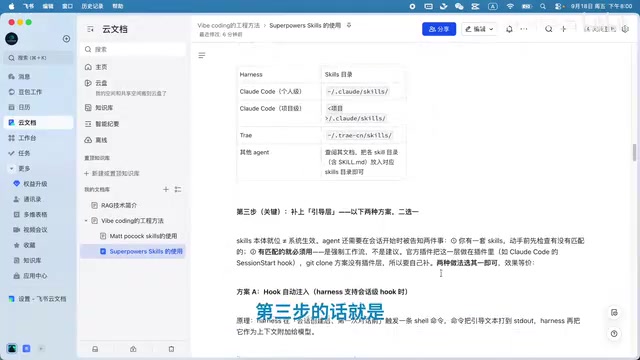
A symbolic link is a filesystem mechanism provided by the operating system — essentially a "shortcut" that points to another file or directory. On macOS/Linux, create one with ln -s source_dir target_dir; the Windows equivalent is mklink. The benefit of Superpowers using symlinks is that the Skill files exist in only one place (the cloned copy), but can be "seen" by multiple Agent tools simultaneously — updates only need to happen in the source directory, and all tools pointing to it automatically get the new version, eliminating the hassle of manually copying and syncing across multiple locations.
A hook is an event callback mechanism provided by many development tools, allowing preset scripts or configurations to run automatically at specific moments. Hooks in tools like Claude Code and Cursor typically fire each time a new task starts or context is initialized. Superpowers injects a loading instruction into the hook, ensuring the Agent is aware of this Skill set every time it starts up. Skip this step, and even with the Skill files in place, the Agent won't proactively call them — which is exactly why the creator specifically emphasizes that "hook injection determines whether Skills will work."
Live Demo: A Library Management System from Zero to Working
To validate the results, the creator used a classic starter project — a library management system. After configuring the hooks, they specifically recommended opening a new task to ensure the Agent reloads the Skill configuration.
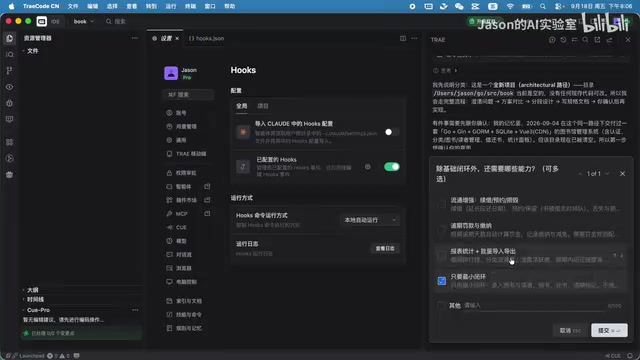
After entering the requirements, the Agent's execution log confirmed it had called the Superpowers Skills series, proving the configuration was working. What followed was a series of requirement questions, with the Agent methodically clarifying like a product manager:
- Who's using it: Internal use by a single admin, or open to multiple readers? — Single admin selected
- Feature scope: Just the basic end-to-end loop, or more capabilities? — Minimum viable loop selected
- Tech stack: Multiple options offered — Go + SQLite + Vue3 CDN, Go server-side + HTML, or separate frontend Vite project
- Auth and modeling: Whether login authentication is needed, whether books are tracked by individual copy or by title
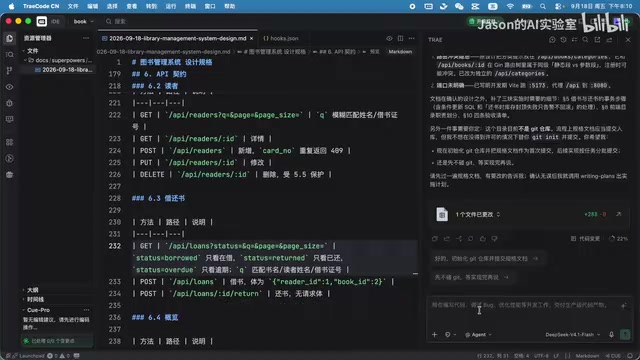
After this round of questioning, the Agent produced a complete API contract, architecture design, and data model — forming an "executable plan." Once confirmed, it called the write plans Skill to establish the workspace, commit the initial changes, and enter the execution phase.
One notable detail was end-to-end self-testing. The creator mentioned that the entire project took the Agent over an hour to write, and along the way it autonomously opened a browser to test the features it had built. This kind of self-directed testing significantly improves the usability of the delivered code — and this is precisely the core differentiator of this workflow methodology compared to ordinary code generation.
An API contract is a core document in frontend-backend development collaboration, explicitly defining the agreed-upon interface paths, request methods, parameter formats, response structures, and error codes. In traditional development, this document is typically written by backend engineers and then handed to the frontend for alignment — a high-communication-overhead process. In the Superpowers workflow, the Agent outputs the API contract before writing any code, effectively enforcing the engineering practice of "define the interface first, then implement." The value here is significant: once the contract is established, frontend and backend can develop in parallel, and most interface mismatch issues can be identified and resolved during the planning phase rather than surfacing during integration testing.
Delivery Validation: Mostly Functional, but Validation Needs Work
Once the project was complete, the Agent asked whether to merge. The creator first started the service and ran a manual acceptance test: this is a frontend-backend separated project, with Go handling the backend and frontend code organized separately.
All tested features performed well:
- Add book: Entering title and category and saving worked correctly
- Edit book: Modifying fields had no issues
- Delete: Executed correctly
- Reader management: Adding readers worked fine
The one shortcoming was data validation — because the demo selected the minimum viable loop, input validation wasn't comprehensive. The creator acknowledged that if stricter validation is needed, it's entirely possible to give the Agent additional requirements to fill that in.
The overall assessment: with just a one-sentence requirement, the AI produced a plan, executed the plan, and independently completed testing, with the final functionality essentially problem-free — "basically perfect."
The Significance and Limitations of This Approach
Superpowers represents a clear trend in AI coding tools: shifting from "generating code" to "managing the development process." Encoding engineering standards into Skills and letting AI work within clear constraints is a practical path toward improving code quality and reliability.
That said, a few limitations are worth acknowledging honestly:
First, it's not fast. A library management system took over an hour to write — for scenarios where instant feedback matters, this slow-and-steady approach requires tradeoffs. Second, feature completeness depends on upfront choices — in minimum viable loop mode, details like validation get omitted, and users need to judge and request additions themselves. Finally, installation and configuration have a real learning curve — symlinks and hook injection aren't beginner-friendly.
The creator made a practical observation at the end: there's no need to study what each individual Skill does, because the Agent calls them autonomously — users just need to focus on clearly communicating what they want. That's really the ideal form for tools like this: encapsulate the complexity inside the workflow, and let developers return to the more fundamental task of figuring out what they actually want to build.
Related articles

Niobia Uses AI Inspection to Crack the Costliest Errors in Battery and Chip Production Lines
San Francisco startup Niobia uses AI to help battery and chip makers detect production line defects, reducing downtime and costly misjudgments. This article analyzes its technology entry point, industry challenges, and competitive variables.

Conductor AI Search vs OmniForce: A Guide to Choosing AI Visibility Tools
Compare Conductor AI Search and OmniForce for AI visibility tracking, and learn how to choose SEO tools in the answer engine era—citation tracking, structured data, and content decay detection.

Running Claude Code and Codex in Parallel: A Practical git worktree Guide
A tested workflow for running Claude Code and Codex in parallel on one repo: git worktree allocation, common pitfalls, cross-agent diff review, multi-account switching for usage limits, plus a verification checklist.