T3 Code in Practice: An AI Coding Experience with Built-in Browser and Multi-Model Switching

T3 Code integrates AI coding, a built-in browser, and device emulation into one workspace, closing the loop from generation to verification.
Based on a hands-on demo, this article outlines T3 Code's core usage: it supports mounting a local folder to start a project, uses the UVS package manager to have the AI generate a Flask to-do app (taking about three minutes), and allows switching models within the same session to suit different tasks. Its most distinctive feature is the built-in browser—after receiving a test instruction, the AI directly opens and operates the app, while users can monitor in real time and take control to verify manually at any time. The article also mentions device emulation support for iOS and Android, though this was not tested in the demo. Overall, T3 Code's competitiveness lies in connecting project loading, multi-model invocation, browser verification, and human takeover into a smooth chain rather than relying on a single strong model; meanwhile, the three-minute scaffolding time also exposes engineering bottlenecks such as dependency resolution.
T3 Code integrates an AI coding agent, a built-in browser, and device emulation into a single workspace, so the "generate—run—verify" loop no longer requires switching between tools. Based on a hands-on demo, this article outlines its core usage and design trade-offs.
Starting a New Project from a Local Directory
The first step in the demo is creating a new project. T3 Code supports two entry points: a brand-new project, or directly mounting an existing local folder. The video author chose the latter, loading their tutorial directory and confirming the selection with Ctrl Enter.
The subsequent task was to have the AI create a minimal Flask to-do app and install dependencies using the UVS package manager. This exposed a noteworthy real-world issue: the generation took about three minutes, and the author's assessment was "way too long." The speed bottleneck for AI coding tools often lies not in model inference itself but in peripheral steps like dependency resolution and environment setup—especially noticeable when using a package manager.

For everyday users, this means delegating time-consuming scaffolding tasks to the AI is worthwhile, but expectations should be set—initializing complex environments still requires waiting.
UVS is the Python package manager used in the demo, whose full name is uv (developed by the Astral team, often jokingly called UVS by the author). Written in Rust, it positions itself as an all-in-one replacement for pip, pip-tools, virtualenv, and similar tools, with its core advantage being extremely fast dependency resolution and installation—typically an order of magnitude faster than pip. uv reuses downloaded packages through a global cache and hard links, and implements its own resolver, so the overhead of creating virtual environments and locking dependency versions is minimal. However, when a project first introduces a large number of dependencies or requires compiling C extensions, actual time still depends on the network and local compilation environment—which partly explains the three-minute wait in the demo.
For AI coding agents, the choice of package manager directly affects the rhythm of the "generate—verify" loop: the faster the resolution, the lower the cost of agent trial and error. uv also provides commands like uv run, which can execute scripts without explicitly activating a virtual environment—precisely fitting the agent's need to run code automatically.
Multi-Model Switching: Strategy Adjustment Within the Same Session
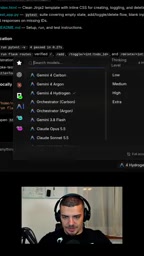
After the project was created, the author switched to another model in the same session (Sonnet was used in the demo) and issued a new instruction: test this app in the browser.
This detail illustrates a product philosophy of T3 Code—models are replaceable execution units, not fixed configurations bound to a project. Different tasks suit different models: scaffolding generation may favor long-output capability that gets it right in one pass, while browser interaction testing relies more on instruction following and tool calling. Being able to switch models without rebuilding context saves considerable effort in re-describing requirements during actual use.
Built-in Browser: Letting the AI Verify Results Itself
T3 Code's most distinctive feature is the built-in browser. When the AI receives the "test in the browser" instruction, it directly invokes this built-in browser to open the app, rather than asking the user to manually copy a link and check it in an external browser.
Opening the sidebar reveals the browser view, where the to-do app loads normally, and the AI can continue operating based on the page content. The author specifically noted that he could monitor the entire process in real time within T3 Code.

Putting a browser inside an IDE is not a new idea, but handing it to the AI as a callable tool changes its value. The verification step after frontend changes is usually the most tedious; letting the agent open the page itself, observe the results, and then decide whether to modify creates a closed loop. Of course, the capability boundary of the built-in browser depends on how well it understands page structure, and the demo did not delve into its performance in complex interaction scenarios.
Device Emulation in this context refers to the ability to virtualize mobile device environments on a development machine, typically including iOS Simulator (requires Xcode and the corresponding SDK) and Android Emulator (requires Android SDK and AVD images). They differ from a "browser responsive view": the latter merely adjusts viewport size, while the former runs a real mobile operating system runtime and can verify native controls, touch events, permission dialogs, and other behaviors that web emulation cannot cover. The trade-off is heavier environment configuration—the iOS simulator depends heavily on macOS and Xcode version matching, while the Android emulator requires hardware acceleration support (such as ARM images on Apple Silicon). The article mentions that T3 Code can connect to iOS devices and test Android apps after configuring the SDK. If true, this means it brings the launching and screenshot feedback of such emulators into the agent's callable toolchain, but the demo did not verify this, and actual stability still depends on the local SDK state.
Taking Control: A Fallback Mechanism for Human-AI Collaboration
The demo also includes an easily overlooked but very practical design: users can "take control" of the browser session at any time. After taking over, the author casually deleted a to-do item, confirming that the interaction indeed works.

This mechanism addresses a common trust issue in AI automation. When the agent gets stuck, deviates from expectations, or you simply want to confirm an interaction detail yourself, you don't need to interrupt the task or open another window—just take over in the same browser view. It puts "AI operations" and "human operations" in the same context, reducing the hassle of state synchronization.
Device Emulation: Extending Mobile Testing
Beyond the browser, the author mentions that T3 Code also supports device emulation—on a Mac, you can connect to iOS devices, and after configuring the SDK, you can also test Android apps. This part was not actually demonstrated in the video and is a capability claim rather than a verified feature. If this positioning holds, T3 Code's ambition extends beyond web development to AI-assisted debugging across multiple platforms. However, device emulation relies heavily on SDK and environment configuration, and more information is needed to assess the actual experience.
Conclusion
From this demo, T3 Code's core competitiveness lies not in how strong any single model is, but in connecting project loading, multi-model invocation, browser verification, and human takeover into a smooth chain. The three-minute scaffolding time reminds us that efficiency gains in AI coding still face engineering-level bottlenecks; while the combination of a built-in browser and takeover control offers a pragmatic human-AI collaboration paradigm—let the AI do the work, but keep the option to step in at any time.
(This article is based on a single video demo; parts such as device emulation were not tested in practice, and readers should evaluate applicability based on their own tech stack.)
Related articles
How to Streamline CLAUDE.md: Cut 322 Lines to 24 and Drastically Reduce Costs
From 322 lines to 24: a systematic guide to writing CLAUDE.md and AGENTS.md correctly, covering load mechanics, streamlining principles, on-demand rules and skills, subagent model routing, and sharing one instruction file across Claude Code, Cursor, and Codex.

Tim Ferriss's Learning Method and Mental Allocation Techniques
Tim Ferriss on Huberman Lab shares how to spot trends via absolute statements and geek activity, build connections through volunteering in high-density environments, conduct annual reviews and late-night writing, and turn trauma into public value.

Larry Lawton Reveals the Reality of Day One in an American Prison
Former inmate Larry Lawton describes day one in an American prison on the Lex Fridman podcast: strip searches, dry cells, ramen for hunger, and how extreme conditions reshape survival psychology.