Takes for Mac: Record Talking-Head Videos, Let Claude Code Handle the Edit

Takes for Mac uses local recording plus Claude Code auto-editing to compress the talking-head video workflow.
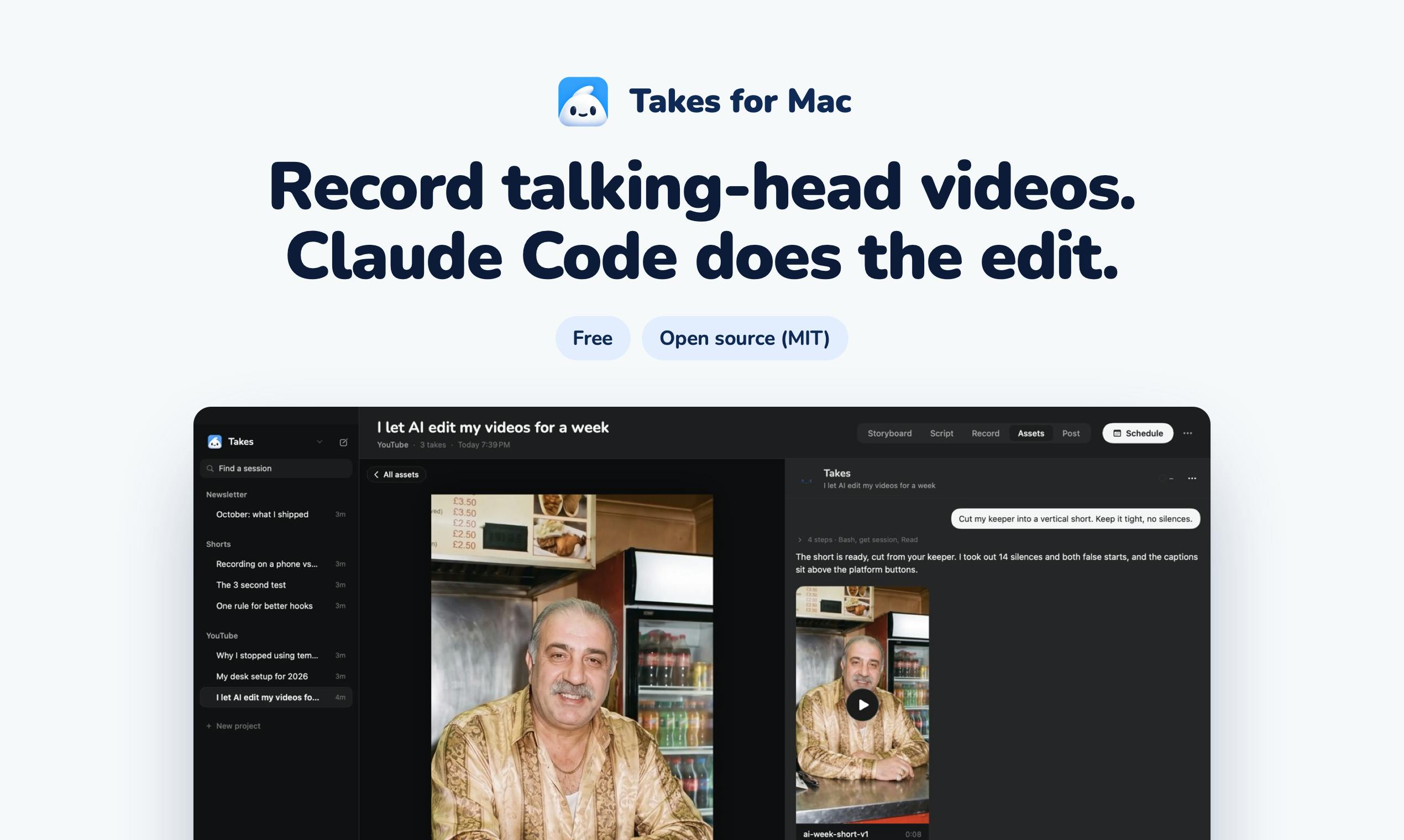
Takes for Mac is a free, open-source Mac app for talking-head videos. Recording stays local: a voice-following teleprompter, one-click camera and screen recording, and each take saved as a plain folder instead of a proprietary project file. Post-production is handed to Claude Code under your own Claude plan, handling editing, vertical versions, and draft copy. It also lets you leave on-frame notes that become remembered rules. It has 99 upvotes and 7 comments, ranking #9 on Product Hunt for the day. Suited to independent creators and Claude-using technical staff, but editing quality depends on Claude Code, it's macOS-only, and output quality needs verification.
In an era where the barrier to video content creation keeps dropping, recording talking-head videos remains a time-consuming chore—retaking shots in front of the camera, manually sorting footage, editing frame by frame, then separately producing vertical versions for short-video platforms. Takes for Mac, ranked #9 on Product Hunt, tries to compress this workflow with a "record locally, edit with AI" approach.
Product Positioning: A Free, Open-Source Mac Tool for Talking-Head Recording
Takes for Mac is built by developer Marvin Aziz as a free, open-source Mac app specifically serving "talking-head" videos—that is, on-camera talking-head content.
Its scope is clearly drawn: recording, teleprompting, and asset management all happen in the local app, while editing and copywriting are handed off to Claude Code. According to the product page, users run it on "your own Claude plan" rather than bundling creative data into a closed cloud service.
This design choice is worth noting. Talking-head videos often contain a lot of unpolished personal appearance and expression. Keeping them in a local folder rather than some SaaS black box is a real source of reassurance for content creators. The open-source nature also means the workflow can be audited and modified.
Open source here isn't just a licensing choice—it directly affects how usable the tool is. Takes for Mac's combination of "local recording + open-source app + your own Claude plan" means the recording and asset storage stages never pass through third-party servers; creators don't have to upload unedited personal footage and flubbed takes to some platform's cloud. Open source also lets the community audit data-handling logic, submit fixes, or add export formats, preventing the tool from dying if the developer stops maintaining it. Connecting to your own Claude plan shifts the cost structure from subscription to usage-based—whether it's worth it depends on your personal Claude usage frequency, rather than paying extra for a video tool. Of course, open source also means installation and updates rely more on your own technical judgment, and official support and documentation are usually less polished than commercial products.
Three Core Capabilities: Voice-Following Teleprompter, One-Click Recording, Folder-Based Asset Management
Takes for Mac's feature set isn't complicated, but each one hits a pain point in talking-head recording.
A teleprompter that follows your voice. Traditional teleprompters are either fixed-speed or require a foot pedal, and they stumble whenever your pace changes. Takes' teleprompter advances the script based on the speaker's speech rhythm, reducing the tension of "chasing the words" while reading.
One-click simultaneous camera and screen recording. For content that involves talking while demonstrating—like software tutorials or product walkthroughs—recording the screen separately and then aligning audio tracks is a common source of rework. One-click simultaneous recording eliminates that synchronization work.
Every take is saved as a plain folder. Assets aren't locked in some proprietary project file but organized as plaintext folders. That means you can process them with Finder, scripts, or any tool, and it provides a natural interface for handing things off to Claude Code later.
Saving "every take as a plain folder" looks unremarkable, yet it directly determines the feasibility of downstream automation. Proprietary project files usually pack the timeline, asset references, and metadata into a binary format that third-party tools struggle to parse; plaintext folders containing video, audio, and log files can be traversed by command-line tools, which is exactly what lets Claude Code perform batch trimming, naming, and transcoding. This structure is also better for version control and backups—you can track asset changes directly with Git or rsync and roll back to a take's original state when something goes wrong. The trade-off for creators is the lack of a visual timeline: choosing which take to use and how to organize directories requires establishing your own naming and organization conventions, otherwise the folder quickly becomes hard to search.
Claude Code Takes Over Post-Production: Editing, Vertical Versions, Draft Copy
The second half of the product slogan is "Claude Code does the edit," which is where it separates itself from ordinary screen-recording tools.
According to official descriptions, Claude Code handles three types of work:
- Completing the edit
- Generating a vertical version
- Drafting publishing copy
Using a general-purpose AI coding agent as a video post-production tool reframes "editing" as a kind of batch operation on the file system—assets are files in a folder, editing rules are code, and the output is new files. This also explains why assets exist as "plain folders."
It should be noted that the source material doesn't disclose actual editing quality, time required, or failure rate, so creators will need to verify the results themselves. Handing the edit to an LLM-driven coding agent means output stability may fluctuate depending on asset complexity.
Claude Code is Anthropic's command-line AI coding agent that can read local files, execute shell commands, write and run scripts, and autonomously plan and iterate through multi-step tasks. Using it for video post-production essentially means letting the model orchestrate command-line tools like FFmpeg to handle cutting, concatenation, and transcoding, then using scripts to generate cropping and re-layout logic for vertical framing. The advantage of this approach is that the process is transparent and reproducible: editing rules are written as readable scripts or instructions that creators can inspect, modify, and even version-control, rather than being sealed inside a click-based black box. The limitations are obvious too—LLM outputs are nondeterministic, and long assets, multi-track projects, or complex pacing requirements may require repeated tweaking of prompts or scripts. Stability depends on how tidy the assets are and how clear the instructions are.
Leave Notes on the Frame, and They Become Remembered Rules
One design detail in Takes is worth mentioning: users can leave notes on video frames, and the system converts those notes into rules and remembers them.
This is a "train the workflow with feedback" approach—rather than configuring a pile of parameters, you point out problems on specific frames, and the AI distills them into reusable rules. For creators making the same type of content long-term, this kind of memory mechanism could in theory reduce repetitive back-and-forth costs for each video.
However, how notes are interpreted, what form the rules take, and how accurate the memory is—the product page doesn't provide more technical details.
Annotating directly on frames rather than filling out parameter forms is essentially an interaction pattern that lowers the cost of expression. A creator's natural-language description of a problem (like "the pause is too long here" or "subtitles are covering the product name") is a feedback signal with concrete context for an AI, closer to real intent than abstract configuration. This kind of "feedback-to-rules" mechanism typically relies on the model generalizing one-off annotations into reusable conditions and automatically applying them when processing similar assets later. Its effectiveness depends heavily on the accuracy of that generalization: rules that are too broad may inadvertently affect unrelated clips, while rules that are too narrow won't transfer to the next video. Additionally, how rules are stored and whether they can be viewed and manually edited affects the creator's sense of control over the system, and the product page currently doesn't explain this.
Who It's For, and What to Keep in Mind
The product currently has 99 upvotes and 7 comments, ranking #9 on the daily list—an early-stage tool.
Well-matched use cases include independent creators, technical or product people who need to frequently produce explainer videos, and users who already use Claude as part of their daily workflow. If you're already on a Claude plan, the marginal cost is basically just learning this workflow.
Points to evaluate carefully include: macOS platform exclusivity (Windows users can't use it for now), the editing stage's dependence on Claude Code's stability, and whether "AI auto-editing" can match human editing in terms of pacing and aesthetic judgment. Being free and open source lowers the barrier to trying it, but actual output quality is what determines whether it sticks.
One-line Summary
Takes for Mac uses local recording plus Claude Code auto-editing to compress the talking-head video production workflow.
Paragraph Summary
Takes for Mac is a free, open-source Mac app focused on on-camera talking-head videos. It keeps recording local: the teleprompter advances with the speaker's voice rhythm, one-click simultaneous camera and screen recording, and each take is stored as a plain folder rather than a proprietary project file. Post-production is handed to Claude Code under your own Claude plan, handling the edit, generating a vertical version, and drafting publishing copy. It also supports leaving notes on frames that convert into remembered, reusable rules. It currently has 99 upvotes and 7 comments, ranking #9 on Product Hunt for the day. Suitable for independent creators and technical users already using Claude, but editing quality depends on Claude Code's stability, it's macOS-only, and output quality still needs to be verified yourself.
Related articles

Chain of Thought Isn't Just for AI: How Humans Can Use CoT to Improve Thinking Quality
Chain of Thought isn't just a prompt trick for large models. Starting from a Hacker News discussion, this article analyzes why CoT works for human thinking too, breaks down actionable ways to transfer it, and highlights the key differences between human CoT and machine CoT.
Cloudflare Teams Up with OpenAI: Closi…
Cloudflare Teams Up with OpenAI: Closing the Loop from Vulnerability Discovery to Defense with AI
Cloudflare uses OpenAI Daybreak to investigate security vulnerabilities and generate reviewable remediation plans, while developers use Codex to boost coding efficiency and quality.

Orca Multi-Agent Orchestration in Practice: A Guide to Parallel Collaboration with Claude and Codex
Orca is Stable AI's free open-source agent workbench supporting 34 agents like Claude Code and Codex in parallel. Learn its Git worktree isolation, multi-model orchestration, and mobile management.