Talanoa: Turning Email Into Chat, the Local AI Email Client That Topped Product Hunt

Talanoa turns email into chat-style conversations and uses on-device AI to safeguard privacy.
Talanoa is an email client that ranked #1 on Product Hunt. It reorganizes messy email threads into clean chat-style conversations, converts emails into to-dos, and lets users manage their calendar without leaving the inbox. Its key differentiator is on-device AI for search, summarization, and composition—all processing happens locally with no cloud sync or tracking. It supports a unified inbox for Gmail, Outlook, iCloud, and any IMAP account. The trade-offs: limited cross-device experience, a capability ceiling for local models, and high migration costs.
Email has existed for decades, yet the way we interact with it has barely changed: nested quotes, lengthy signatures, endless CCs—turning a simple conversation into a tangled thread of dozens of messages. Talanoa, the new product that ranked #1 on Product Hunt, is trying to change that—by turning email into chat.
Why Email Needs to Become "Chat"
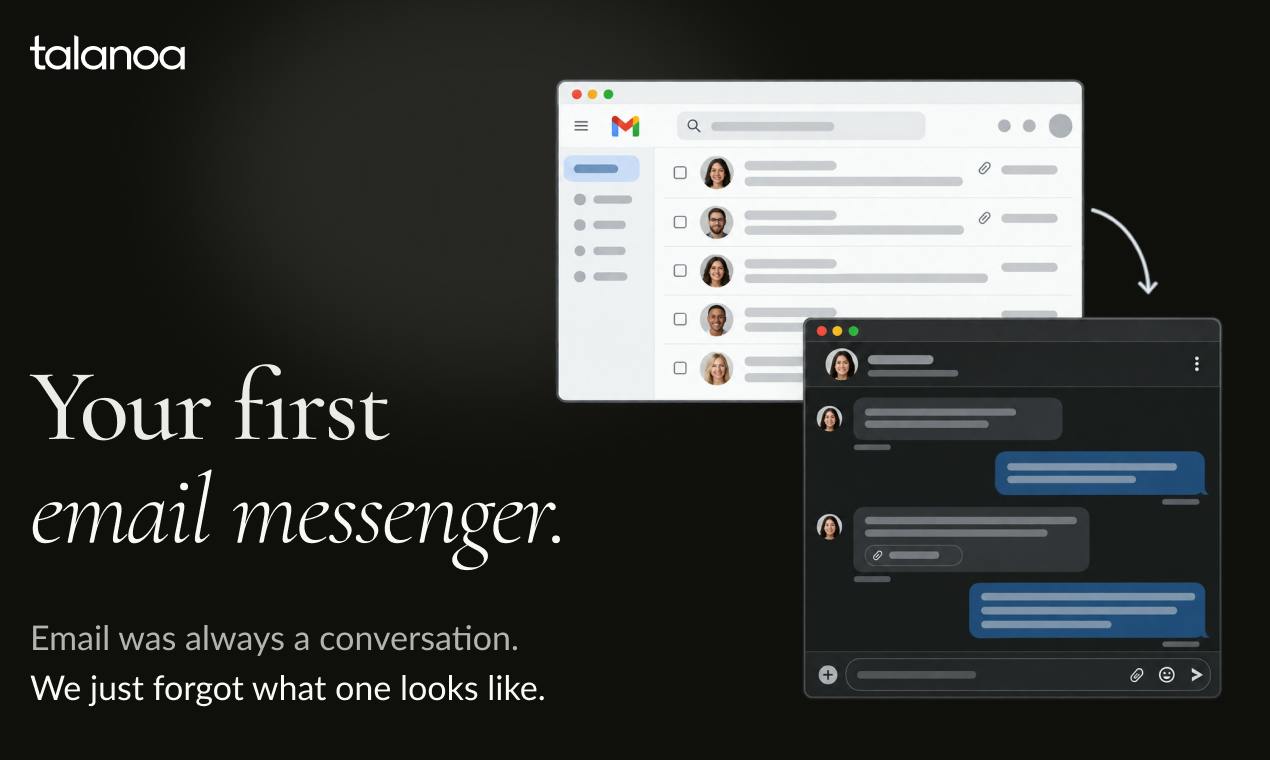
Most people's daily email experience isn't great. Something that could be explained in three sentences often becomes hard to track because of quoted history, signature blocks, and multiple recipients. Talanoa's core idea is simple: strip away the noise and let every email return to being just a conversation.
Its approach is to automatically remove quoted content, signatures, and other clutter, reorganizing email threads into a clean interface resembling instant messaging. According to the product page, Talanoa positions itself as "your first email messenger," aiming to transform messy email threads into clean, chat-style conversations.
This idea didn't come out of nowhere. In recent years, many email clients have experimented with "conversation view," but most simply collapse the existing structure. Talanoa takes a more radical path—treating email as chat messages right from the presentation layer.
From Email to Todos: The Inbox as a Workbench
Talanoa isn't just a reader. It converts emails into actionable to-dos and lets users manage their calendar without leaving the inbox.
The value of this design lies in reducing context switching. In a traditional workflow, after reading an email, you need to switch to a to-do app to record a task, then switch to a calendar to schedule time. Talanoa consolidates these actions into a single interface—email as the entry point, action as the exit.
For professionals dealing with high email volume who need to quickly turn information into action, this integrated design can significantly reduce friction. The product earned 149 upvotes and 11 comments on Product Hunt, taking the #1 spot for the day—showing that this pain point resonates with many people.
Local AI: Privacy as Both Selling Point and Technical Choice
Another key feature of Talanoa is its use of private, on-device AI for searching, summarizing, and composing emails.
This deserves special mention. Most email AI features rely on cloud models, meaning your email content must be uploaded to a server for processing. Talanoa explicitly states that "everything happens on your computer: no cloud sync, no tracking, no one reading your email."
On-device AI has a natural advantage in privacy, but it also comes with constraints: model capability is limited by local hardware, and processing speed and quality for complex tasks may fall short of cloud-based large models. By choosing this path, Talanoa is essentially making a clear trade-off between privacy and performance, and betting on privacy as its core differentiator.
For users handling sensitive business, legal, or financial emails, this trade-off could be decisive.
On-device AI refers to models running directly on the user's device rather than relying on remote servers. Implementations typically include deploying compressed small-to-medium-scale models locally, or leveraging dedicated acceleration units on device chips (such as Apple Silicon's Neural Engine or Qualcomm's Hexagon NPU). Compared to cloud inference, on-device solutions keep email content from ever leaving the device, architecturally avoiding the risks of data upload, storage, and third-party access. The cost is limited model parameters and context windows—when handling long email threads or complex summaries, effectiveness and speed typically fall short of GPT-4-class cloud models. Therefore, on-device AI is better suited for lightweight tasks like classification, short-text summarization, and keyword search, while complex writing assistance often requires model distillation or task decomposition to bridge the capability gap.
Unified Inbox and Multi-Account Support
Talanoa supports connecting to Gmail, Outlook, iCloud, or any IMAP account, integrating them into a unified inbox.
Unified multi-account management is a standard feature of mature email clients—nothing new. But combined with "chat-style display + on-device AI + todo and calendar," Talanoa's complete form is more like compressing the capabilities of several scattered tools into one local app. This is also where it differentiates itself from similar products.
It's worth noting that "no cloud sync" also means a limited cross-device experience—switch to another computer, and your data won't automatically follow. This is the inevitable cost of a privacy-first approach, and users need to weigh it against their own use cases.
IMAP (Internet Message Access Protocol) is the standard protocol for syncing email between clients and servers. Unlike POP3, it keeps copies of emails on the server and supports folder structures, enabling state synchronization across multiple devices. Major services like Gmail, Outlook, and iCloud all support IMAP, which is the technical foundation that allows Talanoa to connect to various accounts simultaneously. Note, however, that IMAP itself only handles email retrieval and synchronization—calendar, contacts, and other data typically require separate protocols like CalDAV and CardDAV. For clients that only declare IMAP support, calendar management features often require additional integration or only work with certain providers. This is a compatibility detail easily overlooked when evaluating unified inbox products.
How Far Can This Kind of Product Go
Competition among email clients has always been fierce, with Superhuman, Spark, Newton, and others digging deep in their own directions. Talanoa's entry point is clear enough: chat-style interaction lowers cognitive load, on-device AI safeguards privacy, and todos and calendar extend use cases.
The challenges are equally obvious. The capability ceiling of local AI, the fragmentation across devices caused by no cloud sync, and the migration cost for users switching email clients will all affect its adoption speed. Email is a high-frequency, high-stickiness tool—getting users to move has never been easy.
Talanoa was built by BetterCallJohn and Serge P, and is now live on Product Hunt. Whether it can push the idea of "email that feels like chat" to a broader audience depends on whether the actual on-device AI experience can back up its privacy bet.
One-line Summary
Talanoa turns email into chat-style conversations and uses on-device AI to safeguard privacy.
Paragraph Summary
Talanoa is an email client that took #1 on Product Hunt for the day. Its core idea is to reorganize messy threads full of nested quotes, signatures, and CCs into clean, chat-like conversations. It automatically strips away noise, converts emails into to-dos, and lets users manage their calendar without leaving the inbox, reducing context switching. Its key differentiator is on-device AI for search, summarization, and composition—all processing happens locally, with no cloud sync or tracking, making privacy its core competitive edge. It supports a unified inbox across Gmail, Outlook, iCloud, and any IMAP account. The costs: limited cross-device experience, a capability ceiling for local models, and the inherent difficulty of getting users to switch email clients.
Related articles

Cursor Can Now Control Your Computer: AI Agents Can Drive Desktop Apps for Testing
Cursor adds desktop control: AI agents can drive desktop apps like the iOS Simulator to test their own features. We analyze the impact on dev workflows, possible technical approaches, and reliability concerns.

Vibecoding a Custom Inference Engine: High Hopes, Harsh Reality
A Reddit developer shares the real experience of vibecoding a custom inference engine: running GGUF Q4 models in the browser with WebGL2 and GLSL, only to fall into tokenizer debugging hell. This article analyzes the engineering challenges of browser-side LLM inference and why cloning llama.cpp is the more rational choice.

How High Are Anthropic's Early Investor Paper Returns Ahead of IPO?
Anthropic's early investor paper returns draw attention ahead of IPO. This article analyzes sources of book gains, capital structure, pre-IPO games and risks, and implications for the AI startup ecosystem.