TanStack Router in Practice: Type-Safe Routing, Data Loaders, and Authentication Guards

TanStack Router reimagines React routing with file-system routes, loader-driven data fetching, and 100% type safety.
This article distills a deep-dive TanStack Router tutorial built around a "Meetup Tracker" app. Key highlights include full TypeScript inference that catches typos at coding time, a file-system-based route tree, loader-driven data fetching that eliminates useState/useEffect patterns, Zod-validated search params with loaderDeps for URL-as-state filtering, and route context with beforeLoad guards for authentication — all compared against React Router and Next.js.
TanStack Router is quickly becoming the go-to choice for React developers building complex web applications. In this deep-dive tutorial from the Tapascript channel, the author builds a production-grade app called "Meetup Tracker" to systematically cover TanStack Router's core capabilities — from file-system routing and data loaders to search parameter filtering and authentication-protected routes. Remarkably, almost no useState or useEffect appears throughout the entire process; all state is driven by the routing system. This article distills the key concepts and design philosophy from the tutorial to give you a solid mental model of TanStack Router.
Why Routing Matters and Where TanStack Fits
At its core, routing connects "user intent" to "UI rendering." When a user visits a specific URL, the routing system acts like a GPS — it parses the URL, determines the path, and renders the corresponding component. Multi-page applications rely on specific URLs to enable deep linking, so users can share or bookmark a particular page state.
The React ecosystem offers several routing solutions: React Router DOM, Next.js's built-in App Router, and the subject of this article — TanStack Router. The author emphasizes that TanStack is an entire ecosystem, not just a router. It also includes TanStack Query for managing server state, and TanStack Start, a full-stack framework built on top of the router. In other words, mastering Router is a prerequisite for getting the most out of Start.
TanStack Router's most critical differentiator is its 100% inferred TypeScript support. The author offers a compelling example: if you mistype /about as /abot, many routing systems won't surface the problem until the code hits production and a user lands on a 404. TanStack Router's type system catches this in your IDE as you type, preventing the error from ever reaching production.
Project Setup and the Route Tree
You can scaffold a new project quickly using the TanStack CLI: npx add TanStack create project-name. The CLI lets you generate only the routing-related scaffold code and supports specifying a package manager like PNPM or Yarn via the --package-manager flag (defaulting to NPM). Supported frameworks include React and SolidJS.
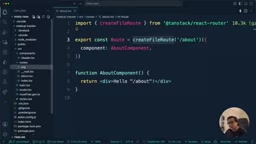
After creating the project, the most important concept to grasp is the Route Tree. In TanStack Router, you define routes by creating files and folders. These structures are automatically translated into a generated file called routeTree.gen.ts — maintained entirely by the framework and never edited manually. It stores the full hierarchical structure of your routes and handles type inference and data passing between routes.
The file conventions are intuitive: __root.tsx is the root route and acts as the global layout; index.tsx maps to the / root path; about.tsx maps to /about. Folders alone don't create routes — a route file (e.g., hackathon.tsx) must exist inside the folder for that path to become active.
Root Route, Outlet, and Navigation
__root.tsx is created using the createRootRoute API and serves as the top-level layout — this is where you place elements that persist across pages, such as the Header, Sidebar, and Footer. The most important concept here is the Outlet, which acts as a dynamic slot: when you navigate to /login, the router injects the content of login.tsx into wherever the Outlet is placed.
Navigation comes in two flavors. Static navigation uses the Link component with a to prop. As you type the path, your IDE will autocomplete all available routes — a direct benefit of type safety. If you type a path that doesn't exist, you'll get a compile-time error rather than a production 404.
The second approach is programmatic navigation. When you need to navigate inside a JavaScript handler (like a button click callback) where JSX Link tags aren't available, you use the useNavigate hook to get a navigate function. The author also demonstrates lazy-loaded routes (Lazy Routes): by naming a file post.lazy.tsx, you get automatic code splitting so the corresponding JavaScript is only downloaded when the user visits that route.
Dynamic Routes and Data Loaders
The core of the app is a Meetup list and detail page. The list page at /meetups displays all meetups, and clicking one navigates to /meetups/:meetupId for the detail view. Dynamic routes are created using filenames prefixed with $, such as $meetupId.tsx, where $meetupId is replaced by the actual value at runtime.
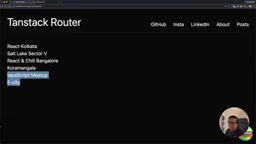
The most impressive part is the Loader. TanStack Router lets you define an async loader function inside createFileRoute, where you can issue fetch requests directly, then consume the result in your component via Route.useLoaderData(). No useState or useEffect is needed to manage the data lifecycle. The author also sets up a JSON Server as a mock backend to make data loading feel closer to a real project.
For dynamic routes, the loader function receives a params argument containing the dynamic URL segment (e.g., params.meetupId), which you can use to fetch the details for a specific meetup. This design makes data fetching entirely route-driven, resulting in a clean and consistent architecture.
In a typical React app, data fetching lives inside components: you initialize empty state with
useState, then kick off a request inuseEffectafter the component mounts and write the result back to state. The problem with this pattern is that the component must render an empty shell before loading can even begin, causing flickers. When multiple components each manage their own requests, controlling load order and race conditions becomes difficult. TanStack Router's Loader mechanism draws inspiration from the data-routing concept introduced in Remix and React Router v6.4: data requests are triggered at the route-matching phase (during navigation), not after the component renders. This means the browser can fetch data and code resources in parallel during a transition, so by the time the component actually renders, data is already available — no need to handle empty-component logic during a "loading" state. The data returned byRoute.useLoaderData()is also fully inferred — TypeScript knows exactly what your loader returns, so no type assertions are needed in the component.
Loading States, Error Handling, and Search Params
Async requests inevitably require handling two boundary states: loading and errors. TanStack Router provides two out-of-the-box configuration options: pendingComponent, which displays a loading indicator while the loader is fetching data, and errorComponent, which gracefully renders an error when the request fails. The author demonstrates by shutting down the API server: a detail page without errorComponent crashes the entire app, while a configured one contains the error locally, leaving other pages fully functional.

Search Params are another highlight. The author implements city and tech stack filtering for meetups without touching component state or useEffect. He introduces Zod to define a search schema (e.g., city and tech defaulting to "all"), binds it to the route via validateSearch for type-safe parameter validation, and uses loaderDeps (loader dependencies) so the loader automatically re-runs with updated values whenever search params change. Components read the current params via Route.useSearch(). Not a single line of useState or useEffect appears in the filtering logic — the URL itself becomes the application state.
Zod is a TypeScript-first runtime schema validation library. Unlike TypeScript types that only exist at compile time, Zod schemas validate data at runtime and throw structured errors when validation fails. This is critical for search params: URLs are strings that users can freely tamper with. Passing dirty data like
?city=123&tech=undefineddirectly to a backend request has unpredictable consequences. By binding a Zod schema viavalidateSearch, TanStack Router validates and coerces parameters when parsing the URL, replacing invalid values with the defaults defined in the schema. This guarantees that components and loaders always receive a structurally correct, type-safe parameter object.loaderDepstells the router "treat the loader cache as stale when these search params change," triggering a re-fetch — the key linking mechanism that makes the URL the single source of truth.
Route Context and Authentication Guards
Authentication is unavoidable in real-world applications. The challenge is that TanStack Router's route definitions (like loaders) run outside the React render cycle, so you can't call React Hooks like useContext inside them. The solution is Route Context.
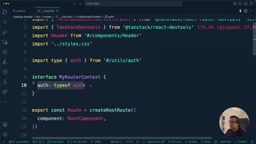
The author creates auth utilities (three methods: login, logout, and isAuthenticated, stored in localStorage for demo purposes) in utils/auth.ts outside the routes folder. He then changes the root route from createRootRoute to createRootRouteWithContext, passing in the defined context type, and injects the auth context when creating the router in main.tsx.
Protected routes are implemented via the beforeLoad function — it checks context.auth.isAuthenticated() before the route loads, and throws a redirect() to the login page if the user isn't authenticated, optionally passing search params with a message (e.g., "You must log in to create a meetup"). The author specifically cautions: don't stuff everything into route context. Only data that needs to be accessed outside the React render cycle — in route components, loaders, beforeLoad, etc. — belongs there. Everything else should use regular React Context.
beforeLoadis a route-level hook provided by TanStack Router. It runs before the route's loader executes and can be used for permission checks, redirects, or injecting additional dependencies into the loader. Unlike the loader itself,beforeLoad's primary job is to "decide whether to allow loading to proceed." The core pattern isthrow redirect()— throwing a redirect object (not a regular error) is caught by the framework, which immediately executes the navigation and terminates the entire route loading flow, skipping any subsequent loader or component rendering. This "throw to redirect" design keeps authentication guard code extremely concise. Because it happens at the route layer rather than the component layer — which is server-renderable — it's also more SSR-friendly. In full-stack scenarios like TanStack Start, the samebeforeLoadlogic can return an HTTP redirect directly from the server, avoiding the client-side flash of rendering before redirecting.
Data Mutations and Cache Invalidation
Creating a new meetup involves a Mutation. The author issues a POST request inside the form's onSubmit handler to create a new event, then navigates back to the parent meetup list with navigate('../') on success. Since the route changes, the list data refreshes automatically.
But if you need to refresh data within the same route, you use router.invalidate() — a "kill switch" that discards stale data and forces a fresh fetch. This is conceptually similar to what Next.js offers with its cache invalidation APIs.
Comparing the Three Major Routing Solutions
At the end of the tutorial, the author shares a side-by-side comparison based on firsthand experience:
- Type Safety: TanStack Router treats type safety as a first-class citizen — it happens automatically and feels like writing a normal TypeScript application. React Router's type safety is partial or requires explicit opt-in. Next.js relies entirely on the framework and can feel like a black box at times.
- Data Fetching: React Router leans client-side, Next.js leans server-side, while TanStack Router uses a loader-driven hybrid model that supports both.
- URL Search State: This is TanStack's most standout advantage. React Router requires manual string parsing; Next.js support is limited with less explicit type bindings. TanStack Router, combined with Zod validation, fully automates the parsing process.
The author uses a memorable analogy: React Router is like a general-purpose toolbox where you build everything yourself; Next.js is like a fully built house — move in immediately but hard to renovate; TanStack Router is like an architect who draws up blueprints on demand, ensuring every pipe and cut fits perfectly. He currently favors TanStack.
Related articles

Chain of Thought Isn't Just for AI: How Humans Can Use CoT to Improve Thinking Quality
Chain of Thought isn't just a prompt trick for large models. Starting from a Hacker News discussion, this article analyzes why CoT works for human thinking too, breaks down actionable ways to transfer it, and highlights the key differences between human CoT and machine CoT.
Cloudflare Teams Up with OpenAI: Closi…
Cloudflare Teams Up with OpenAI: Closing the Loop from Vulnerability Discovery to Defense with AI
Cloudflare uses OpenAI Daybreak to investigate security vulnerabilities and generate reviewable remediation plans, while developers use Codex to boost coding efficiency and quality.

Orca Multi-Agent Orchestration in Practice: A Guide to Parallel Collaboration with Claude and Codex
Orca is Stable AI's free open-source agent workbench supporting 34 agents like Claude Code and Codex in parallel. Learn its Git worktree isolation, multi-model orchestration, and mobile management.