tauri-deepseek-harness: A DeepSeek Harness Desktop Client Built with Tauri

A lightweight Tauri desktop client that provides a graphical interface for connecting to local Harness AI inference services.
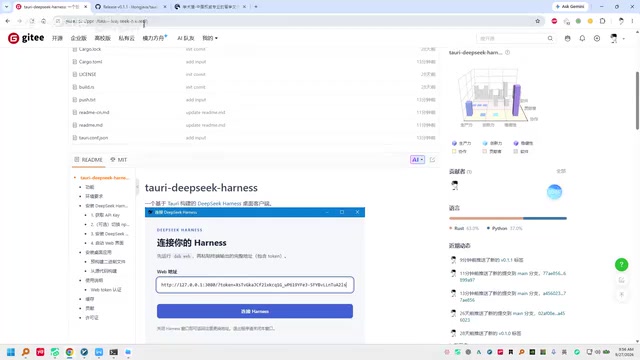
tauri-deepseek-harness is a desktop app built with Tauri that provides a visual connection interface for Harness, a local AI inference tool. The workflow has two steps: launch Harness via command line to get a local connection URL, then paste that URL into the desktop client and connect. The app uses a decoupled design where the desktop client acts only as a lightweight access layer while Harness handles core inference. Thanks to Tauri's native WebView architecture, the app is tiny and fast — ideal for developers who want to manage local model connections without staying in the terminal.
What is tauri-deepseek-harness
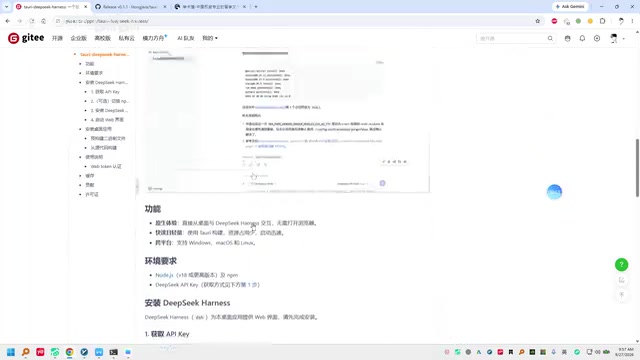
tauri-deepseekAd-harness is a desktop client tool built on the Tauri framework, designed specifically to provide a graphical desktop interface for Harness. For developers accustomed to command-line workflows, this kind of desktop wrapper lowers the barrier to entry by consolidating what would otherwise be a terminal-based connection process into a visual interface.
The project is built with Tauri, which means it has a significant advantage over traditional Electron-based solutions in terms of bundle size and resource usage. Tauri renders its UI using the system's native WebView and uses Rust as the backend logic layer, resulting in final binaries that are typically only a few to a dozen megabytes, with faster startup times as well. For a lightweight client whose only job is to handle connections and forwarding, this is a very appropriate technology choice.
In this context, Harness is a runtime framework or inference service tool for running large language models (like DeepSeek) locally — similar in positioning to Ollama or LM Studio. It starts an HTTP service on your machine and exposes an OpenAI API-compatible interface for other applications or scripts to call. The core value of these tools is enabling developers to run model inference locally without relying on cloud APIs, while keeping data private. The "deepseek" in tauri-deepseek-harness indicates that this client is primarily aimed at local deployment scenarios for the DeepSeek model family, using a graphical interface to simplify connection management with the Harness service.
Tauri is a cross-platform desktop application development framework based on Rust. Since releasing version 1.0 in 2022, it has gradually emerged as a mainstream alternative to Electron. Unlike Electron, which bundles a full Chromium browser engine into every app, Tauri calls the operating system's built-in WebView (WebView2 on Windows, WebKit on macOS/Linux). Frontend logic can still be written using frameworks like React or Vue, while system calls and backend logic are handled by Rust. This architecture keeps Tauri app installers typically between 3–15 MB — far smaller than the 80–200 MB that Electron apps often require — with significantly lower memory usage as well.
How to Use It
Based on the demo, the overall workflow isn't complicated. The core idea is a two-step process: start the service first, then connect the client.
Step 1: Install and Start Harness
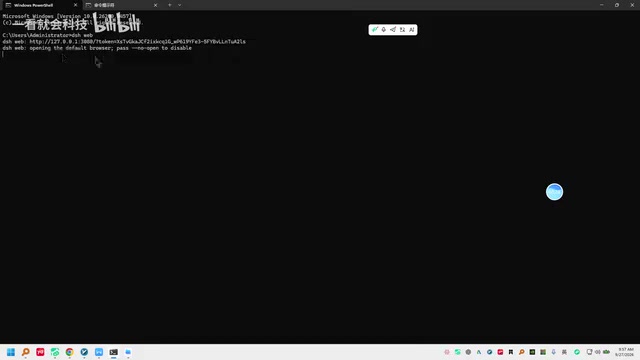
The prerequisite for using this desktop client is having Harness installed on your machine. Once installed, launch the Harness service using a specific command. After the service starts, the terminal will output a connection link (typically a local address) — this link is the key credential needed to connect from the desktop client.
The local address output by Harness after startup typically looks like http://127.0.0.1:<port>, sometimes accompanied by an API key or token as an authentication credential. Together, these form the complete connection string the client needs. This "local service + link credential" pattern is common in local AI inference tools — the service process runs continuously in the background, and external clients communicate with it over standard HTTP without tight coupling. This also means that in theory, any client that supports an OpenAI-compatible interface can connect; tauri-deepseek-harness simply provides a more purpose-built native desktop wrapper.
Step 2: Copy the Link and Connect
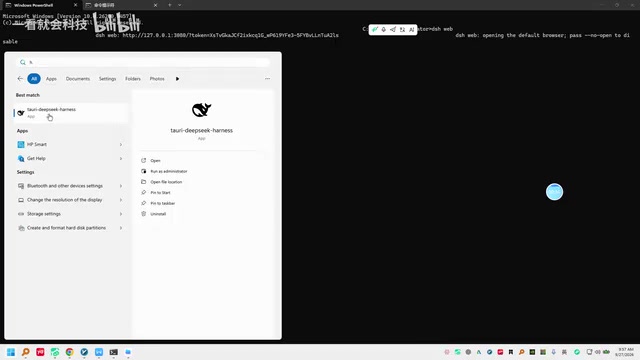
Copy the connection link output by the terminal, open the installed tauri-deepseek-harness desktop client, paste the address into the corresponding input field, and click the "Connect" button to complete the setup. In the demo, the connection process went smoothly — after pasting the address, a brief wait was followed by a successful connection prompt.
The design philosophy is clear: Harness handles the actual runtime logic, while the desktop client serves only as a frontend access layer that communicates with the local service via the link. This decoupled approach makes independent updates easier and keeps the desktop client appropriately lightweight.
Technical Positioning and Use Cases
Based on the demo, tauri-deepseek-harness is positioned as a "glue" tool — it doesn't handle any core computation itself, but instead provides a more user-friendly entry point for Harness users. The value of tools like this lies in:
- Converting manual command-line connection management into a one-click graphical interface;
- Lowering the onboarding cost for users who aren't heavy terminal users;
- Leveraging Tauri to maintain a minimal install size and memory footprint.
For developers who need to interact with Harness frequently but don't want to stay in the terminal, this kind of desktop client can meaningfully improve the day-to-day experience. In team settings, a standardized client can also help normalize the connection workflow and reduce issues caused by environment differences.
Summary
tauri-deepseek-harness is a desktop client project with a clear concept and a well-defined single responsibility: providing a visual access solution for Harness using Tauri's lightweight characteristics. The workflow can be summarized as: install Harness → launch via command to get the link → paste the link in the desktop client to connect. The overall demo leans toward a quick-start introduction, demonstrating the tool's basic usability.
One caveat: since the original demo information is fairly brief, the tool's depth of functionality, stability, and compatibility with different versions of Harness still need more thorough real-world testing. Interested developers are encouraged to consult the project documentation for further details.
Related articles

Chain of Thought Isn't Just for AI: How Humans Can Use CoT to Improve Thinking Quality
Chain of Thought isn't just a prompt trick for large models. Starting from a Hacker News discussion, this article analyzes why CoT works for human thinking too, breaks down actionable ways to transfer it, and highlights the key differences between human CoT and machine CoT.
Cloudflare Teams Up with OpenAI: Closi…
Cloudflare Teams Up with OpenAI: Closing the Loop from Vulnerability Discovery to Defense with AI
Cloudflare uses OpenAI Daybreak to investigate security vulnerabilities and generate reviewable remediation plans, while developers use Codex to boost coding efficiency and quality.

Orca Multi-Agent Orchestration in Practice: A Guide to Parallel Collaboration with Claude and Codex
Orca is Stable AI's free open-source agent workbench supporting 34 agents like Claude Code and Codex in parallel. Learn its Git worktree isolation, multi-model orchestration, and mobile management.