Tbox AI Browser Review: Full Workflow Automation for Xiaohongshu from Content Creation to Publishing

Tbox AI Browser uses AI Agent to automate the entire Xiaohongshu workflow from topic selection to publishing.
Tbox AI Browser combines AI Agent with browser automation technology to connect the complete Xiaohongshu content creation pipeline. Users simply input a one-sentence topic, and the AI automatically completes web search, copy generation, image sourcing (supporting four methods including AI generation), smart layout, and one-click publishing. It supports natural language interactive layout modifications and includes a built-in knowledge base for content reuse. The tool is particularly suited for knowledge-sharing content, condensing hours of creation work into just minutes.
Introduction
Xiaohongshu (RED) has become an indispensable traffic platform for content creators, but the entire workflow—from topic selection, copywriting, and image creation to layout and publishing—often consumes significant time and energy. The latest version of Tbox AI Browser attempts to use an AI Agent approach to chain this entire workflow together, delivering a Xiaohongshu creation experience of "one sentence input, one-click publish."
AI Agent is one of the most important paradigms in current AI applications, fundamentally different from traditional single-turn Q&A AI assistants. Traditional AI tools require users to manually trigger operations at each step, while AI Agents possess autonomous planning, tool invocation, and multi-step execution capabilities—they can decompose a high-level goal into multiple subtasks, sequentially call different tools such as search engines, text generation models, and image generation models, and dynamically adjust subsequent steps based on intermediate results. This "plan-execute-feedback" loop mechanism is the technical foundation that enables Tbox to drive an entire creation pipeline with a single sentence input. Since 2024, Agent architecture has become the core strategic direction for major AI companies, with OpenAI, Google, Anthropic, and others actively investing in this area.
This article provides a detailed breakdown of this Xiaohongshu automation tool's core features and actual workflow, helping you decide whether it deserves a place in your content creation toolkit.
Tbox AI Browser Topic Selection & Material Generation: AI Agent Auto-Search and Content Assembly
From Inspiration to Outline in One Step
Tbox AI Browser can directly access the Xiaohongshu Creator Service Platform, where users can browse recommended topics in the "Note Inspiration" section, covering categories like food, fun knowledge, and science. However, the tool excels most in knowledge-based content—such as brain science trivia that requires information synthesis.
Xiaohongshu's monthly active users have exceeded 300 million, with over 3 million notes published daily. Its unique "seeding" culture and community atmosphere make it a core platform for brand marketing and personal IP building. But content competition on Xiaohongshu is extremely fierce—the platform's algorithm strictly evaluates content quality, cover image appeal, title keywords, and engagement rates. A high-quality Xiaohongshu note typically requires topic research, copywriting, multiple image creation, unified style layout, and tag optimization—at least 5-6 independent steps, with professional creators averaging 1-3 hours per note. This high-investment creation threshold is precisely the core pain point that automation tools aim to solve.
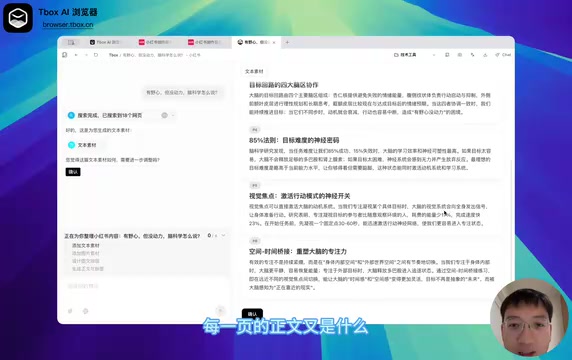
Users simply create a new tab, select "Xiaohongshu" mode, input a one-sentence topic description (e.g., "brain science fun facts"), press Enter, and the AI Agent automatically initiates the workflow:
- Web Search: Automatically retrieves reference materials related to the topic
- Text Organization: Determines the number of pages, titles, and body content for each page
- Material Output: Generates a complete copy outline for user review
If satisfied with the generated material, clicking "Confirm" moves to the next step. This approach dramatically lowers the creation threshold for knowledge-based content—users no longer need to collect data and extract key points themselves; the AI handles the information integration from zero to one.
Xiaohongshu Image Assets: Multi-Source Integration & Smart Editing
Four Image Sourcing Methods
Xiaohongshu is a highly visual platform where image quality directly impacts note click-through rates. Tbox AI Browser provides four image source options:
- Direct Search: Search the web for relevant images
- AI Image Generation: Generate original images matching the topic via AI
- Local Upload: Use the user's own image assets
- No Images: Adopt a text-only layout approach
Among these, AI image generation technology has experienced explosive growth over the past two years. From Stable Diffusion and Midjourney to DALL-E 3, diffusion models can now generate images approaching professional photography and design standards. The basic principle of diffusion models involves gradually adding noise to images and then learning the denoising process, ultimately generating high-quality images from pure noise. In practical content creation scenarios, the biggest advantage of AI-generated images is zero copyright risk and high controllability—users can precisely specify image content, style, and composition through text descriptions, avoiding the copyright disputes common with traditional stock image websites. However, AI-generated images still have certain limitations in detail authenticity (such as finger count and text rendering).
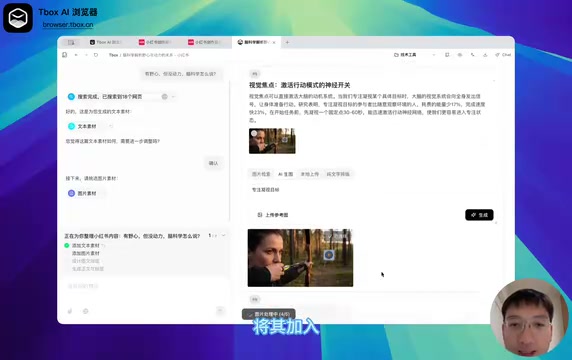
Compared to older versions, the new version has significantly improved the image selection experience. If no satisfactory images are found in search results, users can directly switch to AI image generation mode. In our testing, the generated images showed good topic relevance and can be added to the creation workflow with one click.
Built-in Image Editing Capabilities
Notably, Tbox AI Browser also includes basic image editing functionality. For example, when a retrieved image contains a watermark, users can directly use the image cropping function to remove the watermarked area without switching to another tool. While the feature isn't particularly complex, it eliminates the hassle of switching back and forth during the Xiaohongshu creation process, maintaining workflow continuity.
AI-Driven Xiaohongshu Layout: Auto-Generating Beautiful Pages
Smart Layout Design Results
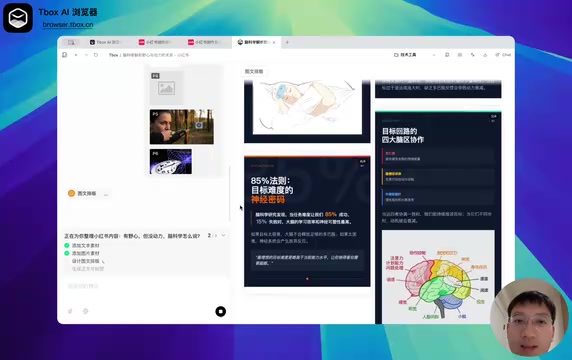
Once image assets are ready, the Xiaohongshu creation Agent enters the layout phase, automatically combining copy and images into polished Xiaohongshu pages. Based on actual results, the layout quality is quite impressive—text and image pairings are well-balanced, and the visual style aligns with Xiaohongshu's aesthetic.
Interactive Modification & Iteration
More importantly, the entire layout process supports interactive modification. Users can provide feedback on the layout results on the right side at any stage. For instance, if the six images appear inconsistent in size, simply tell the AI in natural language "keep page heights consistent," and the AI will regenerate the layout.
This "conversational iteration" design philosophy is highly practical, representing a paradigm shift in human-computer collaboration. Traditional layout tools (such as Canva, Figma, Adobe InDesign) use WYSIWYG (What You See Is What You Get) interaction, requiring users to adjust every visual element through dragging, scaling, alignment, and other precise operations. While flexible, this approach has a steep learning curve and isn't user-friendly for non-designers. Natural language interactive design lets users describe desired effects in everyday language while the AI system handles converting semantic intent into specific design parameter adjustments. This paradigm relies on large language models' ability to accurately understand design intent and map natural language to technical parameters like CSS and layout algorithms. Tbox abstracts these operations into natural language commands, significantly lowering the technical barrier for Xiaohongshu layout.
One-Click Xiaohongshu Publishing: Browser Automation Closes the Last Mile
Automated Publishing Workflow Explained
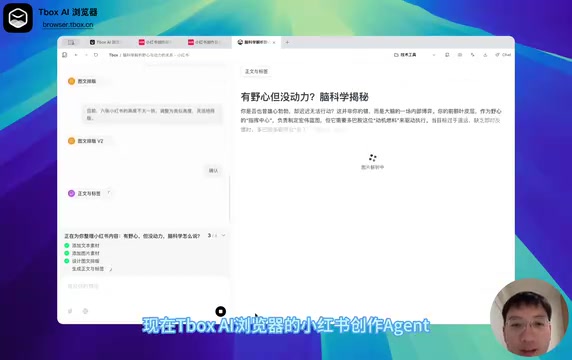
After completing the layout, the Agent automatically generates the full body copy and tags, displaying the corresponding Xiaohongshu page images below for user confirmation.
Two standout features are worth highlighting:
Knowledge Base Storage: Tbox AI Browser has a built-in knowledge base system where completed Xiaohongshu content can be saved directly for future reuse or reference. Knowledge Base systems in AI applications are typically closely associated with RAG (Retrieval-Augmented Generation) technology. RAG's core approach is to retrieve relevant information from the knowledge base as contextual reference before AI generates content, thereby improving the accuracy and consistency of generated content. For Xiaohongshu creators who continuously produce content, the knowledge base provides value on multiple levels: first, avoiding redundant work by using previously created content as reference for future topics and materials; second, maintaining content style consistency as the AI can learn the creator's expression habits from historical content; third, building personal or team content assets that become valuable digital assets as they accumulate.
Browser Automated Publishing: Leveraging browser automation capabilities, Tbox can automatically complete title entry, body text input, tag addition, and upload of all page images—users only need to click the "Publish" button at the end. Browser Automation is the web-specific application of RPA (Robotic Process Automation) technology, with its core principle being programmatic simulation of human browser operations—including clicking buttons, filling forms, uploading files, and scrolling pages. Earlier browser automation tools like Selenium and Puppeteer were developer-focused, requiring code to define operational workflows. The new generation of AI-driven browser automation combines large language models' semantic understanding capabilities, enabling the system to "read" webpage structures and autonomously determine operation paths, significantly lowering the usage threshold. Tbox embeds this capability directly into the browser itself, allowing the AI Agent to directly control the Xiaohongshu Creator Service Platform's publishing interface, truly connecting the complete chain from creation to publishing and eliminating the tedious manual copy-pasting and image-by-image uploading.
Summary: Which Xiaohongshu Creators Is Tbox AI Browser Best Suited For?
Tbox AI Browser's Xiaohongshu creation feature essentially applies AI Agent + Browser Automation capabilities to the content creation scenario. Its core value is reflected in three aspects:
- Workflow Integration: Chains together six steps—topic selection, search, writing, image sourcing, layout, and publishing—into a single automated pipeline
- Lower Barriers: Replaces professional design and layout operations with natural language interaction
- Efficiency Gains: A complete knowledge-based Xiaohongshu note may only take a few minutes from topic input to publishing
Of course, this type of tool is currently better suited for knowledge sharing and information synthesis content. For lifestyle content requiring strong personal style and original photography, AI's involvement is relatively limited. But as a productivity tool, Tbox AI Browser demonstrates the enormous potential of AI Agents in vertical scenarios—in the future, we may see similar automated workflows covering more platforms and content formats.
Related articles
 Product Reviews
The Programmer's Desk Setup Guide: Building a Workspace That Feels Like Home
Discover how programmers build productive, comfortable workspaces. From multi-monitor setups to ergonomic design, explore the desk philosophy that drives focus and flow.
 Product Reviews
Qoder vs Cursor Real-World Comparison: Which $20/Month AI IDE Is Better?
Hands-on comparison of Qoder vs Cursor AI IDEs: Agent autonomy, human interaction count, and architecture decisions. Qoder needed only 2 interactions vs Cursor's 8.
 Product Reviews
Cursor Cloud Agent Demo: Eliminating Bottlenecks Across the Entire Software Development Lifecycle
Deep analysis of Cursor's Cloud Agent demo showing how cloud VMs, automated test artifacts, and a full-chain control plane systematically eliminate human bottlenecks across the software development lifecycle.