Teaching AI Coding Assistants to Be Lazy: The Seven-Step Ladder to Halving Your Code

An open-source project uses a seven-step ladder to teach AI to first judge whether code needs to be written—53% less code yet denser tests.
An open-source project lays down a seven-step ladder for AI coding assistants: from "does this feature need to exist" step by step up to "can it be done in one line," writing the minimal implementation only when all fail, while explicitly never simplifying validation, error handling, security, and accessibility. Official benchmarks show the same agent across 39 people over five rounds: 53% less code, 41% faster, 26% cheaper, with test backing for logic-bearing code rising from 68% to 98% and injected bugs caught by its own tests rising from 46% to 66%. The project is just a prompt and supports 20 agents, but the cost bar is limited to specific Claude Code versions and the terminal/desktop app. The day's chart main thread is setting rules for AI: one governs writing less, one governs checking more, and the final judgment still needs a human to close the gate.
AI coding assistants are being taught one thing: write less code. A new project has surfaced on the open-source trending charts that doesn't teach AI stronger generation capabilities—instead, it lays down a seven-step ladder: if you can avoid doing it, don't do it; if one line will do, never write ten. It sounds like slacking off, but official benchmarks show 53% less code, 41% faster execution, and 26% lower cost—while validation, error handling, security, and accessibility are never simplified.
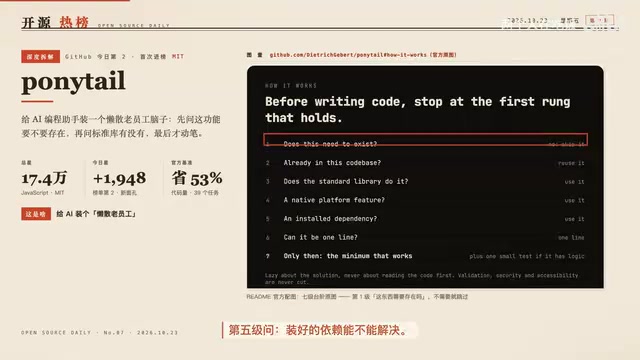
The Seven-Step Ladder: Ask Whether to Write Before Writing
The core of this project is a persona: the laziest senior developer in the room. Its creed is "the best code is the code you never wrote," and it breaks the decision down into a seven-step ladder, asking questions from lowest to highest.
Step one asks whether this feature really needs to exist at all—if not, skip it. Step two asks whether the repo already has it. Step three asks whether the standard library can do it. Step four asks whether the platform itself provides it. Step five asks whether an installed dependency can solve it. Step six asks whether it can be done in one line. Only if all of these fail does step seven actually write the smallest possible implementation. This order isn't just about saving effort—it turns "avoid reinventing the wheel" into an executable checklist. According to a Bilibili creator's video breakdown, it effectively makes senior developers' implicit judgment explicit.
More importantly, the original text draws a hard line: validation, error handling, security, and accessibility are never simplified. What gets cut is the part nobody asked for—not the safeguards that should be there. This design keeps "laziness" from sliding into "cutting corners."
"Standard library" refers to the set of functions and modules that ship with a programming language's distribution, such as Python's os and json, or JavaScript's Math and Array. They've been battle-tested over the long term, are well-documented, require no extra installation, and are usually among the most performant implementations available. Many developers habitually pull in third-party libraries to do what the standard library already does, adding dependency weight and maintenance cost. The seven-step ladder puts "can the standard library do it?" at step three precisely to require AI to first survey the language's own capabilities before reaching for a package on npm or PyPI.
"Whether the platform itself provides it"—here "platform" means the operating system, browser, or host framework running the code. For example, browsers have built-in fetch and IntersectionObserver; operating systems provide file watching, clipboard, and notification APIs; and modern frontend frameworks ship with routing and state management. These capabilities are often overlooked, with developers instead pulling in overlapping third-party implementations. Step four requires AI to first confirm whether native platform capabilities cover the requirement—reuse if possible, don't add dependencies. This complements the standard library step: one looks at the language layer, the other at the runtime environment layer.
Official Benchmarks: More Than Just Money Saved
The official benchmarks give data from the same agent across 39 people running five rounds: 53% less code, 41% faster, 26% cheaper. But more interesting than the savings are two harder quality numbers.
The proportion of logic-bearing code backed by tests rose from 68% to 98%, and the proportion of deliberately injected bugs caught by its own tests rose from 46% to 66%. This shows that while writing less code, test coverage actually became denser. The reason isn't hard to understand: write less, and every line is more worth protecting with tests, and AI can more easily focus its attention on key logic. The video creator specifically pointed out in their breakdown that these numbers are more valuable than the money saved.
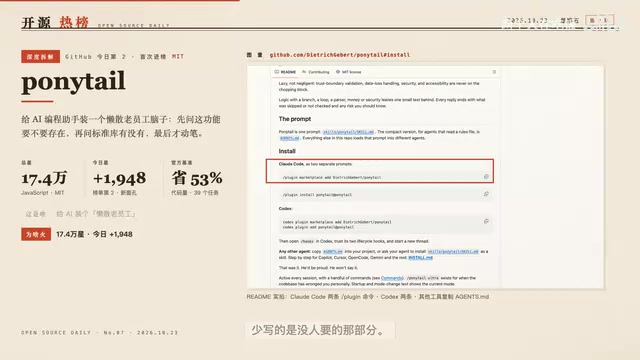
Extremely Lightweight to Install, But Two Real Limitations
The entire project is just a prompt, so the installation burden is nearly zero. It supports 20 agents: Claude Code installs in two commands, Codex in two commands, and for other tools you just copy a specification file in. It's suited to people who run Claude Code, Codex, and Cursor on tasks all day—especially those wincing at their bills at month's end; users who only occasionally use completions and don't run long tasks will see limited benefit.
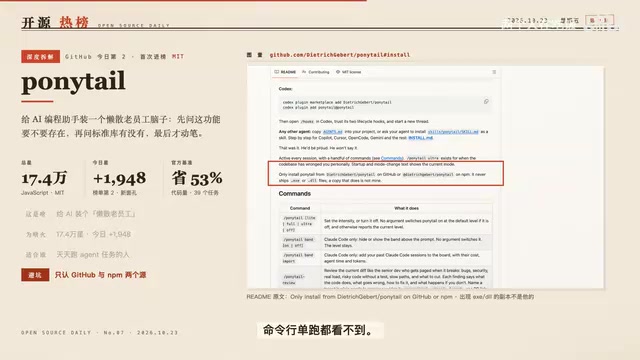
The source author explicitly warns in the README: he never publishes EXEs or DLLs, any copy containing such files isn't his, and you should install only from the GitHub repo or npm—don't look for mirrors via search engines. Another limitation is that the cost bar only supports Claude Code 21.290 and above, and it's only visible in the terminal and desktop app—not in the VSCode chat panel, cloud painting, or standalone command-line runs.
The "agent" mentioned repeatedly in the article refers to an AI coding agent that can autonomously execute multi-step tasks, not an editor plugin that only does single-line completions. Typical examples include the Agent modes of Claude Code, Codex, and Cursor: they can read and write repo files, run commands, and self-correct based on errors, and completing a full task often consumes a large number of tokens. Precisely because of this, the cost of such tools is extremely sensitive to "how much code is written"—one fewer line means one fewer round of generation and validation, which is the underlying reason the seven-step ladder can simultaneously lower cost and time. Users who only use completions don't run long tasks, so naturally they won't feel this benefit.
From a Token-Saving Plugin to Setting Rules for AI
This project gained 1,948 stars today, climbing to second on the overall chart—the first time it's appeared in the top 10 in the past 10 days. But a caveat: its last release was October 16, and there's no new version today, so don't take it as a fresh launch—rather, it's been fermenting since that release and has been pushed up by the chart algorithm.
My take is that it's not just another token-saving plugin, but is setting rules for AI coding: don't write first. Before writing code, ask whether to write—this habit is worth more than the money saved. The video creator agrees halfway: the rules are good rules, but they can't fix a requirement that was wrong to begin with. If the direction is wrong, writing less just makes the error cheaper, not more correct.
Compared with #1: One Governs Writing Less, One Governs Checking More
On the same day, the #1 spot went to an official Cloudflare project with 40,000 stars, pointing in the opposite direction: it doesn't govern AI writing less code, but has AI hunt for vulnerabilities in its own code. The design has the finder not responsible for judgment, avoiding AI vouching for itself—a thought worth referencing.

But its bar is high: the official requirements include OS-level sandboxing, overseas network and resources; without this control setup it can only sit waiting for validation, and the officials say a single standalone run finds only about half, requiring multiple rounds. It also has no new version. So its popularity today doesn't mean it's usable today—it's more like a process template for security teams.
Together, the two projects form the day's main thread: one governs AI writing less, the other governs AI checking more. The trend can be summarized as: the phase of adding capabilities to AI is over; we've started setting rules for it. Opposite directions, same goal: make AI make fewer mistakes. But rules are dead; writing less doesn't equal writing right, and checking more doesn't equal checking everything—the final gate still has to be closed by a human.
A "sandbox" is an isolated execution environment that lets untrusted code run in a restricted space without free access to the host's files, network, or system resources. Security-audit AI needs to run target code and initiate scans, which carries higher risk, so the officials require OS-level sandboxing as a prerequisite. This differs from ordinary code-generation tools: the latter only output text, the former actually executes. Without a sandbox, the project can only stay in the validation stage and can't confidently run the full process. This also explains why the #1 project has a high bar and a single run covers only about half the issues, requiring multiple iterations.
One-line Summary
An open-source project uses a seven-step ladder to teach AI to first judge whether code needs to be written—53% less code yet denser tests.
Paragraph Summary
An open-source project lays down a seven-step ladder for AI coding assistants: from "does this feature need to exist" step by step up to "can it be done in one line," writing the minimal implementation only when all fail, while explicitly never simplifying validation, error handling, security, and accessibility. Official benchmarks show the same agent across 39 people over five rounds: 53% less code, 41% faster, 26% cheaper, with test backing for logic-bearing code rising from 68% to 98% and injected bugs caught by its own tests rising from 46% to 66%. The project is just a prompt and supports 20 agents, but the cost bar is limited to specific Claude Code versions and the terminal/desktop app. The day's chart main thread is setting rules for AI: one governs writing less, one governs checking more, and the final judgment still needs a human to close the gate.
Related articles

Is the Agent Harness Dead? Cursor's Early Engineer Breaks Down the Real Architecture of AI Coding Agents
Cursor early engineer Jediah breaks down the real architecture of the agent harness: why "the harness is dead" is only half right, how the data flywheel lets the harness obsolete itself, and how Grokbot, software factories, and primitive design open new frontiers for agents.

Python Visitor Pattern and Better Alternatives Explained
A deep dive into Python's visitor pattern and four alternatives: method pattern, pattern matching, dictionary mapping, and functools.singledispatch. Choose the best decoupling design by change frequency.

357 Days of Deep Experience: Why Omarchy Made Me Stop Distro-Hopping
A 357-day deep dive into Omarchy: 59-second install, out-of-the-box audio and GPU support, the Quattro QuickShell rewrite migration pains, and why Arch users should try it.