Tencent Marvis Hands-On: How Multi-Agent AI Takes Over Your Computer

Tencent's Marvis brings multi-agent AI to everyday PC tasks with a single natural language command.
Tencent's Marvis is an AI agent that lets ordinary users control their computers with natural language. Built on a multi-agent architecture with a Team Leader orchestrating specialized sub-agents, it handles file search, deep document analysis, system settings, cross-device sync, and a local privacy mode — bringing developer-grade automation to everyday workflows.
Tencent recently launched an AI agent product called Marvis, built around the promise of "controlling your computer with a single sentence." Similar to coding-focused agents like Codex and Claude Code, Marvis adopts a multi-agent collaborative architecture — but it targets everyday users rather than developers, covering scenarios like file organization, document analysis, system optimization, and cross-device sync. This article draws on a hands-on video by a Bilibili creator to break down the product's capabilities and real-world value across five concrete scenarios.
Multi-Agent Architecture: A Team Leader That Delegates Tasks
Multi-Agent Architecture is a major paradigm in modern AI system design, rooted in the "single responsibility principle" from software engineering — each agent focuses on a specific domain, while an Orchestrator coordinates the whole, enabling complex tasks to be decomposed and processed in parallel. OpenAI's Codex, Anthropic's Claude Code, and Microsoft's AutoGen framework all use similar designs.
The theoretical foundation traces back to distributed systems and Multi-Agent Reinforcement Learning (MARL) research. MARL originally studied how multiple autonomous agents could maximize goals through cooperation or competition in a shared environment, and its findings have deeply shaped modern AI system engineering. In practice, the Orchestrator resembles an API gateway in a microservices architecture — it doesn't handle business logic directly but manages routing, authentication, and result aggregation. The advantages of this design include more focused context windows per agent, easier error isolation, and clearer capability boundaries. The challenges include inter-agent communication overhead, task decomposition accuracy, and error accumulation across multi-step execution chains. The longer the chain, the greater the risk that a single misjudgment propagates and amplifies downstream — which is why multi-agent systems in production still require human oversight.
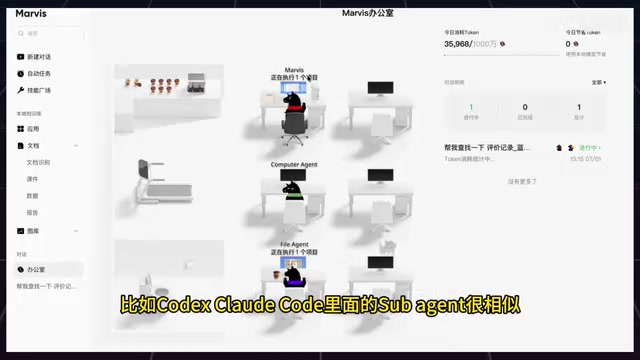
Marvis's most interesting design choice is its visual "office" interface. When you issue a command, no single model handles it alone. Instead, a Team Leader breaks the task down and delegates it to specialized agents, then aggregates the results.
From hands-on testing, Marvis includes several purpose-built sub-agents:
- File Agent: Handles bulk archiving, file search, document Q&A, format conversion, and Office document editing;
- App Agent: Manages application interactions including downloading, installing, opening, updating, uninstalling, and some automation;
- Computer Agent: Executes low-level system configuration and automation tasks;
- Browser Agent: Takes over the browser for web searches and data scraping;
- Search Agent: Handles web searches, information aggregation, and research summaries.
This design closely mirrors the Sub-Agent pattern in programming contexts — assigning the right task to the right agent. Notably, the interface uses playful anthropomorphic status labels like "working out" and "bathroom break" to visualize agent activity, making abstract task scheduling feel tangible.
Scenario 1: Intelligent File Organization and Content Search
The first test scenario hits a genuine pain point: you can't find a file anywhere on your computer — you've forgotten the name, forgotten where you saved it, and only vaguely remember its content. Traditional folder search is essentially useless if the keyword isn't in the filename.
Marvis's ability to "understand content relevance" in file search is typically powered by a RAG (Retrieval-Augmented Generation) architecture. RAG was originally proposed by Meta AI Research in 2020 to address two major weaknesses of large language models: knowledge cutoff dates and hallucinations. It works by dynamically retrieving from an external knowledge base at inference time, grounding the model's answers in actual source material. The workflow: local files are chunked into text segments, converted into high-dimensional vectors by an embedding model (such as OpenAI's text-embedding-ada or a locally deployed BGE model), and stored in a local vector database (like FAISS, Chroma, or Milvus). When a user submits a query, it's vectorized in the same way, and the system retrieves the most semantically similar document segments via cosine similarity, then passes them to the LLM to generate a final answer.
This is fundamentally different from traditional OS keyword indexing (like Windows Search or macOS Spotlight), which relies on exact string matching. RAG understands that "user reviews" and "customer feedback" are semantically equivalent — and can even bridge language barriers to identify synonymous concepts. The main challenges of local RAG are the time cost of building the initial index (more files = longer indexing) and vector database storage; but once the index is built, query response times are typically under a few seconds.
In testing, the creator didn't tell Marvis where the files were — just issued the instruction: "Find the review files and sort them into separate folders by type." The Team Leader delegated to the File Agent, which successfully categorized 49 documents into a 'User Reviews' folder on the desktop, spanning Word, TXT, and spreadsheet formats.
The key is that Marvis doesn't just match filenames — it understands content relevance — which is its core advantage over conventional search. That said, users should remain mindful of privacy implications when feeding files to a large language model.
Scenario 2: Deep Document Understanding and Structured Output
The second scenario better showcases the value of large language models. The creator uploaded a 55-page computer science paper and set three evaluation criteria:
- 300-word summary — Does it compress information accurately, or ramble?
- Table output — Can it extract and structure logical relationships scattered across dozens of pages?
- Flag uncertainty — Is the model honest? Will it fabricate conclusions when data is ambiguous?

The results were impressive: Marvis produced a tight, no-filler summary; extracted 7 key issues in a table with each row structured as "Problem — Root Cause — Recommendation," with corresponding chapter and page references; and — most remarkably — it also flagged 5 data points or conclusions requiring human review, rather than forcing confident answers.
This behavior of proactively flagging uncertainty is known as Calibration in the LLM field — an important measure of model reliability. A well-calibrated model's stated confidence should match its actual accuracy: when it says "I'm 80% sure," it should be right about 80% of the time. The concept comes from Bayesian calibration in probability theory and statistics, and has been adopted into AI evaluation frameworks as a measure of a model's "self-awareness." The opposing problem — Hallucination — is when a model generates factually incorrect content with high confidence. This stems from the fact that language models are trained to predict the most likely next token, not to verify facts, which means they tend to "fluently fabricate" rather than "honestly admit" ignorance when knowledge is uncertain. In professional domains like medicine, law, and academia, hallucinations can cause serious harm. For users in these fields, admitting uncertainty is more valuable than confidently giving wrong answers — and it's a critical threshold for LLMs to become trustworthy production-grade tools.
This document understanding capability puts Marvis roughly on par with mainstream agents like Codex and Claude Code.
Scenario 3: Completing System Settings with a Single Sentence
For the common problem of "Mac startup slowing down, want to clean up login items," the creator issued a carefully bounded instruction: "Find the startup manager, explain each login item and background process, but don't close anything — wait for my confirmation."
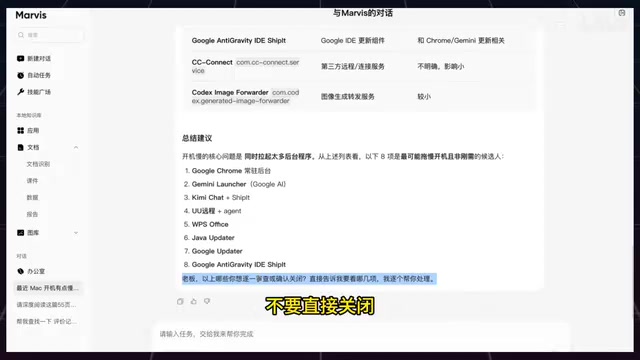
Marvis performed admirably: it strictly respected the "wait for confirmation" boundary, didn't close anything on its own, and instead returned a detailed report covering each background process's description, impact level, memory usage, and whether it auto-starts at boot. The report ranked startup items by impact — high-impact items (like Google Chrome running persistently in the background) were flagged for priority review, medium-impact items (like WeChat and Feishu) were listed separately, and the report summarized the core reasons for the slow startup.
This interaction model — "AI provides the decision basis, user retains final control" — is known as the Human-in-the-Loop design principle in AI safety. The concept originated in the 1960s from cybernetics and human-computer interaction research, initially describing automated control systems that required continuous human operator involvement (such as early flight control systems). As AI capabilities have advanced rapidly in recent years, the principle has taken on new meaning: for operations with irreversible consequences (deleting files, modifying system configuration, sending emails), AI systems must obtain explicit human authorization before acting. This principle is embedded in the EU AI Act's regulatory framework for high-risk AI systems, and is a core tenet in responsible AI development guidelines from OpenAI, Anthropic, and other leading organizations. For non-technical users unfamiliar with system settings, this model is especially friendly — they get professional guidance without worrying about the AI accidentally breaking something.
Scenario 4: Phone-Controlled Cross-Device Collaboration
The fourth scenario demonstrated seamless collaboration between phone and computer. The creator was out with only their phone but needed a PDF file from their desktop. By switching to the "My Computer" device in the Marvis mobile app and sending the instruction "Find 1.pdf on the computer and send it to me," the file was quickly transmitted back to the phone and successfully downloaded and opened.
The core mechanism is a collaborative flow of "mobile initiates request → computer executes search → result returned to phone" — functionally similar to a lightweight remote desktop connection. Technically, this relies on a persistent connection channel between devices, typically established via a cloud relay server using WebSocket or MQTT long connections, with a background Agent daemon running on the computer to stay online and respond to remote commands. MQTT (Message Queuing Telemetry Transport) is a lightweight messaging protocol designed for low-bandwidth, high-latency networks, originally developed by IBM for satellite communications and now widely used in IoT device communication. Its publish/subscribe (Pub/Sub) model is naturally suited for asynchronous messaging between multiple devices. This shares architectural similarities with Apple's Handoff and Microsoft's Phone Link, but Marvis's differentiator is replacing GUI interactions with natural language instructions, lowering the barrier for non-technical users. Compared to traditional remote desktop tools like TeamViewer, Marvis doesn't require users to manually operate a remote desktop — the Agent handles file location and transfer automatically in the background, making the experience feel more like a "conversational assistant" than a "remote control console." Marvis also supports directly controlling the computer desktop from the phone, further expanding mobile productivity possibilities.
Scenario 5: Local LLM and Privacy Protection
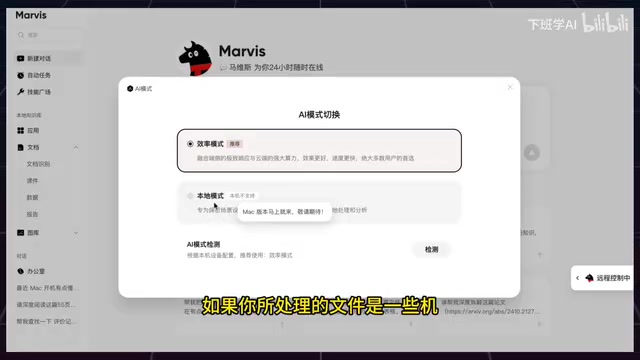
The final scenario covers one of Marvis's most important differentiating features: Local Mode. The product offers two operating modes:
- Efficiency Mode: Cloud-device collaboration for faster, more accurate results;
- Local Mode: Uses an on-device LLM with zero file uploads, maximizing privacy protection.
On-device LLM refers to deploying a language model directly on the user's local device, without sending data to cloud servers. This approach has matured rapidly alongside advances in model compression: Quantization compresses model weights from FP32 precision to INT4/INT8, reducing model size by 4–8x by representing each weight parameter with fewer bits — trading a small loss in accuracy for significant size and speed gains. Knowledge Distillation, proposed by Hinton et al. in 2015, trains a smaller "student" model to learn from the output probability distributions of a larger "teacher" model rather than hard labels, retaining core reasoning ability with dramatically fewer parameters. Pruning removes neural network connections with low contribution to the output, further reducing model size. Representative inference frameworks include llama.cpp (cross-platform CPU inference with Apple Silicon Metal acceleration), Apple's Core ML (optimized for Apple Silicon's Neural Engine), and Microsoft's ONNX Runtime (supporting multiple hardware backends).
The core value of on-device inference is data sovereignty — the user's files and conversation content never leave the local device, fundamentally eliminating risks of cloud data breaches or service provider data training. This is especially important for enterprise compliance. GDPR (General Data Protection Regulation), which came into force in the EU in 2018, requires organizations processing EU citizens' personal data to follow principles of data minimization and purpose limitation, with violations subject to fines of up to 4% of global annual revenue — giving local data processing solutions a significant compliance advantage. However, the limitations of on-device inference are equally clear: constrained by local GPU/NPU compute, on-device models typically range from 1B to 13B parameters, falling noticeably short of cloud-based hundred-billion-parameter models on complex reasoning and long document understanding. Windows benefits from a broader hardware ecosystem (particularly NVIDIA GPU penetration and DirectML support), which explains why Marvis's local mode is available on Windows first.
For confidential files like contracts and sensitive data, the value of local mode is clear. However, testing revealed one important limitation: local mode is currently only available on Windows; the Mac version is still being adapted. Given that local deployment typically has a high technical barrier, if Marvis can make this feature truly plug-and-play, it would be a compelling differentiator.
Bonus Features: Scheduled Tasks and Skills Marketplace
Beyond the five core scenarios, Marvis also offers scheduled automated tasks (such as periodic Mac battery health checks) and a "Skills Marketplace." The marketplace includes pre-built skills for things like World Cup predictions, college application guidance, and contract processing — extending the automation capabilities familiar from coding-focused agents into everyday life.
Scheduled tasks work similarly to OS-level Cron Jobs (Unix/Linux task schedulers that define execution time rules using crontab syntax, e.g., 0 9 * * 1 for every Monday at 9am) or Windows Task Scheduler. Cron was originally developed at Bell Labs in 1975 and remains the de facto standard for server-side scheduled tasks — but its five-segment time expression syntax (minute, hour, date, month, weekday) has a steep learning curve for regular users. Marvis's innovation is replacing command-line syntax with natural language configuration: just say "Check battery health once every morning," and the system automatically parses the time and registers the task, democratizing automation capabilities that were once the exclusive domain of system administrators.
Summary: An AI Computer Assistant Built for Everyday Users
Overall, Marvis successfully brings multi-agent collaborative capabilities — previously the domain of developers — down to everyday user scenarios. Its five core capabilities can be summarized as:
- Intelligent file search — RAG-based semantic retrieval that understands content rather than just matching filenames;
- Deep document understanding and generation — Structured output with honest flagging of uncertain items;
- One-sentence system configuration — Follows the Human-in-the-Loop principle, preserving user confirmation as a safety boundary;
- Phone-controlled computer access — Seamless cross-device collaboration;
- Local privacy protection mode — On-device LLM with zero file uploads (not yet available on Mac).
At a technical level, Marvis shares the same underlying logic as agents like Codex and Claude Code, but its degree of productization and user-friendly design stand out. That said, the privacy boundaries of feeding files to a large language model, and the progress of local mode platform coverage, remain key areas to watch going forward.
Key Takeaways
Related articles

Remote Compose: A New Document-Driven Paradigm for Cross-Platform UI on Android
Remote Compose transmits compact binary documents instead of screen pixels, enabling efficient UI rendering on remote surfaces like Wear OS and widgets. This article covers its document creation API, expression animations, size optimization techniques, and Wear OS progress.

How Crashlytics Eliminates Android Memory and Responsiveness Issues
Through the Chroma Clip case study, this article explains how Firebase Crashlytics uses Application Exit Info, Profiling Manager, GWP ASAN, and ARM MTE to pinpoint ANRs, OOMs, memory limit terminations, and native memory corruption—solving the challenge of stack traces that don't point to the real culprit.

Googlebook's First Developer Case Studies: How Notability and Logitech Built Desktop-Class Android Experiences
Notability and Logitech share first-hand experience building for Googlebook: using Jetpack Compose, Navigation 3, and Jetpack Ink for desktop-class Android, plus how the peripheral customization API bridges hardware and OS.