Testing the 350K-Star REA in an Isolated Environment: 4-Second Install, but Watch Out for Two Pitfalls

Using a 350K-star reverse-engineering tool in an isolated lab to audit open-source software, revealing outbound addresses and communication channels.
The article documents a security review experiment by the Chibitech team using REA, a reverse-engineering tool with over 350K stars on GitHub. In a disposable sandbox with no network or keys, they installed REA and used it to statically read two open-source apps' artifacts: within 15 seconds it listed all outbound addresses in a screenshot tool's plugins (including Imgur, Dropbox, and self-hosted Jira), and mapped 565 named communication channels between a dictation app's UI and engine layers. The article stresses the tool's value is putting facts on the table rather than drawing conclusions—outbound connections and channels don't equal data leakage, but they point to settings that need checking. The experiment also exposed REA's memory limits, paywall, writes to user-level proxy settings, and 31 of 207 tools capable of changing the system, concluding with three rules of use.
In open-source security, there's an awkward reality: most teams vet free tools by reading the official website and README, not the code itself. Eric Grau, CEO of the YouTube channel Chibitech, laid this blind spot bare with an experiment—he and his team installed one of the most-starred repos on GitHub, REA (a reverse-engineering tool) with over 350K stars, into an isolated lab, then used it to "read" other open-source software to see what could actually be uncovered.
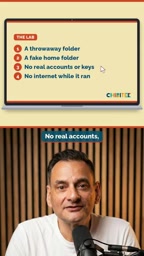
Experiment Design: A Folder You Can Throw Away
The lab setup is worth borrowing. The team prepared a disposable folder, a fake home directory, no real accounts, no keys, and disconnected the network during runtime. In other words, even if REA itself were compromised, the damage would be locked inside this sandbox.
The only hiccup was an environment dependency: REA requires Node 22, while the test machine had Node 20. After upgrading, installation took only about 4 seconds, and every package's source signature passed verification. This detail shows its distribution chain is clean—at least there was no bait-and-switch at this step.
Reverse engineering, in the software world, means inferring a program's internal structure, data flow, and behavior logic by analyzing binaries, bytecode, or packaged artifacts without owning the source code. Traditional reverse engineering is mostly used for malware analysis and vulnerability research, with a high toolchain barrier. Modern tools like REA greatly simplify the process: they can read JavaScript bundles, deconstruct module dependencies, extract string constants and network endpoints, and present them in readable form. Its principle is not to "run" the target program but to statically parse the artifact structure, so it does not trigger execution of the target code, making risk relatively controllable—but this also means it sees "what's written in the code," not "what actually happens at runtime," and the two can still differ (e.g., dynamic loading, server-delivered configuration).
Test 1: 15 Seconds to Expose a Screenshot Tool's "Outbound" Plugins
The first subject was a free, open-source screenshot tool. The team didn't run it—they had REA read its plugin files directly. Fifteen seconds later, REA listed every network address appearing in the plugins.
The results fell into two categories. Six plugins pointed to public image and file-sharing services, including Imgur, Dropbox, and Google Photos; the other two uploaded to self-hosted Jira or Confluence servers. According to Eric Grau's assessment in the video, these are functional design rather than malicious code—but functionality is functionality, and compliance is compliance. If company policy requires screenshots not to leave the premises, this list is the answer to "which plugins to remove."
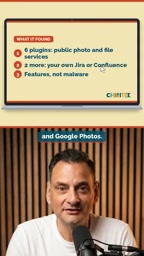
This is exactly the real value of reverse-engineering tools in security review: they don't draw conclusions for you—they put the facts needed for a decision on the table.
Test 2: 565 Communication Channels—Presence Doesn't Mean Leakage
The second subject was an open-source dictation and meeting-notes app that can run speech AI locally. REA mapped the message channels between its UI layer and engine layer, identifying 565 named channels in total.
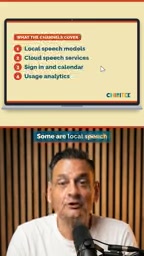
These channels serve mixed purposes: some connect to local speech models, some to cloud speech services, plus login, calendar access, and usage analytics. Here's the key takeaway—channels existing doesn't mean data is sent out by default. Their value is telling you "which settings you should look at right now."
Hitting the Ceiling
When the entire dictation app was thrown at REA all at once, it hit its own memory limit and stopped midway. After selecting only the two main files, it completed in about 30 seconds. The next step—"AI-driven app reconstruction"—requires a paid coding-agent account, so the experiment ended there.
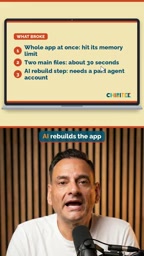
This limitation is worth noting: REA's analysis capability has boundaries, large projects need to be broken up, and the full experience isn't entirely free.
"Named channels" are a core communication mechanism in desktop app frameworks like Electron. Such apps typically split into two parts: the renderer process handling the UI and the main process handling system capabilities, with the two exchanging messages via IPC (inter-process communication), each channel identified by a string. An app registering hundreds of channels is not unusual, because each feature point—opening files, invoking the microphone, reading the calendar, reporting usage—often corresponds to a separate channel. The value of reviewing a channel list is that it amounts to an "app capability map," quickly exposing which features touch the network and which access sensitive local resources. But the existence of a channel only shows the code has that capability; whether it's enabled by default depends on settings and runtime conditions, so you need to check configuration item by item rather than judging risk by count alone.
Two Warnings from the Lab
The first warning is about isolation. REA's installation doesn't stay put in a project folder—its own preview interface shows it writes user-level proxy settings. To truly isolate it, you need a separate system profile or simply another machine.
The second warning is about permissions. REA exposes 207 tools to the agent, 31 of which are flagged as capable of "changing the system," such as debuggers and installing apps on a phone. So don't disable the agent's permission confirmations—keep approval prompts on at all times.
Proxy configuration is network forwarding configuration at the OS or toolchain level, usually split into user-level and system-level. User-level configuration writes to the current user's config files (such as environment variables, npm config, system proxy preferences), affecting every program that makes network requests under that user—not just one project. This is precisely the risk behind "installation doesn't stay in the project folder": a tool that arbitrarily modifies user-level proxies could change traffic routing for other apps, or even leave residue after uninstallation. True isolation therefore can't rely on just "creating a folder"—it requires a separate user profile (such as an independent HOME directory, container, or VM), ensuring any writes by the tool are confined within controllable boundaries. This is also the essential difference between a "disposable environment" and an "isolated environment" in security experiments.
Three Rules of Use
Eric Grau's advice boils down to three points: install only from the official NPM package or repository, and into a separate profile; use it only to analyze software you own or that is open source; and treat it as a review tool before selection, not a shortcut to cloning someone else's product.
This methodology is more universally applicable than REA itself. Before adopting any free tool, rather than trusting the official website copy, it's better to spend a few minutes looking at the actual files—reverse-engineering tools just make this action faster and more readable.
Related articles

Claude Reportedly Able to Hide Secret Messages in Benign Images
A Reddit post claims Claude Fable 5.1 can hide secret messages in benign images. This article reviews the background, image steganography principles, and potential security risks, and suggests a testing path from rumor to verification.

Federal Government Awards $85 Million; CFS to Develop Fusion-Specific Semiconductors
The federal government awards $85 million to Commonwealth Fusion Systems to develop conductors and power semiconductors for fusion plants. This article analyzes the significance of this funding for the fusion supply chain and commercialization path.

When Should AI Assistants Proactively Suggest? Timing Is Everything
When should AI assistants proactively suggest? Reddit discussion reveals: the same suggestion feels different at different times. This article analyzes the dual nature of proactive suggestions, the boundary of user expectations, and design principles, exploring how to balance automation and user control.