The 3 Most Common Mistakes When Using AI to Write Code — How Many Have You Made?

Three big mistakes in AI coding: tasks too large, merging without reading the diff, and no tests in the project.
The article identifies the three most common mistakes when using AI to write code: asking AI to build an entire website at once, which produces superficially complete but loosely structured code missing edge cases (the fix: split into small chunks like login, product page, and cart, verifying each); merging directly when the AI says tests pass without reviewing the diff, risking unexpected side effects (every change must be confirmed before merging); and having no tests in the project, leaving the AI to guess (add tests before modifying code). The common root is treating AI as a fully automated black box—only by decomposing tasks, reviewing diffs, and filling in tests can AI become a reliable development partner.
When using AI to write code, many people assume that simply handing a requirement to the AI will yield usable code. Instead, they often end up with "working" programs that look runnable on the surface but are riddled with hidden pitfalls. According to practical experience shared on a YouTube channel, three mistakes are the most common—and the most easily overlooked.
Mistake 1: Giving the AI too big a task at once
The most common first mistake is asking the AI to build an entire website in one go. It sounds efficient, but the actual result is usually "a pile of code that looks like it runs but is full of holes."
When facing a massive task, AI tends to generate code that is superficially complete but loosely structured and missing edge cases. The right approach is to break the task down: build the login first, then the product page, then the shopping cart—one piece at a time. This not only helps the AI stay focused, but also lets you verify each piece as it's completed, preventing errors from piling up.
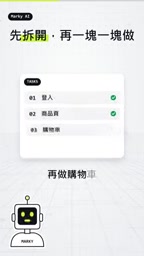
The core logic behind task decomposition is reducing the complexity of each interaction. When a task is split into independently verifiable chunks, the quality of the AI's output improves significantly, and your review and debugging costs drop substantially.
Mistake 2: Merging without reading the diff
The second common mistake is: the AI says the tests pass, so you merge directly without carefully reviewing the diff.
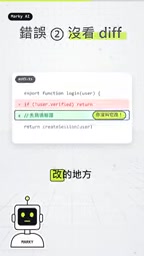
"Tests passing doesn't mean there's no problem"—the AI may have casually changed things you never asked it to touch. These unexpected modifications are especially dangerous in large projects, potentially introducing side effects that are hard to trace. Always review the diff before merging and confirm that every change is within expectations. This isn't about distrusting the AI—it's basic responsibility toward your codebase.
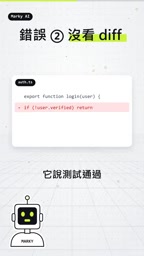
The habit of reading diffs is essentially about preserving a human checkpoint in AI-assisted development. AI can accelerate writing, but the final decision should stay in the developer's hands.
diff (difference comparison) is a core feature provided by version control tools (such as Git) that shows the specific changes to files between two versions. In AI-assisted development, diffs are usually presented line by line: green lines starting with + indicate additions, red lines starting with - indicate deletions, and context lines carry no marker. When reviewing a diff, developers should watch for three types of issues: first, irrelevant changes (the AI casually reformatted files it wasn't asked to touch or refactored unrelated functions), second, hidden side effects (modifying shared state, global configuration, or dependency versions), and third, logic deviations (seemingly implementing the requirement, but with edge cases or error handling that don't match expectations). Cultivating the habit of reading diffs block by block rather than just looking for green test results is the last line of human defense before AI-generated code enters the main branch.
Mistake 3: The project has no tests
The third mistake is that the project itself has no tests. Without tests, the AI can only guess—it can't verify whether its changes are correct, nor can it guarantee it won't break existing functionality.
The correct order is: first ask the AI to add tests, then let it modify the code. With tests as a safety net, every change the AI makes has a clear verification standard, and you can let it iterate with more confidence.
Tests aren't just for the AI—they're for you too. In an AI-assisted development workflow, testing goes from "optional" to "essential," because it's the key mechanism for constraining the AI's behavior and preventing regressions.
Regression testing refers to the practice of re-running the existing test suite after every code change to confirm that new modifications haven't broken existing functionality. In AI-assisted development scenarios, the significance of regression testing is amplified further: AI often generates changes based on local context, easily overlooking implicit cross-module dependencies, leading to regression defects where "fixing A breaks B." An effective strategy is test-first—before asking the AI to modify any feature, first require it to add test cases for existing behavior and ensure they all pass, establishing a baseline; thereafter, every time the AI submits a change, run the full test suite and compare results. You don't need to chase 100% test coverage, but you should cover core business paths and known error-prone edge cases, so as to provide a trustworthy safety net for AI iteration.
Summary: The right way to use AI for coding
Behind these three mistakes lies a common thread: treating AI as a fully automated black box. In reality, the effectiveness of AI coding depends largely on how you set task boundaries, how you review output, and how you establish verification mechanisms. Decompose tasks, review diffs, and fill in tests—get these three steps right, and AI can truly become a reliable development partner.
According to the channel, the complete methodology for setting up AI coding has been made into a full-length video on the channel—worth following up on if you're interested.
One-line Summary
Three big mistakes in AI coding: tasks too large, merging without reading the diff, and no tests in the project.
Paragraph Summary
The article identifies the three most common mistakes when using AI to write code: first, asking AI to complete an entire website or other massive task at once, resulting in code that is superficially complete but loosely structured and missing edge cases—the right approach is to split it into small pieces like login, product page, and shopping cart, completing and verifying each one in turn; second, merging directly when the AI says tests pass without reviewing the diff, potentially introducing unexpected side effects from AI's casual modifications—every change must be confirmed as expected before merging; third, the project itself has no tests, leaving the AI to guess—the correct order is to have the AI add tests before modifying code. The common root of all three mistakes is treating AI as a fully automated black box and neglecting task boundary setting, output review, and verification mechanisms. Only by decomposing tasks, reviewing diffs, and filling in tests can AI become a reliable development partner.
Related articles
How to Review a 22,505-Line PR? Matt Pocock's Stacked PRs and Ratchet Rules
Matt Pocock split a 22,505-line agent PR into 9 stacked PRs, used a two-way/one-way door framework to isolate the DB change, and enforced ratcheted lint rules and retro.
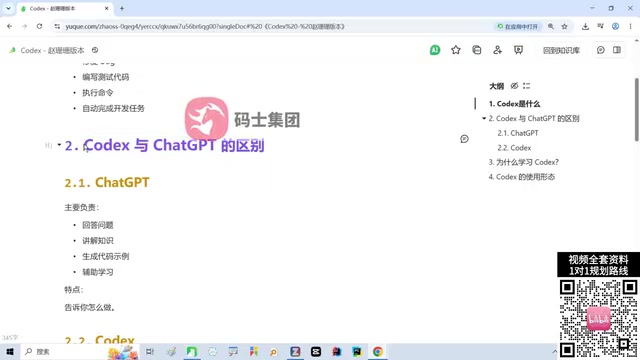
Codex from Beginner to Practitioner: A Complete Analysis of AI Coding Agents
An analysis of OpenAI's coding agent Codex: its positioning, its key difference from ChatGPT (talking vs doing), and why developers should learn it, covering setup, multitasking, automation, and MCP.
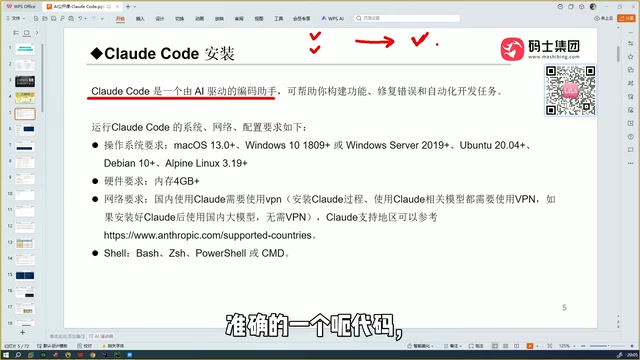
Claude Code in Practice: Multi-Model Comparison and Token Cost Control
Based on a public course, this article covers Claude Code's local installation, project-level context understanding, and auto-debugging, compares coding assistants like Copilot, Cursor, and Trae, and discusses multi-model configuration and token cost control.