The APX Default Project: A Scratchpad, Not a Workspace

APX's default project suits draft work; persistent work should use APC projects for clear ownership.
The article explains why APX's built-in default project is only suitable for unowned draft work like explaining commands, temporary experiments, or private conversations. The default workspace is shared across contexts and lacks a repository contract or portable boundary; once it carries real project work, context becomes hard to review, migrate, and clean up. Persistent work should create or register an APC project with AGENTS.md and .apc/project.json, separating APC's project contract from APX's local runtime state.
Agent tools need a place to hold scattered work that doesn't belong to a project. APX provides a built-in default project for this, located at ~/.apx/projects/default/. It lets the super agent handle general, unscoped tasks without first requiring the user to create a repository.
But this convenience hides a risk: once default quietly becomes the home for real project work, problems emerge. The default workspace is shared across contexts, with no repository contract to carry intent, no committable agent definitions, and no portable boundary another machine can take over. It is a fallback, not ownership.
A simple, practical rule: use default for draft work; when the work belongs to a project, create or register an APC project.
Typical Scenarios for Draft Work
The following situations fit well in the default project:
- Asking APX to explain a command, compare two ideas, or generate a quick checklist.
- Starting a private conversation that isn't tied to a codebase, client, or team.
- Experimenting with a model or tool before deciding whether it belongs in a project.
These operations need local runtime state but don't yet need a persistent project protocol. A conversation log, a short-lived task, or an experiment can all stay local to APX.
When does the boundary change? When the work starts to need shared rules, repeatable agent roles, reusable skills, or review within version control, it already has project shape—even if it isn't yet a Git repository.
APX's runtime state (conversation logs, sessions, task logs, credentials, machine-specific settings) is inherently "local state," independent of a code repository or project definition. It is typically stored in a directory like ~/.apx/projects/<apx_id>/, with APX itself managing its lifecycle. In contrast, the project contract is "portable state," which should be clonable, reviewable, and migratable along with the repository. Understanding this distinction helps determine whether a piece of work really needs a project: if it only produces runtime state, the default project is enough; if it produces a contract that needs to be shared, reviewed, or reused, it belongs in an APC project.
Giving Persistent Work Clear Ownership
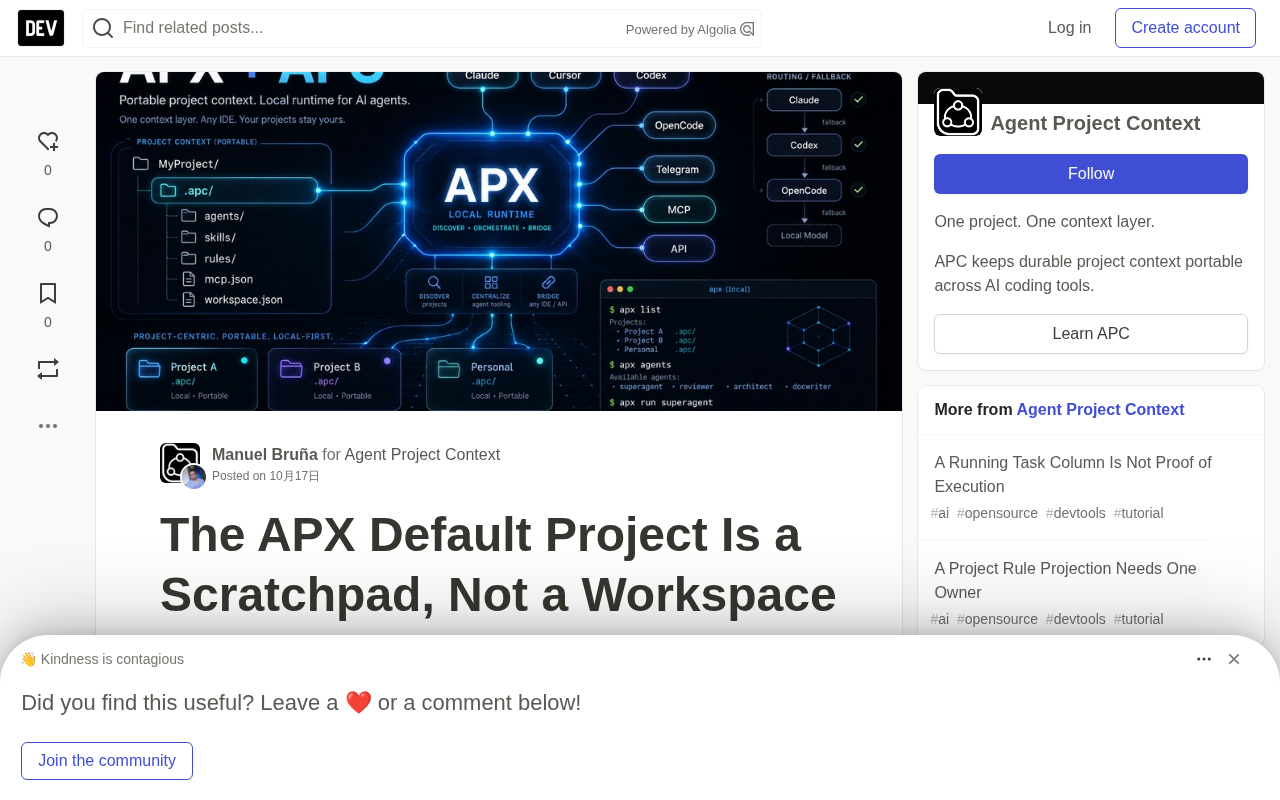
An APX project is a directory containing AGENTS.md and .apc/project.json. The APC file carries portable project context: agent definitions, skills, MCP prompts, and project metadata. APX registers the directory and stores runtime-only state separately under ~/.apx/projects/<apx_id>/.
For a new project, launch inside its directory:
apx init
apx project add .
For an existing APC project, just register it:
apx project add /path/to/project
Afterwards, when the current directory is unreliable, you can explicitly specify the target project:
apx agent list --project my-project
apx exec reviewer --project my-project "Review the release notes"
This choice answers two separate questions. APC answers what the project means and which guidance can migrate with it. APX answers where local conversations, sessions, task logs, credentials, and machine-specific settings should go. Neither side needs to pretend to own the other.
APC (Agent Project Contract) is a convention for describing agent project context, typically centered on a .apc/project.json file that carries agent definitions, skills, MCP prompts, and project metadata. It doesn't dictate how the runtime executes; it dictates what the project "means" and which guidance can migrate with it. APX registers APC project directories and manages local runtime state. The benefit of this separation is that the project contract can exist independently of any single machine, while runtime state can differ by machine without forced synchronization.
AGENTS.md is a documentation file placed in the project root, used to describe project structure, conventions, and operating guidelines to agents. It is typically tracked by version control, so teammates who clone the repository immediately get the same agent guidance. Together with .apc/project.json, AGENTS.md provides human-readable context while the APC file provides the machine-readable contract. Together they form the basis for APX to recognize project boundaries: any directory containing both files can be registered as a project via apx project add.
Why Implicit Ownership Causes Trouble
Suppose a team uses the default project for release planning because it's already open. The plan looks usable in the panel, but a teammate who clones the repository can't discover its rules or agent roles from the repo. Then unrelated private chats and project history share the same runtime bucket. Context becomes hard to review, migrate, or clean up safely.
Putting the same work into an APC project doesn't make every conversation portable—nor should it. Raw sessions and private runtime memory stay local. What actually migrates is the contract: project instructions, named agents, reusable skills, and safe shared metadata. Another machine can register the project and build its own local runtime state around that contract.
Keep the Fallback Visible
The default project's value lies precisely in being temporary and ownerless. Don't delete it, and don't over-engineer it. Just avoid handing it work that needs persistent boundaries.
When a task is just a question, the scratchpad is enough. When a task needs teammates, review, repeatability, or a future checkout, give it a project directory and APC context.
The fallback keeps APX usable; explicit projects keep work understandable.
One-line Summary
APX's default project is suited for draft work, while persistent work should use APC projects for clear ownership.
Paragraph Summary
The article explains why APX's built-in default project is only suitable for unowned draft work, such as explaining commands, temporary experiments, or private conversations. The default workspace is shared across contexts and lacks a repository contract or portable boundary; once it carries real project work, context becomes hard to review, migrate, and clean up. Persistent work should create or register an APC project, carrying portable project context through AGENTS.md and .apc/project.json. APC manages the project contract while APX manages local runtime state, keeping the two responsibilities separate. The default project should remain temporary and ownerless to avoid the trouble caused by implicit ownership.
Related articles

DeepCell: One-Click AI Generation of Documents, Spreadsheets, and Slides
DeepCell tops Product Hunt with one-click generation of documents, spreadsheets, and slides, using the .deepcell format for linked updates, designed for System 2 tasks like modeling and sales reviews.

Doneas: 15-Minute Daily Accountability Calls That Keep Indie Developers From Procrastinating
Doneas is a daily accountability tool for indie developers: plan tasks on Monday, join a 15-minute call with five builders each day, and log deliveries on a public progress page. This article analyzes its core mechanics, effectiveness, and potential issues around retention and matching.

Fastlane 2.0: Fully Automated AI Ad Campaigns, From Creative to Optimization
Fastlane 2.0 is an AI ad automation tool: enter your website and it learns your brand, generates video and image ads, and runs and optimizes them on Meta, TikTok, Instagram, and YouTube.