The Complete AI Coding Tools Landscape: A Selection Guide from Claude Code to Cursor

A practical guide comparing Claude Code, Cursor, Codex, and other AI coding tools for developers.
This article provides a comprehensive comparison of mainstream AI coding tools — ChatGPT, Gemini, Claude, Notebook LM, Cursor, Claude Code, and Codex — covering their positioning, strengths, pricing plans, and installation tips. Based on real-world usage, it ranks their coding capabilities as Claude Code > Codex > Cursor and offers practical advice for access in restricted regions.
Introduction: Choosing the Right Tools in the Age of AI Programming
As AI-assisted programming continues to mature, the first challenge developers face is often not "can AI write code" but rather "which tools should I use?" The mainstream Coding Agents and assistive tools on the market each have distinct roles, and choosing the right combination directly impacts development efficiency.
This article is based on content from the first week of a Geek Time AI training camp course taught by instructor Chen Tian. It systematically covers the positioning, pros and cons, and use cases of ChatGPT, Gemini, Claude, Notebook LM, Cursor, Claude Code, and Codex, along with practical installation and configuration advice.
General-Purpose LLMs: Daily Assistants with Different Strengths
The Division of Labor Between ChatGPT and Gemini
The instructor candidly shared that his ChatGPT usage has noticeably declined, with his primary subscription shifting to Gemini. Behind this is a clear division of labor:
- ChatGPT excels at handling everyday, general-purpose tasks;
- Gemini performs better on software development and deep analysis tasks.
During the course, it was mentioned that the architecture diagrams used in the lectures were generated using Gemini. For scenarios requiring in-depth technical analysis, Gemini is the more suitable choice.
Claude: A Remarkably Polished Product
Claude was praised by the instructor as a "remarkably polished and excellent" product. One detail worth noting: the Claude App subscription is bundled with Claude Code — once you subscribe to the Max Plan, you get virtually unlimited access to both Claude and Claude Code.
Claude's recently added Skills capability is a major highlight, making it easy to build PPTs and various other content. However, the instructor also admitted that since adopting Claude Code, his use of the Claude App itself has actually decreased, with most routine tasks now handled through Claude Code.
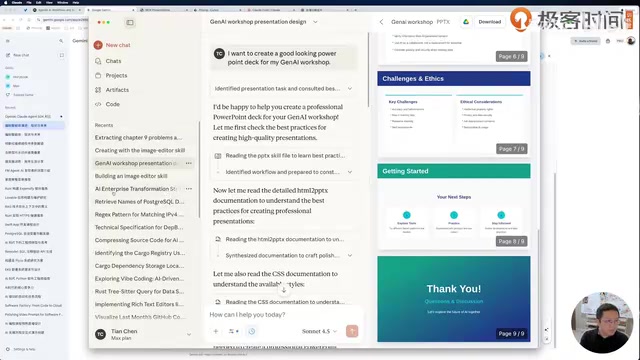
Notebook LM: A Document-Based Exploration Tool
Google's Notebook LM is a rather unique tool. Its core value lies in providing answers based entirely on user-supplied resources, rather than the model's general knowledge.
The typical workflow is: upload known documents, or use the Discover feature to have Google search for relevant resources (the instructor frequently uses it to search YouTube content), then engage in interactive Q&A based on those materials. It also supports setting the response mode to "Learning Guide," where the AI interacts in a teacher's role with guided questioning rather than giving direct answers. Additionally, Notebook LM can generate content mind maps and even conduct conversational voice interactions.
With a Gemini subscription, you can access the Pro version, with the main difference being the document processing space available.
The Two Workhorses: Cursor and Claude Code
These are the core tools for actual development and the key selection focus for developers.
Cursor: An Enhanced IDE
Cursor is essentially an enhanced version of VS Code, with built-in proprietary models and third-party models, offering a Chat mode for communicating development requirements. The latest version also includes a full Agent mode, attempting to provide a purely conversational development experience similar to Claude Code.
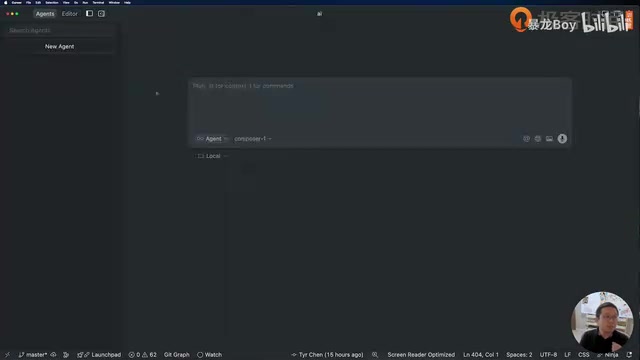
However, the instructor admitted that since adopting Claude Code, his Cursor usage has significantly decreased, now primarily limited to two scenarios:
- Browsing and understanding code documentation: As an IDE, Cursor provides better code context visualization, especially when navigating call stacks;
- In-code auto-completion, particularly when writing prompts.
Claude Code: A Powerful CLI-Based Coding Agent
Claude Code is a Terminal (CLI)-based tool. The biggest advantage of this design is seamless interaction with the entire operating system — without entering an editor interface, you can issue commands directly from the command line and have it complete entire workflows step by step.
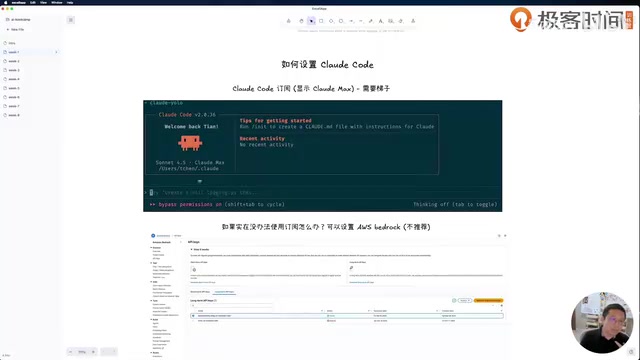
Going further, developers can interact with Claude Code through the Claude Agent SDK, leveraging its full capabilities to build custom Agents. The instructor stated explicitly: "At least for now, Claude Code is the best Coding Agent available."
Pricing and Installation: Practical Configuration Advice
Subscription Plan Comparison
The two tools have similar pricing structures:
| Tool | Pro Tier | Premium Tier |
|---|---|---|
| Cursor | $20/month | Ultra $200/month |
| Claude Code | $17/month | Max $200/month |
The instructor's recommendation: if you're a heavy user, start with Max 5x; if you still frequently hit rate limits, upgrade directly to Max 20x (virtually unlimited usage). For users with lighter daily coding needs, the Pro tier is sufficient.
Claude Code Installation and Access Solutions for China
Claude Code is installed via npm (it's essentially a JavaScript CLI) and requires login after installation. The key challenge here is that every API call checks the caller's country, so you need a US-node VPN active at all times.
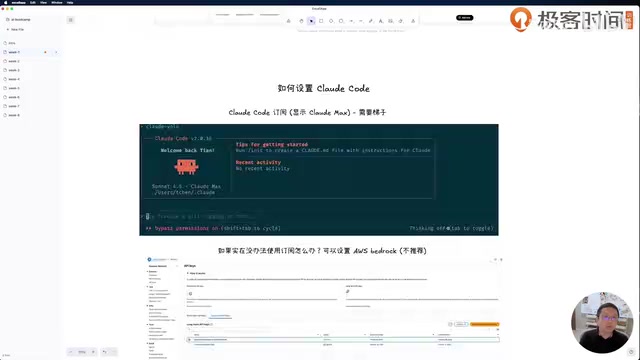
For users who cannot use a VPN, the instructor offered an alternative: use AWS Bedrock as the model provider. The specific steps include:
- Have an AWS account and create an API Key in Bedrock;
- Apply for Claude Code model access permissions;
- In the
~/.claudesettings, setCLAUDE_CODE_USE_BEDROCKto 1; - It's recommended to set the model region to US West 2 (Oregon), as the West Coast is closer to users in China, offering lower latency than East 2.
However, the Bedrock approach has notable drawbacks: personal accounts are easily rate-limited (triggering 429 cooldown prompts), and the total cost based on API usage is significantly higher than a subscription. Therefore, the instructor still recommends obtaining a Claude Code subscription if you want to truly experience AI programming.
Codex: An Open-Source Alternative
OpenAI's Codex is an open-source tool — you can access the source code and install it yourself, or install it via npm. The interface is also CLI-based. When using it, it's recommended to select the gpt-5-codex or gpt-5-codex-mini model, with reasoning typically set to medium and increased to high for complex problems.
Capability Ranking and Learning Path
Based on the instructor's hands-on experience, the coding capability ranking of the three Coding Agents is:
Claude Code > Codex > Cursor
Of course, the instructor emphasized that this is a personal assessment, and others may have different evaluations. In subsequent sessions, the course will guide students through using Claude Code to thoroughly read Codex's source code, generate documentation and system architecture diagrams, serving as a practical case study for deeply understanding how Agents work.
For beginners, the first step is to understand the positioning differences of each tool and get them all installed and configured — this lays the foundation for deeper AI-powered coding going forward.
Related articles

DeepCell: One-Click AI Generation of Documents, Spreadsheets, and Slides
DeepCell tops Product Hunt with one-click generation of documents, spreadsheets, and slides, using the .deepcell format for linked updates, designed for System 2 tasks like modeling and sales reviews.

Doneas: 15-Minute Daily Accountability Calls That Keep Indie Developers From Procrastinating
Doneas is a daily accountability tool for indie developers: plan tasks on Monday, join a 15-minute call with five builders each day, and log deliveries on a public progress page. This article analyzes its core mechanics, effectiveness, and potential issues around retention and matching.

Fastlane 2.0: Fully Automated AI Ad Campaigns, From Creative to Optimization
Fastlane 2.0 is an AI ad automation tool: enter your website and it learns your brand, generates video and image ads, and runs and optimizes them on Meta, TikTok, Instagram, and YouTube.