The Complete Beginner's Guide to Claude Code: From Installation to Advanced Usage

A complete guide to Claude Code: installation, configuration, and advanced usage of this AI terminal agent.
Claude Code is a powerful terminal-based AI coding agent built on the ReAct paradigm. This guide walks through installation, connecting to local models via CC Switch, permission modes, and core concepts like CLAUDE.md, Rules, Skills, MCP, Hooks, Subagents, and Agent Teams—helping you master this AI tool quickly.
What Is Claude Code, and Why Is It Worth Learning
Claude Code is an AI agent that runs in your terminal. Compared with graphical AI coding tools like Trae or Tencent's CodeBuddy, it is command-line-centric, making its capabilities more general-purpose and low-level. The tutorial author vividly calls it "the grandfather of agents"—once you grasp the usage logic of Claude Code, you can easily apply that understanding to other similar tools.
The command-line interface (CLI) grants Claude Code the low-level ability to directly manipulate the file system, invoke system commands, and manage processes—capabilities that most graphical tools struggle to achieve because they are constrained by sandboxing. From a technical architecture standpoint, Claude Code is essentially a ReAct (Reasoning + Acting) agent—a paradigm formally introduced by researchers from Google and Princeton University in their 2022 paper ReAct: Synergizing Reasoning and Acting in Language Models. Its core innovation lies in interweaving Chain-of-Thought reasoning with external tool invocation: the agent not only generates text but also perceives environmental state, plans action sequences, calls tools to execute, and then dynamically adjusts its subsequent reasoning based on real feedback returned from those tools—forming a closed iterative loop of "think → act → observe."
What's worth understanding more deeply is why ReAct dramatically improves success rates on complex tasks compared with traditional single-shot reasoning: it fundamentally changes how errors propagate. In traditional one-shot LLM reasoning, once an error occurs at an intermediate step, all subsequent conclusions accumulate deviations on top of that error. In contrast, every "observation" in ReAct re-anchors to the actual state of the real environment—the model reasons for its next step based on the actual results returned by tools (rather than its own hallucinations), effectively introducing external fact-checking at every decision node. This design also makes the entire execution process more interpretable, allowing users to review each node in the "think → act → observe" chain step by step to pinpoint where problems arise.
Its capabilities extend far beyond writing code. From batch-creating files and generating daily work reports to building complete web projects—as long as you can clearly describe your requirements, it can break them down and execute. In other words, it has the potential to replace a portion of the everyday office software on your desktop.


Installing and Quickly Launching Claude Code
Installing Claude Code is very simple. Choose the appropriate installation command for your operating system (Windows, macOS, Linux), copy it into your terminal, and run it. Taking Windows as an example, open the CMD terminal, paste the command, press Enter, and wait for the installation to complete.
After a successful installation, verify it by running claude --version to check the version number. Launching is also extremely flexible—simply type claude in the terminal of any directory and press Enter, and it will start up in the current directory and take over that workspace.
For example, after creating an empty folder and opening a terminal to launch Claude Code, simply type "Help me create 100 txt files numbered 1 to 100 in the current directory," and it will request permission and complete the task automatically. This "just speak your requirements" interaction style is the most intuitive appeal of Claude Code.
CC Switch: A Bridge for Domestic Users to Connect to Local Models
By default, Claude Code calls the large models behind an overseas account, which isn't user-friendly for users in China. CC Switch was created precisely for this purpose—a bridging tool that lets Claude Code conveniently connect to a wide variety of domestic Chinese large models.
With CC Switch, you can freely choose which model to connect to based on the strengths of different vendors—today you might like Zhipu's model, tomorrow you might want to try Kimi, and you can switch with a single click, without manually editing tedious configuration files.
CC Switch Configuration Process
Download the installation package for your system from the official website, open it, select Claude Code on the left, and click the plus sign in the top-right corner to add a model. Taking DeepSeek as an example, CC Switch already includes default configuration items, so you only need to fill in the API Key. You can create and obtain the Key on the corresponding vendor's official website (such as DeepSeek's API keys page), then copy and paste it back into CC Switch, click add, and finally enable it.
You may not have noticed that a single model often comes with multiple "roles"—a standard version, a super-powered version, and a lightweight version. Taking Xiaomi's Memo as an example, Memo 2.5 is a multimodal version that can recognize images and videos, while 2.5 Pro is better suited for more complex tasks. Within the terminal, you can quickly switch between them using the up and down arrow keys via the /model command.
Integrating with VS Code: Say Goodbye to Pure Terminal Operation
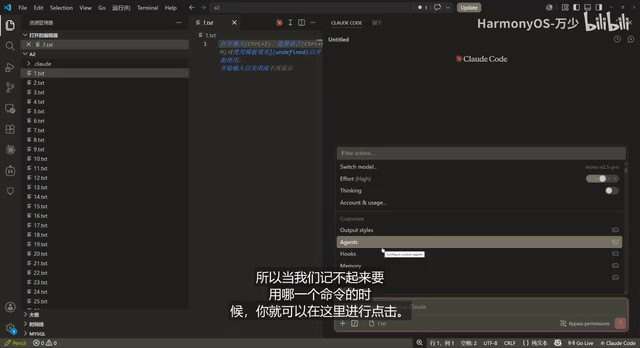
Users accustomed to visual development can integrate Claude Code into VS Code. Just search for Claude Code for VS Code in the extension marketplace and install it.
After installation, open your project files and a Claude Code icon will appear in the top-right corner. Clicking it brings up the familiar dialog box, with a bottom menu offering functions such as adding external resources (the plus sign), slash commands, and referencing directory files with the @ symbol. For example, after selecting 1.txt and typing "Help me write a random 100-word daily work report," it will generate the content directly in the file.
Permission Modes: Solving the Hassle of Frequent Authorization
During use, nothing is more annoying than Claude Code repeatedly stopping to request authorization. It comes with a built-in permission management system, which you can cycle through using Shift + Tab:
- Bypass Permissions: Grants all permissions and no longer asks—the most convenient but also the one requiring the most caution, suitable for familiar environments
- Auto Mode: Automatic mode; automatically executes or rejects when in doubt
- Accept Edits: The default mode; routine operations execute automatically, and only sensitive operations prompt for confirmation
- Plan Mode: Planning mode; lets Claude Code "think before acting," ideal for complex tasks where you want a plan formulated before execution
If you want to launch directly into maximum permission mode, use claude --dangerously-skip-permissions. Since the command is quite long, it's recommended to wrap it in a custom shortcut alias (such as ccd) to simplify the operation.
Core Concepts: CLAUDE.md, Rules, and Skills
These three concepts form the knowledge system for project management in Claude Code, and understanding them is key to advanced usage.
CLAUDE.md: The Project's Permanent Memory
To understand why CLAUDE.md is necessary, you first need to understand the "context window" mechanism of large language models. A Token is the basic unit an LLM uses to process text—typically, one English word corresponds to 1–2 Tokens, and a Chinese character is roughly 1–2 Tokens. Every AI model has a maximum context length limit (for example, the Claude 3.5 series supports 200K Tokens, roughly equivalent to 150,000 Chinese characters), and all conversation history, file contents, and system prompts are counted toward it. When input exceeds the window limit, the model doesn't intelligently and selectively forget—it simply truncates the earliest content, causing the project background and constraints established early on to be lost.
In addition, the context window involves an easily overlooked "Token economics" issue: the computational complexity of the attention mechanism grows quadratically with context length—the longer the context, the higher the API call cost and the slower the response. More critically, mainstream AI providers typically bill based on the total number of input and output Tokens—which means every piece of redundant background information carried in each conversation directly consumes your budget. In a long-running engineering project, if every session re-injects the complete history into the model, the accumulated overhead of useless Tokens may far exceed the actual task itself. This economic pressure makes "streamlining the context and externalizing long-term memory" not just an engineering best practice, but a practical necessity for cutting costs and boosting efficiency.
CLAUDE.md is essentially an external memory mechanism: it solidifies stable project background information into a file that is loaded on demand each time a session starts. This avoids the inefficiency of repeatedly restating background knowledge and prevents the context from being crowded out by redundant information—analogous to the design philosophy in RAG (Retrieval-Augmented Generation) systems of separating long-term memory from working memory and retrieving it on demand. The core insight of RAG is: rather than cramming all background knowledge into a limited context window, it's better to build an external knowledge base and precisely retrieve relevant fragments to inject when needed—CLAUDE.md is precisely a lightweight implementation of this idea at the project-memory level.
When you run /init to initialize, Claude Code will read through the project and generate a CLAUDE.md file to serve as the project's core documentation. It's suited for storing big-picture, stable information (such as "this is a web project") rather than trivial details—an overly large file would consume precious context capacity.
CLAUDE.md exists at multiple levels: a global file (e.g., setting "always respond in Chinese"), a project root directory file (shared by the team), and CLAUDE.local.md (personal preferences, not shared with the team). When an overly full context causes "amnesia," you can use /clear to clear the conversation history, while the permanent memory in CLAUDE.md remains intact.
Rules: Fine-Grained Rule Constraints
Unlike the macro-level positioning of CLAUDE.md, Rules store fine-grained coding conventions, such as function naming rules, comment styles, and component constraints. They are usually placed in the .claude/rules/ folder in the project directory, saved with the .md extension.
The layered design of Rules and CLAUDE.md embodies the principle of "separation of concerns": CLAUDE.md answers "what is this project and what are its goals," while Rules answer "how should things be done in this project and what constraints should be followed." This separation allows teams to flexibly maintain the two categories of information—project goals are relatively stable, whereas coding conventions may be frequently adjusted as the tech stack evolves. Managing them separately reduces maintenance costs and makes enforcing conventions in code review more traceable.
Skills: Reusable Encapsulation of Capabilities
Skills are an important mechanism for enriching the capabilities of the AI terminal, which the official documentation describes as "installing a manual for handling a certain type of task into Claude Code." When a task involves many steps and needs to be executed repeatedly, rather than copy-pasting a long prompt each time, it's better to distill it into a Skill.
Skills are not all loaded at the start of every new conversation; instead, they are intelligently triggered by Claude Code based on prompts or keywords, so in theory you can install an unlimited number of them. Even better is find-a-skill—a "skill for finding skills" that searches the skill community website for high-quality Skills uploaded by others. For example, searching for "a Skill for writing WeChat Official Account articles" lets you directly reuse mature, packaged expertise from authors like Baoyu.
The design philosophy of Skills aligns closely with "function encapsulation" in software engineering: abstracting repetitive operations with clear inputs and outputs into named, reusable units. Unlike hard-coded functions, Skills are carried by natural-language descriptions, which means they can automatically "evolve" as model capabilities improve—the same Skill manual often achieves better execution results on a stronger foundation model, without any modification to the Skill itself. This characteristic is almost entirely new in the history of software engineering: traditional function libraries require manual rewriting to adapt to new environments, whereas a Skill's "upgrade" is accomplished automatically through improvements in the underlying model's capabilities—essentially transferring execution intelligence from code logic to model weights.
Creating your own Skill also requires no manual coding—simply tell the AI "Help me create a Skill called XX that does such-and-such." Skills also come in two types: global-level and project-level.
MCP and Custom Commands
MCP (Model Context Protocol) is Claude Code's "universal plug" for connecting to the outside world, and it's an open standard protocol launched by Anthropic in late 2024. Before MCP existed, any AI tool wanting to connect to a database, API, or third-party service required developers to write a dedicated adapter layer, making maintenance extremely costly—this predicament is essentially the "N×M problem" in the field of AI tool integration: if there are N AI clients (Claude, GPT, Gemini, etc.) and M external services (GitHub, databases, browsers, etc.), the traditional approach requires developing a separate adapter for each pairing, resulting in a total workload on the scale of N×M. MCP reduces this complexity to N+M by introducing a unified protocol—each client only needs to implement the MCP standard once, and each service only needs to publish one MCP Server, enabling any client to freely combine with any service. This mirrors how the USB interface unified hardware connection standards and how the LSP protocol unified the way editors support programming languages.
MCP draws on the successful experience of LSP (Language Server Protocol)—it was precisely LSP that enabled VS Code to support intelligent suggestions for dozens of programming languages without developing a separate editor plugin for each language. LSP was released by Microsoft in 2016 alongside VS Code, and has since been adopted by Neovim, Emacs, and virtually all mainstream editors, becoming the infrastructure for editor intelligence. MCP is even more ambitious: it seeks to play the same role between AI tools and the outside world. At the technical level, MCP uses JSON-RPC 2.0 as its underlying communication protocol, supports both stdio and HTTP+SSE transport methods, and its core abstractions comprise three types of capabilities: Resources (structured data reading), Tools (executable operations), and Prompts (prompt templates). This layered design allows the same MCP Server to be called by Claude Code as well as reused by any MCP-standard-compatible client, truly achieving "develop once, connect anywhere." As of 2025, MCP has gained support from mainstream AI vendors such as OpenAI and Google DeepMind, and is becoming the de facto standard for AI tool integration, currently covering hundreds of implementations including GitHub, databases, and browser automation.
When you need to query a remote database or create a repository on GitHub, you'll need to securely connect to the corresponding service by following its protocol via MCP. The core approach to using MCP is likewise "write a prompt, drop a keyword"—for example, "Help me install and configure Playwright's MCP," and Claude Code will automatically complete the configuration without you having to manually edit files. You can use the /mcp command to view the services already installed locally.
Worth mentioning: the latest version of Claude Code has already merged Skills with custom Commands. Since both start with a slash, the official approach simply unified them under Skills—because Skills can be actively invoked as well as automatically triggered by Claude Code based on context, making them more capable overall.
Hooks: Automation Hooks for the Lifecycle
Hooks are a long-standing design pattern in software engineering. The core idea is to expose injectable points at predefined lifecycle nodes, allowing external logic to extend system behavior without modifying the core code. This pattern is ubiquitous in modern development toolchains: Git's pre-commit and post-merge hooks are used to automate code checks; React's useEffect and other Hook APIs manage component lifecycles; and Webpack's plugin system uses tapable to achieve fine-grained control over the build process.
Understanding the design philosophy behind the Hooks pattern helps grasp its true value in AI workflows: it solves the problem of balancing "separation of concerns" with the "open-closed principle." The core system (Claude Code's task execution engine) is closed to modification but open to extension—cross-cutting concerns such as quality checks, notification pushes, and logging can be implemented via hook injection without intruding into the core logic. This means teams can reuse the same set of Hooks configurations across different projects and environments, and can flexibly adjust quality gate standards without affecting the AI's behavior itself.
Claude Code's Hooks system brings this same philosophy into the AI agent workflow, allowing you to inject tasks or code throughout the entire lifecycle—from session start to tool execution to completion. Combined with the automated triggering of ESLint code checks, Prettier formatting, and Jest unit tests, you can build a closed-loop workflow of "AI generates code → automatic quality check → commit if passed → feedback and correction if failed," truly achieving continuous integration through human-machine collaboration.
For ordinary users, its use is limited, but it's very practical for teams working on engineering projects. One amusing example is automatically playing a "Nice one, buddy!" sound effect each time a task completes. Configuration can likewise be done through conversation, with no need to memorize syntax.
Parallel Collaboration: Subagents and Agent Teams
This is Claude Code's advanced capability for handling complex tasks.
Subagents are a form of "cloning technique," embodying the Divide and Conquer strategy in AI system design. A single agent faces two core bottlenecks: context window capacity limits and inefficient sequential execution. Multi-agent architecture can be traced back to distributed artificial intelligence research in the 1980s, but it didn't truly take off in software engineering scenarios until the era of large language models—in 2023, research teams at Stanford and Microsoft released the MetaGPT and AutoGen frameworks respectively, systematically validating the significant advantages of multi-agent systems over single agents on complex software development tasks. Through task decomposition and parallel execution, they simultaneously address both bottlenecks—each Subagent has its own independent context space, so it doesn't pollute the main agent's context while handling a subtask, and only reports a summary of the results upward upon completion, greatly improving overall Token utilization efficiency.
Faced with a complex task, Claude Code will automatically split it into multiple subagents that execute in parallel, and they don't consume the main agent's context capacity. For example, when traversing 10 directories and summarizing all documents, it might spin up 10 subagents each reading one directory, with the main agent ultimately consolidating and polishing the results. Subagents do not communicate with each other; they are only accountable to the main agent—much like a manager overseeing three independent programmers in three different countries.
Agent Teams go a step further by introducing an inter-agent communication mechanism, similar to the Actor model in distributed systems—a concurrent programming paradigm that originated in the Erlang/Elixir ecosystem. Its core idea is that each Actor has its own independent state and communicates through asynchronous message passing, making it naturally suited for distributed concurrency scenarios. Claude Code's Agent Teams draws on this design, enabling each agent to both operate independently and coordinate shared state when needed.
Understanding the essential difference between Subagents and Agent Teams can be likened to the trade-off between "Share-Nothing" and "Stateful Coordination" patterns in software architecture: Subagents adopt a share-nothing architecture with thorough isolation and small failure domains, at the cost of limited collaboration ability, making it suitable for parallel scenarios where dependencies between tasks are simple; Agent Teams introduce state sharing and message passing for stronger collaboration ability, but also bring issues of state consistency and greatly increased Token consumption, making it suitable for scenarios where tasks have complex dependencies and require dynamic negotiation. Understanding this trade-off helps you choose the appropriate parallel strategy in real projects.
Enabling Agent Teams requires a Claude Code version of at least 2.1.32, and it must be explicitly turned on in the configuration file. Note that Agent Teams consume Tokens significantly, so you should assess your quota before using them.
In testing, for the task "Use Agent Teams to help me create 10 folders on the desktop and write 10 tech articles on different topics," Claude Code launched 5 Agents to collaborate on a division of labor and efficiently completed all the content.
Conclusion: From "Learning Tools" to "Shifting Mindset"
Looking across this entire tutorial, the learning logic of Claude Code always revolves around one core idea—if you can clearly describe your requirements, you can get the AI to do the work. Whether it's permission configuration, MCP installation, or Skill creation, the vast majority of operations can be handled by Claude Code itself through conversation, rather than manual tinkering.
As the tutorial author emphasizes: in the AI era, there's no need to "learn for the sake of learning"—it's better to "learn in reverse when you actually need to." True advancement means shifting your mindset from "I'm lost when I don't understand something" to "let the AI solve it for me."
Key Takeaways
Related articles

Kimi K3 Deep Dive: 2.8 Trillion Parameter Open-Source Model Closes the Gap with Closed-Source Frontier for the First Time
Moonshot AI releases Kimi K3 open-weight model with 2.8T parameters and 1M token context. Our deep dive covers coding, 3D dev, agent capabilities, and safety concerns.

How to Choose an AI Agent Platform for Your Team: 5 Evaluation Dimensions and a Decision Framework
Choose the right AI Agent platform by evaluating model flexibility, observability, tool integration, security compliance, and total cost. A complete decision framework to help technical leaders avoid vendor lock-in.

Legora's Legal AI Practice: How Vertical AI Empowers Law Firms and Corporate Legal Transformation
Explore Legora's legal vertical AI practice, covering AI model selection strategies, enterprise legal transformation challenges, and the path to deploying vertical AI in the legal industry.