The Complete Beginner's Guide to Dify: A Full Roadmap for Building AI Applications from Scratch

A complete roadmap for building and publishing AI applications with Dify, from Docker setup to Workflow nodes.
Dify is a low-code AI application platform that wraps model invocation and tool orchestration into visual modules, eliminating the need for heavy coding. It supports cloud, source code, and local Docker deployment — with Docker recommended for direct MySQL access. Dify offers five application types: Chatbot, Text Generation, Agent, Chatflow, and Workflow. For LLM connectivity, paid APIs like DeepSeek are recommended over local models due to superior performance at minimal cost. Finished apps can be published as web apps, embedded in websites, or exposed via API.
What Is Dify: A Low-Code AI Application Building Platform
Dify is a platform tool designed for AI application development. Its core value lies in enabling developers to rapidly build all kinds of AI applications without writing large amounts of code from scratch. Whether it's an enterprise-grade business system or a personal utility tool, you can get it built with Dify.
This tool significantly lowers the barrier to AI application development. In the past, integrating a large language model into a real-world workflow required dealing with a long list of tedious tasks — model invocation, context management, tool orchestration, and more. Dify wraps all of these capabilities into visual modules, allowing users to build applications through drag-and-drop and configuration. For teams that want to quickly validate AI ideas without getting bogged down in low-level engineering details, this is an highly efficient starting point.
Three Deployment Options: Local Docker, Source Code, and the Official Cloud
Dify offers three deployment paths, each suited to different scenarios.
- Official cloud version: The most hassle-free option — just open the official page and start using it. The interface is essentially identical to a self-hosted instance. However, there's one notable limitation: if your AI application needs to access a local database or local environment, you'll need to use an intranet tunneling tool to expose your machine's IP to the public internet.
- Source code deployment: Suited for developers who need deep customization.
- Local Docker deployment: The approach recommended in this tutorial, based on deploying Dify via Docker on Windows.
The advantage of choosing local Docker is straightforward: Dify can directly access and call MySQL and other services running on your local machine. In production environments or internal company use cases, self-hosting on your own machine is more convenient and controllable.
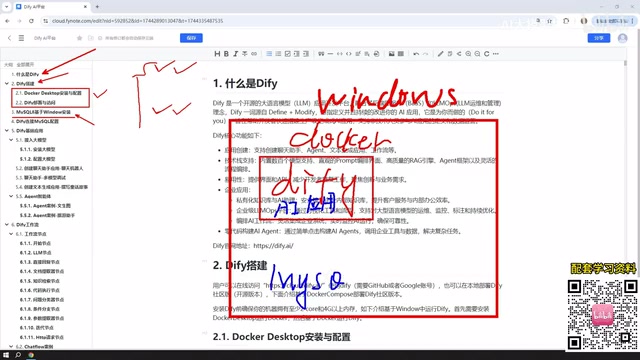
Why You Should Also Install MySQL 8
The tutorial dedicates a dedicated section to installing MySQL 8 on Windows, because the AI applications you'll build later will often need to interact with a database.
Here's the network topology logic: Docker is installed on your Windows machine to deploy Dify, while MySQL 8 is also installed on Windows (or via Docker or a virtual machine). Once Dify is deployed, its network can communicate with both the MySQL 8 instance on Windows and any virtual machines deployed via VMware. In other words, it doesn't matter where MySQL lives — Dify can call it either way. This is one of the key advantages of local deployment in terms of data connectivity.
If you're already familiar with MySQL 8 installation, feel free to skip this section. After setting up the database, you'll also need to understand the specific settings for connecting Dify to MySQL, so your AI applications can properly read database data and deliver intelligent interactions backed by real data.
Dify's Five Core Application Types
This is the backbone of the entire tutorial series. When creating an application in Dify, there are five main types to choose from:
Chatbot and Text Generation
The Chatbot is the most fundamental form — essentially a conversational interface with an AI model. Text Generation focuses on producing content in a single pass, such as writing articles, generating documents, or crafting story narratives. Both are entry-level application types that are intuitive and easy to get started with.
Agent
The key distinction between an Agent and the previous two types is its ability to call tools. An Agent can systematically use multiple tools to fulfill user instructions — for example, first crawling a webpage, then analyzing its content — forming an automated processing pipeline. This moves AI beyond mere conversation into actively executing tasks.

The underlying mechanism of an Agent typically runs on the "ReAct" framework (Reasoning + Acting), where the model cycles through "think → select tool → observe result → think again" until the task is complete. This is fundamentally different from a standard chatbot's single-turn Q&A: an Agent has autonomous planning capabilities, breaking a complex goal into multiple subtasks and dispatching different tools as needed. Tools available in Dify include web search, code interpreters, database queries, external APIs, and more — developers can also define custom tool interfaces. It's worth noting that an Agent's execution path is not fixed in advance; the model determines it dynamically based on context. This makes Agents more flexible, but also introduces uncertainty. In scenarios where results need to be strictly controlled, Workflow's fixed pipelines are often more reliable than Agents.
Chatflow and Workflow: Two Types of Pipelines
Workflows represent the most important advanced capability in Dify, available in two forms: Chatflow and Workflow. In the current version, workflows are still marked as beta, but stability is already quite solid.
The core difference lies in interaction mode: Chatflow supports ongoing conversation with the workflow; Workflow is a one-shot execution — it delivers a result and ends. In practice, the two differ more subtly in how they're built and what scenarios they're best suited for.
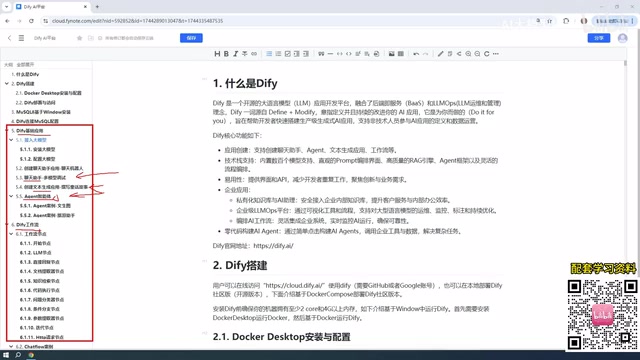
The concept of Workflow originates from business process automation. Its core idea is to decompose complex tasks into a series of ordered steps, driven by data passing between nodes. In AI application contexts, workflows give developers precise control over model inputs and outputs, allow conditional branching, enable calls to external services, and support the passing of structured data across multiple processing steps. The fundamental difference between Chatflow and Workflow comes down to state management: Chatflow maintains conversational context across multiple turns, making it ideal for interactive scenarios that require back-and-forth confirmation (such as customer service or Q&A bots); Workflow is a stateless, single-execution pipeline, better suited for batch data processing, report generation, content moderation, and other one-off tasks. Understanding this distinction will help you choose the right application type for real projects.
Workflow Nodes: The Building Blocks of Your Applications
Both Chatflow and Workflow are assembled from individual nodes. Each node represents a functional module, and chaining multiple nodes together forms a complete workflow.
The tutorial covers the most commonly used nodes in everyday Dify usage, spanning the majority of node types provided by the platform. Every node explanation is paired with a practical example — the workflow nodes section alone includes more than a dozen cases, on top of separate examples for Chatflow, Workflow, and each of the three basic application types. The hands-on density of the full course is quite high. This "concept + example" teaching approach is particularly helpful for grasping the abstract logic of node orchestration.
Connecting to LLMs: Use a Paid API Rather Than a Local Model
All AI applications need to interact with a large language model, so connecting to one is an unavoidable first step. The tutorial's recommendation here is worth paying attention to: prioritize using paid cloud-based models over locally deployed ones.
Recommended paid options include DeepSeekAd, ChatGPT, and others. Free options include Baidu ERNIE Bot and Alibaba Qwen — both typically offer millions of tokens upon registration, which is more than enough for learning and experimentation.
There's a particularly noteworthy point about cost: paid models aren't expensive. Take DeepSeek as an example — topping up with 10 RMB will last a very long time. The tutorial author shows that after depositing 10 RMB and using it consistently, less than 1 RMB has been spent.
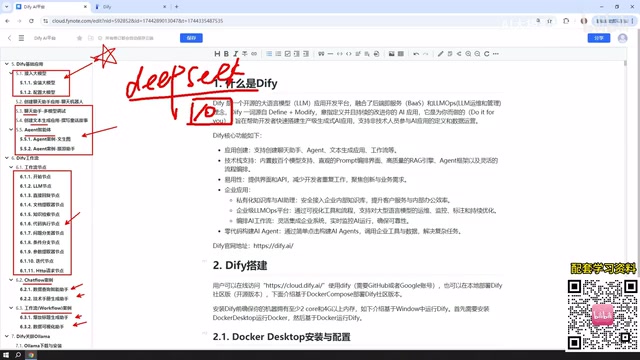
As for local models, Dify does support integrating locally deployed models via Ollama, but this isn't the recommended first choice. The reason is that local models runnable on average hardware tend to have fewer parameters, leading to noticeably weaker performance. Unless you have a high-performance machine or enterprise-grade cluster capable of running large-parameter models like DeepSeek's open-source releases (which can exceed 400 GB to download), local deployment won't deliver satisfying results.
A token is the basic unit large language models use to measure text length — it does not map simply to character count. For English, 1 token corresponds to roughly 4 characters; for Chinese, the more complex characters mean 1 Chinese character consumes approximately 1.5 to 2 tokens on average. Cloud models typically charge separately for input tokens and output tokens, with pricing varying by model size. DeepSeek's API pricing, for example, is far lower than international services like OpenAI, making costs essentially negligible for everyday learning and lightweight business use cases. Ollama is a tool for running open-source large language models locally, supporting models such as LLaMA, Mistral, DeepSeek, and more — a simple command downloads and runs the model on your machine. Its advantages are that data never leaves your device and there are no API fees. However, consumer-grade hardware's limited VRAM and compute typically restricts you to smaller-parameter models, with generation quality noticeably behind large cloud-based models.
Publishing Your App: From Local to the Public Web
Applications built in Dify aren't limited to local use. The platform offers multiple publishing options:
- Publish as a public web app: Generates a link accessible to anyone (local deployments require intranet tunneling).
- Embed into your own website: Integrate the application into a webpage you've developed.
- Call via API: Expose the application as an interface for other systems to consume.
This means Dify isn't just a building tool — it covers the complete loop from development to delivery, enabling the AI applications you build to genuinely serve external users.
Summary: A Clear Learning Path for Dify
The logical thread running through the entire tutorial series is remarkably clean: start by understanding what Dify is and its key characteristics, then complete local Docker deployment and MySQL configuration, then progressively master the five application types — Chatbot, Text Generation, Agent, Chatflow, and Workflow — along with workflow nodes, and finally learn how to connect models and publish applications. For developers who want a structured introduction to Dify, this is a solid roadmap worth following.
Related articles

Felix Rieseberg Personal Homepage
Felix Rieseberg's personal homepage sparks attention on Hacker News. This article covers the Slack engineer's technical background, the rise and fall of nativefier, and the value of a developer homepage as a tech calling card.

@ai-sdk/vue 3.0.306 Patch Release Syncs with [email protected] Update
@ai-sdk/vue 3.0.306 released, synced with [email protected]. A routine patch release for the Vercel AI SDK ecosystem with no public API changes; the Vue adapter layer stays version-aligned with the core package.

Gemini 4 Argon API Launches: The Era of Million-Token Output Begins
Google launches Gemini 4 Argon with sparse MoE architecture, up to 1M output tokens, and a 68.90% Vals Index score, available across API, AI Studio, and the Gemini app.