The Complete Claude Code Installation and Ban-Avoidance Guide: Getting Started with an AI Coding Agent from Scratch

China guide to Claude Code: NPM install, ccswitch login bypass to avoid bans, with MCP and Skills for advanced use.
Based on a Bilibili course, this article outlines the full onboarding path for Claude Code in China. The main points: most users treat it as a chat box and underuse its potential. Install via NPM (not the official script), requiring Node.js 22+ and Git. To avoid bans, use ccswitch to connect third-party model providers and skip login, noting it configures per tool. DeepSeek Harness offers better cache hit rates under Claude Code. Advanced modules include permissions, MCP, Skills, Subagent, and CLAUDE.md.
Why Learn Claude Code
AI coding agents are reshaping developers' workflows. According to a public course shared by the Bilibili creator "Mashibing Education," many companies in China are now requiring that 50% or even 100% of code be completed with AI assistance. Among mainstream tools like Cursor, Codex, and Claude Code, Claude Code and Codex are currently the two most widely used and consistently well-regarded choices among programmers.
There's no absolute best or worst tool—the key is finding the one that fits your own work scenario. But the creator also emphasized that most students only use Claude Code as a "natural language chat box"—asking it to write a feature and that's it. This falls far short of its true capabilities. Only by properly leveraging its built-in components and configuration can you genuinely improve efficiency and output quality.
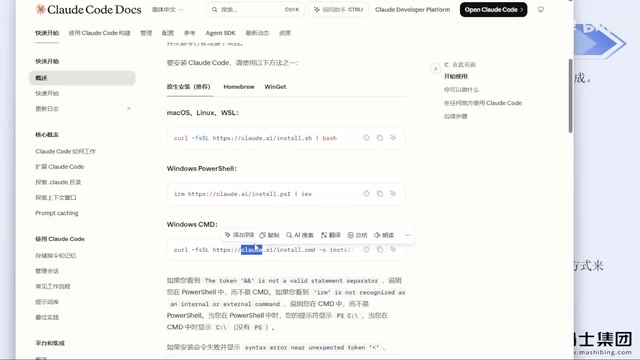
Installation: Why NPM Is Recommended Over the Official Script
There are several ways to install Claude Code. The official site provides installation commands for PowerShell and CMD, but for developers in China, these two methods have a low success rate due to network environment limitations. The creator explicitly advises: don't start by fiddling with various API Keys and environment variables—that's too much hassle.
The more reliable path is to install via NPM. The official site provides this command under "Advanced Setup," and as long as your network environment is normal, it basically won't fail. Using the NPM method has two prerequisites:
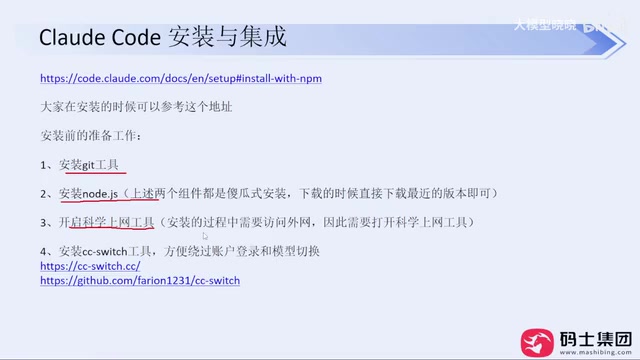
- Install Node.js, version 22 or above (the current latest, around version 24, will do)
- Install Git
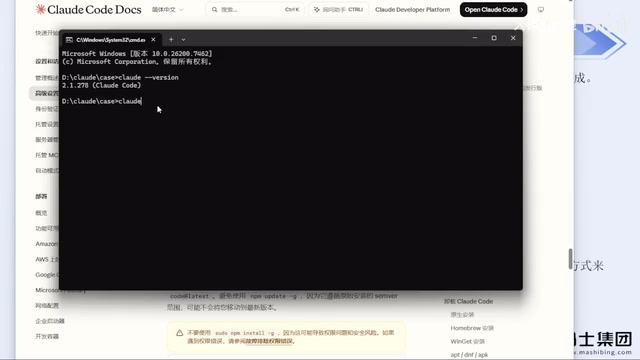
Both are straightforward installations—just download the installer package and click "Next" all the way through. Don't overthink the installation path. After installation, type claude --version in the command line. If the version number displays correctly, Claude Code has been installed successfully. The creator said he's installed it this way for company colleagues many times and has never encountered an error.
NPM (Node Package Manager) is the package management tool bundled with Node.js. Developers commonly use it to install, update, and uninstall various command-line programs. Compared to the official script, NPM installation offers these advantages: a stable installation source, automatic dependency resolution, upgrades requiring just a single npm update command, and clean uninstallation that won't leave hard-to-remove residual files on your system. For developers in China, NPM can work with mirror sources to further reduce the probability of network failures. This is also why the article recommends installing Node.js 22 or above first—newer versions of Node.js have more complete support for modern features like ESM modules and native fetch, avoiding compatibility errors when Claude Code runs.
Avoiding Bans: Using ccswitch to Bypass Account Login
This is the most practically valuable part of the entire sharing session.
When you first launch Claude Code, it guides you through choosing whether to trust a folder, selecting a theme style, and then requires you to log in to an account. According to the creator and the experience of many users, logging in directly with an official account or configuring environment variable API Keys both carry a high risk of account bans—he himself has been banned multiple times.
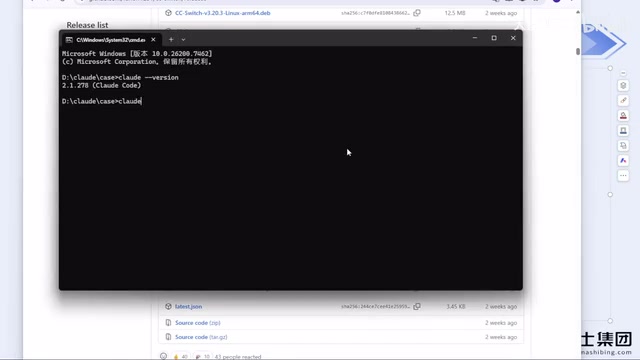
The recommended solution is the open-source tool ccswitch. It now has its own standalone website, and you can also download the Windows .msi installer from the GitHub Releases page (Mac works the same way, just with different commands). After installation, open the software and you can configure model providers separately for different tools like Claude Code, Codex, and OpenClaude.
The process is simple: click the plus sign, select a provider (such as DeepSeekAd), fill in the corresponding API Key, and save. The creator specifically reminds—ccswitch differentiates by tool. If you configure a provider in Claude Code, Codex won't automatically reuse it; you need to configure it separately, but you only need to fill in one API Key and ignore everything else. After configuration, restart Claude Code, and the login step will be skipped directly—naturally, there's no ban issue. The creator said that after adopting this approach, he hasn't been banned for months.
So-called "account bans" typically refer to restrictions placed on an account after the official platform detects abnormal login environments, shared usage, or violations of regional policies. The reason directly configuring environment variable API Keys is high-risk is that once the key is leaked or shared among multiple people, it easily triggers risk controls. Tools like ccswitch work by forwarding Claude Code's requests to a third-party model provider interface that you purchase yourself. The client no longer has a login relationship with the official account system, so there's no account ban issue. It's important to understand that this is essentially a "backend swap" solution—you're using the Claude Code client framework, while the underlying inference capability is provided by third-party models like DeepSeek, connected through compatible API protocols.
Network Tool Selection Advice
As a programmer, accessing the internet freely is almost an essential skill. It's recommended to use a paid, stable service. The creator gave one practical piece of advice: don't casually buy a one-year membership. These tools have strict ban and risk-control policies, and stability is hard to guarantee. Once the service is interrupted, the money for a long-term membership is wasted. Even if buying monthly is slightly more expensive, it's better to pay month by month for greater flexibility.
Model Selection and DeepSeek Harness
On model selection, the creator mentioned that DeepSeek's prices are relatively high after the price increase, so you can try DeepSeek Harness. One impression from his personal use: DeepSeek Harness has a higher cache hit rate under agent frameworks like Claude Code, making it more cost-effective to use.
As for whether DeepSeek Harness supports ccswitch, the creator said it probably doesn't yet, but Harness itself is very simple to configure—just set it up directly, no need for ccswitch.
"Cache hit rate" is a key metric for measuring the cost of calling large models. In agent-type tools, system prompts, tool definitions, project context, and similar content are repeatedly sent across multiple conversation turns. If the provider supports context caching (Prompt Caching), the repeated portions can hit the cache at a lower price or even for free, significantly reducing the cost per task. DeepSeek Harness is optimized for agent scenarios, so under multi-turn, long-context frameworks like Claude Code, its cache hit rate tends to be higher than ordinary interfaces, resulting in lower long-term costs. This also explains why the article suggests switching to Harness after DeepSeek's price increase—it's not a difference in model capability, but a difference in billing efficiency.
Core Topics to Master Next
This public course only covered the basics of installation and configuration. The creator previewed that follow-up sessions will dive into several key modules—these are what truly separate users of different skill levels:
- Permission Modes and Built-in Commands: Understanding Claude Code's permission mechanism is essential to safely and efficiently letting it operate on the file system
- MCP: A standard protocol for extending agent capabilities
- Skills: Enabling agents to master domain-specific workflows
- Subagent: Task decomposition and parallel processing
- CLAUDE.md File: Best practices for project-level context
If you stay only at the "natural language chat" level, all these capabilities go to waste. The creator's advice: first install it, configure it, and avoid bans—then gradually put the built-in components to use.
MCP (Model Context Protocol) is an open protocol that lets AI models connect to external data sources and tools—such as databases, file systems, and third-party APIs—in a standardized way. Think of it as "AI's USB interface": as long as a tool implements MCP, any agent that supports the protocol can call it directly, without writing custom adapter code for each tool. Skills, meanwhile, are encapsulations of specific workflows, letting the agent execute preset steps when encountering certain types of tasks—essentially giving it an operations manual. Subagent is used to break complex tasks into multiple subtasks for parallel processing, improving efficiency. CLAUDE.md is a documentation file placed in the project root directory. The agent reads it automatically at startup to inject project structure, coding standards, and important notes—it's one of the most direct means of controlling output quality.
Summary
The barrier to getting started with Claude Code is actually not high. The real pitfalls are concentrated in two areas: the choice of installation method and the ban risk of account login. Installing via NPM and using ccswitch to configure third-party model interfaces to bypass login is currently the more reliable combination verified by developers in China. Once installed, focus your energy on advanced capabilities like permissions, MCP, and Skills—that's how you truly make this AI coding agent work for you.
One-line Summary
A China-focused guide to Claude Code: NPM installation, ccswitch login bypass to avoid bans, with MCP and Skills for advanced use.
Paragraph Summary
Based on a Bilibili public course, this article outlines the complete onboarding path for developers in China using Claude Code. The core point: most people only use it as a natural language chat box, falling far short of its real capabilities. For installation, NPM is recommended over the official script, requiring Node.js 22+ and Git—high success rate and stability. The most critical practical tip is avoiding bans: logging in directly with an official account or configuring environment variable API Keys carries high risk, so the open-source tool ccswitch is recommended to connect third-party model providers and bypass login, noting that ccswitch configures per tool. On models, DeepSeek Harness has a higher cache hit rate and better cost under the Claude Code framework. The article concludes by previewing advanced modules like permission modes, MCP, Skills, Subagent, and CLAUDE.md, noting these are the key to differentiating skill levels.
Related articles

AI New Grad Resume Diagnosis: How to Stand Out for ML/CV Roles?
How can AI/ML new grads optimize their resumes to get interviews? Based on a real Reddit case, this article analyzes project selection, depth display, and structure for ML/CV roles, with actionable revision advice.

OpenAI Opens Up Decision Models as Competition with Jev Heats Up
OpenAI makes its decision model widely available, directly challenging first mover Jev. We analyze the impact on the decision model competitive landscape and key considerations for developers and enterprises.

Startup Growth Secrets: Early Sales Are Not the Key
At Disrupt, experts from Lovable, Polska, and Theory Ventures said early startup growth depends not on early sales but on a repeatable sales process, a clear ICP, team development, and data-driven iteration.