The Complete Claude Guide: Chat, Cowork, Skills, and Claude Code in Practice

A full Claude workflow guide — from prompt frameworks and local automation to Skills and auto-deploying websites.
This guide, based on a comprehensive video tutorial, walks through Claude's full workflow from account setup to automated deployment. The GCAO prompt framework (Goal/Context/Action/Output) transforms generic AI responses into data-driven results. Cowork mode with MCP connectors lets Claude operate local files, Notion CRM, and Gmail to automate tasks like drafting follow-up emails. The DBS framework turns proven workflows into reusable Skills, while Claude Code connects GitHub and Netlify for automated website deployment and daily scheduled blog generation — all runnable in a Cloud environment without a local machine.
From Zero to Mastery: The Full Claude Feature Map
Anthropic's Claude is no longer just a chat box. This hands-on guide, compiled from a comprehensive video tutorial, covers the entire workflow — from account setup and prompt techniques to Cowork, Skills, Claude Code, and website deployment. Whether you're a brand-new user or someone who wants to turn Claude into a true "digital employee," you'll find actionable steps at every stage.
The tutorial author frames Claude as "an extra employee" — and measured against that standard, a paid subscription offers surprisingly strong value. The free tier is fine for experimenting, but for serious work, Pro is the recommended starting point, with Max for heavy users. One thing worth noting during registration: there's a privacy toggle that controls whether Anthropic can use your conversations to train its models. The author's advice is blunt — turn it off. There's no compelling reason to leave it on.
Account & Settings: Configuring Claude to Work Your Way
A few key settings directly shape your day-to-day experience. Under Capabilities, you can enable memory so Claude remembers information across conversations. You can also import memory from ChatGPT and other AI tools — Anthropic provides an export prompt; paste it into ChatGPT, copy the generated memory back, and the migration is done.
For Tool Access, the recommended setting is "load tools on demand." Loading all tools at once consumes a significant amount of context (tokens), and Claude is already quite good at deciding which tool to use — there's no reason to sacrifice context length unnecessarily.
On model selection: Opus 4.6 is best for demanding tasks but unavailable on the free tier; Sonnet 4.6, the default free model, is "almost as good"; and Haiku is faster and more token-efficient. When deep reasoning is needed, enable Extended Thinking. The author repeatedly stresses one point: this industry moves fast, models update nearly every month, and something that doesn't work today might work beautifully in a few months with a new model.
What is a token, and why does it matter? A token is the basic unit by which large language models process text — roughly 4 characters per token in English, or 1–2 Chinese characters per token. The context window is the total number of tokens a model can handle in a single conversation, including all inputs (message history, uploaded files, tool descriptions) and the model's outputs. Claude's 3.x series supports approximately 200K tokens, but pre-loaded tool descriptions eat into that budget — which is exactly why the guide recommends loading tools on demand rather than all at once. Once a conversation exceeds the context window, earlier content gets truncated and the model can no longer "see" it, leading to degraded response quality. Understanding this helps you proactively manage long tasks — for example, by summarizing in stages, splitting into subtasks, or using Projects' isolated memory to prevent any single conversation from bloating.
The GCAO Prompt Framework: From Generic Answers to Precise Results
One of the most practical methodologies in the tutorial is a prompt structure called GCAO — Goal, Context, Action, and Output format.
The author runs a direct comparison: when he simply types "give me ideas to grow my channel," Claude produces generic advice that could apply to any channel. But when he follows the GCAO structure — stating his goal (improve video performance), uploading a CSV export from YouTube Studio as context, specifying the action (analyze historical data + research the niche online + generate three video topics), and defining the output format (a bullet list with title, length, and description) — the result instantly becomes a personalized topic plan grounded in his actual data.
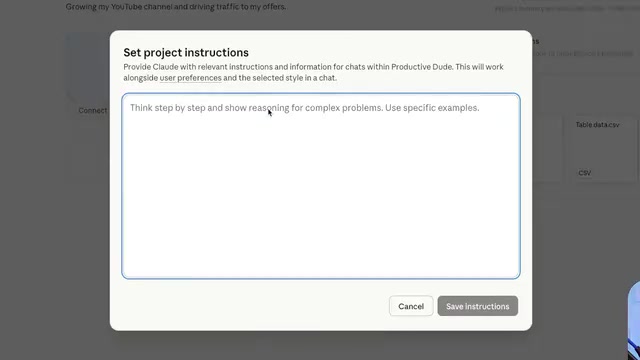
This framework works equally well inside Projects. Projects support isolated memory, file uploads, and custom instructions, meaning you don't have to re-enter your goal and context every time. The author configured one as a "channel growth advisor," and Claude began responding like a real consultant — asking about his business model, conversion funnel, and which videos were currently generating leads.
Artifacts & Visualization: Building Apps Inside the Chat
Artifacts are "mini apps" or runnable code that Claude generates and renders directly in the browser — no local environment needed. The author starts with built-in examples like a platformer game and a 3D forest scene, then demonstrates real-world value by generating a personal portfolio website.
First drafts often have an unmistakable "AI aesthetic" — gradients, emoji everywhere. The author's fix: ask Claude to "generate 10 unique style variations with tab switching," producing polished options like Dark Luxury, Neon Terminal, and Editorial Broadsheet all at once. Another lightweight use case is a time zone slider: tell Claude you need to schedule a meeting with a client in Saudi Arabia, and it builds a draggable interactive slider that shows the Saudi time for any given Eastern Time — with color-coded indicators for whether it falls within business hours for both parties.
Inline visualizations are another format — code that renders directly inside the conversation flow. The author fed Claude his channel's CSV data and got a dashboard with monthly trends and future projections (best, neutral, and worst-case scenarios), with a one-click option to save it as a reusable Artifact.
Cowork & Dispatch: Letting Claude Operate Your Computer
After downloading the Claude desktop app, a three-mode switcher appears at the top: Chat, Cowork, and Code. Cowork's core capability is direct access to and control of your local machine — reading and writing the file system, running scripts, and using installed apps.
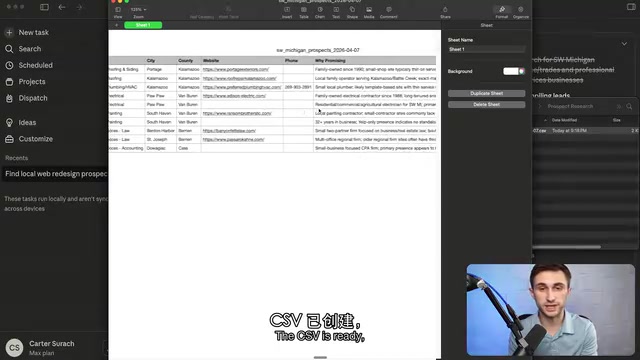
The author's first demo is immediately practical: he asks Claude to read his Downloads folder and sort all files by type, moving them into corresponding subdirectories under Documents (photos, templates, videos, etc.). After granting Finder and Script Editor permissions, Claude operates the computer in real time on a second screen, highlighted by an orange border. Paired with scheduled tasks, this kind of cleanup can run automatically every night at 8 PM.
Cowork's other major strength comes from connectors (MCP, the Model Context Protocol). The author links his Notion CRM and Gmail, then asks Claude to identify clients he hasn't contacted in a while and draft personalized follow-up emails — the drafts even accurately reference details like a client mentioning "let's reconnect in May after tax season." Fifteen emails, done in minutes.
Dispatch extends this to mobile: as long as your computer stays on (with "keep computer awake" enabled), you can remotely direct it from your phone while out.
What is MCP? MCP (Model Context Protocol) is an open standard Anthropic released in late 2024 that defines how AI models communicate with external tools and data sources. Think of it as a "USB port" for AI — whether it's Notion, Gmail, GitHub, or a custom database, any service that implements the MCP spec can be read, written to, and triggered by Claude through a unified interface. This is a significant improvement over earlier AI integration approaches, which required bespoke hardcoded adapters for each tool. The open-source community already has hundreds of MCP Servers ready to use, and you can build your own. One important note: granting MCP connector permissions gives Claude real operational access to that service. Enable connectors only as needed, and periodically review what's connected to avoid over-permissioning.
Skills: Turning Successful Workflows into Reusable Routines
A Skill is essentially a repeatable, standardized process — the same guardrails, the same steps, the same tools — delivering consistent results every time, rather than having Claude "improvise" in each new conversation. There are three ways to create one: describe what you need and let Claude build it, reverse-engineer a workflow after running it once and ask Claude to "turn this into a skill," or upload a skill package someone else has built.
The tutorial recommends a skill-building method called the DBS framework: D (Direction — the name, description, and step-by-step process in skill.md), B (Blueprints — examples and reference materials), and S (Solutions — embedded scripts or code to make the skill more powerful).
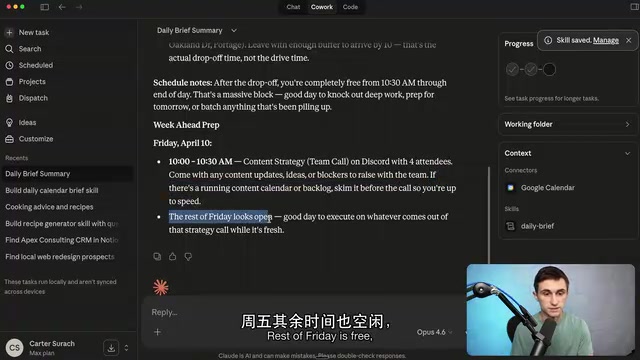
The author starts with a low-stakes /cook skill — Claude asks a series of questions to inventory what's in your fridge, spice cabinet, and pantry, then generates three recipes. He then levels up to a /daily morning briefing skill that connects to Google Calendar, automatically summarizes the day's schedule, and offers preparation tips for the week ahead.
Claude Code & Website Deployment: From Portfolio to Auto-Publishing Blog
The tutorial acknowledges upfront that this section "gets more technical" — readers unfamiliar with development may need to pick up some extra knowledge. Claude Code runs in two modes: directly in the terminal, or through the desktop app's GUI. The environment selector in the bottom-right corner offers local machine, SSH connection, remote control, or a Cloud environment — the latter runs coding tasks against a GitHub repository on Anthropic's servers, with no dependency on your local machine being on.
The author converts the website style he liked from the Artifacts section into a JSON object, then delivers a full GCAO-structured prompt to Claude Code: build a personal site using Astro + Tailwind with a blog and homepage, deploy via Netlify, and support an API endpoint for publishing and editing blog posts. Claude Code enters plan mode first, producing a reviewable proposal, and only scaffolds the full project after confirmation.
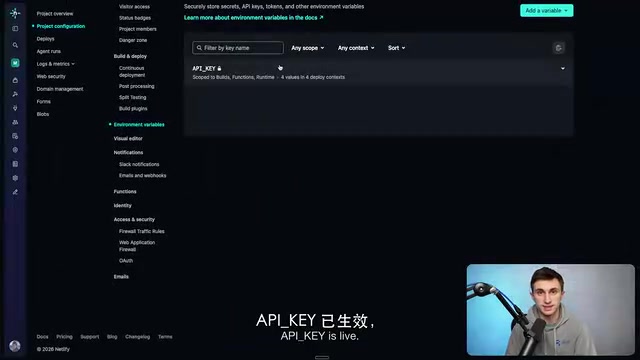
Environment variables act as "passwords" here, authorizing the website to perform specific operations. The author generates an API key with uuidgen, configures it in both Netlify and Claude's Cloud environment, pushes the code to a private GitHub repository, and connects Netlify's continuous deployment — from that point on, any change pushed to the main branch goes live automatically.
The final end-to-end loop is impressive: he sets up a remote scheduled task that runs every morning at 6 AM, has Claude automatically research trending AI topics, drafts three blog posts from different angles (micro, meso, and macro), and sends preview links to his inbox via Gmail. Once the system is set up, he can even make changes like "move the Friday post to Monday" entirely from his phone — the code doesn't live on his phone or require his local computer to be running. Everything happens through a conversation with Claude. His analogy is apt: it's like training a new employee — early results may not be perfect, but Claude's consistency in following SOPs far exceeds what you'd get from a human.
Astro, Tailwind, and Netlify — a quick primer Astro is a modern static site generator built around the idea of "zero JavaScript by default" — pages are pre-rendered as static HTML at build time, and client-side scripts are only loaded for components that genuinely need interactivity, resulting in excellent first-load performance. Tailwind CSS is a utility-first styling library that eliminates the need to write custom CSS class names; you style elements directly in HTML by composing pre-built utilities like
flex,text-xl, andbg-gray-900. Together, they're one of the most popular tech stacks for personal sites and blogs today. Netlify is a static hosting and continuous deployment platform — connect it to a GitHub repository, and everygit pushautomatically triggers a build and deploys the new version to a CDN, no server management required. These three tools form the backbone of the "serverless frontend" stack, and they're exactly what enables Claude Code to complete deployment in its Cloud environment without depending on a local machine.
Closing Thoughts
The greatest value of this tutorial isn't any single feature — it's the way it connects Claude's individual modules into one coherent, real-world workflow: write better prompts with GCAO → accumulate context inside Projects → prototype quickly with Artifacts → operate local files and business systems with Cowork → codify processes with Skills → handle deployment and automation with Claude Code. For anyone looking to upgrade AI from a "question-and-answer tool" to genuine automated infrastructure, this is a path worth working through step by step.
Related articles

Chain of Thought Isn't Just for AI: How Humans Can Use CoT to Improve Thinking Quality
Chain of Thought isn't just a prompt trick for large models. Starting from a Hacker News discussion, this article analyzes why CoT works for human thinking too, breaks down actionable ways to transfer it, and highlights the key differences between human CoT and machine CoT.
Cloudflare Teams Up with OpenAI: Closi…
Cloudflare Teams Up with OpenAI: Closing the Loop from Vulnerability Discovery to Defense with AI
Cloudflare uses OpenAI Daybreak to investigate security vulnerabilities and generate reviewable remediation plans, while developers use Codex to boost coding efficiency and quality.

Orca Multi-Agent Orchestration in Practice: A Guide to Parallel Collaboration with Claude and Codex
Orca is Stable AI's free open-source agent workbench supporting 34 agents like Claude Code and Codex in parallel. Learn its Git worktree isolation, multi-model orchestration, and mobile management.