The Complete Claude Guide: From Basics to Building Your Own AI Operating System

A full methodology for using Claude — from smart prompting to a five-layer AI operating system.
This article distills an advanced Claude tutorial from an AI educator, arguing that most users only tap a fraction of Claude's potential by treating it like a search engine. Starting with the GCAO prompting framework, it covers native features like web search, vision, and Artifacts, then walks through the four-layer architecture of custom instructions, Projects, Skills, and Connectors — forming a personal AI operating system where each layer builds on the last. The author emphasizes you don't need to build it all at once; start with one good prompt and layer up from there.
Most people treat Claude like a fancy Google search bar — type something in, grab the answer, close the tab. But that approach barely scratches the surface of what it can do. An AI educator with 300,000 subscribers recently published a comprehensive tutorial breaking down every layer of Claude's capabilities, from basic conversation techniques all the way to building a personal "AI operating system" that works for you like a true executive assistant.
This article distills the core methodology and feature hierarchy from that tutorial — to help you level up from "occasional AI user" to "running your business with AI."
Choose the Right Plan: You Have to Invest to Truly Benefit
The tutorial's author makes clear that the free plan is genuinely solid — it includes Claude Sonnet, web search, file uploads, and Artifacts, which is more than enough for beginners to try everything out. But his advice is direct: if you're serious about getting into AI and using it properly, you should "put some real money into it."
He recalls how upgrading from the free tier to the roughly $20/month plan was when "everything started to change," because paying created a sense of commitment — "you need to be invested in it to actually get the benefits of these plans." His practical take: start free, follow along with tutorials, and only upgrade once you hit the usage limit within a week.
The First Thing That Makes or Breaks It: How You Talk to Claude
Before demoing any features, the author leads with a key insight: how good Claude is depends entirely on how you talk to it.
Most people type things like "write me an email" or "give me a business plan" — vague prompts that produce generic, one-size-fits-all responses, leading them to conclude "AI is just like this." The truth is, the more context you provide and the more specific your request, the more "dramatically" the output quality improves.
The author introduces a prompting framework called GCAO — Goal, Context, Action, Output format.
He ran a comparison experiment using "how to go viral on social media." The vague version returned boilerplate advice like "create content that triggers strong emotions" and "post consistently." After rewriting with the GCAO framework — specifying the target audience (small business owners already making money but overwhelmed by operations), his situation (a $15K/month coaching business posting on Instagram and LinkedIn but only getting empty likes), the specific action (identify content types that attract buyers, not just followers), and the output format (three content angles, one sentence each, no talk about consistency or hashtags) — Claude returned highly specific, actionable recommendations tailored to his exact situation.
His advice: don't be afraid to keep pushing. He's had conversations with Claude lasting seven or eight hours straight before getting to the answer he needed.
The GCAO framework aligns closely with mainstream prompt engineering methodology. Its core idea is converting "vague intent" into "structured task instructions." Goal defines the destination, preventing Claude from guessing what you want. Context provides constraints so the output matches your specific situation rather than being generic. Action breaks down the concrete steps you want Claude to execute. Output format tells Claude exactly what the answer should look like — for example, "three suggestions with one sentence each" saves far more back-and-forth than "give me some suggestions." This framework also applies beyond conversation, to image generation and code writing. Beginners can treat GCAO like a fill-in-the-blank template: before sending any prompt, check whether all four dimensions are addressed and fill in what's missing — no need to follow the format rigidly every time.
Web Search and Vision: From Search Box to Research Tool
Two native features push Claude well beyond the "chatbot" category: real-time web search and visual recognition.

Enabling web search is as simple as clicking the plus button and selecting "web search." The author recommends always keeping it on for accurate, up-to-date information without hallucinations. He demonstrated using web search to research a competitor coach's products, content strategy, and sales funnel — Claude pulled from the competitor's website, Instagram, Quora, and other sources in real time, synthesizing their flagship offerings, pricing (a ~$599 self-study course as a lead-in), and positioning strategy within seconds.
The vision capability is equally impressive: upload a YouTube thumbnail and Claude gives specific, actionable feedback on improving click-through rates — pointing out things like the title using jargon, or the subject's expression being too passive. It can genuinely "understand" real photos taken on a phone, documents, and screenshots, then help you solve problems based on what it sees.
Artifacts: Build in Five Minutes What Would Take a Developer Days
Artifacts is the feature that tends to blow newcomers away. You can ask Claude to create calculators, dashboards, forms, interactive documents, and other functional tools. Instead of returning text, it opens a new panel alongside the conversation and builds a working, runnable product — no code required.
The author demonstrated a "one-shot" example: using a single prompt to have Claude build an AI automation ROI calculator. You enter hourly rate, weekly hours spent on repetitive tasks, and annual working weeks — and it outputs annual cost, time saved, estimated yearly savings, and ROI metrics. The whole process took five minutes, and the result can be published as a public link to share with clients or teammates. For more complex builds like this, he recommends using the Opus model, which has stronger coding capabilities.
Artifacts is essentially a sandboxed code execution environment. Claude generates HTML, CSS, and JavaScript in the background and renders it as an interactive page — users see the finished product, not the code. This means it can build not just static documents, but calculators with logic, conditional-branching forms, data visualizations, and even small single-page applications. The output can be published as an Anthropic-hosted public link with no server deployment required. Worth noting: Artifacts currently cannot persist data (it resets on refresh) and cannot access external APIs, making it best suited for "computation" or "display" tools rather than full applications requiring login or backend logic. For tools you want to truly deploy, you can export the generated code and hand it to a developer or hosting platform for further processing.
Custom Instructions: Build Your Personal AI Operating System
All the features above work out of the box with zero setup. Custom instructions are where Claude transitions from "great tool" to "personal assistant." They're a permanent set of rules that Claude automatically follows at the start of every new conversation.
Access them by clicking your avatar in the bottom-left corner, going to Settings, and filling in the "Personal Preferences" box — whatever you enter takes effect globally. The author used a fun "pirate mode" example to show how precisely Claude follows instructions, then introduced the real use case: what he calls an "AI operating system," built around five sections:
- Identity: Who you are, what work or business you do
- Communication style: How you want the AI to talk to you — direct, casual, etc.
- Goals and priorities: What you're focused on right now
- Schedule and non-negotiables: Your time constraints and daily structure
- Avoid list: Content and guardrails you never want to see
The author showed his fully filled-out version — two companies, a YouTube channel with 300K subscribers, a $49/month community, clients ranging from $15K to $100K/month — all written in. Now every conversation starts with Claude already knowing what he needs, no re-introduction required. He argues that doing this puts you in the top 1%, because almost nobody bothers.
Projects and Skills: Knowledge Layer Meets Process Layer
If custom instructions are the personal layer, Projects are dedicated workspaces built on top of them, with persistent context. You can upload brand guidelines, SOPs, client files, and other documents, and set project-specific instructions.

The author doesn't just create a project per company — he creates projects for different departments within a business (one for content, one for community). When he sits down to work, he opens the relevant project and Claude already has full context, remembers what they discussed last week, and knows his standards and expectations.
Skills are the process layer — teaching Claude to complete specific tasks in a consistent, repeatable way, similar to training an employee: teach it once, document it, and it handles it automatically from then on. The author demonstrated using Claude's built-in "skill creator" to build a skill that generates professional AI business audit proposals, outputting a downloadable .docx file in one click. He gave the example of his father in construction, who used to spend three hours handwriting quotes after work — now he just tells Claude the client's needs by voice, has it search local pricing online, and it auto-generates the proposal.
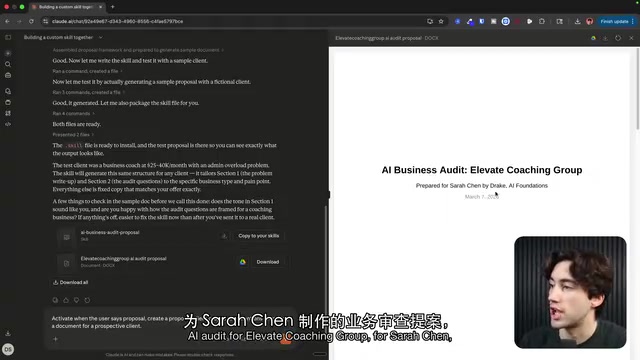
On the distinction between the two, the author is clear: Projects are context (holding your knowledge, documents, and client information); Skills are process (knowing how to complete a task the same way every time). One manages knowledge, the other manages instructions — they work together.
The core mechanism of Projects is a "persistent context window." In regular conversations, Claude only remembers the current session — close the window and you need to re-establish context next time. Projects permanently save uploaded documents and configured instructions within that workspace, so every new conversation inside the project automatically loads that content. The effect is like having a fully trained dedicated employee. Supported upload formats include PDF, Word, plain text, and other common file types. Skills are also built on structured prompt templates under the hood, but the "skill creator" locks in input parameters, processing steps, and output format — ensuring the same type of task produces stylistically and structurally consistent results every time, reducing output variability caused by minor differences in phrasing. This is especially valuable for businesses that need to produce content or documents in bulk and repeatedly.
Connectors: From "Thinking" to "Actually Doing"
Connectors let Claude interface directly with the tools you use every day — Google Calendar, Gmail, Google Drive, Slack, and more, with new integrations added weekly. You can ask it to "check tomorrow's schedule," "find the proposal I sent last week," or "draft a reply" — and Claude will actually operate those tools, not just generate relevant text.
You can fine-tune permissions when connecting: for write operations like creating, deleting, or updating, the author always requires approval; for read-only operations like listing calendar events, he lets Claude execute automatically. More powerfully, Claude can pull information from multiple connectors simultaneously and synthesize it into a single response — combining calendar, email, and personalized context all at once.
The Full Stack: From Level 1 to Level 5
The author closes by connecting all the features into one bottom-up system:
- Foundation: AI Operating System — Custom instructions, loaded every session
- Project Layer — Independent workspaces with dedicated knowledge and instructions
- Skills Layer — Reusable, repeatable processes
- Connectors Layer — Integration with real tools, turning Claude from "thinking" to "doing"
He's honest that this system wasn't built overnight: three years of using AI, starting with one conversation and one decent prompt, gradually turning prompts into templates, saving those as instructions, then building projects, creating skills — one layer at a time.
"Most people are still typing into an empty chat box. That's Level 1. Now you know what Level 5 looks like." His conclusion: you don't need to do everything today. You just need to start.
Related articles

Chain of Thought Isn't Just for AI: How Humans Can Use CoT to Improve Thinking Quality
Chain of Thought isn't just a prompt trick for large models. Starting from a Hacker News discussion, this article analyzes why CoT works for human thinking too, breaks down actionable ways to transfer it, and highlights the key differences between human CoT and machine CoT.
Cloudflare Teams Up with OpenAI: Closi…
Cloudflare Teams Up with OpenAI: Closing the Loop from Vulnerability Discovery to Defense with AI
Cloudflare uses OpenAI Daybreak to investigate security vulnerabilities and generate reviewable remediation plans, while developers use Codex to boost coding efficiency and quality.

Orca Multi-Agent Orchestration in Practice: A Guide to Parallel Collaboration with Claude and Codex
Orca is Stable AI's free open-source agent workbench supporting 34 agents like Claude Code and Codex in parallel. Learn its Git worktree isolation, multi-model orchestration, and mobile management.