The Complete Codex Guide: Free Access in China & Hands-On Configuration

A complete guide to accessing and configuring Codex in China using domestic LLM APIs.
This guide explains the core difference between Codex as a task execution agent and ChatGPT as a conversational assistant, then addresses the practical challenge of accessing Codex in China. Using open-source tools Codex++ and CC Switch, users can connect domestic models like DeepSeek and Kimi to Codex without a VPN. The article also covers multimodal limitations, model tier selection, permission modes, key plugins, and project management with real-world test cases.
From ChatGPT to Codex: The Essential Difference Between a Conversational Assistant and a Task Execution Agent
If ChatGPT is the "recipe master" who explains every step of a dish in perfect detail but leaves you to do the cooking yourself, then Codex is the "head chef" who puts the finished dish right in front of you. This analogy captures the core distinction between these two types of AI tools.
ChatGPT is fundamentally "all talk, no action" — it provides methods, steps, and guidance, but execution still falls on you. Codex is the opposite: you state what you need, and it thinks, plans, executes, and delivers. This evolution from "conversational assistant" to "task execution agent" is the defining characteristic of the Agent era.
Today's Codex goes far beyond writing code. It can build presentations, process Excel files, control a browser, and even generate images and videos — it has evolved into a fully capable all-around work assistant. OpenAI has integrated ChatGPT and Codex into a single platform, with Codex functioning as an application layer within the ChatGPT ecosystem.
How Codex and Claude Code Differ
Both tools are essentially "intelligent colleagues" that understand plain language, browse files autonomously, and modify code. The difference lies in how they work: Codex is more like a remote colleague who quietly gets things done and submits the results when finished; Claude Code is more like a desk neighbor who needs you watching over their shoulder and giving real-time direction. From a cost perspective, Codex is cheaper and doesn't suffer from rate limiting, account bans, or capability degradation — practical considerations that drive many users to choose it.
Installing Codex: Official Channels and Domestic Alternatives
The official installation is straightforward. Head to the OpenAI website, download the installer, and double-click to run it — no different from installing any regular software. You can also search for ChatGPT in the Microsoft Store and install it from there. After installation, the icon shows as ChatGPT, since the two have been merged into one.
The real barrier appears at login. Signing in with a ChatGPT account requires a VPN, which blocks a significant portion of users in China. For those without a ChatGPT account or OpenAI API key, there's a more practical path: log in using an API key from a domestic large language model.
Connecting to Domestic Models via Codex++
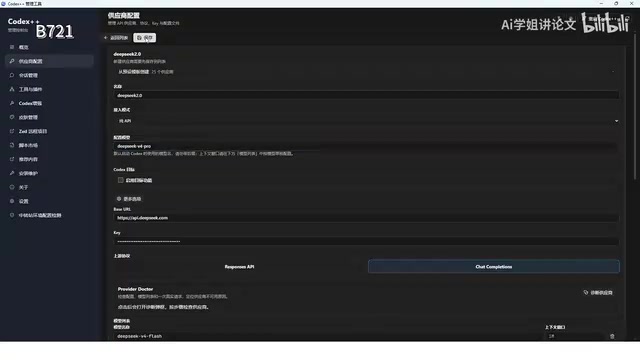
The first option is the open-source tool Codex++ (available on GitHub for your respective OS). When installing, make sure the installation path contains no Chinese characters. After installation, two icons appear: one is the Codex++ management tool for connecting to model providers, and the other launches Codex itself.
To connect DeepSeekAd as an example, the configuration steps are as follows: Open the management tool → Add a provider → Enter the Base URL (the API endpoint from DeepSeek's open platform) → Enter your API key. You'll need to create the key on DeepSeek's open platform — the full key is only shown once, so save it carefully. In terms of cost, 10 RMB will last you a long time. Once the model is configured, save the settings and restart Codex.
One important caveat: DeepSeek does not support multimodal input when connected through Codex. It can only process plain text and cannot handle images, voice, video, or other file types. In testing, asking DeepSeek V4 Pro to generate an image resulted in a seven-to-eight minute wait followed by: "Image generation tools are not available in the current environment." If you need multimodal capabilities like image generation or image reading, you'll still need ChatGPT's GPT-5-series models.
CC Switch: A More Elegant Multi-Model Switching Solution
Compared to Codex++, CC Switch is the recommended alternative — an open-source, cross-platform desktop management tool designed to centrally manage configuration files for AI coding tools like Claude Code, Codex, and Gemini. Its core function is "one-click API provider switching."
Here's a key concept to understand: Codex natively only accepts OpenAI's API — like a device that only accepts a three-prong plug. Domestic models like DeepSeek, Kimi, Doubao, and MiniMax are effectively "two-prong plugs" that can't connect directly. CC Switch acts as the adapter, converting those models' interface formats into something Codex can recognize.

Installing and Configuring CC Switch
The installer is available from the official website or GitHub — again, avoid Chinese characters in the path. After installation, go to settings to customize the interface language and theme, and use "Homepage Display" to hide unused tools and keep only Codex. Next, enable the "Show Project Switcher," "Codex App Enhancement," and "Local Routing" toggles.
Adding providers is even easier than with Codex++, since the tool already has built-in support for OpenAI, Kimi, Doubao, DeepSeek, Xiaomi, and other major models. To connect Kimi as an example: Select the Kimi provider → Enter the API key from Kimi's open platform → Click to download the model list (it will fetch 12 models) → Select K3 as the default model → Save.
One detail worth noting: different providers have different routing requirements. Kimi, for instance, requires the Codex routing toggle to be enabled or the connection will fail. Once enabled, test the connection in the ChatGPT interface (not in CC Switch itself). The first response will be slow — a normal reply indicates a successful connection; errors or a spinning loader means you need to go back to CC Switch and check your configuration.
Interface Layout and Model Selection: Choosing Between Three Model Tiers
Codex's interface is similar to most AI software, consisting of a menu bar, main navigation panel, projects and task history panel, account panel, central workspace, project selector, and task input controls.
Model selection is critical to efficiency. Here's a simple breakdown of the three commonly used models:
- Top-tier model: Most capable, most expensive, slowest — best for "hard tasks where cost is no concern";
- Mid-tier model (Teller): About half the price of the top model, moderate speed without lag — great for everyday productivity on a budget;
- Entry-level model (Luna): Cheapest, near-instant responses, but lower quality — best when "volume is high, tasks are simple, and you want to save money."

There's also a "reasoning intensity" setting with four levels: light, medium, high, and extreme. Higher levels mean the AI thinks longer and produces more detailed output, but consume more compute and take more time. Light works fine for simple questions; medium is a safer choice for moderately complex tasks like file organization.
Real-World Test: Batch Organizing 2,530 Files
A practical test scenario: organizing 2,530 files totaling approximately 85GB. Using the Sol model with medium reasoning, Codex ran for about 20 minutes, automatically created 10 major categories, sorted everything by modification date, and even provided a verification report — confirming no files were missing, sizes were consistent, and all original files were preserved untouched. Work that used to take an hour can now be handed off to Codex entirely.
Permissions, Plugins, and Projects: Getting Codex to Actually Do the Work
Three Permission Modes Explained
Codex offers three permission levels, each balancing safety and efficiency differently:
- Request Approval: Prompts for confirmation before every action — completely safe but cumbersome;
- Approve on My Behalf: Codex assesses risk itself, automatically executing safe actions and prompting only for high-risk operations like deleting or modifying system files — the smoothest experience for everyday use;
- Full Access: Unrestricted, fully automatic — maximum efficiency, but a mistaken instruction could result in accidental deletion or modification of files.
For beginners with important data on their computer, "Approve on My Behalf" is the safer starting point. Once you're comfortable, you can switch to "Full Access" based on your needs.
Core Plugins That Let Codex Actually "Do Things"
Codex on its own only writes code and text — plugins are what enable it to truly get things done. Key plugins include:
- File System Plugin: Reads, modifies, and batch-rewrites code files on your computer;
- Computer Use Plugin: Automatically controls your computer — creating, deleting, and moving files, opening any document. This is also a prerequisite for scheduled tasks and automation;
- Visualize Plugin: Reads video subtitles, extracts scripts, parses content, and can even cut basic clips.

A particularly interesting demo is the "Scheduled Tasks" feature: configure Codex to automatically open Kugou Music and play a specific song every evening at 8:20 PM. With the Computer Use plugin enabled, Codex actually takes over the computer at the specified time, opens the app, types in the song title, and plays it. This alarm-style automation can be extended to scenarios like timed emails, scheduled file modifications, and more.
The Projects Module: Giving Your AI a Dedicated Workspace
A project is essentially "granting your AI access to a specific folder." Each project maps to a folder, and everything Codex produces is output to that project directory. Users can create as many projects as they need and organize them by category.
In one demonstration, two projects ran simultaneously — "Hat Product Page" and "Electric Fan Product Page." The first generated a sun hat product detail page based on requirements; the second uploaded a reference image and generated three different style variations. Both were completed in about 4 minutes with impressive results. Work that used to take a full day of design now takes minutes — a clear demonstration of Codex's value as an execution-focused productivity engine.
Summary: The Core Pathway for Using Codex in China
Overall, there's a clear path for users in China: connect DeepSeek, Kimi, or other domestic models via Codex++ or CC Switch for free access, while being aware that multimodal capabilities are limited when using domestic models. If you need the full suite of image generation, image reading, and video processing, you'll still need ChatGPT's GPT-5-series models. Master the three core mechanisms — permissions, plugins, and projects — and even a complete beginner can transform Codex from a "chat tool" into a true "automated productivity platform."
Related articles

Coinbase Engineer: How to Determine Whether an AI Agent Can Operate Unattended
Coinbase engineer Evan Kormos shares an engineering method for judging whether an AI agent can run unattended: model processes with DAG/DCG, replace output comparison with statistical evaluation, and hand over control in three phases—supervision, sampling, and exception handling.

WorkBuddy Beginner's Guide: How AI Agents Automate Office Tasks
WorkBuddy tutorial: learn how this desktop AI agent workbench automates files, organizes data, and generates documents, compared with LLMs and Codex, plus a beginner path and cost analysis.

Doubao Work in Practice: Three Modes That Let AI Actually Get Work Done
Doubao Work practical tutorial: from chat mode to Work Mode Lite and Pro, explaining the logic for choosing among three modes with real office task demonstrations. Even complete beginners can learn to use an AI agent to handle local files, organize materials, and generate documents.