The Complete Cursor Guide: Building a Student Management System with AI from Scratch

Build a full working project in 30 minutes using Cursor's Agent mode and Claude — a complete hands-on guide.
Cursor is a code editor that deeply integrates AI into the development workflow, offering three modes: fully autonomous Agent, conversational Ask, and developer-controlled Manual. For production projects, pairing it with the Claude model series delivers best-in-class code generation. In the demo, a detailed prompt specifying the full tech stack and database info allowed Cursor to auto-generate a complete student management system with CRUD, pagination, and breadcrumbs — handling all dependency conflicts and runtime errors automatically in about half an hour. Effective use still requires programming knowledge and a properly configured local environment.
Cursor has been called one of the most powerful AI code editors available today. Rather than simply embedding a language model into a text editor, it lets AI actively participate in the entire development workflow — generating files, writing code, auto-debugging, and fixing errors — covering nearly everything from an initial idea to a working project. This article, based on a hands-on demo by a Bilibili content creator, walks through Cursor's core concepts, modes, and model selection, then fully recreates a real "zero to one" project development experience.
What Is Cursor and Where to Download It
Cursor is an AI-powered code editor whose interface looks very similar to VS Code, but with AI interaction deeply woven into the editing experience. Its goal isn't "autocomplete assistance" — it's to have AI take on a substantial share of the actual coding work.
Downloading is straightforward: visit the official website and it will automatically detect your operating system (Windows or macOS) and serve the right installer. One important note: after installation, you must register an account and log in before you can use it.
Once the app is open, you can create a new project or open an existing folder. The interface has three sections: the project directory on the left, the file view in the center, and on the right, the panel where you chat with the AI and submit requests. For developers, the two settings that really matter are in that right panel — mode and model.
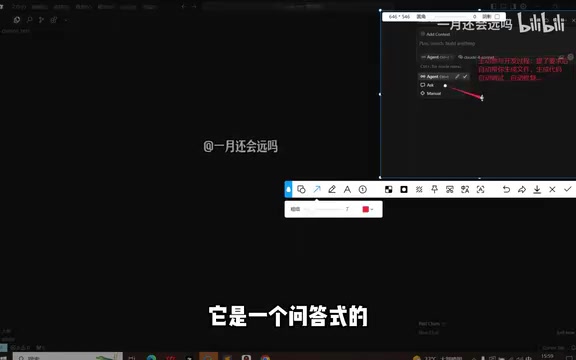
Three Working Modes: Agent, Ask, and Manual
Cursor offers three core working modes, each suited to different development scenarios:
Agent Mode
This is the most powerful and autonomous mode. The AI actively participates in development: it automatically generates files and writes code based on your requirements, and when errors occur, it debugs and fixes them on its own until the project runs correctly. The whole process is close to "fully automatic" and is ideal for building a complete project from scratch.
Ask Mode
This is a question-and-answer style interaction. You ask the AI a specific question and it responds with an answer or reference code. It leans more toward consultation and won't proactively make changes to your entire project.
Manual Mode
In this mode, AI serves only as a reference, with the developer fully in control of the code. It suits scenarios where you want tight control over the project and only need AI for localized suggestions.
For building a project from the ground up, the content creator recommends going straight to Agent mode and letting AI handle both generation and debugging end to end.
Model Selection: Why Claude Is Recommended
Next to the model selector, you can enable "Auto," which lets the system pick the best available model based on your account tier — it'll use a premium model if your plan allows, and fall back to a standard one otherwise. Turning off Auto lets you manually choose a specific model; options include both paid and free models, and you can also add your own.
The key recommendation is simple: if you're using Cursor to develop a production-ready project that needs to go live, Claude is the top choice for coding tasks. It's widely regarded as the strongest option for writing code, and it was used throughout the hands-on demo in this article.
Claude is a family of large language models developed by Anthropic. Current major versions include Claude 3.5 Sonnet and Claude 3 Opus, among others. Anthropic was founded by former OpenAI researchers and its training philosophy emphasizes "Constitutional AI" and safety alignment. The Claude series is especially strong at code generation — on public benchmarks such as HumanEval and SWE-bench, Claude models consistently outperform contemporary GPT-4 series models in code comprehension, multi-file coordinated edits, and error localization. Its advantages in coding contexts include: an extended context window (up to 200K tokens), allowing it to understand an entire project's file structure at once; strong instruction-following that keeps generated code closely aligned with the architectural requirements described in your prompt; and stable output style with fewer cases of "correct format, wrong logic." This is why heavy Cursor users broadly favor it for complex engineering tasks.
Hands-On: Building a Student Management System in Half an Hour
With the theory covered, the real value of Cursor shows up in practice. The content creator wrote a carefully crafted prompt and used it to generate a fully working student management system.
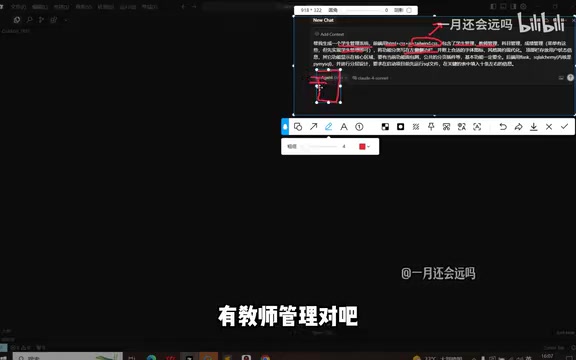
How to Write an Effective Prompt
This is the heart of the entire process. Writing a good prompt requires a clear "technical mental model" — you need to know what each technology is for so the AI can tailor its output to your specifications. The requirements in the demo included roughly:
- Frontend tech stack: Traditional HTML + CSS + JS, plus the Tailwind CSS library to give the interface a more modern, polished look;
- Feature modules: Core functionality like student management and teacher management, with categories listed in a left sidebar and corresponding content displayed in the right area when a menu item is clicked;
- Interaction details: Sidebar icons with font icons, a top bar with user login/logout, breadcrumb navigation (showing the current location in the hierarchy), and a shared pagination plugin (for displaying large datasets across pages);
- Backend tech stack: Flask for the backend, SQLAlchemy as the ORM for database access, and a layered architecture;
- Database info: The creator specifically emphasized that it's best to include database connection details directly in the prompt (local address, port, username
root, password, and the name of the database to be created) so AI can handle both schema creation and table setup.
The more specific and technical your requirements, the closer the output will match your expectations.
A few technologies mentioned in the prompt are worth briefly explaining. Tailwind CSS is a "utility-first" CSS framework. Rather than providing ready-made UI components, it offers a large set of atomic utility classes (like flex, pt-4, and text-gray-700) that developers apply directly to HTML elements to control styling — eliminating the need to write large amounts of custom CSS while producing consistent, maintainable designs. Flask is a minimalist Python web framework whose core consists of just routing and request handling. It imposes no prescribed project structure, making it well-suited for quickly building small-to-medium backend services. SQLAlchemy is Python's most widely used ORM (Object-Relational Mapper), allowing developers to interact with database tables using Python classes and objects rather than writing raw SQL, and supporting multiple database backends including MySQL, PostgreSQL, and SQLite. Specifying the frontend framework, backend framework, and ORM all together in your prompt is key to getting AI to generate a project with a consistent tech stack and sensible structure. Vague descriptions or mismatched combinations will cause framework incompatibility issues in the generated code.
AI Auto-Generation and Debugging
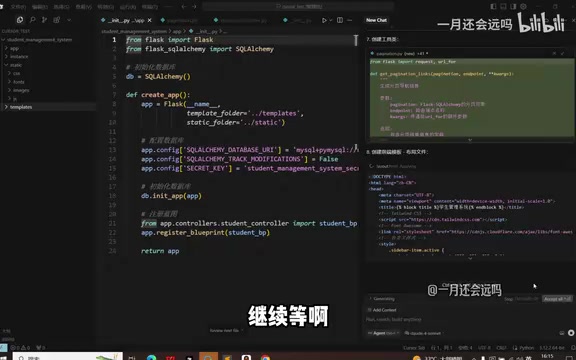
Once you submit the prompt, the rest is mostly waiting. In Agent mode, Cursor sequentially analyzes the requirements, generates the directory structure, and writes both frontend and backend code. Generated code is flagged in yellow, prompting you to accept or reject each change — you can review them one by one or click "Accept All" to take everything at once.
What stands out is the level of automation: during the process, Cursor proactively created list pages, add pages, detail pages, and more — none of which were individually specified in the prompt. Based solely on the instruction to "be comprehensive," the AI filled in all the pages a typical management system would need. When red errors appeared, it automatically located and fixed them.
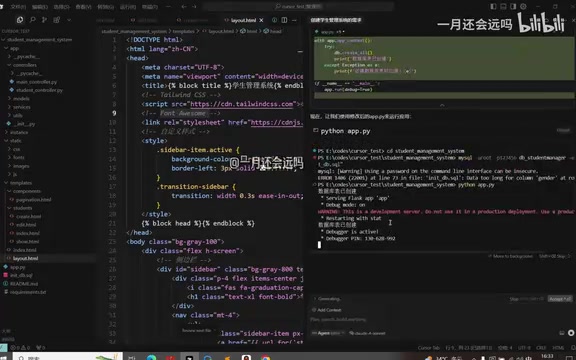
Fixing Errors at Runtime
After generation comes the runtime phase — and this is where AI's value shows most clearly. When running the startup command, Cursor automatically downloads dependency packages; when version incompatibilities arise, it automatically installs the correct library versions. These are exactly the kinds of issues that can eat up significant time when debugged manually.
During startup, several issues came up, including template syntax errors and dependency conflicts. The AI handled them in a loop — detect, reason, fix, attempt to run again — until the server returned a 200 response and the page loaded successfully. You can also paste error messages directly into the chat to help it zero in on the problem faster.
In the end, a fully functional student management system — with create, read, update, and delete operations, detail views, breadcrumb navigation, search, and pagination — was up and running, with newly added student records correctly persisted to the database. The entire process, including pauses, took about half an hour. The creator estimated that a more comprehensive version could be generated in two to three hours.
Two Prerequisites That Are Easy to Overlook
The hands-on demo revealed two critical prerequisites that directly determine whether you can replicate the same results:
First, you need some programming foundation. The quality of your prompt depends on whether you know what each technology is for. Without the ability to make informed technical judgments, AI will struggle to produce a well-tailored, reasonable solution.
Second, you need a working local environment. The Flask application in the demo ran successfully because Python was already installed on the machine. To reproduce a similar project yourself, you'll need to set up the appropriate runtime environment first.
In other words, Cursor dramatically reduces the cost of writing code, but it doesn't eliminate the need to understand technology. It's more like a highly efficient senior assistant than an autonomous machine that replaces developers.
The configuration requirements for a "local runtime environment" vary by tech stack. The Flask project in the demo requires at minimum a local Python installation (version 3.9 or higher is recommended) and the ability to install third-party packages via pip. If the project involves a MySQL database, you'll also need a locally running MySQL service with the appropriate user permissions configured. These environment issues are the most common "invisible barriers" beginners encounter when trying to follow tutorials — Cursor can automatically fix code-level errors, but it cannot install OS-level runtimes or start local services on your behalf. Additionally, network conditions in China may affect pip download speeds; it's advisable to configure a mirror source such as Tsinghua or Aliyun in advance, otherwise dependency installation can time out and cause the AI to misinterpret the problem as a code error and repeatedly revise the logic.
Summary
Cursor's value lies in upgrading AI from a "completion tool" to an active "development participant": Agent mode for fully automated generation, Claude for production-quality coding, and automatic error recovery — together, this combination enables individual developers to ship a working, complete project in a short amount of time. But the results depend heavily on the user's technical knowledge and local environment setup. To truly get the most out of Cursor, a solid programming foundation remains an unavoidable prerequisite.
Related articles

Felix Rieseberg Personal Homepage
Felix Rieseberg's personal homepage sparks attention on Hacker News. This article covers the Slack engineer's technical background, the rise and fall of nativefier, and the value of a developer homepage as a tech calling card.

@ai-sdk/vue 3.0.306 Patch Release Syncs with [email protected] Update
@ai-sdk/vue 3.0.306 released, synced with [email protected]. A routine patch release for the Vercel AI SDK ecosystem with no public API changes; the Vue adapter layer stays version-aligned with the core package.

Gemini 4 Argon API Launches: The Era of Million-Token Output Begins
Google launches Gemini 4 Argon with sparse MoE architecture, up to 1M output tokens, and a 68.90% Vals Index score, available across API, AI Studio, and the Gemini app.