The Complete GPT Plus Subscription Guide: From Sign-Up to Picking the Right Tier in One Go

A Bilibili tutorial breaks down ChatGPT registration, three-tier selection, and top-up subscription, teaching you to spend wisely by usage intensity.
Based on a Bilibili tutorial by "11月19号," this article outlines the three-step ChatGPT membership process. Step one: register with Google, Apple, or domestic email (QQ, 163, 126 all work). Step two: choose a tier—Go for light users, Plus at $20/month for most daily users, and Pro at $100/$200/$500 for heavy workflows, with the $500 tier exclusively getting GPT6's Ultra mode; the author suggests trying Plus for a month first. Step three: payment—the video demos a quick third-party top-up, but the article warns it's unofficial and risky, with official card binding safer. The core takeaway: choose by usage intensity, not price.
Thinking about signing up for ChatGPT membership? With three tiers—Go, Plus, and Pro—plus a confusing array of subscription channels, many people get stuck on the same three hurdles: registration, payment, and choosing a tier. A tutorial video by Bilibili creator "11月19号" breaks the entire process—from creating an account from scratch to subscribing quickly—into three steps and compares the differences between tiers in detail. This article is based on that video, combined with hands-on experience, to help you think it through and spend your money wisely.
Why Do Your Subscriptions Always Fail?
The video opens by pointing out three common pain points: registration is too much hassle—you don't know whether domestic email providers work or how to register a Google account; subscriptions always fail—you keep trying on both the web and the app but still can't pay; picking the wrong tier wastes money—what exactly is the difference between Go, Plus, and Pro, and which one should you choose? These three problems are interlinked—the account is the foundation, the plan sets the direction, and payment is the final push. Below, we break it down step by step following the three-step method in the video.
Step 1: Register Your Own ChatGPT Account from Scratch
Registering a ChatGPT account isn't complicated. The video demonstrates two paths: logging in directly with a Google or Apple account, or registering with an email address. QQ Mail, 163 Mail, and 126 Mail—which domestic users care about—have all been tested and work. Using a Google account as an example, the creator walks through the full process: open the Google account registration page and select personal use, fill in your name and date of birth, set an email password, complete phone verification, then on the ChatGPT login page choose "Sign in with Google," and after logging in, fill in your name and age.
If you already have a ChatGPT account, you can skip this step. One reminder: keep your network environment stable during registration to avoid losing progress if verification gets interrupted.
On Google Account Registration and Phone Verification
The phone verification step in Google account registration is where many domestic users get stuck. Google typically requires binding a phone number to receive a verification code, and the number of accounts a single number can be bound to is limited (generally no more than 3–5). If you see "This phone number cannot be used for verification," try a different number, switch your network environment, or log in to a Google account on an existing device first and then add the binding. Note that registering a Google account itself also requires a relatively stable network environment; otherwise the verification page may fail to load. After completing Google account registration, when you return to the ChatGPT login page and choose "Sign in with Google," OpenAI will request to read basic information such as your name and email—this is a normal OAuth authorization flow, and you just need to confirm.
Step 2: How to Choose Between Go, Plus, and Pro?
ChatGPT membership currently comes in three levels—Go, Plus, and Pro—with usage quotas and available capabilities increasing progressively, and prices rising accordingly.

Go: A Low-Cost Entry Option for Light Users
Go is an entry-level paid plan between the free version and Plus, offering more quota than the free version. As described in the video, if you mainly use ChatGPT for chatting, looking things up, translation, or study assistance, occasionally run out of free-tier quota, and don't yet need many advanced features, Go is a low-cost way to get more usage. In one sentence: it suits users who want a light upgrade and want to keep their budget in check.
Plus: The First Choice for Most People
Plus costs $20 per month and is the tier the video creator explicitly recommends. It suits people who use ChatGPT almost every day: editing copy, organizing files, analyzing materials, generating images, assisting with study, occasionally using Cursor to write code or modify projects, or simply wanting more ample usage quota when busy.
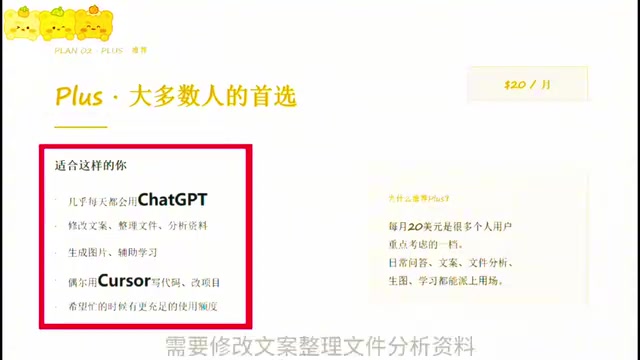
The advice given in the video is pragmatic: if this is your first subscription and you're not sure which tier fits, start with Plus for one month, then decide based on actual usage whether to adjust. This "try first, adjust later" strategy effectively avoids paying for features you won't use.
Pro: A Professional Solution for High-Intensity Workflows
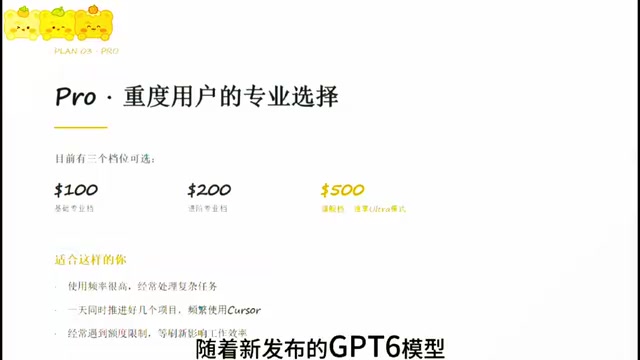
Pro currently offers three tiers—$100, $200, and $500—corresponding to a basic professional tier, an advanced professional tier, and a flagship tier. It's better suited to users with very high usage frequency who often handle complex tasks and need to work continuously for long stretches. The video mentions that with the newly released GPT6 model, the Pro 500 tier exclusively gets Ultra mode—stronger performance and lower latency. If you often push multiple projects forward in a single day, use Cursor frequently, and have repeatedly hit quota limits that forced you to interrupt your work, Pro's continuous-use experience is worth considering.
Step 3: The Practical Path to Completing Your Subscription Quickly
Once you've chosen a plan, payment is the last step. The video demonstrates the process for a third-party top-up channel: open the specified website, select the product you need (Plus, for example), and on the top-up page click "Official Login" to complete authorization, then go back to obtain a Token and copy it, return to the top-up page and paste the Token, verify the information, confirm the order, and finally complete payment via WeChat Pay. The video says the whole crediting process takes about one to two minutes; afterward, refresh the ChatGPT page and click your avatar—if you see the Plus badge, the subscription was successful.
It should be noted objectively that the third-party top-up website used in the video is not an official OpenAI channel and carries account security and payment risks. Poe and binding a credit card directly on OpenAI's official website remain the safer approaches. For users without international payment options, top-up services can solve an urgent need, but it's advisable to prioritize official channels and avoid leaking sensitive information such as account passwords during the top-up process.
Token Authorization and the Risk Boundaries of Third-Party Top-Ups
The "obtain and copy the Token" step mentioned in the video is essentially a third-party website obtaining access credentials to your ChatGPT account through OAuth authorization, then completing the subscription payment on your behalf in the background. This means the top-up provider can technically read some of your account information and may even initiate operations in your name. Therefore, even if you choose a top-up service, you should follow a few bottom lines: don't enter your ChatGPT account password on the top-up website—only go through the official authorization redirect; after authorizing, check and revoke suspicious third-party connections in ChatGPT settings; and change your password promptly after a successful subscription. In addition, once issues such as refunds or account bans arise with a top-up service, channels for defending your rights are limited—which is the fundamental reason why official card binding is safer.
The Core Logic of Choosing a Tier: By Usage Intensity, Not Price
Taking the video's content as a whole, the criteria for choosing a tier are actually quite clear: base it on usage intensity, not price. Choose Go if you use it occasionally and are budget-sensitive; choose Plus for daily high-frequency use with comprehensive feature needs; choose Pro if your workflow depends heavily on it and you can't tolerate quota interruptions. The video creator repeatedly emphasizes "helping you spend your money on the right tier," which is more rational than blindly chasing the highest configuration.
A subscription is just the starting point—what really determines your experience is how you use it. Choose the right tier, and it will serve you well.
One-line Summary
A Bilibili tutorial breaks down the full ChatGPT registration, three-tier selection, and top-up subscription process, teaching you to spend your money right based on usage intensity.
Paragraph Summary
Based on a tutorial video by Bilibili creator "11月19号," this article outlines the three-step process for getting a ChatGPT membership. Step one is registration: you can sign in with a Google or Apple account, and domestic QQ, 163, and 126 email addresses have been tested and work. Step two is choosing a tier: Go is a light entry-level option, Plus at $20/month suits most daily high-frequency users, and Pro comes in $100/$200/$500 tiers for heavy workflows, with the $500 tier exclusively getting GPT6's Ultra mode. The author recommends trying Plus for one month first before adjusting. Step three is payment: the video demonstrates a quick third-party top-up process, but the article notes that this unofficial channel carries account security and payment risks, and official card binding is safer. The core conclusion is to choose a tier by usage intensity rather than price.
Related articles
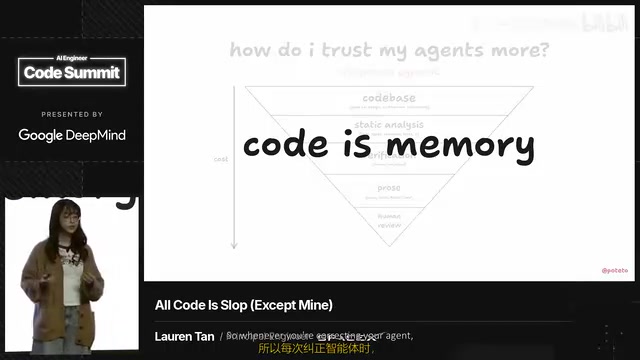
How the Grok Team Hits 11,000 PRs a Month: Replacing Manual Review with Deterministic Constraints
Inside the Grok team's formula for 11,000 monthly PRs at a 0.5% rollback rate: Lint rules, type systems, and formal verification as deterministic constraints.

Is Spacetime Made of Something? Six Possible Answers from Quantum Gravity
Is spacetime made of something? This article surveys the main candidate answers from quantum gravity: spacetime may be fundamental, geometry quantized, causal relations prior to distance, spacetime an emergent state of matter, geometry derived from string theory, or no spacetime atoms needed at all.
After GTA 6, Where Does the Game Industry Go?
The Vergecast talks with Game File's Stephen Totilo about GTA 6's impact on gaming: billion-dollar budgets, console market struggles, cloud gaming tests, and the future of microtransactions—and whether it marks the end of an era.