The Complete Guide to agent-browser: The Ultimate Tool for AI-Powered Browser Automation

agent-browser lets AI autonomously control browsers via snapshots and REF-based element targeting.
agent-browser from Vercel Labs is a CLI tool that enables AI agents like Claude Code to autonomously operate web browsers through its innovative REF mechanism—numbering interactive elements in page snapshots so AI can precisely click, fill, and scrape without fragile CSS selectors. Built on Rust CLI + Node.js Daemon architecture with direct Chrome CDP connection, it offers parallel sessions, login state persistence, and command chaining for 10x efficiency gains.
Repeatedly filling forms, testing login pages over and over, clicking through the same web workflows every day—these mechanical browser tasks have consumed countless hours from developers and testers. Now, agent-browser, an official browser automation tool from Vercel Labs, aims to change this entirely: letting Claude Code open web pages, click, fill forms, take screenshots, and collect data on its own. According to community testing, repetitive web operations see a 10x efficiency improvement with an automation success rate of 92%.
Why Web Automation Has Been So Painful
Before diving into agent-browser, it's worth clarifying the three longstanding pain points of web automation.
First: repetitive labor. Filling forms, collecting data, running regression tests—these purely mechanical actions repeat daily, eating up entire afternoons with zero technical value yet remaining unavoidable.
Second: the fragility of CSS selectors. Traditional automation scripts typically rely on selectors like #main > div:nth-child(3) > a. The moment the page DOM structure changes even slightly, selectors break, and maintaining them becomes more painful than rewriting from scratch.
To understand why CSS selectors are so fragile: they're the standard syntax for locating DOM elements in front-end development, and traditional automation tools (Selenium, Playwright) rely heavily on them to identify buttons, input fields, and other page elements. The problem is that modern front-end frameworks (React, Vue, Next.js) auto-generate hashed class names during compilation (like .css-1a2b3c), and component hierarchies change frequently across iterations. A seemingly minor UI refactor—such as wrapping a button in an extra div—can completely break path-based selectors. While conventions like data-testid exist to mitigate this, they require developers to actively add attributes in source code, increasing maintenance burden, and are completely ineffective for third-party websites or enterprise applications without source code access.
Third: the targeting mismatch of traditional tools. Tools like Playwright and Puppeteer are fundamentally programming APIs designed for developers—AI can't read or write them fluently, and they're easily detected by anti-scraping mechanisms. More practically, many enterprise internal applications simply don't have open APIs, making the browser the only operational entry point.
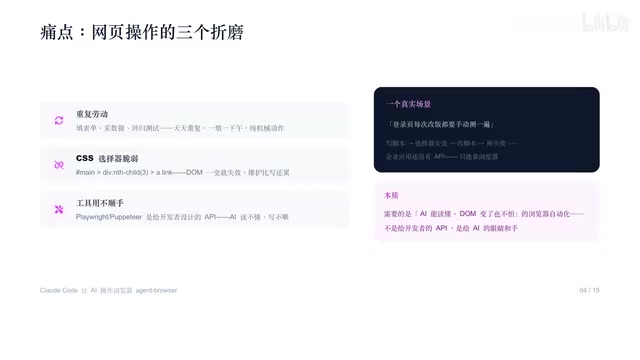
In other words, what we truly need isn't an API for developers, but eyes and hands for AI—browser automation capabilities that can read pages and remain unfazed when the DOM changes.
Meet agent-browser: Browser Control Built for AI Agents
Official Positioning and Community Traction
agent-browser is an official project from Vercel Labs. Its positioning in one sentence: a browser automation CLI designed for AI agents. The core philosophy is clear—snapshots let AI see the page, REFs let AI precisely target elements.
In terms of community traction, the project has earned approximately 8,900 stars and 461 forks on GitHub, with 41,900 installs in the skill marketplace, making it one of the most popular skills in the browser automation category.
Architecture Design: Rust CLI + Node.js Daemon
It adopts a Rust CLI + Node.js Daemon architecture where the browser stays open between commands, supporting chain calls for exceptional speed. The complete workflow is: Claude Code → agent-browser CLI → Daemon → Chrome CDP (direct WebSocket connection), with no third-party NPM library dependencies and built-in network idle detection.
The engineering logic behind this hybrid architecture is deliberate. The Rust-written CLI layer handles command parsing and process management—Rust's zero-cost abstractions and lack of garbage collection make CLI startup extremely fast (typically in milliseconds), which is critical for a tool frequently invoked by AI agents. Every time Claude Code initiates a browser operation, the CLI needs near-instant response. The Node.js Daemon runs as a persistent background process maintaining the WebSocket connection to Chrome—Node.js's event-driven model is naturally suited for handling WebSocket's asynchronous message streams. The key advantage of the Daemon mode is that the browser instance doesn't close when a single command finishes; multiple commands share the same browser context, which is the underlying reason command chains achieve ultra-fast sequential execution.
Chrome CDP (Chrome DevTools Protocol) is a low-level debugging protocol exposed by Chrome that allows external programs to control virtually all browser behaviors via WebSocket: page navigation, DOM manipulation, network interception, JavaScript execution, performance analysis, and more. Both Puppeteer and Playwright are built on CDP (or similar protocols) under the hood. agent-browser connecting directly via CDP WebSocket means it bypasses intermediate abstraction layers, achieving minimum latency and maximum control granularity. CDP's connect mode is particularly powerful—it can take over any already-open Chrome instance (including a user's everyday browser), meaning it can reuse existing login states, extensions, and local storage without creating a clean browser environment from scratch.
The built-in Network Idle Detection is a critical signal for determining whether a page has finished loading. Modern single-page applications (SPAs) often don't load all at once: after the initial HTML loads, dozens of API requests, lazy-loaded images, and WebSocket connections may still fire. Traditional page load events only capture when the initial document finishes loading, while networkidle waits until no new network requests have been sent for a period before considering the page ready. agent-browser having this built in means AI doesn't need to manually add sleep or wait logic—the tool intelligently determines when the page is truly ready for interaction, dramatically reducing failure rates caused by premature interaction.
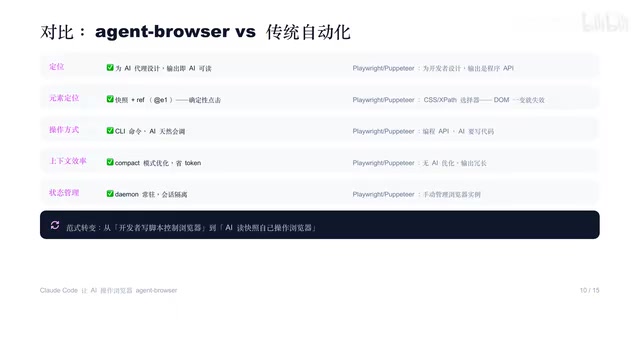
The most fundamental difference from traditional tools: Playwright-type tools hand developer tools to AI, while agent-browser rebuilds an entire browser control system for AI, outputting structured information that AI can directly understand.
Core Mechanism: How REF Element References Work
The soul of agent-browser lies in the REF mechanism, working in four steps:
- Open — Navigate to the target webpage
- Snapshot — Capture all interactive elements with REF numbers
- Operate by REF — Click or fill based on the assigned numbers
- Re-snapshot — Take a new snapshot after page changes
The essence of REF is numbering every interactive element (e.g., e1, e2, e3). AI reads the snapshot and selects the corresponding number to perform operations. For example, opening a form page, the snapshot returns e1 as the email input, e2 as the password field, e3 as the submit button—then a single command chain completes filling the email, filling the password, and clicking submit.
This REF mechanism differs fundamentally from traditional element targeting. Traditional automation tool element targeting is essentially a "query" operation—you provide a selector expression, the tool searches the current DOM tree for matches, operates if found, and errors if not. This process is highly time-sensitive: if the page hasn't finished loading, animations are still running, or Ajax requests haven't returned, elements might temporarily not exist. The REF mechanism is a "snapshot-binding" paradigm: at a specific point in time, it performs a complete scan of the page and generates a stable number mapping for all interactive elements. AI makes decisions based on this static mapping table and executes operations all at once. This "observe first, then act" pattern naturally avoids timing issues and makes AI reasoning more reliable—it faces a definitive set of information rather than a continuously changing DOM tree.
Compared to writing fragile CSS selectors in the past, now you simply say "click element e3"—the action is definitive and won't break due to minor DOM structure adjustments.
Four Core Capabilities of agent-browser and Installation Guide
Four Core Capabilities Explained
Parallel Sessions: Using the --session parameter, you can open multiple independent sessions, each with its own Cookies and Storage—perfect for multi-account parallel testing without interference.
CDP Mode: Using connect, you can take over existing browser instances, and even control Electron applications and WebViews.
Login State Persistence: Use state save to save login state, then load it next time for direct reuse—log in once, skip login afterwards.
Command Chains: String multiple operations together with connectors, compressing seven or more round-trips into two or three—saving Tokens while doubling speed. There's also a visual mode easter egg—snapshots with annotation parameters display numbered labels directly on screenshots, letting AI operate by looking at images.
The significance of command chains saving Tokens deserves elaboration: in AI agent workflows, every interaction with a large language model consumes Tokens (the text units processed by the model), and Tokens directly correspond to API call costs and response latency. Using Claude as an example, the cost per million input Tokens is in the several-dollar range. If every browser operation requires a complete LLM round-trip (send page state → model reasoning → return instructions → execute → send new state again), a 7-step form-filling workflow would need 7 round-trips, potentially consuming thousands of Tokens. Command chains compress multi-step operations into a single expression—AI only needs one reasoning pass to output the complete operation sequence, reducing Token consumption and latency to a third or less of the original.
Two-Step Installation and Configuration
Installation is straightforward. Step one: globally install the agent-browser CLI via npm. Step two: create the Claude Code skill directory and copy SKILL.md into it. After installation, new sessions automatically load the skill—you simply say "test whether the login page works properly" and AI opens the browser and gets to work.
If the browser engine is missing on first run, execute agent-browser install to install the built-in Chromium.
Three Real-World Application Scenarios
Scenario 1 · Automated Login Testing: You say "test the login page," AI opens the page, takes a snapshot to identify email/password/login button, fills in test credentials, clicks login, waits for the redirect to Dashboard, and finally reports "login successful, no console errors."
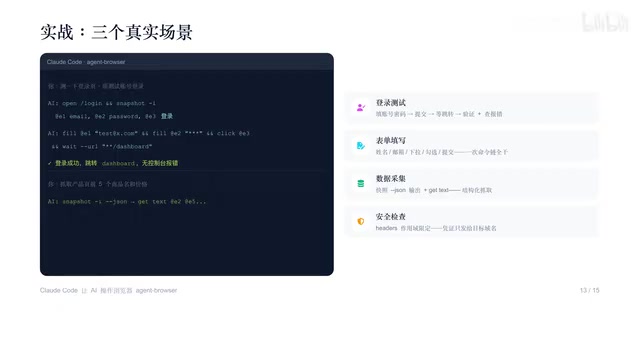
Scenario 2 · Batch Form Filling: Name, email, dropdown, checkbox, submit—a single command chain handles everything without manual intervention.
Scenario 3 · Structured Data Collection: Using snapshots combined with JSON output, then extracting element text by REF for structured scraping. For example, scraping the names and prices of the first five products on a product page.
There's also a security detail worth noting: Headers can be scoped by domain, ensuring credentials are only sent to the target domain and never leaked to other sites.
Four Best Practices for Using agent-browser
To use agent-browser effectively, the official team provides four golden rules:
- Prioritize chain calls: If operations can be strung together with connectors, chain them—reduce round-trips, save Tokens.
- Snapshot on demand: Only re-snapshot when the page actually changes; don't snapshot at every step.
- Reuse login state: Save once with
state save, skip login for all subsequent operations. - Test in isolated environments: Real browser operations should be validated in isolated environments first before connecting to production workflows.
Conclusion: A Paradigm Shift from Writing Scripts to AI-Driven Operation
agent-browser represents a paradigm shift—from developers writing scripts to control browsers, to AI reading snapshots and operating browsers autonomously. For enterprise applications without APIs, the browser is the only entry point, and this tool enables AI to truly walk through that door.
The profound significance of this shift lies in the following: past automation was "determined at coding time"—developers had to anticipate all possible page states and exceptions when writing scripts. AI agent-based automation is "decided at runtime"—AI makes judgments at each step based on the actual current page state, possessing the ability to handle unforeseen situations. This means automation scripts are no longer rigid flowcharts but adaptive intelligent behaviors.
If you take away just one thing today, let it be this: anything you can click, fill, or scrape in a browser can be delegated to AI. Handing off your most annoying repetitive web task might just be the first step toward a major efficiency boost.
Key Takeaways
Related articles

Transitioning to AI Agent Development: A Complete Three-Stage Learning Path for Programmers
Why do programmers keep failing at AI Agent development? This guide breaks down a 3-stage learning path: ReAct & Tool Calling fundamentals, LangChain engineering, and production-grade project delivery.

Getting Started with Agent Skills: A Complete Guide from Prompts to Intelligent Skills
Deep dive into AI Agent Skills' four components (skill.md, references, scripts, assets), explaining how Skills differ from prompts and how to build reusable intelligent skill systems.

Codex Beginner's Guide: Installation, Configuration & Connecting Chinese LLM APIs
Complete guide to installing OpenAI Codex, how it differs from Claude Code, and how to connect Chinese LLMs like DeepSeek via API keys with full setup steps and limitations.