Codex Beginner's Guide: Installation, Configuration & Connecting Chinese LLM APIs

A beginner's guide to installing Codex and connecting Chinese LLM APIs like DeepSeek as an alternative to OpenAI.
This guide walks beginners through what Codex is (an autonomous AI agent vs ChatGPT's conversational approach), how it compares to Claude Code, two installation methods, and a complete walkthrough for connecting Chinese LLMs like DeepSeek via API keys using the Codex++ management tool. It covers key limitations including text-only processing and slower response times when using third-party APIs.
What Is Codex: From "Recipe Master" to "Head Chef"
If you're already used to conversational AI like ChatGPT, Codex will completely redefine how you think about AI tools. The fundamental difference between the two can be understood through a "braised pork belly" analogy.
When you tell ChatGPT "I want braised pork belly," it thoroughly explains: how to cut the meat, how to blanch it, how to caramelize the sugar, when to add soy sauce—every step laid out clearly, and then it's "done." Buying the meat, cutting it, turning on the stove, watching the pot—all of that is on you. If you mess up the heat and burn it, all it says is "be more careful next time."
Codex is completely different. You say "make me braised pork belly," and it picks up the knife, cuts the meat, turns on the stove, watches the pot, and presents you with the finished dish. In one sentence: ChatGPT is a recipe master that talks but doesn't act; Codex is a head chef that acts without talking.
In real-world work scenarios, Codex has evolved into a full-capability AI assistant—it can write code, create presentations, process Excel files, control browsers, and even generate images and videos. You give it requirements, and it thinks, plans, executes, and delivers the finished product.
From a technical perspective, Codex represents an important step in AI's evolution from "conversational assistant" to "autonomous agent (AI Agent)." An AI Agent is an intelligent entity that can perceive its environment, make autonomous decisions, and execute multi-step tasks. It doesn't just understand instructions—it can decompose complex tasks into subtasks, invoke tools, handle exceptions, and ultimately deliver results. This is fundamentally different from traditional LLM conversation modes, which only generate text responses. An Agent possesses a complete "plan-execute-verify" closed loop. Codex is the productization of this concept.
How Codex Differs from Claude Code
Many people confuse Codex with Claude Code. They do share quite a few similarities: both fundamentally understand natural language, can autonomously browse files, manually rewrite code, undo mistakes, and remember your usage habits—essentially "intelligent workhorses."
But their working modes differ significantly:
- Codex is more like a colleague sitting across from you who "puts their head down and gets things done." You assign the task, they complete it and submit it for your remote review—you don't need to monitor the entire process. It uses an asynchronous task queue model, where tasks are submitted and executed in a cloud sandbox, putting less network pressure on the user side.
- Claude Code is more like a colleague sitting right next to you—you need to watch the screen while directing them, and they modify code while chatting with you along the way. Claude Code is developed by Anthropic and uses a "terminal interaction" mode—running directly in the developer's command-line environment, reading project files in real-time, executing commands, and outputting results. The advantage of this mode is low latency and high transparency, but the tradeoff is continuous consumption of local resources and network connections.
There are also two key differences: Codex is cheaper price-wise; stability-wise, Codex doesn't have rate-limiting, account bans, or intelligence degradation issues, while Claude Code is more prone to triggering account bans. Claude Code's rate limiting and account ban issues stem from Anthropic's strict limits on API call frequency—when users send large volumes of requests in a short time, the system triggers protective mechanisms. These two points are precisely the experience dimensions that long-term users care most about.
Two Ways to Install Codex
There are currently two main paths to install Codex, both very straightforward.
Method 1: Download from the OpenAI Official Website
After visiting the OpenAI website, you'll see two software icons—ChatGPT and Codex. A small detail: these two programs have now been integrated together—Codex is essentially a built-in application within ChatGPT. So the installer icon after downloading shows ChatGPT. Double-click to run, wait patiently, and installation completes—no different from installing any other regular software.
Method 2: Install via Microsoft Store
Click the Windows icon in the bottom-left corner of your computer to enter the Microsoft Store, search for "Codex," and install the first ChatGPT application. After installation shows "Installed," search for ChatGPT in the search box to open it.
The Login Challenge & Chinese LLM Integration Solution
After opening Codex, you'll reach the login screen. The official options are: log in with a ChatGPT account, or log in with an OpenAI API key.
The problem is—logging in with a ChatGPT account requires a VPN, which immediately blocks a large number of users in China; and obtaining an OpenAI API key is a cumbersome process for most people. Fortunately, there's a third path: use a Chinese LLM's API key for integration, such as DeepSeek, Kimi, etc.
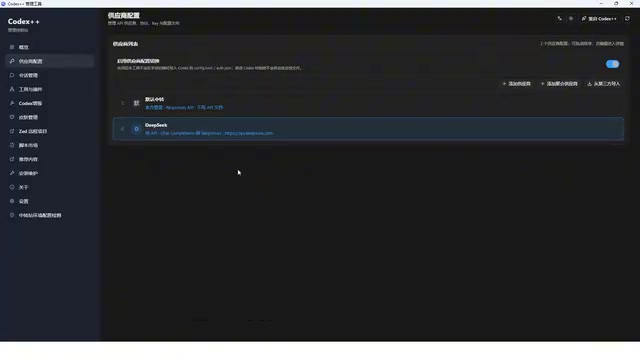
To achieve this, you need a management tool (commonly called the "Codex++ Management Tool"). Download the installation package for your system (Windows or Mac) from the GitHub Release page. During installation, make sure the path does not contain any Chinese characters. After installation, two icons will appear: one is the management tool (for connecting LLM providers), and the other is the Codex launcher.
Using DeepSeek as an Example: Complete API Integration Configuration
After entering the management tool, select "Provider Configuration." Here you need to understand a core concept: Codex is just a tool shell—it needs to connect to various LLMs to function. What we need to do is "feed" it a Chinese LLM.
Here are the specific configuration steps:
- Add a Provider: Give it an easily identifiable name (e.g., "DeepSeek 2.0"), and select "Store API" as the integration mode.
- Fill in the Base URL: This is the fixed public prefix URL for the interface, equivalent to the server's "front door address." You need to copy it from DeepSeek's official website under "API Open Platform → Interface Documentation." From a technical standpoint, the Base URL is the base endpoint address in RESTful API architecture—all API requests use it as a prefix. For example, DeepSeek's Base URL is typically
https://api.deepseek.com/v1, and different paths (like/chat/completions) are appended to call different functions. The Codex++ management tool's role is to centrally manage these configuration details and automatically route requests to the correct model provider when Codex makes a request—this "middleware proxy" design pattern is common in software engineering, decoupling the binding between front-end tools and back-end services. - Top up your balance: Recharge on DeepSeek's usage information page—10 yuan (about $1.50) will last a long time (the balance is essentially a Token consumption quota). Here's an explanation of Tokens: a Token is the basic unit of measurement for how LLMs process text. In Chinese, one character typically corresponds to 1-2 Tokens; in English, one word is about 1-4 Tokens. Both input and output of every conversation consume Tokens, so topping up your balance is essentially purchasing a certain amount of Token processing quota. DeepSeek's pricing is much lower than OpenAI's (typically 10-50x cheaper), which is one of the core competitive advantages of Chinese LLMs.
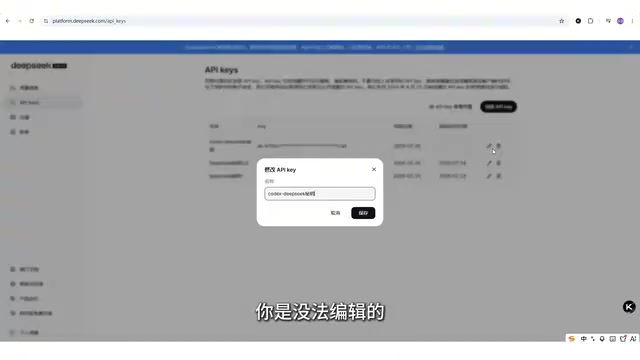
- Create and enter your API key: Click "Create" on DeepSeek's API key interface. Special reminder: the key is only displayed in full once—copy and save it immediately. Afterward, you can only modify the name but cannot view the full key again; if lost, you can only create a new one. An API key is essentially an encrypted string used to verify the caller's identity and handle billing, similar to your bank card number plus password—anyone who obtains the key can consume your balance under your identity, so keep it safe and never share it publicly.
After entering the key, you'll also need to select the protocol mode: if you need to handle complex engineering, have AI run autonomously, or read large amounts of code files, choose the first option; if it's just daily coding or regular conversational debugging, the second option will suffice. Finally, "Fetch from upstream" to get the model list—DeepSeek will return the V4 Flash and V4 Pro models (where V4 Pro is currently DeepSeek's most powerful model). Keep these two, delete the extras, then click save.
Usage Testing & Key Limitations
After configuration, select the DeepSeek provider in the management tool, click "Use," restart Codex, and it's ready to go. The overall interface layout is basically identical to ChatGPT.
In actual testing, response speed is on the slower side, mainly for two reasons: first, no VPN is being used; second, connecting through a third-party API introduces additional network latency. Using a native ChatGPT account with a direct connection would be much faster.
There's one critical limitation you must remember: DeepSeek's LLM integrated with Codex does not support multimodality. This means it can only process pure text content and cannot recognize images, audio, video, or other non-text files. In testing, asking it to generate an image resulted in a 7-8 minute wait followed by the response "image generation tools are not available in the current environment"; uploading images for processing also directly returns errors.
Explaining this limitation technically: Multimodal refers to a model's ability to simultaneously process and understand multiple types of information input, including text, images, audio, video, etc. Text-only models (like DeepSeek V4) only accept text Tokens as input, and their training data and model architecture are designed around language understanding and generation. Multimodal models (like GPT-4o, GPT-5) additionally integrate Vision Encoders and audio processing modules that can convert image pixels and audio waveforms into vector representations the model can understand. This architectural difference means multimodal models have larger parameter counts and higher inference costs, but also much broader application scenarios—which explains why GPT accounts supporting multimodality require paid subscriptions.
If you have a ChatGPT membership account, you can use the multimodal GPT-5 series models—which not only generate and recognize images, support video uploads, and voice dictation, but also respond much faster.
Summary & Next Steps
For zero-experience users, connecting through a Chinese LLM API is the fastest and most economical way to experience Codex. But you need to clearly understand its boundaries: Free or low-cost solutions (like DeepSeek) excel in stability and affordability, but are limited to text-only processing and slower response speeds; multimodal capabilities and high-speed experiences still depend on native GPT accounts.
Additionally, this configuration only connects one model—DeepSeek. If you want to use Kimi or other Chinese LLMs, you'll need to add them one by one using the same API key method. More convenient multi-model management tools (like CC Switch) are available for advanced use.
For those who want to truly put AI to work in their actual jobs, upgrading from "knowing how to use a recipe master" to "knowing how to direct a head chef" makes Codex worth trying. It represents a paradigm shift in AI tools from "passive response" to "proactive execution"—and this trend will only accelerate in 2025. The future of AI tool competition won't be about who "talks better," but who "does better."
Related articles

Archify: The Viral Open-Source Tool That Lets AI Agents Generate Verifiable Architecture Diagrams
archify is a viral GitHub project that works as an AI Agent Skill to auto-generate verifiable architecture, sequence, and data-flow diagrams as self-contained HTML files with animations.

Jerk Oracle Retiming: Solving Fast-Motion Smearing and Ghosting Artifacts in MiniMax H3
Deep dive into why MiniMax H3's single token spanning 4 frames causes fast-motion smearing, and how the open-source Jerk Oracle retiming solution eliminates artifacts while preserving choreography.

AI Slop Is Drowning Tech Communities: Real Data from a Reddit Moderator
A Reddit MLOps moderator reveals alarming AI spam data: 45% of posts deleted, page views declining while post volume surges. Analysis of AI slop patterns, detection methods, and mandatory AI disclosure policies.