The Complete Guide to Building Dify Workflows: A Hands-On Guide to No-Code AI Applications

A complete guide to deploying Dify 1.8.0 and building no-code AI workflows for enterprise use.
This guide covers Dify's five application types (Chat Assistant, Agent, Workflow, Chatflow), step-by-step Docker deployment for version 1.8.0, and how to build AI workflows without code. It compares Dify against Coze, RagFlow, and N8N, highlighting Dify's advantages in feature completeness, self-hosted deployment for data privacy, and ease of use. A progressive learning path from basics to advanced RAG and tool integration is included.
What Is Dify? A No-Code AI Application Building Platform
Dify is an AI application building platform designed for both everyday users and developers. Its standout feature is that you can quickly build a wide variety of AI applications without writing a single line of code. Compared to tools like Coze that many people may have used before, Dify offers a richer set of application types.
From a technical architecture perspective, Dify falls under the category of LLMOps (Large Language Model Operations) platforms. It abstracts complex AI development processes—such as prompt engineering, model management, data processing, and application orchestration—into a visual interface, dramatically lowering the barrier to AI application development. Users don't need to understand the underlying API call logic or model inference mechanisms; they can build applications simply through drag-and-drop and configuration.
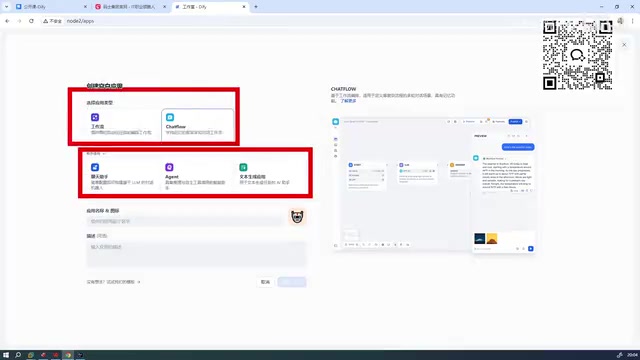
Dify currently supports five application types: the first three are more beginner-friendly (including Chat Assistant, Agent, etc.), while the latter two are more advanced—Workflow and Chatflow.
Among these, Agent is an important concept in the AI field, referring to an AI system capable of autonomously perceiving its environment, making decisions, and taking actions. Unlike simple Q&A-style AI, an Agent has tool-calling capabilities—it can independently determine which tools to use (such as search engines, calculators, database queries, etc.) based on user needs, decide the execution order, and integrate the results of multi-step operations before returning them to the user. This "think-act-observe" loop mechanism enables Agents to handle tasks far more complex than single-turn conversations.
Although Workflow and Chatflow essentially belong to the same broad category, they differ significantly in interaction style and use cases. Workflow uses a DAG (Directed Acyclic Graph) architecture, where data flows unidirectionally from the start node to the end node, making it ideal for automated tasks that don't require user intervention mid-process, such as batch document summarization, data cleaning, and scheduled report generation. Chatflow, on the other hand, adds conversation memory and user interaction nodes on top of the workflow, allowing the process to pause and wait for user input during execution. This makes it suitable for building multi-turn chatbots, customer service systems, and other scenarios requiring ongoing interaction. Both share the same node component library but differ fundamentally in trigger mechanisms and state management.
Dify's Position Among Domestic AI Tools
Recommended Ranking of Enterprise-Grade AI Tools
Among the current mainstream AI application building tools—including Coze, Dify, RagFlow, N8N, and others—the recommended ranking from an enterprise use perspective is as follows:
- Tier 1: Dify — Most comprehensive features, highest user-friendliness
- Tier 2: Coze — Also offers strong ease of use
- RagFlow, N8N, and similar tools can be deprioritized for now
Here's a brief introduction to the latter two: RagFlow is an open-source tool focused on RAG (Retrieval-Augmented Generation) scenarios, with unique strengths in document parsing and knowledge base construction, but its application types are relatively limited. N8N is a general-purpose workflow automation platform that, while powerful, isn't specifically designed for AI applications. It has a steeper learning curve and is less convenient than Dify and Coze when it comes to Chinese-language ecosystem support and domestic model integration.
The core reason for this ranking is that Dify and Coze, as domestic platforms, clearly excel in feature completeness, supporting a wider range of capabilities. They also achieve the best levels of ease of use and user-friendliness among similar products.
Key Differences Between Dify and Coze
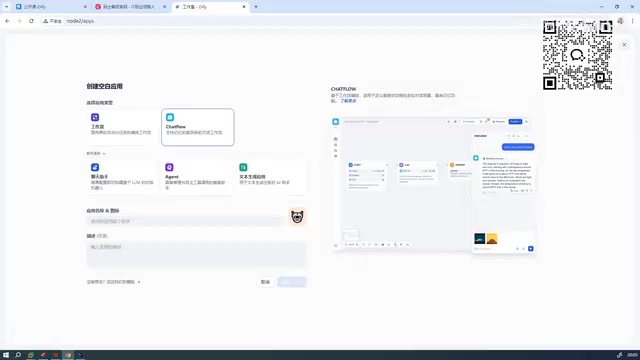
Coze primarily supports two types of AI applications: standard AI apps and AI apps with Email functionality. Dify supports five application types, offering broader coverage. For enterprise-level use cases, Dify's workflow capabilities and self-hosted deployment (via Docker) give it inherent advantages in data privacy protection and custom development.
Self-hosted deployment means enterprises can run the entire AI platform on their own servers or private cloud, ensuring that all data (including user conversation logs, knowledge base documents, model call logs, etc.) never leaves the enterprise's network boundary. This is critical for industries with stringent data compliance requirements, such as finance, healthcare, and legal. In contrast, while SaaS mode is convenient to use, data must be transmitted to third-party servers, posing potential data leakage and compliance risks. Dify's open-source nature also allows enterprises to audit the source code and perform secondary development, further enhancing security and controllability.
Dify 1.8.0 Deployment in Practice
Environment Preparation and Installation Steps
This tutorial is based on Dify's latest version 1.8.0, which has significantly simplified the deployment process compared to older versions. Here are the complete Docker deployment steps:
Before we begin, a brief technical background on Docker deployment: Docker is a containerization technology that packages an application and all its dependencies into a standardized unit, ensuring consistent execution across any environment. Docker Compose is Docker's orchestration tool, which uses a single YAML configuration file to define the relationships and startup order among multiple container services. As a complex platform, Dify typically includes multiple service components such as a web frontend, API backend, PostgreSQL database, Redis cache, Weaviate/Qdrant vector database, and Nginx reverse proxy. Docker Compose can coordinate the startup and communication of all these components with a single command, eliminating the tedious process of configuring each one manually.
Step 1: Extract the Installation Package
cd dify
# Extract the Dify installation package
Step 2: Configure Environment Variables
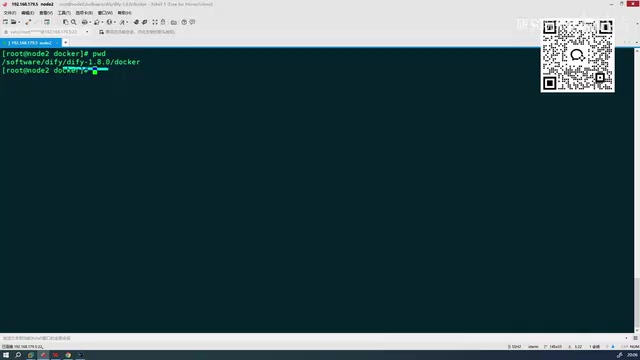
Navigate to Dify's Docker directory, find the .env.env file, and rename it to .env. This file contains all the required environment variable configurations, including database connection details, secret keys, storage paths, and other critical parameters. Older versions required additional manual environment configuration, but version 1.8.0 has eliminated these steps, essentially making it work out of the box.
Step 3: Start the Docker Containers
docker compose up -d
A single command launches the entire Dify platform. The -d flag runs the containers in detached daemon mode, so the terminal won't be occupied after startup. If you need to view startup logs for troubleshooting, use docker compose logs -f to follow them in real time.
Image Size and Download Speed
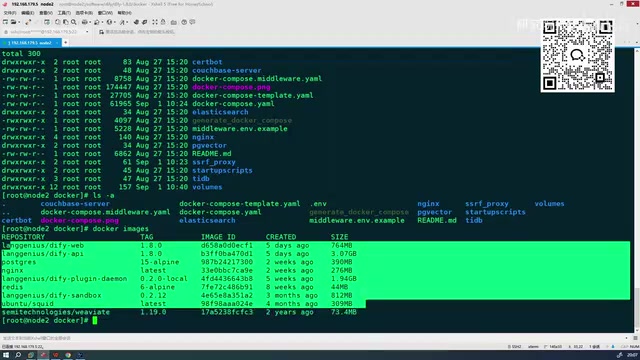
The Docker images for version 1.8.0 total approximately 5–6 GB, so 10 GB of disk space is more than sufficient. Compared to previous versions, the new version's image download speed has improved significantly, allowing you to complete the full download and start services in a short time. More importantly, many bugs from previous versions have been fixed in the new release, resulting in noticeably improved overall stability.
Note that if Docker image pulls are slow in a domestic (Chinese) network environment, it's recommended to configure a domestic mirror accelerator (such as Alibaba Cloud Container Registry or USTC Mirror), or deploy using offline image packages.
Login and Admin Interface Overview
Once startup is complete, access the Dify admin interface by navigating to the deployment node's address in your browser (the default port is typically 80 or a custom port). On first access, you'll need to set up an admin account and password. The interface includes the following core modules:
- Explore: Browse and discover AI applications shared by the community
- Studio: Create and manage your own AI applications (the core functional area)
- Knowledge Base: Manage documents and data needed for RAG
- Tools: Integrate and manage external tools and APIs
The Knowledge Base module provides RAG (Retrieval-Augmented Generation) capabilities. RAG is one of the most important technical architectures in enterprise AI applications today. Its core approach is: before the large language model generates an answer, it first retrieves document fragments relevant to the user's question from an external knowledge base, then injects these fragments as context into the model's prompt, enabling the model to generate more accurate and reliable answers based on domain-specific knowledge. RAG effectively addresses the "hallucination" problem and knowledge timeliness issues of large models, and is the mainstream approach for enterprises to combine private data with AI capabilities. In Dify, you can upload documents in various formats including PDF, Word, and web pages, and the platform automatically handles text splitting, vectorization, and index construction.
Studio is the most essential module—all AI application creation starts here. Click "Create Blank App" to begin building your first AI application.
Notes on Using the New Version
Although version 1.8.0 performs excellently overall, there are still some minor issues to be aware of in actual use. The new version differs from previous versions in certain details, which may become pitfalls for beginners. Common issues include: compatibility changes with certain plugins, adjustments to environment variable naming, and version upgrades to some API interfaces.
This is precisely why following tutorials based on the latest version is so important—many online tutorials are based on older versions, and their configuration methods and operational procedures may be outdated. Copying them directly can easily lead to problems. When encountering issues, it's recommended to first check the Issues section of Dify's official GitHub repository and the official documentation. The community is quite active, and solutions to most common problems can be found there.
Dify Learning Path and Summary
With its no-code operation, multi-application type support, and self-hosted deployment capabilities, Dify has become the most worthwhile AI application building platform to learn in China today. For beginners, the following progressive learning path is recommended:
- Master the basics first: Start with beginner-friendly application types like Chat Assistant and Agent to understand the fundamental principles of Prompt Engineering—that is, how to guide large models to produce high-quality responses through carefully designed instructions
- Then dive into workflows: Understand the differences between Workflow and Chatflow and their respective use cases, and master flow control logic such as conditional branching, variable passing, and loops
- Integrate knowledge bases: Learn RAG-related knowledge base configuration, including document splitting strategies (choosing chunk size), vector model selection, retrieval and recall strategy tuning, and more, to build AI applications with domain knowledge
- Tool integration: Master methods for connecting external APIs and tools, such as HTTP request nodes, custom code nodes, and third-party service integrations, to expand your application's capabilities
Mastering a platform-level tool like Dify enables you to quickly bring AI capabilities into real business scenarios without writing a single line of code. Whether for personal projects or enterprise needs, Dify provides complete support from prototype validation to production deployment. As large model technology continues to evolve, the ability to use AI application orchestration platforms like this will become an important competitive advantage for both technical practitioners and business professionals.
Related articles

Vibe Coding Full-Stack in Practice: AI Programming from Beginner to Enterprise Deployment
From Cursor to Claude Code, this Bilibili AI programming course uses four progressive projects to cover full-stack development, open-source secondary development, and team collaboration. The article analyzes the shock to frontend roles, the efficiency shift from 50 people to 5, and the methodology required for enterprise-grade projects.

David Blaine's Global Quest for Real Magic: From South Africa to Japan and India
David Blaine travels to South Africa, Japan, and India in his Do Not Attempt special, documenting Spinning drivers, black mamba rescuers, iaijutsu masters, and ascetics—exploring the boundary between magic and real human极限 challenges.

Is a Touchscreen MacBook Coming? Vergecast Reveals Apple Executive's Response
Vergecast podcast reveals a conversation between a reporter and Apple executive John Ternus about a touchscreen MacBook and Apple Pencil support. Ternus says iPad is the best device for a stylus, while the reporter bets MacBook will eventually support Apple Pencil.