The Complete Guide to Mistral Wire: Free Open-Source Terminal AI Coding Assistant & Best Claude Code Alternative

Mistral Wire: A free open-source terminal AI coding assistant challenging Claude Code
Mistral's team has launched Mistral Wire, a free open-source terminal-native AI coding assistant featuring four core capabilities: custom sub-agents, parallel async tasks, multi-option confirmation, and a slash command skills system. Powered by multi-model coordination with support for GitHub, Jira, and other third-party integrations, it matches or exceeds the $200/month Claude Code in feature completeness—ideal for budget-conscious developers and teams needing deep customization.
The Free Era of AI Coding Assistants Has Arrived
Claude Code's power is undeniable, but the subscription cost of up to $200/month puts it out of reach for many developers. The current AI coding assistant market shows a clear tiered structure: at the top sits Anthropic's Claude Code (Max subscription ~$200/month) and Cursor Pro (starting at $20/month), dominating the premium market with powerful model capabilities and mature product experiences; the middle tier consists of various API-based pay-per-use tools; and the free open-source tier includes projects like OpenCode and Aider. As the AI-assisted coding space continues to heat up, more and more developers are seeking affordable or even free alternatives.
Recently, the Mistral team launched Mistral Wire, which has generated significant attention. It's a terminal-native AI coding assistant that's not only fully open-source and partially free, but also equipped with powerful agentic capabilities and code generation. Can it truly replace Claude Code and OpenCode? This article provides an in-depth analysis across three dimensions: features, practical experience, and usage methods.
What Is Mistral Wire?
Core Positioning
Mistral Wire is a terminal-native AI coding assistant, positioned similarly to Claude Code and OpenCode. Terminal-native means the tool runs directly in the command-line interface, fundamentally different from traditional IDE plugin-based AI assistants (like GitHub Copilot). The core philosophy of such tools is to let developers complete the entire workflow from code writing to deployment directly in the terminal without switching between multiple applications. This paradigm emerged from the preference many senior developers have for terminal workflows—terminal operations are scriptable, automatable, and composable, making them naturally suited for integration with CI/CD pipelines. Claude Code first validated market demand for this product form in early 2025, followed quickly by open-source alternatives like OpenCode, forming an emerging niche in AI coding tools.
Under the hood, it's powered by multiple Mistral models working in coordination—an advanced architectural pattern in current AI application design. Unlike the single large model approach that handles all tasks, multi-model coordination lets each model focus on what it does best: one model handles code generation and deployment, fine-tuned on extensive programming corpora to understand programming semantics and generate high-quality code; Corel handles context information for large projects, optimized specifically for long-context processing to maintain understanding of overall project structure when analyzing large codebases; Codastro Embed serves as the embedding model, converting code snippets into high-dimensional vector representations to support semantic similarity-based code retrieval rather than simple keyword matching, making code navigation and search more intelligent. This architectural design is similar to the microservices philosophy—decomposing complex tasks to specialized components, coordinating their collaboration through an orchestration layer, ultimately achieving results that surpass what any single model could deliver.
Core Feature Overview
- Async task support: Parallel processing of multiple tasks without blocking the development workflow
- Third-party integrations: Support for GitHub, Jira, Slack, and Jenkins
- Custom agent workflows: Create sub-agents to handle specific tasks
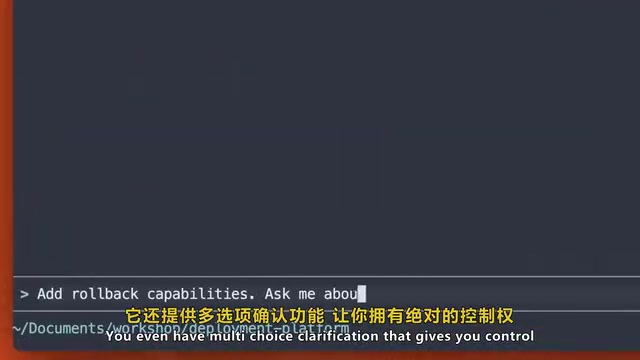
- Multi-option confirmation mechanism: Provides multiple options to choose from when uncertain
- Slash command system: One-click invocation of preset workflows
Four Killer Features
Custom Sub-Agents: Let AI Specialize
This is one of Mistral Wire's most differentiating capabilities. The sub-agent concept originates from Multi-Agent System (MAS) theory, an important research direction in artificial intelligence. You can build specialized sub-agents in Wire to handle different tasks like script deployment, PR reviews, and test generation. Sub-agents inherit project context while focusing on specific business domains.
Creation is straightforward—simply tell Wire what kind of agent you need, such as "create a sub-agent to handle code reviews," and it will generate one automatically. This system supports Composable Automation, allowing you to chain multiple specialized agents to execute complex tasks, even having them collaborate with each other. For example, a PR review agent can first invoke a code style checking agent, then a security vulnerability scanning agent, and finally a summarization agent to generate the review report. This design pattern aligns closely with the Unix philosophy of "do one thing well" and matches the current industry trend toward Agentic AI architecture—2025 is widely considered the pivotal year for AI Agents moving from concept to production deployment.
Multi-Option Confirmation: No More Blind Guessing
When Wire is uncertain about the next step, it doesn't guess blindly—instead, it provides multiple options for you to choose the one that best matches your intent. This design ensures automation safety and makes results more precise and controllable. This is particularly important for code operations in production environments—in highly automated systems, a single wrong decision can trigger cascading failures. The multi-option confirmation mechanism essentially finds a reasonable balance between AI autonomy and human control, embodying the "Human-in-the-Loop" design principle advocated in current AI safety research.
Parallel Async Tasks: An Efficiency Powerhouse for Large Projects
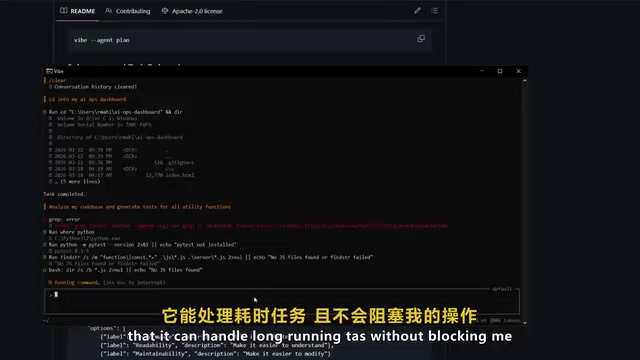
Mistral Wire natively supports parallel execution. Traditional AI coding interactions are sequential—users issue a command, wait for the AI to finish, then issue the next one, causing significant time waste when working with large codebases. Wire's parallel processing mechanism draws from modern operating systems' multi-thread scheduling concepts. When you ask it to analyze a large codebase and generate tests, it can invoke multiple synchronous agents for parallel processing, allowing multiple agent instances to run simultaneously on different tasks. A Validation Loop runs concurrently to ensure output accuracy—each parallel task's output undergoes automated checks to maintain code quality despite parallelization. Time-consuming tasks won't block your other operations, which is crucial for enterprise-level projects with hundreds of thousands of lines of code, compressing full test generation tasks from hours to minutes.
Slash Commands & Skills System: One-Click Execution of Repetitive Tasks
With preset slash commands, you can complete repetitive tasks like deployment, code checks, and documentation generation with a single command. Going further, you can use the Skills feature to create custom slash commands. The skills system is essentially a declarative workflow definition mechanism: create a skills directory and a skills.md file, describe the command's execution logic in natural language, and Wire will parse it into an executable automation flow that can be invoked at any time.
This design lowers the automation barrier—developers don't need to write complex scripts or configuration files, just describe their intent in Markdown format. Similar mechanisms exist in Claude Code as the CLAUDE.md project configuration file, and in Cursor through .cursorrules files. This "convention over configuration" design philosophy is becoming the standard paradigm for AI coding tools, allowing teams to encode best practices as reusable skill templates that new members can immediately inherit upon joining. Similar to the mechanism in Claude Code, but completely free.
Installation & Getting Started Guide
Three Installation Methods
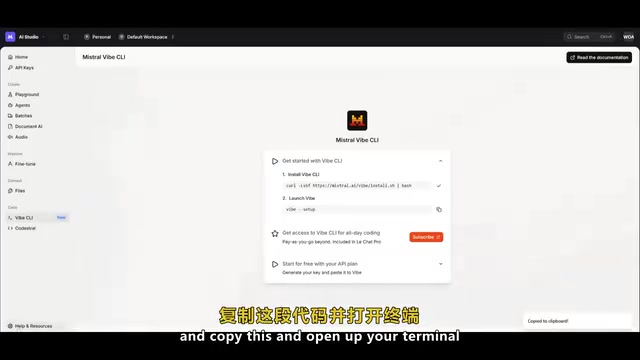
Installing Mistral Wire is straightforward and supports multiple methods:
- Bash/Curl installation: Go to the Mistral AI Studio website, find "Wire CLI" in the left panel, copy the Curl command and execute it in your terminal
- Python pip installation: Install directly via pip
- IDE plugin installation: Supports VS Code and JetBrains plugins, providing Tab completion and context-aware code editing
Two Operating Modes
After installation, Mistral Wire offers two usage modes:
- Wire command mode: Standard CLI usage mode with manual command execution and step-by-step interaction, suitable for scenarios requiring fine-grained control over each step
- Agent-driven mode: More automated, capable of orchestrating tasks and managing workflows autonomously. In this mode, Wire plans execution steps on its own based on task objectives—developers only need to set goals and constraints
Type the help command to view all available commands, features, and shortcuts.
Hands-On Demo: Rapidly Building a Frontend Page
In practical testing, Mistral Wire demonstrated impressive prototyping speed. After entering a detailed prompt, Wire executes the following steps:
- Presents a multi-choice questionnaire: Confirms requirement details through interactive Q&A
- Prompts for reference image upload: Option to upload design mockups, skip, or enter text descriptions
- Creates an execution plan: Automatically generates a detailed executable plan including project structure and dependency management
- Generates complete code: Automatically writes HTML, CSS, and JavaScript files
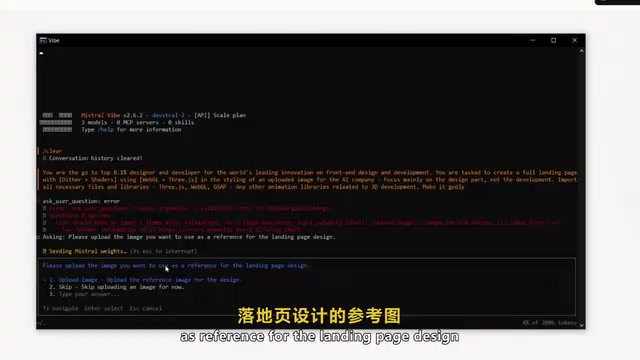
The entire process from prompt input to landing page generation was nearly instantaneous, with impressive code quality.
An even more compelling scenario is large codebase analysis: asking Wire to analyze an entire codebase and generate tests for all utility functions. Thanks to parallel processing capabilities, it can simultaneously invoke multiple sub-agents to handle different modules, ultimately producing not only complete test code but also a summary report.
Mistral Wire vs. Claude Code Comparison
| Feature | Mistral Wire | Claude Code |
|---|---|---|
| Price | Free/Open-source | ~$200/month |
| Terminal-native | ✅ | ✅ |
| Sub-agents | ✅ | Limited support |
| Parallel tasks | ✅ Native support | Partial support |
| Custom skills | ✅ | ✅ |
| IDE integration | VS Code / JetBrains | VS Code |
| Third-party integrations | GitHub/Jira/Slack/Jenkins | GitHub |
| Custom API keys | ✅ | ❌ |
In terms of feature completeness, Mistral Wire matches or even exceeds Claude Code across multiple dimensions, with particularly clear advantages in pricing and third-party integrations. As one of Europe's most influential AI companies, Mistral's business strategy has consistently emphasized openness and open-source—attracting developer ecosystems through free tools, then monetizing through enterprise services and API usage volume. This mirrors Meta's strategy of open-sourcing the Llama model series, essentially trading free products for developer mindshare and ecosystem lock-in. However, Claude Code still has its strengths in code comprehension depth and complex reasoning capabilities—Anthropic's long-term investment in model safety and reasoning chains gives it an edge when handling highly complex architecture-level tasks. The specific choice depends on your actual use case and budget.
Conclusion: Who Should Use Mistral Wire?
Mistral Wire brings a highly competitive free option to terminal-native AI-assisted development. Its custom sub-agents, parallel task processing, multi-option confirmation mechanism, and skills system form a structured automation control framework.
The following types of developers should especially consider this free AI coding assistant:
- Budget-conscious individual developers: Need a high-quality AI coding assistant but don't want to spend $200/month
- Development teams requiring deep customization: Want to build custom automated workflows to improve collaboration efficiency
- DevOps engineers: Prefer terminal operations and need seamless integration with CI/CD toolchains
As a recently released open-source coding tool, Mistral Wire has already demonstrated the potential to disrupt the AI-assisted development landscape. Developers are encouraged to try it early, follow its GitHub repository changelog, and keep up with weekly feature releases.
Related articles
 Product Reviews
The Programmer's Desk Setup Guide: Building a Workspace That Feels Like Home
Discover how programmers build productive, comfortable workspaces. From multi-monitor setups to ergonomic design, explore the desk philosophy that drives focus and flow.
 Product Reviews
Qoder vs Cursor Real-World Comparison: Which $20/Month AI IDE Is Better?
Hands-on comparison of Qoder vs Cursor AI IDEs: Agent autonomy, human interaction count, and architecture decisions. Qoder needed only 2 interactions vs Cursor's 8.
 Product Reviews
Cursor Cloud Agent Demo: Eliminating Bottlenecks Across the Entire Software Development Lifecycle
Deep analysis of Cursor's Cloud Agent demo showing how cloud VMs, automated test artifacts, and a full-chain control plane systematically eliminate human bottlenecks across the software development lifecycle.