The Complete Guide to OpenAI Codex: AI Agent Programming and Automation in Practice

A comprehensive guide to OpenAI Codex covering AI agent programming, browser automation, and productivity workflows.
This guide breaks down OpenAI Codex's core features — from its clean sidebar interface and Goal-based autonomous task execution to browser automation, plugins, Skills, and Automations. Built on GPT-5.5, Codex functions as a true AI agent platform that integrates coding, productivity tools, and real browser actions in one unified workspace.
Recently, a growing number of developers have been switching from Claude to OpenAI's Codex platform. According to hands-on insights shared by the blogger No Code MBA, he has almost entirely shifted to Codex over the past few weeks — for personal coding projects and even everyday productivity tasks. The core reason isn't just GPT-5.5's strong reasoning capabilities, but Codex's product design that deeply integrates programming, browser automation, and productivity workflows. This guide systematically covers Codex's core features — read it and you'll have a solid grasp of about 90% of what it can do.
Why Choose Codex: A Dual Advantage in Model Capability and Product Experience
Among today's mainstream AI coding tools, OpenAI's GPT-5.5 model has established a clear competitive edge in high-level reasoning, making it particularly well-suited for complex codebase scenarios.
Why reasoning capability matters: GPT-5.5 is a significant milestone in OpenAI's large language model evolution. Compared to the earlier GPT-4 series, GPT-5.5 shows substantial improvements in code comprehension, multi-step reasoning, and long-context handling. Reasoning here doesn't just mean the model can write syntactically correct code — it means the model can understand the overall architectural intent of a codebase, identify potential logic errors, and maintain consistency across multi-file dependencies. This difference becomes especially pronounced when working with large projects exceeding tens of thousands of lines of code.
But the model is only part of the story — Codex's true differentiator lies in the integrated product experience.
Specifically, Codex has three core competitive advantages: integrated browser-based AI agent capabilities, a clean and unified interface, and workflow features like Goal-based task execution. Together, these make it remarkably smooth to get things done directly inside Codex, without constantly switching between tools.
For engineering scenarios involving large collaborative codebases, GPT-5.5's understanding and generation capabilities are equally impressive, positioning Codex not just as a prototyping tool but as an engineering platform capable of supporting real production environments.
Interface Structure: One Sidebar, All Entry Points
When using Codex for the first time, understanding the interface layout is step one. The Codex sidebar is divided into three functional sections:
Pinned
Used to pin important chat sessions so high-frequency conversations are always visible at the top, reducing the time spent searching.
Projects
Projects correspond to folders on your local computer. Code or documents created in Codex are saved directly to your local machine. You can grant Codex access to existing project folders (supporting file creation, deletion, and editing) or start fresh. All content within a project is included as context in the AI's responses, making collaboration on a specific codebase far more precise.
Chat
Chat is suited for lightweight, one-off questions that don't require a project context — quick and flexible.
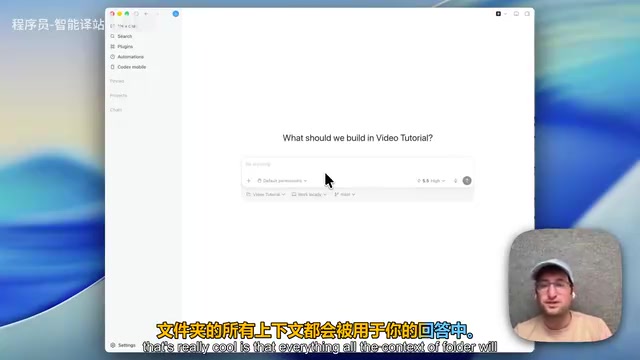
Unlike other AI tools that require constantly switching between multiple tabs (chat, collaboration, code), Codex consolidates all of these capabilities into the sidebar, dramatically reducing cognitive overhead.
From Productivity Tasks to Coding: A Full Ice Cream Shop Case Study
Let's use a concrete example to show how Codex bridges the gap between "productivity tool" and "coding tool."
The first task is purely productivity-oriented: search for 10 ice cream shops in New York City and compile them into a spreadsheet with names and addresses. Codex automatically invokes its spreadsheet workflow, verifies the shop information, and generates a file locally. A real-time preview on the right shows the completed 10 rows of data (including addresses and neighborhood info), ready to open in Numbers or export to Google Sheets.
The Goal Feature: The Core Tool for Long-Running Automated Tasks
The Goal feature is one of the most important capabilities in Codex to master, and it directly embodies the core concept of AI Agent architecture.
An AI agent is an AI system capable of perceiving its environment, autonomously planning, and executing multi-step operations — distinct from traditional chatbots that only handle single-turn Q&A. Technically, agents are typically built on frameworks like ReAct (Reasoning + Acting) or Plan-and-Execute, which allow the model to call tools (such as a browser, code interpreter, or external APIs) during execution and dynamically adjust subsequent steps based on intermediate results. The Goal feature is a direct expression of this architecture — instead of producing a one-shot answer, the model continuously interacts with its environment until the objective is achieved.
Type the slash command /goal, set a clear objective — such as "find 20 more shops and append them to the spreadsheet" — and Codex will display its execution status at the bottom, continuing to work and repeatedly checking whether the goal has been met until it's accomplished.

In the demo, Codex expanded the spreadsheet to 30 rows in about 2 minutes and 30 seconds. The real value of the Goal feature lies in executing very long-running tasks — in real-world use, goals have been run for over an hour. However, extended execution means higher token consumption, so it's worth evaluating cost versus benefit before use.
Codex also supports a wide range of other slash commands, and mastering them is key to boosting your efficiency.
Plugins, Skills, and Automations: A Three-Layer Extensible Ecosystem
Codex's extensibility is organized across three layers — understanding each one's role and how they differ is essential.
Plugins
Plugins are built directly into Codex and represent platform-native capabilities. They cover creating and editing files like spreadsheets and presentations, as well as connecting to personal data sources like Gmail, Figma, and Notion to bring external data into your workflow.
Skills
Skills are essentially prompts that the AI agent can decide when to invoke on its own, or that can be bound to a specific project. For example, a "minimal UI skill" can guide the AI toward a particular interface design style.
The engineering value of the Skills system: In the field of prompt engineering, the reusability of high-quality prompts is key to reducing costs. The Skills system is essentially a structured prompt library — similar to the concept of "function encapsulation" in software engineering, abstracting reusable logic into standalone units to avoid repetitive work. Unlike plugins, prompts within Skills can be reused across tools, interoperating between Codex and other AI tools. This means the prompt assets you build up won't be lost if you switch platforms, forming a truly portable personal AI workflow asset.
Automations
Automations allow chat tasks to run on a schedule or on demand — for example, setting up a morning briefing on weekdays that automatically summarizes your calendar and unread emails.
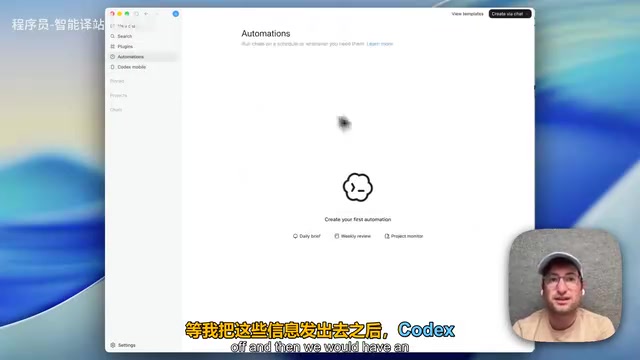
One important limitation: Automated tasks only run when your computer is on. It's therefore recommended to keep your device powered up. This also brings an added convenience — as long as Codex remains active on a running computer, you can control Codex remotely from your phone, continuing your work anytime, anywhere.
Browser Integration: From Information Gathering to Real Action Execution
Browser integration is one of Codex's most practically valuable features. It doesn't just let the AI retrieve information through a browser — it lets the AI directly execute actions inside the browser.
This is fundamentally different from traditional automation tools: Traditional RPA (Robotic Process Automation) tools like UiPath and Selenium have been used in enterprise workflows for years, but they require precise rule configuration and are extremely brittle — if the page layout changes, the script breaks. AI-driven browser automation is fundamentally different: the model identifies page elements through visual understanding and semantic analysis, giving it the generalization ability to handle dynamic changes without hardcoded rules. This paradigm shift transforms "letting AI operate a browser to complete tasks" from an engineer-only tool into something any user can leverage.
In the demo, the instruction was "find 5 more shops using the browser." The AI immediately opened a browser window on the right, autonomously searched for the target information, clicked links, and handled cookie pop-ups — all without any human intervention.

A more advanced demo involved form submission: directing Codex to visit an email subscription page and complete the email field and submit. The AI successfully completed the entire process independently. This means Codex is no longer just an information gatherer — it's an actual task executor. This is precisely what distinguishes an AI agent from an ordinary chatbot.
Automatic Context Compression
Codex also has a thoughtful built-in feature: automatic context compression.
Understanding this feature requires some background on the context window concept: it's the maximum number of tokens a large language model can process in a single inference pass, directly determining how much conversation history and file content the model can "remember." Early models had context windows of only 4K tokens, while modern models have expanded to hundreds of thousands or even millions of tokens — but larger contexts mean higher computational cost and latency. Automatic context compression uses techniques like summarization and importance filtering to distill historical content into an essential summary, preserving key information while keeping token consumption under control.
In practice, this means you can keep conversing in the same session window for weeks. It gradually builds up an understanding of you and your project — no need to manually start a new session, and no risk of hitting context limits.
Coding Capabilities: Real-World Support for Complex Apps and Large Codebases
It's worth noting that the ice cream shop example is just the most basic introductory demo. In practice, Codex is fully capable of building complex applications and large codebases.
For coding tasks, Codex automatically takes screenshots of the app or website as a preview and debugs as it runs, significantly reducing debugging costs. GPT-5.5 excels at understanding existing code structures, writing new code that fits the context, and collaborating on complex codebases — which is a compelling reason to choose Codex purely from a programming standpoint.
Conclusion: A Practical Tool for the AI Agent Era
Codex represents the direction AI tools are evolving — from "conversational assistant" to "autonomous agent." It integrates programming, productivity workflows, browser automation, and external data connections under a unified interface, and enables true autonomous task completion through mechanisms like Goal execution, Skills reuse, and automated scheduling.
When AI can open a browser on its own, fill out forms, continuously check on objectives, and run for hours at a time, "digital labor" is no longer just a concept. Mastering these capabilities means you're already ahead of a significant portion of your peers.
Key Takeaways
Related articles

How to Interview Engineers in the AI Era: Practical Insights on Restructuring the Interview Process
When AI coding tools render traditional algorithm interviews ineffective, how should teams restructure? Insights from a year of practice on evaluating systems thinking, problem decomposition, and human-AI collaboration.

AI Agent Observability: A New Paradigm for Production Debugging and Hallucination Governance
Deep dive into AI Agent observability tools for production debugging and hallucination governance, covering full-chain tracing, semantic evaluation, and continuous improvement strategies.

How Theoretical Physicists Can Efficiently Get Started with Machine Learning: Optimal Paths and Resource Guide
A systematic guide for theoretical physicists transitioning to ML, covering math advantages, a three-stage learning path, classic textbooks, and physics-ML cross-disciplinary research directions.