The Complete TypeScript Guide: How JavaScript's Superset Came to Dominate Modern Web Development

How TypeScript's static type system made it the default choice for modern web development.
TypeScript, Microsoft's superset of JavaScript, catches errors at compile time through static type checking. This guide explores its core advantages, ecosystem dominance, and real-world trade-offs, explaining why it has become the default choice for modern web development.
TypeScript: More Than Just a Type Patch for JavaScript
TypeScript, developed and open-sourced by Microsoft, is officially defined as "a superset of JavaScript that compiles to clean JavaScript output." Behind this seemingly modest description lies a profound transformation in the engineering of modern web development. Notably, TypeScript was designed under the leadership of Anders Hejlsberg—the father of the C# language—whose deep expertise in static type system design has profoundly shaped TypeScript's architectural philosophy. The language was first publicly released in 2012, directly stemming from the JavaScript engineering challenges Microsoft encountered while developing large-scale web applications like Office Online. Today, TypeScript's star count on GitHub has surpassed 109,700, with 13,600 forks, and it continues to grow at a pace of 166 stars per day. These numbers not only demonstrate that it is an evergreen presence in the open-source world, but also reflect the strong demand for "type safety" across the entire frontend and full-stack ecosystem.
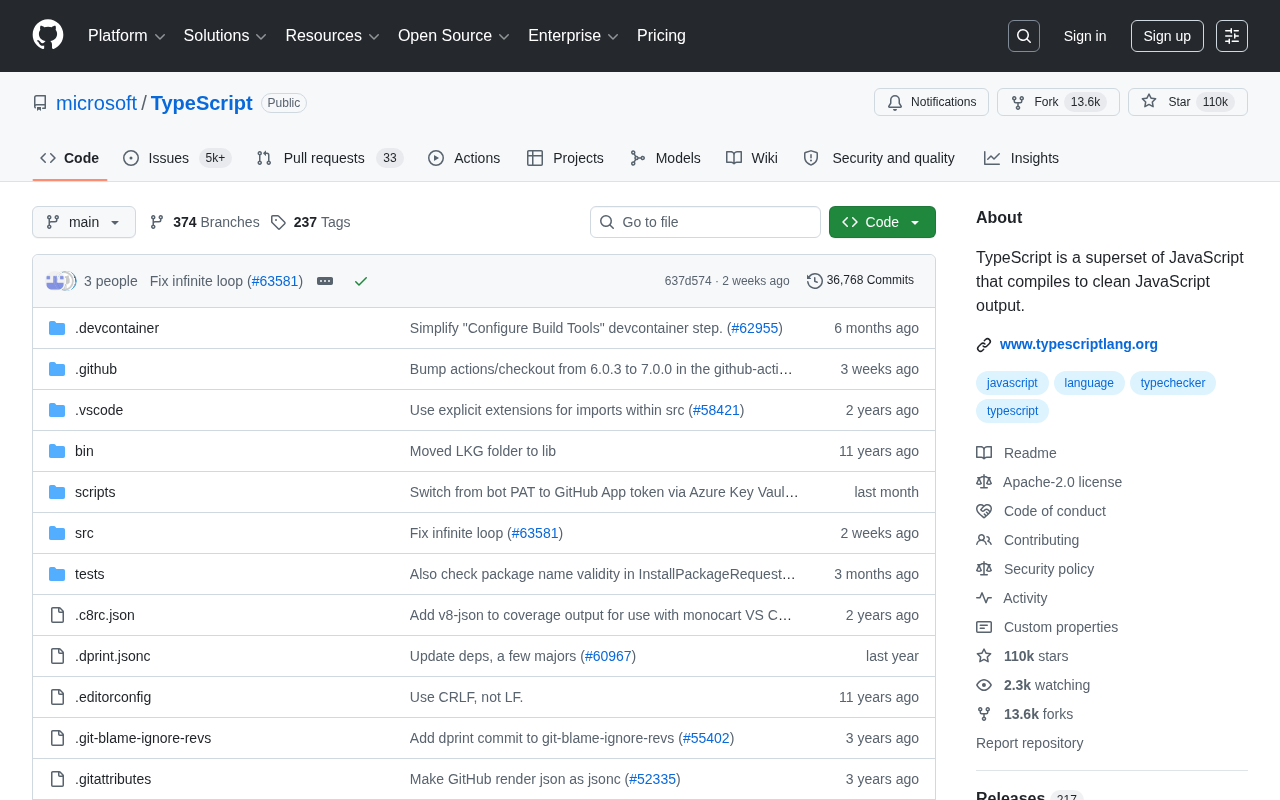
As a "superset" language, the brilliance of TypeScript lies in this: any valid JavaScript code is also valid TypeScript code. Developers don't need to overhaul their existing codebase—they can adopt the type system in a progressive, incremental way. This low-migration-cost design philosophy is a key reason it was able to gain rapid adoption across the vast JS ecosystem.
Why a Static Type System Matters So Much
From "Runtime Crashes" to "Compile-Time Interception"
As a dynamically typed language, JavaScript offers tremendous flexibility, but many errors only surface when the code actually runs. The core difference between static and dynamic typing lies in the timing of type checking: a static type system completes type validation during the compilation phase, while a dynamic type system defers this process until runtime. This difference has negligible impact on small projects, but in codebases with millions of lines, the gap in maintenance costs is dramatically amplified. Academic research (such as a paper published at FSE in 2017) has shown that introducing static type annotations to JavaScript projects can detect approximately 15% of the bugs that would otherwise have made it into production. This may be inconsequential for small scripts, but when a project balloons to hundreds of thousands of lines of code, maintained collaboratively by dozens of people, the cost of lacking type constraints rises sharply.
Through static type checking, TypeScript shifts potential errors forward from "runtime" to "compile time." Passing the wrong type to a function parameter, accessing a nonexistent property, misspelling a field name—these common bugs get flagged by the IDE right at the coding stage. This "shift-left" mechanism for discovering errors significantly reduces the maintenance costs of large projects.
Enhanced Developer Experience and Intelligent Suggestions
Type information serves not only error checking but also forms the foundation of IntelliSense in modern editors. IntelliSense is a code intelligence assistance system developed by Microsoft for editors like Visual Studio Code, and it relies on complete type information to deliver precise auto-completion, parameter hints, and type inference displays. When code is fully annotated with types, the editor can perform precise auto-completion, go-to-definition, refactoring, and renaming operations. This "code as documentation" characteristic allows developers to quickly understand data structures and interface contracts when reading unfamiliar codebases, significantly boosting team collaboration efficiency.
How TypeScript Compiles to "Clean JavaScript"
TypeScript's official documentation specifically emphasizes "compiles to clean JavaScript output," a point worth savoring. The TypeScript compiler (tsc) strips away type annotations and generates standard, readable JavaScript code that can run in any JS-compatible environment—browsers, Node.js, Deno, and various edge runtimes.
It's worth noting that tsc is responsible not only for stripping types but also for syntax downleveling. Through the target field in tsconfig.json, developers can automatically compile code that uses new ES2022 features into ES5, ensuring compatibility with older browser environments. This essentially allows TypeScript to also play the role of the Babel transpiler, letting developers use cutting-edge language features without worrying about runtime compatibility. This design brings two major advantages: first, TypeScript introduces no runtime overhead—the final output is pure JavaScript; second, developers are free to choose the target ECMAScript version, enabling them to use the latest language features while still compiling to code compatible with older environments. This balance of "backward compatibility + forward evolution" makes TypeScript a universal choice across different tech stacks.
TypeScript's Ecosystem Dominance: The Numbers Speak
A magnitude of 109,700 stars places it among the top-tier open-source projects across all of GitHub. Even more noteworthy is the sustained nature of its growth—even years after release, with an already mature ecosystem, it maintains a growth rate of over a hundred new stars per day, indicating how deeply it's embedded in the industry's infrastructure layer.
Looking at actual adoption, mainstream frontend frameworks React, Vue, and Angular have all fully embraced TypeScript, with Angular going so far as to make TypeScript its default development language. In the backend realm, frameworks like NestJS and Deno likewise treat it as a first-class citizen. In today's JavaScript world, "whether to use TypeScript" is no longer a question—"how to use TypeScript well" is the real challenge teams need to consider.
TypeScript's Trade-offs and Challenges
Of course, TypeScript is not without its costs. Introducing a type system means an additional build step, a steeper learning curve, and the time investment required for type definitions. For rapid prototypes or extremely small projects, these overheads are sometimes not worth it. Moreover, complex generics and type gymnastics can make code obscure, actually reducing maintainability.
Mature teams typically weigh the level of type strictness based on project size and lifecycle—using tsconfig configuration options to find the balance point between "loose" and "strict" that suits their needs. The strict mode is a collection of strict checking options, including strictNullChecks (which forces explicit handling of null/undefined) and noImplicitAny (which prohibits variable types from being implicitly inferred as any), among others. For the progressive migration of legacy projects, teams usually start with strict mode disabled and gradually increase type strictness file by file, module by module—this incremental strategy is precisely a concrete manifestation of TypeScript's "superset" design philosophy in engineering practice. This adjustable flexibility is itself a reflection of TypeScript's design wisdom.
Conclusion: TypeScript Has Gone from "Optional" to "Default"
TypeScript's success is essentially the inevitable result of the maturation of JavaScript ecosystem engineering. Rather than starting from scratch to create a new language, it gently enhanced JavaScript in the guise of a "superset," trading an optional type system for the reliability and maintainability that large projects urgently need. Behind its 100,000+ stars are the votes of confidence cast through practice by countless development teams. For any modern web project that takes code quality seriously, TypeScript has become an engineering standard that cannot be ignored.
Key Takeaways
Related articles

AI Comic Drama with WorkBuddy from Scratch: A Step-by-Step Skill Pack Installation Guide
Learn how to create AI comic dramas with WorkBuddy from scratch. This guide covers installation, Skill pack import and invocation, plus a script generation demo with manual revision tips to get you through the first step from script to storyboard.

WorkBuddy Agent Runs the Entire GEO Database Mining Pipeline with a Single Prompt
WorkBuddy agent automates GEO database mining: from data search and curation to batch correction, differential analysis, co-expression networks, feature gene screening, and immune infiltration—a single prompt generates a complete bioinformatics report, greatly lowering the barrier to bioinformatics analysis.

PC Memory Wasted? Hacker News Debates Centralized Data Centers
Hacker News users argue that personal computer memory is wasted and should be centralized in data centers, sparking debate on centralized vs. distributed computing resource allocation. This article analyzes the logic behind the claim, the costs of centralization, and new tensions in memory resource allocation in the AI era.