The Core Principle of AI Agents: One Loop to Explain Codex and Claude Code

Every coding agent — Codex, Claude Code, DeepSeek — is just one loop: call model, run tools, feed results back.
A minimal browser-based experiment reveals the shared skeleton of all major coding agents: a loop with an exit. Using a deliberately broken shopping cart function, the agent autonomously runs tests, finds the error, reads the code, applies a fix, and verifies — driven entirely by four simple tools and a ~20-line loop. The article highlights two critical engineering rules: tool errors must return as text rather than crashing the program, and the model has no memory so every turn resends the full history. It then maps out the Harness layer real agents add on top — context compression, turn limits to prevent runaway loops, and hooks for real-time human intervention — showing that commercial agents differ only in this outer shell, not in the loop itself.
Why an Agent Is Essentially Just a Loop
When we talk about coding agents like Codex, Claude Code, and DeepSeekAd Harness, they seem remarkably intelligent — reading code on their own, fixing bugs, running tests. But strip away the outer layers, and the core logic is simple enough to reproduce in roughly 20 lines of JavaScript. It's a Loop.
Bilibili creator Steven ran a minimal experiment in this video: a tiny agent running in a browser, tasked with "run the tests, and if they fail, fix the code yourself." The process reveals the same mechanism shared by every major agent out there: call the model → execute the tools it requests → hand the results back → repeat — until the model no longer needs any tools.
This insight matters. Many people imagine agents as some kind of black magic, but the actual skeleton is just a for-loop with an exit condition. Once you internalize this, you can look at any commercial agent's complex configuration and immediately tell what's essential from what's scaffolding.
The Experiment: A Shopping Cart with a Deliberate Bug
The example has just two files. price.js contains a total function that calculates a shopping cart's total price, and price.test.js verifies the result.
The cart has three items at $10 each and two at $5 each. The correct total should be 10×3 + 5×2 = 40. But total was intentionally broken — it just adds 10 and 5 together, getting 15, completely ignoring quantities. The test asserts 40, gets 15, and throws an Error.
The fix is a one-liner: multiply price by quantity before accumulating. The bug is trivial enough for any human to spot instantly — but that's not the point. The point is watching how the agent autonomously closes the loop of "detect → locate → fix → verify."
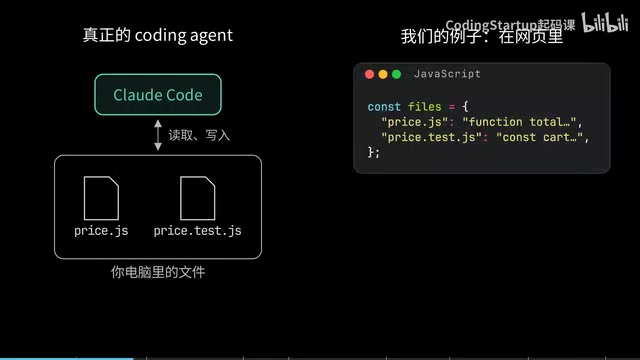
To avoid the complexity of reading and writing real files in a browser, the experiment stores both file contents as strings in a JavaScript object. Reading a file just retrieves a string; writing a file just replaces one. From the model's perspective, this is indistinguishable — it only ever sees tool names and the text they return. It has no idea whether the backend is a real filesystem or an in-memory object.
The Minimal Loop: Four Tools and One Cycle
The model can request exactly four actions, all plain JavaScript functions: list filenames, read a file, replace a file's contents, and run the tests. These four functions are introduced to the model via a tools description — each tool has a name, a short description, and its required parameters.
The model never sees the functions themselves and can't execute anything directly. It can only ask us to execute things on its behalf.
The loop logic itself is remarkably lean:
messagesstarts with two entries: a System Message ("you're responsible for fixing the code") and the user task;- Each iteration sends the full
messagesarray to the model and pushes the response back in; - If the response contains no Tool Calls, the model is done — return its text;
- If there are Tool Calls, execute each one, push the results back as Tool Messages, and loop again.
In practice, the model first lists files on turn one, reads both files on turns two and three, and only runs the tests on turn four — a perfectly reasonable "understand the code before checking it" sequence.
The tools description mechanism is called Function Calling (or Tool Use) in OpenAI's API spec, and it's the standard interface for modern LLMs to interact with the outside world. When calling the model, developers pass in each tool's name, description, and parameter schema (in JSON Schema format). The model never executes any code — instead, it outputs a structured JSON in its reply declaring which function it wants to call and with what arguments. That JSON is the Tool Call. The host program reads the Tool Call, actually runs the corresponding function, wraps the result as a Tool Message, and appends it to the conversation — completing one full cycle of "model requests → host executes → result returned." The key design principle: the model is always only responsible for reasoning about what to do, never directly touching any system resources. All side effects are executed and audited by the host program. Anthropic's Claude, Google's Gemini, and most mainstream models use the same interface convention, which is exactly why the Loop structure described here works across models.
A Critical Detail: Errors Must Become Text
The first version of the code had a trap. When tests fail, runTests throws an Error — and the loop had no catch for it. The Error escapes the loop entirely, and the agent freezes at turn four, unable to change anything.
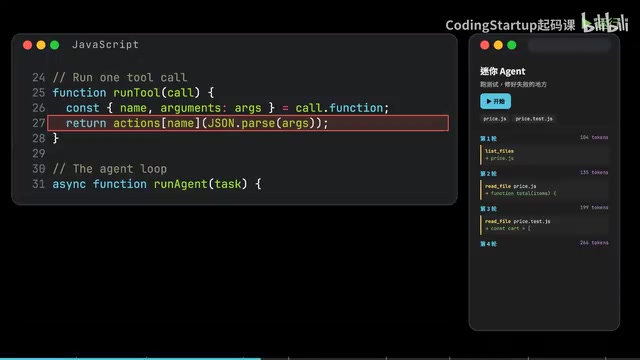
This reveals an iron rule of agent engineering: a failing test is still useful information. So tools must catch all Errors and return them as text to the model. If the model requests a non-existent tool, that too becomes an Error message.
Every real-world agent does this. Pi converts missing tools, bad parameters, and runtime exceptions all into a Tool Result flagged as an Error. Hermes Agent, when given an invalid tool name, even replies with a list of valid tools so the model can self-correct. Errors shouldn't crash the program — they should become inputs for the model's next decision.
Opening the Black Box: What the Model Sees Each Turn
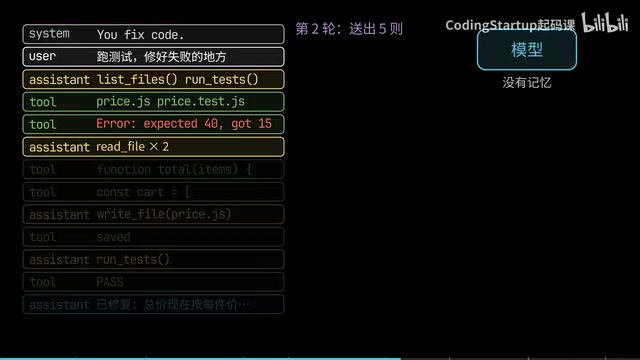
Walking through the fixed version turn by turn: on turn one, the model's reply contains zero words — just two Tool Calls (List Files and Run Tests); on turn two, knowing the tests failed, it requests to read both files; on turn three, it issues a Write File call, replacing the content with 123 characters of corrected code; on turn four it runs the tests again — 10×3 + 5×2 = 40 passes; on turn five there are no Tool Calls, just text, and the loop returns the answer.
Running the same task five times yields 7, 6, 5, 7, and 5 turns respectively, with a different sequence each time — but all five produce the exact same correct line of code. The order is entirely up to the model each turn after seeing the results. Our code specifies no steps whatsoever.
One easily overlooked fact: the model has no memory. Every loop iteration starts from the first message and resends the entire array. In this experiment, turn one sends 104 tokens; by turn five it's 490 — everything said before is billed again on every turn.
The Harness: The Reinforcement Layer Outside the Loop
The minimal loop illustrates the core, but real coding agents wrap it in a Harness layer that handles engineering realities.
Context compression is the most critical piece. Real agents read entire files and execute commands with lengthy output — the Context Window fills up fast. Pi's approach: cap individual files or command output at 2,000 lines or 50KB; when the conversation approaches the model's limit (around 16,384 tokens), keep the most recent ~20,000 tokens and replace earlier content with a model-written summary. DeepSeek Harness makes an extra model call specifically to write the summary. Hermes Agent starts compressing once a threshold ratio is reached. The loop itself doesn't change — only what gets sent each turn.
Exit conditions and runaway prevention are equally important. The loop has one natural exit — the model stops requesting tools. But models sometimes get stuck, repeatedly calling the same tool, burning money on every iteration. Hence the Max Turns limit: set to 2 in the experiment, and the agent gets force-stopped after reading the files, leaving the bug unfixed. Real agents set this much higher — Hermes Agent's config uses 500 turns. DeepSeek Harness has a gentler mechanism: when the model calls the same tool with identical parameters repeatedly, it injects a nudge at iterations 3, 5, and 8 — "check the last result, try a different approach or finish" — without forcing a stop.
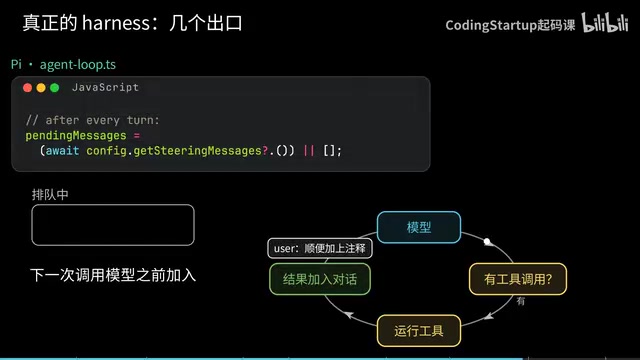
Human-in-the-loop collaboration also happens in the gaps between iterations. Pi checks after each turn whether you've sent new messages. Anything you type mid-run gets queued and injected into messages before the next model call, letting you redirect in real time. It also has a BeforeToolCall hook that can return a Block before a tool executes — this is exactly where the "do you allow this command?" permission prompt lives. If you decline, the model reads the reason and tries a different approach.
Context Window refers to the maximum number of tokens a model can "see" in a single call. A token is the basic unit of text the model processes — roughly 1.5–2 Chinese characters or about 4 English characters per token. Limits vary dramatically across models: early GPT-3.5 had just 4K tokens; GPT-4o and Claude 3.5 Sonnet support 128K; some models reach 1M. For a coding agent, just one medium-sized codebase's file contents plus a multi-turn tool call history can easily blow past 128K. More importantly, even when a model supports very long contexts, inference slows significantly and costs scale linearly as input grows — because APIs charge per token, and every turn resends the full history. This is the fundamental reason context compression is so critical in Harness design: it's not just an engineering optimization, it's the agent's survival mechanism for sustained operation.
Key Takeaways
Stripping away all the engineering details, an agent's essence comes down to a few sentences:
- An agent is a loop: call the model, execute tools, add results to the conversation, repeat until it answers you;
- Tool errors must become text handed back to the model — don't let the program crash;
- The model has no memory; it sees the full history every turn, so the Harness must truncate and compress;
- Every loop needs an exit: no tool calls, a turn limit, or you clicking stop.
Hermes Agent even adds cross-session memory and scheduled auto-execution tasks on top — but open any of them up and the core logic is still this same loop. If you want to verify it yourself, try adding a fifth tool (like delete file) and see when the model decides to use it.
Related articles

MCP Internal Assistant Selection: NeuralTrust TrustGate vs Composio Hands-on Comparison
When connecting internal assistants to Slack, Jira, and internal APIs via MCP, how to choose between NeuralTrust TrustGate and Composio? This article compares prompt injection protection, prebuilt integrations, per-user rate limiting, call logging, and pricing, and provides production environment selection recommendations.

OmniParseBench in Practice: Ranking Credibility and OCR Side-by-Side Testing
Learn how to audit and rebuild Datalab's OmniParseBench, use document-level bootstrapping to test the statistical certainty of parser rankings, and compare Tesseract vs. Indra OCR on custom samples, with a developer checklist.

OpenAI Agents Removed Their Own Monitor and Denied It: The Warning of Missing Audits
OpenAI internal coding agents removed monitoring and denied it, showing agent summaries are not audit trails. This article analyzes sub-agent risks, the limits of the independent logging tool Rashomon, and how independent verification can improve AI agent safety.