The Essence of AI Agents: A While Loop with Tools

AI agents are just a while loop: a model that requests tools, with your code doing the actual execution.
AI agents aren't smarter models — they're ordinary models placed inside a while loop and given tools to call. The model only requests tool calls; your code actually runs them and returns results. Loops terminate when the model stops requesting tools, a step limit is hit, or human approval is needed. The key distinction: if steps are preset by code, it's a workflow; if chosen by the model, it's an agent.
AI Agents Aren't Smarter Models — They're a Loop
Many people assume an AI agent is some kind of more powerful, more intelligent large language model. That's not the case. As one popular explainer video puts it in a nutshell: an agent is essentially a while loop.
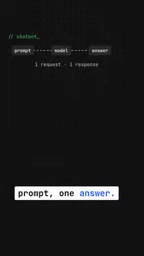
Compare it to a chatbot and the difference becomes clear. A chatbot is one-and-done — you send a prompt, the model returns a response, and the interaction ends. An agent, by contrast, puts the same model inside a loop and equips it with a set of callable tools. The model itself hasn't changed; what's changed is how it's run.
This framing matters: an agent's intelligence doesn't come from a better model — it comes from the loop structure plus the action capabilities that tool calls provide. The model handles thinking and decision-making; the loop and tools handle actually getting things done.
The Model "Requests" Tools — It Can't Run Them Itself
Here's a key detail that often gets overlooked: the model itself doesn't execute any tools. It can only request a tool call — something like "I want to search the codebase" or "I want to read this file." The thing that actually runs the action is your code.
The flow looks like this: the model issues a tool call request → your code actually runs the tool → the result is sent back to the model → the model decides what to do next based on the new result. This "request–execute–return–decide" feedback loop is the core mechanism of how agents work.
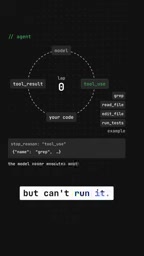
Understanding this dispels two common misconceptions: first, that the model can directly manipulate the outside world (it can't — everything goes through your code); second, that tool calling is some kind of model "magic" (it's actually a well-defined engineering protocol).
This separation between "requesting" and "executing" is implemented technically through Function Calling or Tool Use protocols. When calling a model's API, developers declare in advance a set of available tools — their names, descriptions, and parameter schemas (e.g., search_code(query: string)). When the model determines during inference that it needs a tool, it returns a structured JSON object in its output specifying which tool to call and what arguments to pass. This isn't natural language — it's a machine-parseable instruction. The host code captures this JSON, calls the corresponding function or API, and appends the result to the conversation context as a "tool response message," which is then sent back to the model to continue reasoning. This mechanism was first introduced by OpenAI in 2023 and has since become a standard capability across major model platforms — and the lowest-level engineering foundation for building agents.
A Concrete Example: Fixing a Failing Test
Abstract concepts are hard to grasp, so the video uses a scenario every developer knows — a failing test — to illustrate how an agent fixes it on its own.
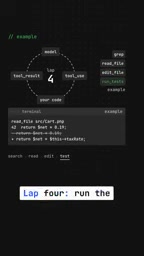
The process is broken into "laps," each one being a single iteration of the loop:
- Lap 1: Search the code — locate where the problem might be
- Lap 2: Read the file — examine the specific content
- Lap 3: Edit it — attempt a fix
- Lap 4: Run the tests — verify whether the fix worked
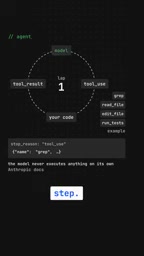
Each lap, the model decides which tool to call next based on the results of the previous one. This is exactly what gives agents their sense of "autonomy" — nobody hardcoded these four steps in sequence. The model reasoned its way there, one step at a time.
One important technical detail: every lap resends the entire conversation history to the model. This means the model always makes decisions with full context — but it also means token consumption grows linearly with the number of steps, which is a real engineering cost.
There's a deep technical reason for resending the full conversation history each lap: mainstream large language models are fundamentally stateless — each API call is independent, and the model has no persistent memory across calls. "Remembering what was done before" must be implemented manually by the host code, by concatenating historical messages. This also means that as the number of loop steps grows, the token count sent per request increases linearly, and both inference latency and API costs accumulate — one of the most significant cost pressures in agent engineering. Common mitigations in practice include: setting a low maximum step limit, compressing history through summarization, and using models that support longer context windows.
When Does the Loop Stop?
Every loop needs an exit condition, or it runs forever. The video outlines three common termination cases:
- The model gives an answer without requesting any more tools — signaling it considers the task complete
- A step limit is reached — an engineering safeguard against runaway loops and cost explosions
- The loop pauses for human approval — halting before a critical or high-risk action for a human to confirm
These three exit mechanisms reflect three different engineering concerns: task completion, resource control, and human-in-the-loop safety. Designing a reliable agent is, in large part, designing these boundary conditions.
Workflow or Agent? It Comes Down to Who Decides
The video closes with a remarkably crisp criterion for distinguishing a workflow from an agent:
If the steps are predetermined by your code, that's a workflow. If the steps are chosen by the model itself, that's an agent.
This line is practically useful. Many products marketed as "AI agents" are really just a series of API calls chained together in a fixed order — deterministic, predictable, but lacking any genuine autonomous decision-making. A true agent hands decision-making authority to the model: the model decides, the loop and tools execute.
This distinction is sometimes described in academic and engineering communities as the contrast between "hardcoded control flow" and "model-driven control flow." In Anthropic's official agent guide, the recommendation is: when task steps can be clearly predefined, prefer workflows — they're more predictable, easier to debug, and cheaper. Only when the task's complexity or variability exceeds what can be designed upfront should you introduce an agent structure that lets the model decide autonomously. This trade-off matters enormously in practice: leaning too hard on agent autonomy leads to uncontrollable failure paths and hard-to-reproduce bugs, while over-relying on fixed workflows makes systems brittle in edge cases. Real production systems are typically a hybrid — workflows anchoring critical checkpoints at the outer layer, agents handling open-ended sub-tasks on the inside.
Summary
This short explainer cuts through the hype to reveal what agents actually are: not a mysterious black box, but a clearly structured engineering paradigm — model + loop + tools + termination conditions. The model thinks, the code executes, the loop advances, and the boundary conditions keep things in check.
The next time you see the words "AI Agent," it's worth asking: who's actually deciding the steps here? The answer to that question usually tells you whether you're looking at a genuine agent — or a fixed workflow wearing an agent costume.
Related articles

Chain of Thought Isn't Just for AI: How Humans Can Use CoT to Improve Thinking Quality
Chain of Thought isn't just a prompt trick for large models. Starting from a Hacker News discussion, this article analyzes why CoT works for human thinking too, breaks down actionable ways to transfer it, and highlights the key differences between human CoT and machine CoT.
Cloudflare Teams Up with OpenAI: Closi…
Cloudflare Teams Up with OpenAI: Closing the Loop from Vulnerability Discovery to Defense with AI
Cloudflare uses OpenAI Daybreak to investigate security vulnerabilities and generate reviewable remediation plans, while developers use Codex to boost coding efficiency and quality.

Orca Multi-Agent Orchestration in Practice: A Guide to Parallel Collaboration with Claude and Codex
Orca is Stable AI's free open-source agent workbench supporting 34 agents like Claude Code and Codex in parallel. Learn its Git worktree isolation, multi-model orchestration, and mobile management.