The Hands of Agentic AI: Function Calling and Tool Contracts Explained

Tools are the Agent's hands; a clear tool contract determines whether it can act accurately.
The article argues that the core dividing line of Agentic AI is tool-using capability: the model does not execute tools itself but returns a structured tool name and parameters, which code executes and feeds back as observations in a closed loop. A tool contract has five parts—name, description, input, output, and failure modes—and the description influences tool selection more than the code. Calls must follow a schema to turn vague guesswork into reliable action. It also clarifies the difference between function calling (requesting a single answer) and code execution (actually running dynamic code), and uses the "check calendar but search email" case to show that wrong tool selection usually stems from unclear descriptions, so fixes should start with the contract.
From Chatting to Acting: Tools Are the Agent's Hands
An Agent that can only talk is nothing more than a confident chatbot. Give it tools, and it can truly act. This sharp metaphor from the AvaSkill Academy course captures the core dividing line of Agentic AI—the ability to use tools.
Function calling is precisely the mechanism by which a model requests the use of a tool. The key point is that the model does not execute the tool itself; instead, it returns a structured call: the tool name plus the required parameters. Your code runs the tool and passes the result back to the model as an observation, forming a closed loop. This loop was already established in the first lesson of the course; now we are simply giving it "hands."
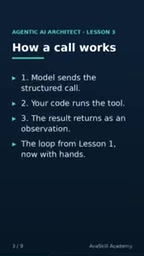
Function calling is a structured output capability offered by current mainstream large language models (such as OpenAI's GPT-4, Anthropic's Claude, and Google's Gemini). When generating a response, the model can choose not to output natural language directly but instead output a JSON object that conforms to a specific schema, declaring which function it wants to call and what parameters to pass. The platform or developer is responsible for parsing this JSON and actually executing the function, then sending the result back into the model's context under a specific role (such as the tool/function role). Its core value lies in decoupling the model's "intent" from "execution": the model handles understanding and decision-making, while code handles safe, controlled execution. This also makes engineering patterns such as multi-turn tool calling, parallel calls, and error retries possible, making it the foundational infrastructure for building Agents.
Contract First: Every Tool Needs a Contract
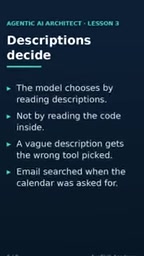
The course repeatedly emphasizes a core principle: tool descriptions matter more than the code itself. When the model selects a tool, it reads the description, not the internal implementation. Vague descriptions lead to wrong tool selection—which explains why when you ask it to check the calendar, it searches your email instead.
A complete tool contract consists of five parts: name, description, input parameters, output results, and failure modes (what happens when something goes wrong). These five elements form the foundation of trust between the tool and the model.
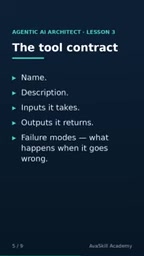
Calls must also follow a schema—a fixed shape that declares which parameters exist, what type each parameter is, and which are required. A clear schema turns guesswork into reliable action. The model can also return structured output, allowing your code to trust and use results of a fixed shape.
Schema in this context usually refers to JSON Schema, a standard for describing and validating JSON data structures. In tool calling, the schema declares parameter names, types (string, number, boolean, array, object, etc.), whether each is required, enum value ranges, default values, and nested structures. The model generates compliant call parameters based on the schema, and the platform can also validate parameter legitimacy at runtime, intercepting format errors in advance. A clear schema not only reduces the model's "guessing" cost but also enables more precise error messages to be fed back to the model for self-correction. For complex tools, it is recommended to use nested objects and description fields to further constrain semantics and avoid ambiguity.
Function Calling vs. Code Execution: Same Hand, Different Grip
The course specifically clarifies a common confusion: tool use is not equal to code execution.
Function calling requests a single answer; the tool is essentially a nameless interface with structured parameters. Code execution, by contrast, actually runs code—for example, performing calculations, fetching data, or making modifications via an API. The original metaphor is vivid: it's the same hand, but a different grip.
Only by understanding this distinction can you choose the right architecture when designing an Agent. Use function calling when you need deterministic answers; use code execution when you need dynamic computation or complex operations.
Code execution in Agent scenarios typically refers to the model generating executable code (such as Python or JavaScript), which is actually run in a sandbox environment and whose output is returned. Compared with function calling, code execution gives the model greater expressiveness and flexibility: it can write loops, conditionals, call third-party libraries, process files, or make network requests. But the cost is a significant increase in security risk, requiring isolated sandboxes, resource limits, and permission controls. Function calling is better suited to atomic operations with clear boundaries and fixed parameters; code execution is better suited to scenarios requiring dynamic logic, complex computation, or batch processing. The two can be combined—for example, using function calling to trigger a code execution tool, and then letting the model decide the next step based on the returned result.
A Case Study: Why the Agent Chose the Wrong Tool
The quiz scenario in the course is highly representative: you ask the Agent to check the calendar, but it searches your email instead. Among the options, the correct answer is—the tool description was not clear enough.
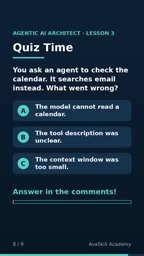
The calendar tool was always there; the problem lies in the contract. The fix is straightforward: give the tool a clear name, a description that explicitly states what it does, list its inputs and outputs, and define failure modes.
This also confirms the course's core thesis: tools are hands, and contracts are the grip. Write the contract first, and the Agent can choose more accurately. If your Agent always "grabs the wrong tool," check the description first rather than doubting the model's capability.
One-line Summary
Tools are the Agent's hands, and a clear tool contract determines whether it can act accurately.
Paragraph Summary
The article points out that the core dividing line of Agentic AI is tool-using capability: the model itself does not execute tools but returns a structured tool name and parameters, which code executes and then feeds observations back to form a closed loop. A tool contract consists of five parts—name, description, input, output, and failure modes—with the description influencing tool selection more than the code. Calls must follow a schema, turning vague guesswork into reliable action. The article also clarifies the difference between function calling and code execution: the former requests a single answer, while the latter actually runs dynamic code. Finally, the case of "checking the calendar but searching email" shows that the root cause of an Agent choosing the wrong tool is usually an unclear tool description, and the fix should start with the contract.
Related articles

DeepSeek Harness in Detail: DIY Your Own Software Like Building with LEGO
What is DeepSeek Harness? Using the metaphor of a car assembly platform, this article explains this equipment system of freely combinable functional modules, analyzes its spatiotemporal composability technical foundation, and shows how ordinary users can DIY exclusive software that does not exist on the market at extremely low cost.

DeepSeek Harness Step-by-Step Tutorial: Master DSH and Its Plugin Ecosystem in 50 Minutes
DeepSeek Harness step-by-step install tutorial: from Node.js environment setup to client installation, covering three plugin install methods — chat, marketplace, and command line — plus practical uses of local file access and plugin extensions.

DeepSeek Open-Sources Super-agent Architecture: A Turning Point for Proactive AI
DeepSeek's open-source Super-agent architecture proposes a new proactive AI paradigm: a central Agent dispatches tasks, sub-Agents execute autonomously, and humans only decide and accept. This article analyzes the watershed between passive and proactive AI, and the implementation logic of proactive Agents in scenarios like short-video lead generation.