The New Windows Search: From Finding Files to Taking Action

Windows Search evolves into a system-level command launcher built on WinUI 3, now live for Insider users.
Microsoft is rebuilding Windows Search from a file-finder into a direct action launcher. The new version lets users toggle dark mode, Bluetooth, brightness, mute, and window layouts from the search box — no menus required. Built on WinUI 3 with improved search relevance, it's currently in staged rollout for Windows Insiders. The direction mirrors Command Palette tools and AI assistant interaction patterns, marking a shift from "locate" to "execute."
Windows Search's Role Transformation
Microsoft is rebuilding Windows Search from the ground up — evolving it from a "find" tool into a "do" tool. According to Microsoft, the new search experience is faster, cleaner, and lets users complete actions directly from the search box, rather than simply locating a file or app.
The change may seem subtle, but it reflects a meaningful shift in how operating systems handle interaction: the search box is becoming a universal command entry point. Instead of opening Settings and hunting for a toggle, you just type what you want to do.
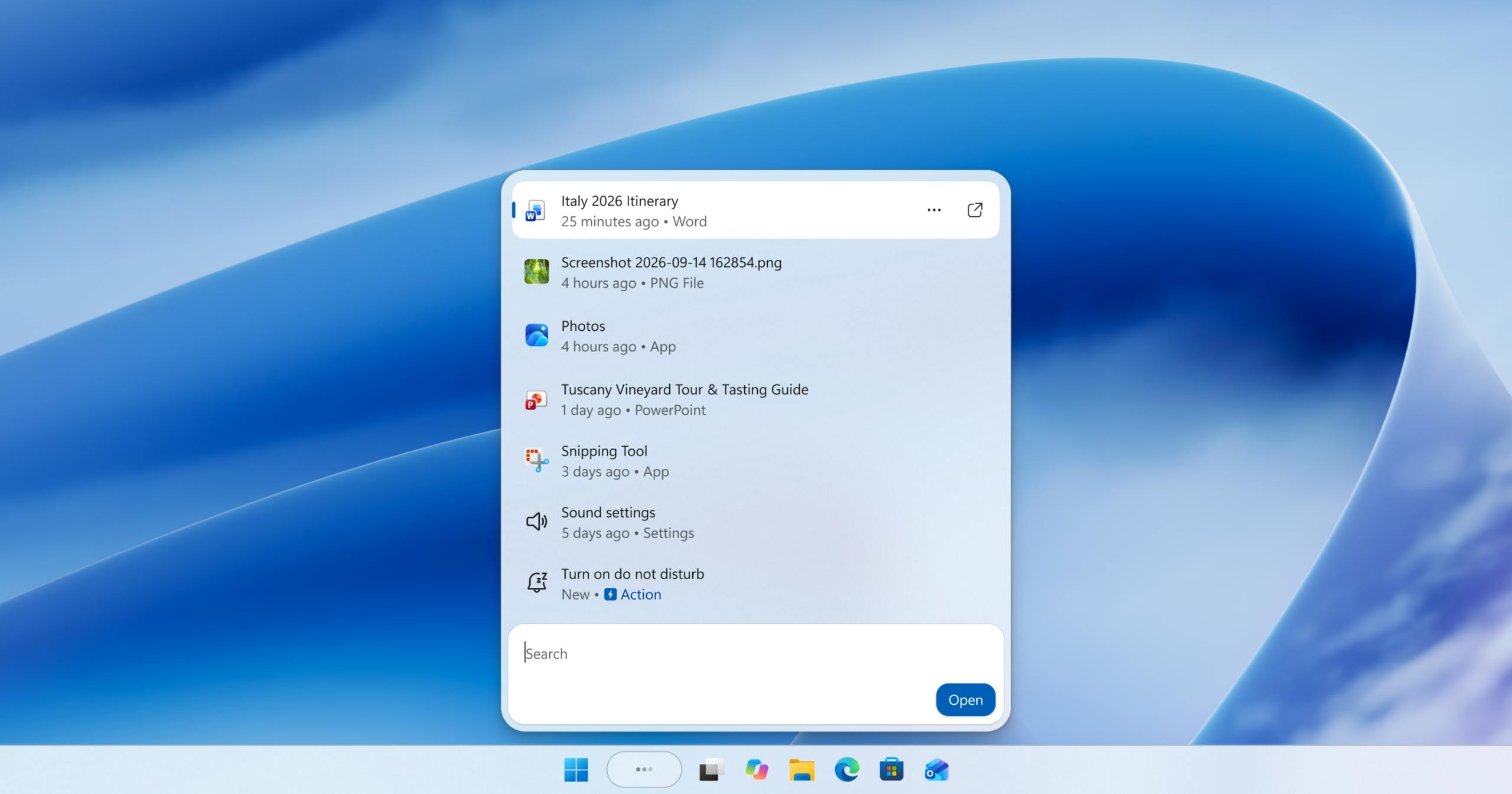
What You Can Do Directly
According to the official announcement, the new Windows Search supports triggering a range of system actions directly from the search box, including:
- Toggling dark mode
- Turning Bluetooth on or off
- Adjusting screen brightness
- Muting with one click
- Snapping window layouts
In short, type what you need and the corresponding action appears right there. This "type to act" design follows the same philosophy as modern Command Palette tools — eliminating the cost of navigating through layers of menus.
For users who rely on quick system tweaks, this significantly reduces the steps involved. Adjusting brightness or switching to dark mode, for example, used to require opening Settings or the Action Center. Now it's a single search away.
The Command Palette is a UI pattern that lets users trigger app functions via text matching in a single input field. It gained widespread popularity in the Sublime Text code editor, and has since been adopted by VS Code, Figma, Notion, Linear, and other mainstream tools. Its core value lies in "flattening" features buried across multi-level menus into one searchable list — users don't need to memorize navigation paths, just describe their intent. What Windows Search is introducing here is essentially bringing this pattern from the application layer down into the operating system itself.
Technical Foundation and Performance
The new search is built on WinUI 3, Microsoft's modern native UI framework, which brings a more contemporary look and a more consistent system experience. Microsoft also highlights improvements to search relevance — meaning results should better match what users actually intend, rather than surfacing a pile of unrelated items.
Search relevance is critical to whether this kind of feature actually works. A search box that can execute actions becomes a liability if it misreads user input, creating accidental triggers. The fact that Microsoft is pairing relevance improvements with action capabilities suggests the goal is a search that's both fast and accurate.
WinUI 3 is the core UI layer of the Windows App SDK, with its stable release shipping in 2021. It decouples the Fluent Design components previously locked to UWP (Universal Windows Platform) apps, allowing developers to use the same modern control library in traditional Win32 applications. Compared to the earlier WinUI 2 — which depended on the system's built-in XAML framework — WinUI 3 bundles the UI framework directly with the app, reducing version dependencies. This also lets Microsoft iterate its own system components independently, without waiting for a full OS release cycle.
Gradual Rollout Strategy
The feature is currently rolling out to Windows Insiders first, following the typical staged validation approach. Microsoft says more rich preview content and additional actions are on the way.
This approach — testing in the Insider channel before broader release — helps gather feedback and refine the experience before it reaches everyone. For general users, it means the full version is still a little ways off.
On Product Hunt, the feature received 68 upvotes and ranked 11th, categorized under Windows and Productivity — a sign of the community's sustained interest in OS-level efficiency tools.
The Windows Insider Program is Microsoft's public pre-release testing channel, divided into four tiers: Canary (cutting-edge, highest risk), Dev, Beta, and Release Preview, in increasing order of stability. Participants get early access to unreleased features and can submit feedback through the Feedback Hub. This mechanism lets Microsoft catch compatibility issues and experience gaps in real-world environments before pushing updates to hundreds of millions of devices — a standard staged validation approach used by most major OS vendors today.
A Closing Thought
At its core, this redesign of Windows Search is a step toward "natural language-driven system control." Using the search box as a unified entry point — where users describe intent and the system matches it to an action — aligns closely with the interaction paradigm emerging from today's AI assistant products.
That said, based on what's publicly available, the current functionality is still largely limited to predefined system actions, and true intelligent understanding remains a future goal. But the direction is clear: search is no longer just about "finding" — it's about "getting it done." For everyday Windows users, that's an efficiency upgrade worth watching.
Related articles

Chain of Thought Isn't Just for AI: How Humans Can Use CoT to Improve Thinking Quality
Chain of Thought isn't just a prompt trick for large models. Starting from a Hacker News discussion, this article analyzes why CoT works for human thinking too, breaks down actionable ways to transfer it, and highlights the key differences between human CoT and machine CoT.
Cloudflare Teams Up with OpenAI: Closi…
Cloudflare Teams Up with OpenAI: Closing the Loop from Vulnerability Discovery to Defense with AI
Cloudflare uses OpenAI Daybreak to investigate security vulnerabilities and generate reviewable remediation plans, while developers use Codex to boost coding efficiency and quality.

Orca Multi-Agent Orchestration in Practice: A Guide to Parallel Collaboration with Claude and Codex
Orca is Stable AI's free open-source agent workbench supporting 34 agents like Claude Code and Codex in parallel. Learn its Git worktree isolation, multi-model orchestration, and mobile management.