The Ultimate Bilibili Guide to Codex: From Installation to Real-World Pitfall Avoidance

A full-process pitfall-avoidance guide and tool philosophy for the Codex desktop app, from registration and installation to quota usage.
Based on a Bilibili Codex guide video, this article distills the key steps from registering a GPT account to daily use. At the installation stage, it recommends installing to the system drive via the Microsoft Store to avoid launch failures caused by non-C: paths. At the login stage, phone verification, 403 region not supported, and token exchange failures mostly point to network and cache issues; optimizing the network, clearing cache, and logging in again usually solve them. The high-frequency "reconnecting 5 times" error requires creating a .env file with the proxy port under the .codex directory in the user folder; when configuration is chaotic, follow the ladder of "ask on the web—log in again—delete directory and reinstall," and be sure to back up local projects before reinstalling. On quota, Plus uses a points system of 100 per week and 20 per 5 hours; high reasoning intensity consumes very fast, and those with high demand can pay the difference to upgrade to Pro 5X. The author concludes by reminding that most paid tutorials are ripping people off and advocates getting hands-on directly and expressing needs clearly.
Title
Bilibili's Step-by-Step Codex Guide: From Installation to Real-World Pitfall Avoidance
Meta Description
A breakdown of Bilibili's step-by-step Codex guide: from GPT account registration, desktop install paths, phone verification and 403 error troubleshooting, to the ".env" environment file fix for "reconnecting 5 times," plus the Plus membership quota system and Pro upgrade advice, with beginner tips.
Article Content
With AI coding tools springing up left and right, OpenAI's Codex desktop app—thanks to its deep integration with the GPT account system—has become a handy daily assistant for many developers writing code, building animations, and creating websites. But when it comes time to actually get started, issues like registration, installation, login verification, network proxies, and quota limits often stop beginners in their tracks. A Bilibili video billed as "the most detailed Codex guide on all of Bilibili" walks through the entire process in one complete flow, from registering a GPT account to everyday use. This article distills the most bookmark-worthy key information from that video.
From Registration to Installation: Lay a Solid Foundation First
The first step in the video is solving the account problem. The author suggests going straight to the GPT official website, clicking free sign-up in the top right corner, and using a 163 or QQ email to receive the verification code to complete registration—name and age can be filled in however you like. There's not much of a barrier at this step; the real dividing line appears at the download and installation stage.
According to the author's observations, many people encounter a "won't open" situation after downloading the Codex desktop app, and the cause often lies in the installation path—installing to a drive other than C: may trigger launch errors. A more reliable approach is to search for ChatGPT in the Microsoft Store and install from there; the system will default to installing on the system drive, so you basically won't run into the won't-open problem.
Login Verification: The Chain of Pitfalls with Phone Numbers and Networks
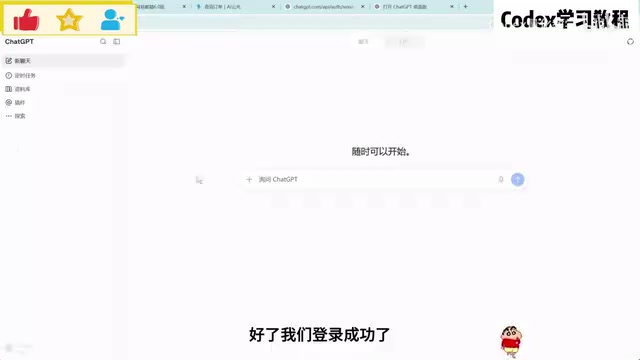
Once installation is complete, the login stage is the real "turn-off zone." The first problem the author encountered was phone number verification, and two solutions were offered: one, subscribe to a membership—old accounts have a chance of skipping verification; two, find a US-region phone number for SMS verification. Newly registered accounts will most likely still need verification even after subscribing, while accounts registered longer ago have a higher chance of skipping verification after subscribing.
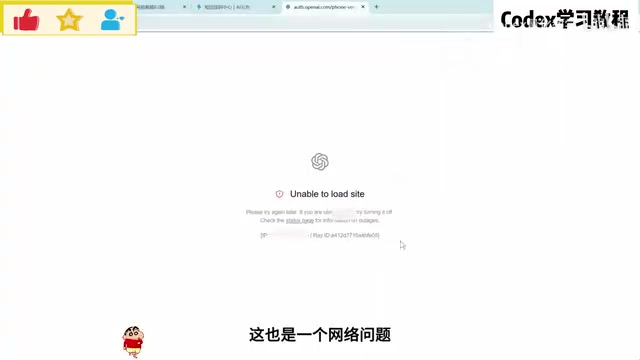
Then comes a string of network-related errors: 403 region not supported, token exchange failure, abnormal login pop-ups, and so on. The author's experience is that these problems basically all point to network and cache—optimize the network, clear the cache, and log in again; these three steps usually solve it. In other words, Codex login problems are rarely bugs in the software itself; more often it's the network environment not being configured properly.
The Root-Cause Fix for the High-Frequency "Reconnecting 5 Times" Error
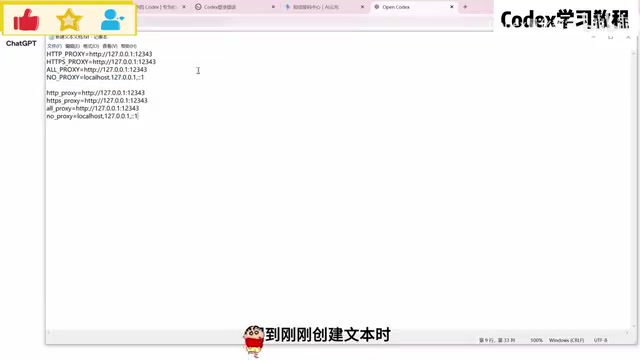
The video spends a large chunk of time explaining a high-frequency problem: every conversation shows "reconnecting 5 times." The author's solution is to manually create an environment file. Specifically, open the .codex directory under the user directory on the C: drive, create a new TXT file, paste in the specified code, and change the port number at the end to your network proxy's global or TUN mode port. If you can't find the port, the author even suggests just letting Codex find the port itself and generate the .env environment file, then save and restart Codex.
For various abnormalities caused by configuration chaos, the author offers a ladder of solutions from gentle to drastic: first, describe the problem to GPT on the web and let it guide you step by step to restore the configuration; second, try logging out and back in; the most drastic approach is to delete the Codex directory and reinstall, but the author specifically warns that this will also delete local projects, so before doing so, be sure to ask GPT on the web to teach you how to back up first.
What Are the .codex Directory and the .env Environment File
The .codex directory is the default local location where the Codex desktop app stores configuration and cache; on Windows it's usually at C:\Users\<username>\.codex. Among these, .env is a common environment variable file format, with each line written as KEY=VALUE; when the program starts, it reads these key-value pairs to override default settings. For Codex, writing the proxy port into .env is equivalent to fixing the network exit before startup, avoiding repeated reconnections caused by failed automatic client detection. Two things to note: first, Windows Explorer hides known file extensions by default, so after creating a txt file you must confirm the filename is .env and not .env.txt; second, the port number must match the port your proxy software is actually listening on—common proxies use HTTP port 7890 or mixed port 7897, and in TUN mode you usually don't need to specify anything extra.
The Quota System: The Real Pain Point for Plus Users
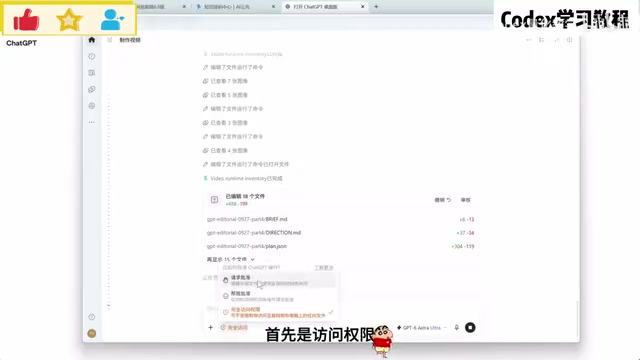
Once you get to actual usage, the author focuses on explaining the quota rules. Plus membership is not "use it however you want within 5 hours"; instead it uses a points system: a total of 100 points per week, at most 20 points within 5 hours, and when used up you must wait for the next 5-hour window to recover; if the weekly quota is exhausted, you have to wait until next week. More critically, the highest GPT model consumes extremely fast—maxing out reasoning intensity could burn through the quota in just a few minutes. The author states outright that this is the pain point for many Plus users and suggests that those with high demand pay the difference through the store to upgrade to Pro membership—Pro 5X has five times the quota of Plus, and the 5-hour limit disappears.
The author also reminds that upgrading a plan recalculates one month from the day of upgrade; before recharging, you can check through the web billing page whether you are a non-region recharge (if the transaction record shows PHP, it's non-region), then follow the process to obtain the account Session, calculate the price difference, and submit payment.
The Calculation Logic Behind the Points-Based Quota
Codex's quota is not measured by "number of requests" or "duration," but by converting token consumption into points: different models and different reasoning intensities correspond to different conversion multipliers. The higher the reasoning intensity and the longer the context, the more points are deducted per conversation—this is why "maxing out intensity burns through it in minutes." The weekly quota and the 5-hour window are two parallel limits—the former is the total cap, the latter is the rate cap, and hitting either one triggers a wait. With this understanding, practical ways to save quota include: breaking long tasks into smaller chunks, switching to lower reasoning intensity or lighter models for simple questions, and avoiding repeatedly resending ultra-long contexts. Pro 5X removes the 5-hour window limit, which essentially loosens the rate constraint and keeps only a larger total pool.
Usage Philosophy: Don't Treat Tutorials as a Moat
At the end of the video, the author throws out a rather sharp viewpoint: most AI usage tutorials online today, especially paid courses, are essentially ripping people off. Large models themselves are already capable enough—needs like building websites and editing videos can be done directly, and if you don't understand something, just ask. Much of the content demonstrating plugin installation and computer control is more about performance effect; as long as you clearly state your needs, the model will automatically help you achieve your goal.
The author's core advice is "just get started and use it": rather than burying yourself in complicated tutorials, spend more time looking at finished products and ideas shared by creators and just pick them up and start creating. The more you use it, the more naturally you'll be able to achieve the effects you want according to your own ideas. Although these words carry a personal tone, for beginners caught up in tutorial anxiety, they serve as a sobering dose of clarity.
Final Thoughts
The value of this video lies in breaking down the most easily stuck points in using Codex one by one—installation path, login verification, proxy port, quota rules—and providing an actionable troubleshooting order. For developers new to Codex, following along can save a lot of hassle. However, it's also worth noting that operations in the video such as network proxy configuration and non-region recharging involve account security and platform rules, and you need to assess the risks yourself when actually doing them. Tools are ultimately just tools; the real barrier has never been installation tutorials, but whether you can clearly define the problem and keep putting in hands-on practice.
One-line Summary
A full-process pitfall-avoidance guide and tool philosophy for the Codex desktop app, from registration and installation to quota usage.
Paragraph Summary
Based on a Bilibili Codex guide video, this article distills the key steps from registering a GPT account to daily use. At the installation stage, it recommends installing to the system drive via the Microsoft Store to avoid launch failures caused by non-C: paths. At the login stage, phone verification, 403 region not supported, and token exchange failures mostly point to network and cache issues; optimizing the network, clearing cache, and logging in again usually solve them. The high-frequency "reconnecting 5 times" error requires creating a .env file with the proxy port under the .codex directory in the user folder; when configuration is chaotic, follow the ladder of "ask on the web—log in again—delete directory and reinstall," and be sure to back up local projects before reinstalling. On quota, Plus uses a points system of 100 per week and 20 per 5 hours; high reasoning intensity consumes very fast, and those with high demand can pay the difference to upgrade to Pro 5X. The author concludes by reminding that most paid tutorials are ripping people off and advocates getting hands-on directly and expressing needs clearly.
Related articles

LLM Application Development Interview Crash Course: High-Frequency Topics on LLMs, RAG, and Agents
A systematic guide to high-frequency LLM application development interview topics: LLM fundamentals, Prompt and Context Engineering, the RAG pipeline, Agent loop prevention and memory design, tool calling, and AI coding engineering follow-ups, with preparation strategies and answer approaches.

Animal Conservationist Maya Higa's Advice to Her 9-Year-Old Self
Animal conservationist Maya Higa shares advice to her 9-year-old self, core values, and a philosophy of observing nature in a National Geographic interview, discussing Jane Goodall and Bill Nye's influence—offering transferable inspiration for tech content creators.

EACL 2027 Decisions Imminent: The Wait and Anxiety Trending on Reddit
EACL 2027 decisions are imminent, and a Reddit decision thread has drawn collective attention from authors. This article analyzes the waiting anxiety during conference decision periods, the review decision mechanism, and how authors should plan resubmission and revision after decisions are released.