Three Key Android Cross-Device APIs: CDM, Jetpack Telecom, and Quick Share

Android takes over cross-device connectivity with three APIs: CDM, Jetpack Telecom, and Quick Share.
The article systematically reviews the state of cross-device interaction on Android and the official solutions. With users owning three to four devices on average and roughly 22 billion IoT devices worldwide, cross-device capabilities have become app infrastructure—but building them yourself on low-level networking and Bluetooth APIs brings battery and memory overhead, unpredictable latency, and connection friction. The Android team offers three dedicated APIs: Companion Device Manager replaces always-on foreground services with system wakeups and one-tap permission grants via device profiles; Jetpack Telecom registers VoIP calls into the system call framework, unifying projection, audio focus, and state sync; and the Quick Share SDK lets apps embed end-to-end encrypted local peer-to-peer file sharing. The article closes with clear selection boundaries.
Cross-Device Experiences: From Edge Cases to Everyday Necessity
In this Android Dev Summit session, engineers Hanrui, Yaxin, and Natraj systematically laid out the current state of cross-device interaction on Android and the solutions available. They noted that connectivity is no longer just about "connecting Bluetooth earbuds to a phone"—users own an average of three to four devices, spanning phones, watches, earbuds, tablets, foldables, Chromebooks, and in-car systems.
The data backs this up: there are roughly 22 billion IoT devices worldwide, up 14% year over year, with Wi-Fi accounting for a third and Bluetooth for a quarter. Meanwhile, over 40% of calls are made over VoIP networks, 71% of which happen on Android devices. More than 14 billion photos and videos are shared every day across social and messaging apps. These numbers show that cross-device capabilities are no longer a nice-to-have—they're app infrastructure.
Yet most developers still rely on low-level networking and Bluetooth APIs to build cross-device features themselves, which brings three challenges: battery and memory overhead (background scanning and always-on services drain power), unpredictable latency (real-time calls and data sync suffer), and connection friction (the complexity of discovery, pairing, and reconnection easily breaks the experience). To address these, the Android team offers dedicated APIs in three areas.
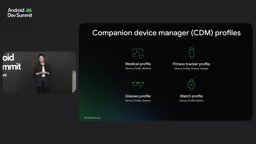
Companion Device Manager: No More Always-On Background Services for Bluetooth Peripherals
Four Categories of Companion Devices and Four Core Needs
CDM targets the "phone + Bluetooth peripheral" scenario, with typical devices including medical devices (glucose meters, vital sign monitors), wearables (watches, fitness bands, earbuds), and in-car kits (digital car keys, hands-free calling). These scenarios all depend on a reliable connection between phone and peripheral—and for medical devices, lives may be at stake.
Developer needs center on four points: device management (precisely finding and pairing the target among many nearby devices), presence awareness (waking the app when a device approaches or leaves), connection maintenance (automatic reconnection after disconnection, even when the app isn't running), and data sync and transfer (sensor readings, firmware updates, settings delivery).
Traditional Approach vs. CDM
The traditional implementation relies on foreground services: declare Bluetooth scan and connect permissions, the foreground service permission and connected device type, and notification permission, then run an always-on service to keep the process alive. This works, but at the cost of a service that runs constantly—even when the device isn't anywhere nearby.
CDM changes this: the system wakes the app based on device presence, keeping the process alive while the device is in range without a foreground service. It also introduces device profiles, letting users grant all the permissions an app needs with a single tap, replacing the lengthy chain of permission dialogs and significantly improving conversion. The watch profile arrived in Android 12, glasses in Android 14, and Android 17 adds medical device and fitness tracker profiles.
Code Path and Limitations
Taking a medical device as an example: declare permissions (all normal, install-time permissions with no popups), build an association request with a device filter, and call associate; CDM handles the scanning. In onAssociationPending, launch the system association dialog—one user tap completes both association and permission grant, and can even bypass Do Not Disturb, which matters for critical alerts. After obtaining the association ID, call startObservingDevicePresence and implement CompanionDeviceService; when the device comes into range, the system binds the service and invokes the BLE_APPEARED callback, and BLE_DISAPPEARED when it leaves.
The speakers acknowledged CDM's limitations: most features landed in Android 12/13, with core improvements in Android 16 and new profiles in Android 17, so version fallbacks are needed; background scanning is supported but background broadcasting is not; it uses low-power scanning, trading off some real-time responsiveness—don't expect instant wakeups; and it doesn't support payload pre-filtering, so you can't register for specific characteristics or advertising data. Given rising memory pressure, the team strongly recommends that apps migrate from foreground services to CDM as soon as possible.
Device profile is a preset set of capabilities and permission templates in CDM, organized by device category. After a developer declares a target profile (such as medical device, fitness tracker, watch, or glasses), the system knows which permissions the app needs and which type of device presence to detect, and grants them all in one bundle at association time. This avoids the multiple popups caused by requesting Bluetooth scan, connect, and notification permissions one by one, and lets the system wake the app according to profile semantics when a device appears. Profiles are tied to Android versions—new categories often require a newer system version—so cross-version support still needs to fall back to the traditional permission path.
Jetpack Telecom: Bringing VoIP Calls into the System Call Framework
Three Pitfalls of Building It Yourself
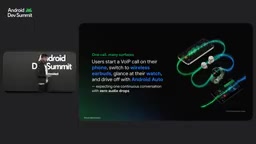
Natraj opened with a typical scenario: a user glances at their watch to see caller info, answers on the watch, puts in earbuds to continue the call, and then gets in the car where the call seamlessly switches to the car speakers. This is now an everyday user expectation, not a premium experience.
But building it yourself runs into three walls. Bluetooth socket fragmentation: the system doesn't know your app is on a call, so you have to build your own Bluetooth socket and media session just to project the call to a watch or Android Auto. Audio focus: directly manipulating the underlying AudioManager and Bluetooth APIs causes audio leaks, and VoIP calls rank low in system priority, so cellular calls preempt the audio; worse, focus isn't necessarily returned when the cellular call ends. State sync: the user taps mute on the watch but the phone UI still shows unmuted; the user hangs up from the steering wheel but the phone still shows the call in progress.
Register Once, Let the System Coordinate Everything
Jetpack Telecom's approach is for apps to register calls through CallsManager, with the library acting as a system-level call coordinator: it handles projection to remote interfaces like watches and Android Auto, manages audio focus, and is compatible all the way back to Android 8. Hardware events (watch mute, steering wheel hangup, earbud double-tap) converge as callbacks into ControlScope; the app just listens and updates its call engine, and the library handles state sync.
There's an extra benefit from Kotlin: when adding a call, you launch a coroutine scope that lives exactly until the call ends, so call-related tasks are cleaned up automatically with no orphaned jobs. Integration takes three steps: declare the dependency and MANAGE_OWN_CALL permission, instantiate CallsManager and register with capabilities (video calling, call streaming); build CallAttributes carrying metadata like display name, address, direction, and call type, and call addCall; then collect Flows like muted and currentCallEndpoint in CallControlScope, calling requestEndpointChange when switching devices.
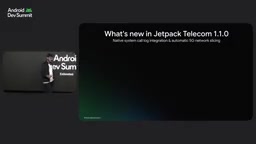
Jetpack Telecom 1.1.0 brings unified call history—VoIP calls appear natively in the system dialer, and users can call back with one tap; it also supports selective exclusion from logging via the isLogExcluded flag. Another new feature is 5G network slicing: on supported carrier networks, calls automatically get a dedicated slice with low latency and no interference, with no code required from developers, and an opt-out via a capability flag. Global communication apps like Google Meet, WhatsApp, Kakao, and Zoho have already integrated the library.
Audio focus is the mechanism Android uses to arbitrate among competing audio streams: typically only one stream holds focus at a time, and other sources must pause, lower volume, or wait. If a VoIP call manipulates AudioManager on its own without participating in focus negotiation, it's prone to issues like overlapping audio, being silently preempted by a cellular call without getting focus back afterward. Once Jetpack Telecom registers a call as a system-level call, the system requests and releases focus uniformly according to call priority, and coordinates audio routing when devices switch (watch, earbuds, car), reducing leaks and preemption.
Quick Share: Embedding Peer-to-Peer File Sharing in Your App
The Experience Debt of Cloud Relays
Yaxin pointed out that file sharing has long relied on cloud relays: take a photo, upload, and the other person downloads. Two people in the same room still have to route through the cloud, and inviting a collaborator means manually typing a username or email. Social and messaging apps also compress images for performance and storage, making them look pixelated on high-end screens. Meanwhile, files themselves keep getting bigger—a single photo easily hits 10MB, a five-minute video about 500MB—so uploads and downloads take forever, and on poor networks transfers may break or time out.
Local Network + System-Level Abstraction
Quick Share is already built into the share sheet as a system capability, automatically choosing the best protocol (Bluetooth or Wi-Fi) between two devices. It covers Marshmallow and above and has expanded to Chromebooks, Google Books, and Windows, reaching over 3 billion devices. Tap to Share, introduced with Pixel 11, uses NFC for discovery—just tap two devices together to share, with no manual device selection.
For developers, the Quick Share SDK is being opened up: end-to-end encryption, full-speed local network transfers, automatic hotspot creation when needed, Wi-Fi Direct support, and images kept at original resolution. Because it runs over the local network, it works deep in the subway or on a plane, while saving data for users and storage and bandwidth costs for servers.
Integration takes about 20 lines of code: initialize the Quick Share client, attach files, and start a session, which brings up a preview bottom sheet; for sensitive content you can enable screenshot protection. The receiving side is just as simple. Tap to Share also unlocks new possibilities—the receiving app doesn't need to be open; once the file transfer completes, it's automatically launched and receives the URI, so it can process or display the content right away, with the UI responding to transfer events via Kotlin Flow.
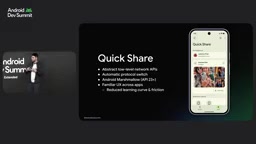
Wi-Fi Direct is a technology that establishes a Wi-Fi connection directly between devices without going through a router, also known as Wi-Fi P2P. One device acts as the group owner, taking on a role similar to a hotspot, while the others join as clients, achieving throughput far higher than Bluetooth—ideal for large file transfers. When the two parties share no common network, Quick Share automatically creates a hotspot or enables Wi-Fi Direct, so peer-to-peer transfers still run at full speed offline—a key underlying capability that lets it work without the cloud.
How to Choose: Three Clear Boundaries
The selection logic the three speakers gave is straightforward: if you need continuous interaction with your own Bluetooth peripherals, use Companion Device Manager; if your app has any VoIP calling capability—even just a customer support call entry point—use Jetpack Telecom; if you're dealing with peer-to-peer file sharing or want to launch your app via Tap to Share, use Quick Share. The common direction of all three APIs is to take system-level connection, audio, and transport complexity onto the platform, leaving developers to focus on their business logic.
For older projects still maintaining foreground services, migrating to CDM offers the most direct payoff: lower battery and memory usage, smoother permission grants, and a system-managed connection lifecycle.
One-line Summary
Android takes over cross-device connectivity with three APIs: CDM, Jetpack Telecom, and Quick Share.
Paragraph Summary
The article systematically reviews the state of cross-device interaction on Android and the official solutions. With users owning three to four devices on average and roughly 22 billion IoT devices worldwide, cross-device capabilities have become app infrastructure—but building them yourself on low-level networking and Bluetooth APIs brings three challenges: battery and memory overhead, unpredictable latency, and connection friction. To address this, the Android team offers three dedicated APIs: Companion Device Manager replaces always-on foreground services with system wakeups and one-tap permission grants via device profiles; Jetpack Telecom registers VoIP calls into the system call framework, unifying projection, audio focus, and state sync; and the Quick Share SDK lets apps embed end-to-end encrypted local peer-to-peer file sharing. The article closes with clear selection boundaries.
Related articles

AI Comic Drama with WorkBuddy from Scratch: A Step-by-Step Skill Pack Installation Guide
Learn how to create AI comic dramas with WorkBuddy from scratch. This guide covers installation, Skill pack import and invocation, plus a script generation demo with manual revision tips to get you through the first step from script to storyboard.

WorkBuddy Agent Runs the Entire GEO Database Mining Pipeline with a Single Prompt
WorkBuddy agent automates GEO database mining: from data search and curation to batch correction, differential analysis, co-expression networks, feature gene screening, and immune infiltration—a single prompt generates a complete bioinformatics report, greatly lowering the barrier to bioinformatics analysis.

PC Memory Wasted? Hacker News Debates Centralized Data Centers
Hacker News users argue that personal computer memory is wasted and should be centralized in data centers, sparking debate on centralized vs. distributed computing resource allocation. This article analyzes the logic behind the claim, the costs of centralization, and new tensions in memory resource allocation in the AI era.