Three Open-Source Spreadsheet AI Skills Compared: Why the One with the Worst Docs Won

The spreadsheet AI skill with the worst documentation won by having the most reliable code.
Three open-source spreadsheet automation skills for Claude Code were evaluated across five dimensions including multi-table joins, data cleaning, and automation reusability. While all three scored well on basic tasks, only Excel Macro Creator — paradoxically the one with the worst documentation — reliably preserved its conflict-resolution logic in frozen scripts when tested against fresh data.
The Real Pain Point in Spreadsheet Automation Isn't Cleaning — It's Merging
When most people think about using AI for spreadsheet work, "data cleaning" is the first thing that comes to mind. But ask anyone who actually does this day in and day out, and you'll find the real headache isn't dirty data — it's having too many spreadsheets. Every week, tables from multiple departments and multiple sources have to be manually aligned by field, deduplicated, and joined together. Only after all that does cleaning even enter the picture.
In other words, multi-table joins are the single biggest real-world bottleneck at the start of any data processing pipeline. Multi-table joins work similarly to SQL JOIN operations: enterprise data is typically scattered across CRM, ERP, finance, and other systems, each with its own field naming conventions ("客户ID", "CustomerID", and "客户编号" might all refer to the same column), requiring field mapping before anything can be aligned. Even trickier is primary key conflict — when the same order number maps to different customer records, the system needs a clearly defined conflict resolution strategy, or silently dropping data becomes the most dangerous hidden failure mode in enterprise contexts.
This review was built around exactly that pain point. Three open-source spreadsheet automation skills that can be installed into Claude Code (ClubTool) were put through a rigorous re-evaluation using brand-new data.
About Claude Code and its skill ecosystem: Claude Code is a command-line AI coding assistant developed by Anthropic. It supports third-party tool integration via MCP (Model Context Protocol), a standardized interface opened in late 2024 that lets developers package custom tools as "skill bundles" and plug them directly into Claude's reasoning pipeline. This allows Claude to invoke code execution environments, read and write local files, and manipulate spreadsheets — essentially combining an LLM's comprehension capabilities with deterministic program execution to form an AI Agent workflow. All three open-source skills evaluated here are published in public repositories through this ecosystem and require no additional API keys.
Scoring is based on a three-tier task structure, each corresponding to a real-world pain point:
- Tier 1: Merge three tables with inconsistent column names and formats into a single consolidated table.
- Tier 2: Clean the merged table — fix mixed date formats, and handle amount fields that mix numeric values with text strings.
- Tier 3 (Critical): Crystallize the entire process into a reusable script that can be run again next month without modification.
The hidden challenge in data cleaning: Data wrangling is widely recognized as the most time-consuming step in any ETL pipeline, consuming an estimated 60–80% of a data analyst's time. Inconsistent formatting (mixed date conventions) and type mixing (amount fields containing both plain numbers and text like "元") are common issues — but the most insidious problem is "near-duplicate" records: entries with the same primary key but differing fields. Simple deduplication loses information; you need human-defined conflict resolution rules. This is precisely where the biggest gaps emerged in this evaluation.

Five Dimensions, One Clear Differentiator: Automation Reusability
This evaluation scored all three skills across five dimensions: multi-table join, data cleaning, automation reusability, traceability, and production efficiency, using fresh data for re-validation to test real-world performance against unseen inputs.
All three skills scored well on multi-table joins and data cleaning. The real differentiator was automation reusability — whether the skill could actually encode its interactive decision-making into a script that holds up when run independently. This is where many AI tools fall apart: performing well in front of you is not the same as producing reliable code.
There's a systemic reason for this: LLMs rely on dynamic, context-driven reasoning during conversation, allowing them to "improvise" and catch anomalies on the fly. But once the generated code is frozen into a static script, its logic branches are fixed — unable to adapt to data patterns it has never seen. AI reliability researchers call this distribution shift: the divergence between demo data and real production data can cause scripts to silently fail in production environments.
3rd Place: CSB Excel Merger (16 points)
This skill comes with genuinely solid documentation and earned full marks on the cleaning task. But its multi-table join handling was a step behind the other two: when it encountered an "same order number, different customers" conflict, it simply kept one side's data and discarded the other.
Worse, when re-validated with fresh data, the frozen script applied the same mechanical deduplication — and the written summary didn't even mention that this had happened. It's the least transparent of the three: problems occurred and the tool didn't notice them itself.

Being More "By the Book" Doesn't Mean Being More Reliable
2nd Place: DSXS (17 points, built-in skill in official repository)
This is the most "by the book" of the three. Its field mapping and conflict detection were the best in class — when two conflicting records appeared, it preserved both in full instead of making a unilateral decision about which to drop. That kind of rigor at the interaction level should, in theory, make it the most trustworthy.
But that's exactly where it fell short: during fresh-data re-validation, the frozen script lost all of that judgment. The written summary even claimed it had printed a warning — when the code contained no such logic whatsoever. This proves that "performing reliably in conversation" and "being reliable in code" are completely different things — even the most careful interactive behavior can fall apart once committed to a script.
This outcome underscores the necessity of what might be called acceptance-test-driven AI deployment: before pushing any AI-generated automation script into production, you must run regression tests against real, previously unseen data.
Its documentation is also the most perfunctory of the three — almost entirely boilerplate filler.

1st Place: Excel Macro Creator (19 points)
The winner's re-validation result was the most surprising of all. Its multi-table join and data cleaning were on par with the other two, and it was the fastest of the three by processing speed. But the real gap emerged during re-validation: the fresh dataset included the same trap — two customers sharing the same order number — and the frozen script still correctly identified this as a customer-conflict scenario rather than a simple duplicate, printing a clear log showing exactly which record was kept and which was discarded.
The biggest twist: upon closer inspection, its documentation turned out to be the same kind of template-generated boilerplate — not a single code example in sight. Yet its actual code was the most solid of the three. It won with the worst docs by delivering on substance.
Conclusion: Docs Can Deceive, Code Doesn't Lie
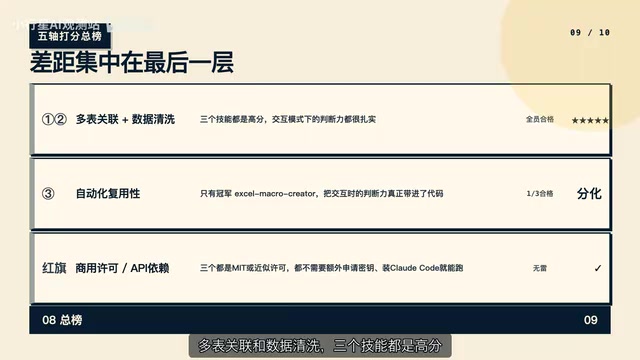
Overall, all three skills scored high on multi-table joins and data cleaning. The gap came down to automation reusability — and only the winner, Excel Macro Creator, actually carried its interactive judgment into the generated code.
The good news: none of the three skills require additional API keys. Install Claude Code and they're ready to run, with no commercial licensing issues. If your need is just "merge this one table and be done with it," any of the three will get the job done.
But if you're looking for something you can rerun reliably every month, this evaluation delivers an uncomfortable but honest reminder:
An AI performing beautifully in front of you doesn't mean the judgment it encodes into code will hold up just as well. Before you actually put it into production, you need to run it yourself against new data.
This lesson applies to every AI Agent and automation tool: there is often a wide validation gap between demo-environment success rates and production-environment reliability. No amount of polished documentation is a substitute for a single run against real, fresh data. This is the core of acceptance-test-driven AI deployment: don't trust demo success rates — trust empirical results on real-distribution data. That's the right way to safely bring AI tools into production workflows.
Key Takeaways
Related articles

WorkBuddy Beginner's Guide: How AI Agents Automate Office Tasks
WorkBuddy tutorial: learn how this desktop AI agent workbench automates files, organizes data, and generates documents, compared with LLMs and Codex, plus a beginner path and cost analysis.

Doubao Work in Practice: Three Modes That Let AI Actually Get Work Done
Doubao Work practical tutorial: from chat mode to Work Mode Lite and Pro, explaining the logic for choosing among three modes with real office task demonstrations. Even complete beginners can learn to use an AI agent to handle local files, organize materials, and generate documents.

AI Agent Runs the Entire GEO Database Mining Workflow with a Single Prompt
Based on a Bilibili creator's demo, this article explains how the WorkBuddy AI agent completes GEO database mining with a single prompt: automatically searching datasets, downloading and organizing data, batch correction, differential analysis, WGCNA, machine learning-based feature gene screening, and regulatory network construction, and generating a complete analysis report.