Three PDF Agent Skills Tested: One-Click Generation of Bilibili Video Notes & Technical Manuals

Hands-on testing of three AI Agent PDF generation skill plugins and their capabilities
This article introduces the concept of plugin-based Skills architecture in the AI Agent ecosystem and provides hands-on testing of three PDF generation Agent Skills: Bilibili Render PDF converts Bilibili videos into LaTeX-typeset illustrated notes (requiring a multimodal model); MiniMax PDF supports generating professional PDF documents from scratch; and Any2PDF addresses brand-level PDF production needs. These tools demonstrate how Agent Skills break beyond pure text generation by calling external toolchains.
AI Agent Ecosystem & Plugin-Based Skills Architecture
An AI Agent is an AI system capable of autonomously perceiving its environment, formulating plans, and executing multi-step tasks—fundamentally different from traditional single-turn Q&A language models. Skills (skill plugins) are functional extension units within the Agent ecosystem, similar to apps on a smartphone. Each Skill encapsulates specific tool-calling capabilities (such as web access, file operations, API calls, etc.), enabling Agents to break beyond pure text generation and truly interact with the external world. Current mainstream Agent frameworks (such as OpenAI's GPT Actions, Anthropic's Tool Use, and various open-source frameworks) all support this plugin-based architecture—which is exactly why complex tasks like PDF generation that require external rendering engines can be packaged into simple, easy-to-use Skills.
As the AI Agent ecosystem matures, various practical Skills (skill plugins) are reshaping our workflows. This article provides hands-on testing of three Agent Skills centered around PDF generation—Bilibili Render PDF, MiniMax PDF, and Any2PDF—which respectively address pain points in video note organization, technical document conversion, and brand-level PDF production.
Video Note-Taking Powerhouse: Bilibili Render PDF
Use Cases & How It Works
Many people share this need: you find a high-quality technical course video on Bilibili (China's leading video platform), but don't have time to watch it from start to finish, or want structured notes for later review. Bilibili Render PDF is built for exactly this—it automatically converts Bilibili videos into richly illustrated LaTeX-typeset notes, outputting them as PDF files.
LaTeX Typesetting Background: LaTeX is a document preparation language based on the TeX typesetting system, developed by Leslie Lamport in the 1980s. It remains the gold standard in academia and technical documentation to this day. Unlike WYSIWYG tools like Word, LaTeX uses a markup language to describe document structure, with a compiler handling the final layout calculations—producing extremely precise mathematical formulas, code blocks, and complex table formatting. LaTeX was chosen as the intermediate format precisely because its typesetting quality for technical content (code, formulas, architecture diagrams) far exceeds direct HTML or Markdown rendering. However, LaTeX compilation environments (such as TeX Live, MiKTeX) are quite large, which is why such Skills typically need to run in sandbox environments with complete toolchains.
Its workflow is roughly as follows:
- Receives a Bilibili video link from the user
- Uses Python libraries (such as yt-dlp) to download the video content
- Extracts key frames and audio through tools like FFmpeg
- Calls multimodal large models to recognize visual content and summarize text
- Integrates everything into a structured LaTeX document and compiles it to PDF
FFmpeg & Video Processing: FFmpeg is an open-source, cross-platform audio/video processing framework, hailed as the "Swiss Army knife of audio/video processing." Nearly all major video platforms and editing software rely on it under the hood. In this workflow, FFmpeg handles the core tasks of key frame extraction (Scene Detection) and audio separation. Key frame extraction isn't simply taking screenshots at regular intervals—it analyzes pixel differences between adjacent frames to intelligently identify moments when the visual content changes significantly (such as PPT slide transitions or demo content switches), covering maximum information with minimum images. The extracted audio is further converted to text via speech recognition (ASR), then sent along with key frame images to a multimodal model for comprehensive understanding. This "audio-visual fusion" approach is the mainstream technical path for video content comprehension.
Key Requirement: Must Be Paired with a Multimodal Model
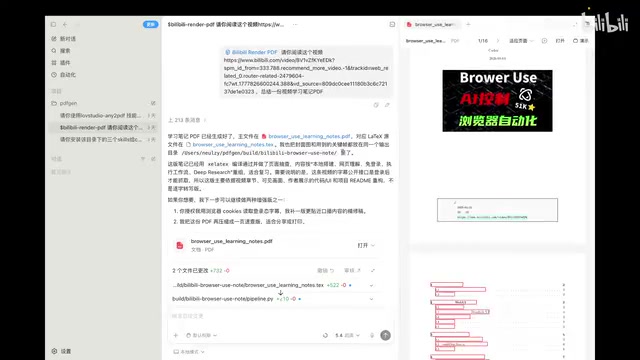
Here's an important technical detail: this Skill requires the underlying large model to have multimodal capabilities. During the note generation process, the AI needs to recognize image content from video key frames—such as code screenshots, architecture diagrams, PPT slides, etc. Only a model that can "see" and understand images can accurately extract information.
Multimodal LLM Technical Deep Dive: A Multimodal LLM is an AI model capable of simultaneously processing multiple data types including text, images (and in some cases audio and video). Compared to pure text language models, multimodal models incorporate large amounts of image-text alignment data during pre-training, giving them the ability to "describe what they see." Representative models include GPT-4V, Claude 3 series, Google Gemini, and open-source options like LLaVA and Qwen-VL. In Bilibili Render PDF's workflow, multimodal capability is critical: video key frames often contain PPT screenshots, code snippets, architectural diagrams, and other visual information. A pure text model can only process the audio transcription, while a multimodal model can "read" these image contents to generate more complete and accurate notes. This is the fundamental reason why model selection directly impacts final note quality.
In testing, the author used Codex as the runtime environment, achieving satisfactory results.
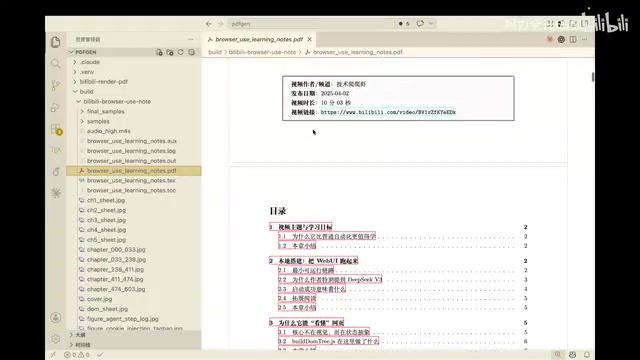
Looking at the actual generated PDFs, the notes contain core knowledge points from the video, key screenshots, and structured chapter divisions. For technical tutorial videos that often run one to two hours long, this automated note-taking capability can dramatically save study time while preserving key visual information.
Technical Document to PDF: MiniMax PDF & Any2PDF
MiniMax PDF: Generate Professional Documents from Scratch
The second noteworthy Skill is MiniMax PDF. Its core capability is generating PDF documents from scratch, while also supporting PDF form filling, document reformatting, and other operations.
In testing, the author had the AI write a "Complete Beginner's Guide to Learning RAG
Related articles
 Product Reviews
The Programmer's Desk Setup Guide: Building a Workspace That Feels Like Home
Discover how programmers build productive, comfortable workspaces. From multi-monitor setups to ergonomic design, explore the desk philosophy that drives focus and flow.
 Product Reviews
Qoder vs Cursor Real-World Comparison: Which $20/Month AI IDE Is Better?
Hands-on comparison of Qoder vs Cursor AI IDEs: Agent autonomy, human interaction count, and architecture decisions. Qoder needed only 2 interactions vs Cursor's 8.
 Product Reviews
Cursor Cloud Agent Demo: Eliminating Bottlenecks Across the Entire Software Development Lifecycle
Deep analysis of Cursor's Cloud Agent demo showing how cloud VMs, automated test artifacts, and a full-chain control plane systematically eliminate human bottlenecks across the software development lifecycle.