Tiles: A macOS Window Management Tool That Switches Work Contexts with One Click

Tiles saves and restores macOS desktop layouts for instant work context switching.
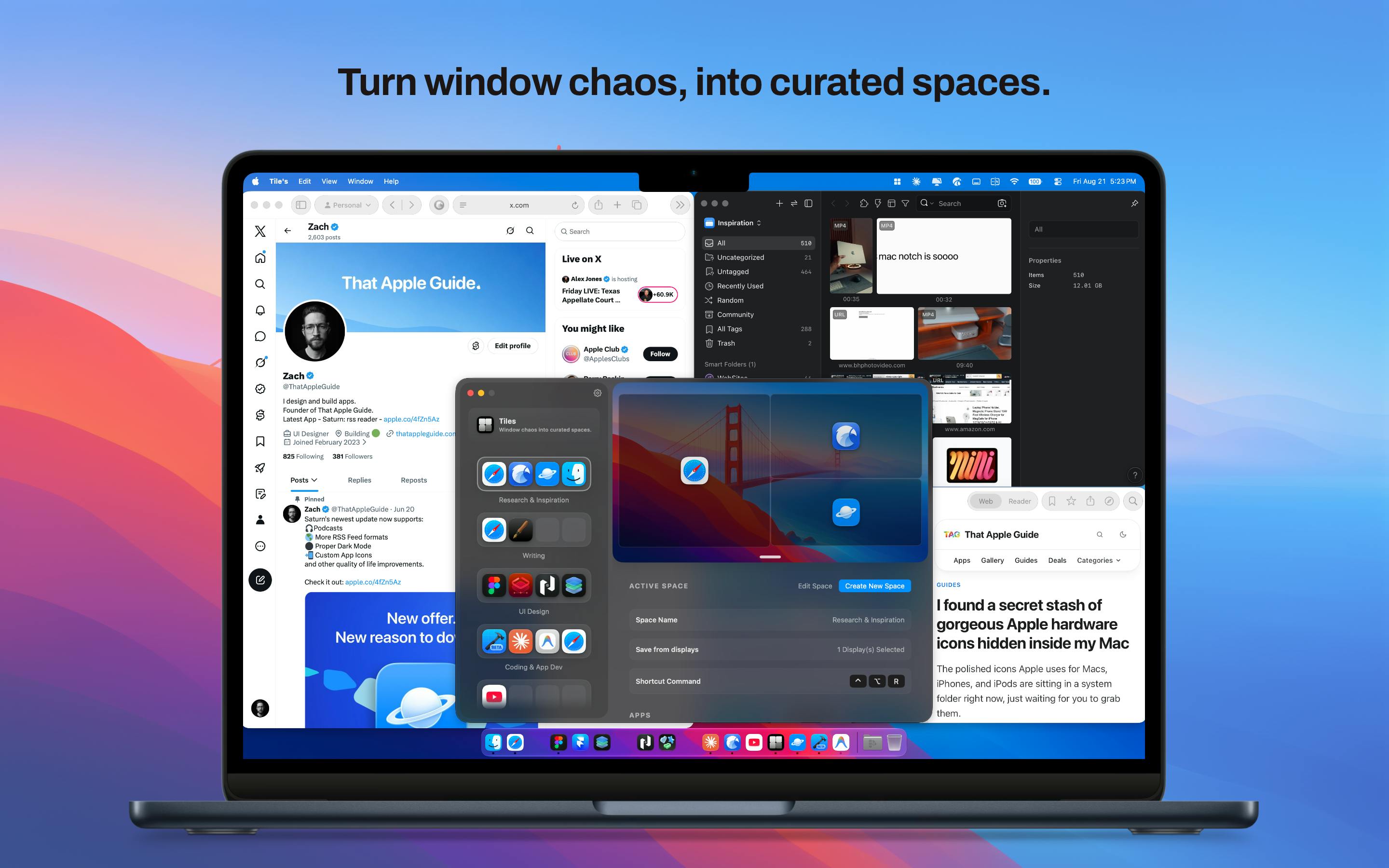
Tiles is a macOS productivity tool that lets users capture and save desktop window layouts for different work scenarios — coding, meetings, design, and more. With three restoration methods (keyboard shortcuts, menu bar, and desktop widgets), it enables instant context switching, reducing the cognitive cost of rearranging windows. Built by indie developer Zach Olsen, it goes beyond simple window snapping to offer full scene-based layout capture and one-click restoration.
Desktop Chaos Is Every Multitasker's Pain Point
For macOS users who need to switch between multiple work contexts daily, a cluttered mess of stacked windows on the desktop has long been the norm. Switching from deep coding to a client meeting, or from research to writing and design — every task transition means rearranging windows, opening apps, and adjusting layouts. These seemingly trivial actions add up, draining significant attention and time.
Tiles, a productivity tool that recently debuted on Product Hunt, targets exactly this pain point. With the tagline "Turning desktop chaos into curated spaces," it offers macOS users a reusable workspace management solution. After launch, it received 56 upvotes, ranking 16th on the daily leaderboard, categorized under productivity tools and menu bar apps.
Tiles' Core Concept: Save Desktop Layouts and Restore Them Instantly
From "Manual Arrangement" to "Scene Capture"
Tiles' core idea hits the nail on the head: instead of manually arranging windows every time, why not "snapshot" your ideal desktop layout and restore it with a single action whenever needed?
Users can capture desktop window layouts for different work scenarios — for example, in "Coding Mode," the IDE, terminal, and documentation are arranged side by side; in "Meeting Mode," the video conferencing app and notes are centered on screen; in "Design Mode," the design tool fills the entire screen. Once saved, switching to any work context is just one action away from instantly restoring the corresponding desktop state.
Three Restoration Methods to Suit Different Habits
According to the product description, Tiles offers three trigger methods to restore saved window layouts:
- Menu bar icon click: Select the desired scene through the menu bar icon
- Keyboard shortcuts: Ideal for keyboard-heavy users who don't want to leave their current workflow
- Desktop widgets: Call layouts directly from the desktop with higher visual accessibility
This multi-entry design accommodates different user preferences. For efficiency-focused developers, keyboard shortcuts are undoubtedly the fastest path, while users who prefer graphical interaction can rely on the menu bar or desktop widgets.
What Core Problem Does Tiles Solve?
The Hidden Cost of Context Switching
One of the biggest productivity killers for modern knowledge workers is frequent "context switching." Each time you switch tasks, your brain needs to reload the work environment, and a cluttered desktop amplifies this cognitive burden. Research generally suggests that it can take several minutes or even longer to regain a focused state after being interrupted.
Tiles reduces this friction at the physical level — when windows can instantly return to "where they should be," the psychological resistance to switching tasks drops accordingly. This aligns with the philosophy behind the growing number of window management tools in the macOS ecosystem (such as Rectangle, Magnet, Moom, etc.), but Tiles places greater emphasis on complete scene-based layout capture and one-click restoration, rather than simple window snapping and alignment.
How It Differs from macOS Native Window Management
Although macOS's built-in Mission Control and multiple desktops (Spaces) can also manage window distribution, they lean more toward virtual desktop isolation and lack the ability to precisely save and instantly restore specific window sizes and positions. Tiles fills exactly this gap: it remembers not just "which apps are running," but also "how they should be arranged."
Brief Assessment and Outlook
Tiles was built by independent developer Zach Olsen. Based on currently available information, it's a lightweight Mac productivity tool with a clear positioning and well-defined use cases. For macOS users who frequently switch between coding, meetings, writing, design, and other work modes, it offers a practical solution that genuinely reduces operational friction.
Of course, as a newly launched product, Tiles still has some areas worth watching: whether layout restoration can accurately adapt to external monitor plug/unplug changes, the level of multi-monitor support, and compatibility with mainstream applications — all of these are key details that will determine its long-term practicality. Additionally, competition among macOS window management tools is fierce. To stand out, Tiles may need to go deeper into automation (such as automatically switching layouts based on time or active applications) and intelligent features.
For users who have long been frustrated by desktop window chaos, Tiles at least offers an approach worth trying — transforming "organizing your desktop" from a daily repetitive manual chore into a one-time configuration with one-click reuse.
Related articles

Chain of Thought Isn't Just for AI: How Humans Can Use CoT to Improve Thinking Quality
Chain of Thought isn't just a prompt trick for large models. Starting from a Hacker News discussion, this article analyzes why CoT works for human thinking too, breaks down actionable ways to transfer it, and highlights the key differences between human CoT and machine CoT.
Cloudflare Teams Up with OpenAI: Closi…
Cloudflare Teams Up with OpenAI: Closing the Loop from Vulnerability Discovery to Defense with AI
Cloudflare uses OpenAI Daybreak to investigate security vulnerabilities and generate reviewable remediation plans, while developers use Codex to boost coding efficiency and quality.

Orca Multi-Agent Orchestration in Practice: A Guide to Parallel Collaboration with Claude and Codex
Orca is Stable AI's free open-source agent workbench supporting 34 agents like Claude Code and Codex in parallel. Learn its Git worktree isolation, multi-model orchestration, and mobile management.