Tixio 3.0 Review: An All-in-One Collaboration Workspace That Lets You Start Meetings Directly from Chat

Tixio 3.0 unifies chat, meetings, tasks, and docs in one workspace at $2.30/seat/month.
Tixio 3.0 tackles collaboration fragmentation by integrating chat, video meetings, task management, and document collaboration into a single workspace. Its standout feature lets teams start meetings directly from chat with full context preserved. Priced at just $2.30/seat/month with a no-credit-card 14-day trial, it targets budget-conscious SMBs seeking to reduce tool-switching overhead.
One Workspace to Solve All Collaboration Problems
The collaboration dilemma facing modern teams is hardly a new topic: a work plan might be scattered across task management tools, discussions happen in instant messaging apps, documents live in a third location, and meetings require opening yet another video application. Frequent tab-switching and tool-hopping not only disrupt workflows but also allow critical information to silently slip through the cracks between applications.
This fragmentation is no minor issue. According to multiple industry studies, modern knowledge workers switch between 9 to 12 different applications per day on average, with the cognitive load from each switch requiring approximately 23 minutes to re-enter a deep work state — a finding from the classic research by Professor Gloria Mark at UC Irvine. This "Context Switching Cost" doesn't just reduce individual productivity; at the team level, it creates information silos, scatters decision-making data across different platforms, and leads to communication distortion and redundant work. According to Statista data, the global collaboration software market has exceeded $17 billion, yet the proliferation of tools has actually worsened fragmentation, driving strong demand for all-in-one solutions.
Tixio 3.0, which recently launched on Product Hunt, targets precisely this pain point. With "Start meetings from chat" as its core selling point, it aims to integrate task management, instant messaging, document collaboration, and video conferencing into a single workspace. After launch, it received 72 upvotes and ranked #17 on the daily leaderboard, demonstrating sustained market demand for unified collaboration tools.
It's worth noting that Product Hunt is one of the world's most influential platforms for launching new tech products, with a core mechanism based on community voting — new products launched daily are ranked by registered user votes. Receiving 72 votes and ranking #17 means the product gained some attention but hasn't yet broken into the top five "breakout" tier for that day (top-ranking products typically receive hundreds to thousands of votes). However, Product Hunt attracts a large concentration of tech professionals, investors, and early adopters, so even a mid-range ranking can bring valuable early user communities to a product.
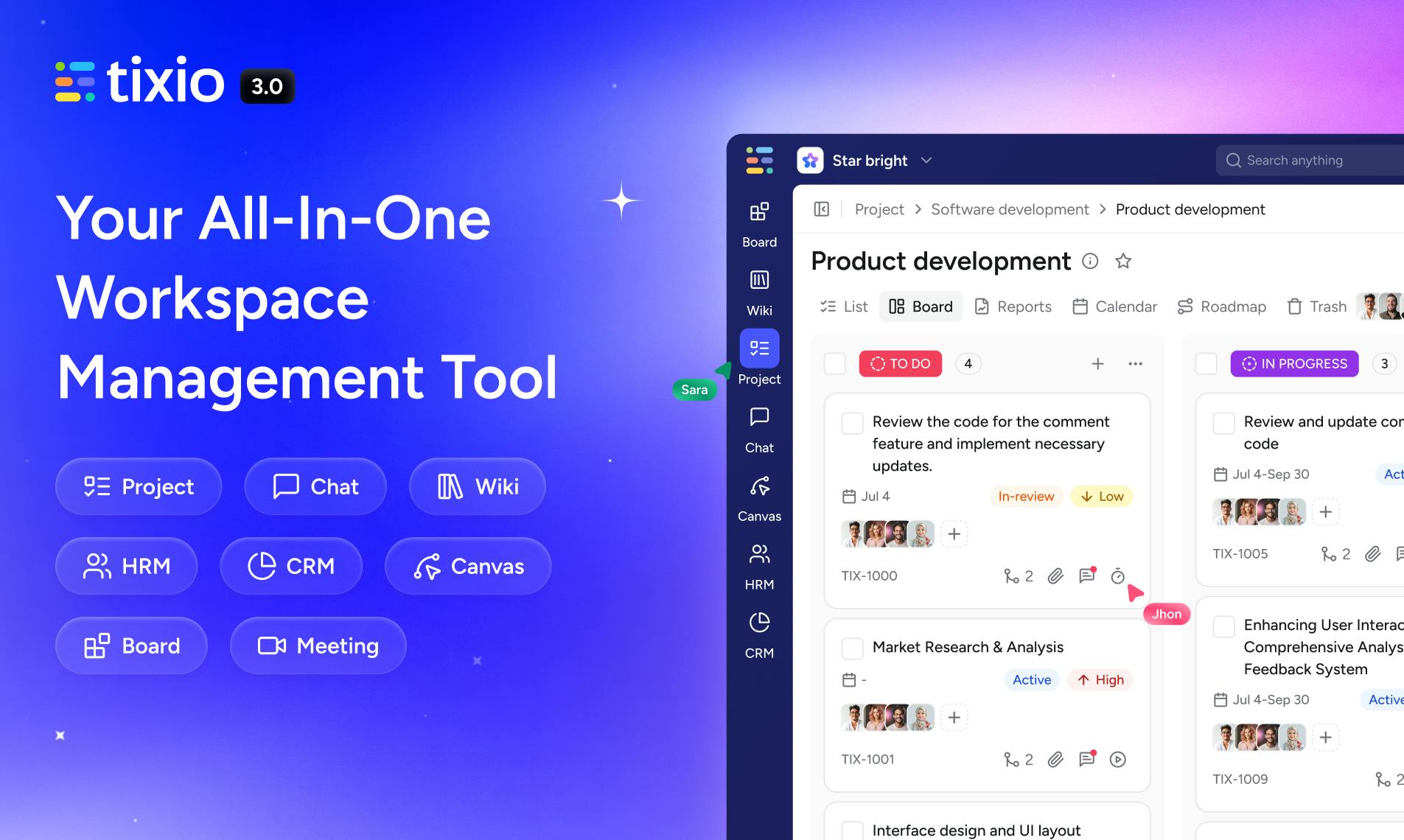
Tixio 3.0 Core Highlight: Seamless Meeting-Chat Integration
From Conversation to Meeting — Zero Switching Cost
Tixio 3.0's most eye-catching feature allows users to initiate meetings directly from the chat window — no need to switch to a separate video tool or open a new tab. When a team is discussing a project, they can instantly enter meeting mode while preserving the full discussion context.
The value of this design philosophy lies in "context continuity." In traditional workflows, when an impromptu discussion escalates from text chat to a voice/video meeting, it typically requires opening a separate link and re-explaining the background. Tixio compresses this process into a single action within the chat window, reducing friction in collaboration. This design draws from the communication concept of "Media Escalation" — seamlessly upgrading communication from a low-bandwidth medium (text) to a high-bandwidth medium (audio/video) without interrupting the session, ensuring that conversation context and participant state aren't broken by tool switching.
Discussion and Project Data Displayed Side by Side
Going further, Tixio allows users to view built-in Sprint Reports and Time Tracking data while discussing projects. This means teams can directly reference progress and time investment information during communication, without switching back and forth between project management dashboards and chat windows.
Some background explanation is helpful here: Sprint Reports originate from the Scrum framework in agile development, which divides product development cycles into fixed-length iteration periods — "Sprints" — typically lasting 1 to 4 weeks. At the end of each sprint, teams generate reports that include Burndown Charts, Velocity Charts, completed and incomplete user stories, and other data. Time Tracking records the actual hours team members invest in each task, helping evaluate estimation accuracy and resource allocation effectiveness.
For agile development teams, this "discuss while viewing data" mode is especially practical — Daily Standups, Sprint Retrospectives, progress alignment sessions, and similar scenarios can all be completed within a single interface. Teams can instantly reference actual data to make decisions rather than relying on memory or looking up information after the fact, preventing information from being lost in the gaps between applications.
Tixio's Product Positioning: Integration, Not Replacement
The Tixio team explicitly articulated its positioning philosophy in its product introduction: "We don't replace your tech stack. We take the best from every tool and pack tasks, chat, docs, and meetings into one workspace."
This statement is worth pondering because it touches on a long-standing core debate in enterprise software: the tension between "All-in-One Suite" and "Best-of-Breed" approaches to building a tech stack. The former, represented by Microsoft 365 and Google Workspace, emphasizes unified functionality and data interoperability; the latter advocates choosing the best specialized tool in each functional area (such as Figma for design, GitHub for code management, Linear for project management), then connecting them through APIs or integration platforms. The advantage of all-in-one tools lies in reducing integration complexity and learning costs, while the disadvantage is that individual feature depth may not match specialized tools.
The market has no shortage of "replace everything" all-purpose tools, but such products often struggle with implementation due to feature bloat or excessive migration costs. Tixio has chosen a more pragmatic path — it acknowledges that existing tools each have their strengths, aiming to reduce the sense of disconnection between tools through integration rather than forcing users to abandon their existing work habits. In effect, it attempts to find a middle ground between all-in-one and best-of-breed: providing a one-stop experience for core features while implying compatibility with existing tool ecosystems.
This "integrate rather than replace" approach holds considerable real-world appeal in today's increasingly fragmented collaboration tool landscape. Teams don't need to overhaul existing processes — they just need to centralize high-frequency collaboration actions into a single entry point.
Tixio 3.0 Pricing: $2.30/Month Per Seat
In terms of commercialization strategy, Tixio 3.0 has adopted highly competitive pricing: $2.30 per seat per month, with a 14-day free trial that requires no credit card to get started.
Compared to mainstream collaboration platforms that typically charge $8 to $15 per seat per month (such as Slack Pro at $8.75/month, Asana Premium at $13.49/month, Monday.com Standard at $12/month, and Notion Plus at $10/month), Tixio's price advantage is obvious. This aggressive low-price strategy in the SaaS space typically follows one of two business logics: first, rapid customer acquisition through low barriers, relying on economies of scale and subsequent premium feature upgrades (Freemium/Upsell model) for profitability; second, being in an early market validation phase, trading price for user base and usage data.
The 14-day free trial with no credit card required further reduces "trial friction" — industry research shows that requiring pre-linked credit cards reduces trial conversion rates by over 60%. The low entry barrier combined with this strategy lowers the psychological burden for teams to try the product, aligning with its positioning toward budget-sensitive small-to-medium teams and startups.
Comprehensive Analysis and Recommendations
Tixio 3.0's product logic is clear: it targets the universal pain point of "tool switching" and improves efficiency by integrating core collaboration features. The "start meetings from chat" feature, while not entirely novel (Microsoft Teams and Google Chat offer similar capabilities), demonstrates an understanding of real team workflows through its deep integration with project data and time tracking — a depth of integration uncommon among lightweight tools.
However, all-in-one tools face inherent challenges. While integrating features, they often struggle to surpass specialized tools in individual capabilities — whether Tixio's chat experience can match Slack (with over 2,600 third-party integrations and mature channel management mechanisms), whether its meeting quality can rival Zoom (which has invested billions in R&D on codec optimization, weak network adaptation, and large-scale concurrency), and whether its document collaboration can compete with Notion (known for its flexible block editor and database features) — all require real-world testing to verify.
Additionally, the product currently has only 2 comments on Product Hunt, meaning the market feedback sample is still small, and its actual experience and stability await validation from more users. For any collaboration tool, stability and performance (especially video meeting latency and audio/video quality) are key factors determining user retention — aspects that can only be truly tested through larger-scale real-world usage.
For small-to-medium teams seeking to reduce collaboration costs and minimize tool switching, Tixio 3.0 offers a price-friendly, pragmatically designed option worth evaluating. Teams are advised to take advantage of the 14-day free trial to focus-test its smoothness and feature completeness in real work scenarios before deciding whether to adopt it as a long-term solution.
Key Takeaways
Related articles

Claude Reportedly Able to Hide Secret Messages in Benign Images
A Reddit post claims Claude Fable 5.1 can hide secret messages in benign images. This article reviews the background, image steganography principles, and potential security risks, and suggests a testing path from rumor to verification.

Federal Government Awards $85 Million; CFS to Develop Fusion-Specific Semiconductors
The federal government awards $85 million to Commonwealth Fusion Systems to develop conductors and power semiconductors for fusion plants. This article analyzes the significance of this funding for the fusion supply chain and commercialization path.

When Should AI Assistants Proactively Suggest? Timing Is Everything
When should AI assistants proactively suggest? Reddit discussion reveals: the same suggestion feels different at different times. This article analyzes the dual nature of proactive suggestions, the boundary of user expectations, and design principles, exploring how to balance automation and user control.