Top 10 Practical Cursor Tips for 2025: From Agent Mode to Multi-Model Parallel Processing

A systematic guide to the top 10 core usage tips for Cursor's latest 2025 version
This article details the top 10 core usage tips for Cursor's latest 2025 version, including switching between Agent and Edit interface modes, layered usage strategies for the official proprietary model, custom model configuration essentials, precise distinctions between four modes (Agent/Plan/Debug/Ask), the embedded browser for merging design and development, Rules management, MCP protocol configuration, and WorkTree for multi-Agent parallel processing—helping developers efficiently leverage this AI programming tool.
Top 10 Core Tips for Using Cursor's Latest 2025 Version
As one of today's hottest AI programming tools, Cursor has undergone massive changes in 2025—from pricing model adjustments to the release of version 2.0. This article systematically covers ten core usage tips for Cursor's latest version to help developers use this tool more efficiently.
Agent and Edit: Two Interface Modes
When you open Cursor, it defaults to Agent mode—a chat box in the center, whitespace on both sides, with no visible code file directory tree. This mode emphasizes interacting with AI and focusing on a macro view of code changes. The traditional Edit mode, on the other hand, lets you see the code details of each file.
Technical Background of Agent Mode: Agent mode originates from the "Intelligent Agent" concept in AI, referring to AI systems that can autonomously perceive their environment, formulate plans, and execute multi-step tasks. Unlike traditional single-turn Q&A, an Agent can invoke tools, read/write files, and execute terminal commands, forming a closed loop of "perceive → think → act." Leading labs like OpenAI and Anthropic incorporated Agent capabilities into their core product roadmaps around 2024, marking a paradigm shift in AI tools from "assisting with answers" to "autonomously completing tasks." Cursor's Agent mode brings this concept to the programming domain, enabling AI to not just "answer questions" but truly "complete tasks"—which also explains why the interface design deliberately de-emphasizes code details in favor of highlighting task progress and change summaries.
In the latest version, Cursor has blurred the distinction between these two modes. The previous Edit/Agent toggle button in the upper left has been removed, and now a unified button lets you switch within the same interface. While many community users are uncomfortable with the new Agent mode, looking at trends from products like Google's AI programming tools, "not focusing on code details, but focusing on code changes and output artifacts" may well be the future direction of AI programming tools.
Cursor's Official Model: Positioning and Usage
In November 2025, Cursor finally released its own large language model. As an AI programming tool, lacking a proprietary model posed a strategic risk—long-term dependence on OpenAI or Anthropic's APIs means not only cost pressure but also vulnerability if upstream providers adjust pricing or terms of service. Developing a proprietary model was a strategic necessity.
Cursor's official model has two notable characteristics: fast speed and low cost. However, its coding capabilities still lag behind the GPT series or Claude series. The optimal strategy in practice is: first use GPT or Claude to generate detailed design documents and task documents, then hand them to Cursor's official model to write code within the established framework. This controls costs while ensuring output quality. This layered strategy of "strong model for planning + lightweight model for execution" essentially concentrates LLM inference costs on high-value architectural decisions while delegating repetitive code generation to more economical models.
Key Points for Custom Model Configuration
After purchasing a Cursor Pro plan (e.g., the $20 tier), your quota often runs out within days. You can then configure custom models to continue working, but two conditions must be met:
- You must be a Pro member or above—even if your plan quota is exhausted, as long as your membership hasn't expired, it works
- The model must have a dedicated API endpoint adapted for Cursor—this is different from endpoints for tools like Claude Code
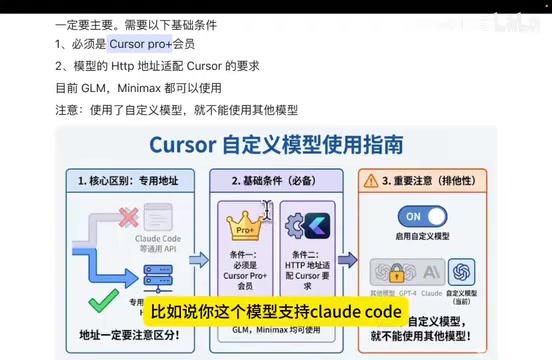
For example, with Zhipu's GLM-4.6, Cursor and Claude Code correspond to different API endpoints. This is because Cursor requires support for specific streaming response formats, tool-calling protocols, and context window management on top of the standard OpenAI-compatible interface—not all model providers will create separate adaptations for this. If a model hasn't released a Cursor-specific endpoint, custom model configuration will fail. Also note: once you configure a custom model, other built-in models become unavailable—you must delete the custom configuration to restore them.
Precisely Distinguishing Four Modes: Agent, Plan, Debug, and Ask
Cursor offers four modes—Agent, Plan, Debug, and Ask—and understanding their differences is crucial for efficient use:
- Agent (Generalist): Can do anything, but heavily depends on prompt quality
- Plan (Specialist - Planning): Has built-in system prompts for task planning, capable of breaking requirements into task lists
- Debug (Specialist - Debugging): Specifically for bug investigation, following a workflow identical to human debugging
- Ask (Specialist - Consultation): For discussing approaches, won't modify code
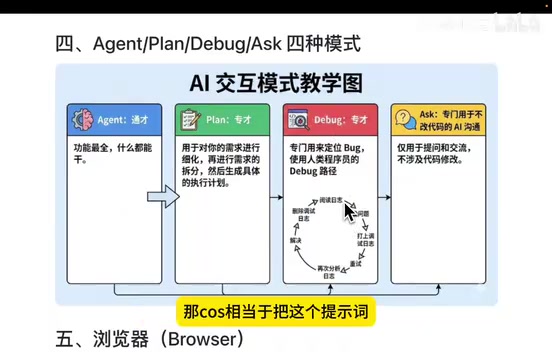
The fundamental difference between these four modes lies in different preset content in the System Prompt. Plan mode has built-in instructions like "Please break down the requirement into executable sub-tasks and assess dependencies between each task"; Debug mode pre-loads a complete debugging workflow prompt that guides the model to proceed using the scientific methodology of "hypothesis → verification → elimination." The advantage of this "specialization" design is that developers don't need to manually craft complex prompts each time, lowering the barrier to use.
Debug mode is particularly noteworthy. Its workflow is: read relevant code → hypothesize possible causes → insert debug logs at hypothesized locations → ask the user to restart and reproduce → read and analyze logs → eliminate possibilities one by one → fix the issue → clean up all debug logs. The entire process completely simulates a human developer's debugging approach. Currently, among all AI programming tools, only Cursor has a dedicated built-in Debug mode like this.
Embedded Browser: Merging Design and Development
Cursor's embedded browser isn't new, but it has made a major breakthrough on top of it. After opening the browser window via @Browser, you can directly view the page's element structure and even make modifications directly in the interface—for example, changing text color to red, previewing the effect in real time, then clicking Apply to submit to the LLM for saving.
The underlying principle of this feature is similar to the Chrome DevTools Protocol (CDP), using programmatic interfaces to directly manipulate the DOM tree and CSS styles, then reverse-translating the user's visual operations into code change instructions passed to the AI model. This "WYSIWYG" interaction method dramatically reduces the communication cost of "describing UI requirements" in front-end development—developers no longer need to describe in words "move the button 8px to the right, change the color to #FF5733"; they can simply drag and drop.
This means Cursor is integrating the design workflow into AI programming tools. In the future, developers may no longer need external design tools like Figma or Sketch—Cursor aims to achieve a complete closed loop from design → development → deployment.
Rules and Context Management
Rules can be understood as a project's "regulations"—constraining the LLM to output code according to your specific standards. This is especially important in complex projects.

Rules typically fall into two categories:
- Prohibition rules: e.g., "The service layer must call the management layer to access the database; direct SQL is forbidden"
- Example rules: e.g., "When method parameters are too numerous, you must define a DTO rather than listing a dozen parameters"
DTO Design Pattern Background: DTO (Data Transfer Object) is a classic design pattern in enterprise application development, systematically described by Martin Fowler in Patterns of Enterprise Application Architecture. Its core idea is to encapsulate multiple discrete parameters into a structured object for passing between different application layers, avoiding problems like overly long method signatures, confused parameter ordering, and interface changes causing cascading impacts. In mainstream frameworks like Java Spring, Python Django, and Node.js NestJS, DTOs have become the standard practice for data exchange between Controller and Service layers and are an important guarantee of code maintainability. Writing such conventions into Rules is essentially injecting the team's "coding culture DNA" into the AI model.
A notable detail: the Rules feature is being de-emphasized. Cursor 2.0 removed the ability to generate Rules directly via slash commands, reflecting that model capabilities are improving—the latest models already generate code that largely conforms to general development standards (like Java or Python conventions), needing only one or two corrections to remember specific requirements. However, Claude Code has also recently started supporting Rules, suggesting this feature still has its value.
MCP Configuration: Current Status and Usage
MCP Protocol Background: MCP (Model Context Protocol) is an open-source communication protocol proposed by Anthropic in late 2024, aimed at standardizing how AI models interact with external tools and data sources. By analogy, MCP is to the AI tool ecosystem what USB ports are to hardware peripherals—before MCP, every AI application needed to develop proprietary adapters for databases, search engines, code execution environments, etc., making development costly and hard to reuse. MCP defines a unified "tool description + invocation protocol" specification, allowing any standards-compliant AI client to plug-and-play with any MCP server. Currently, major platforms including GitHub, Stripe, and Cloudflare have released official MCP services, and the ecosystem is expanding rapidly.
Configuring MCP in Cursor is still somewhat cumbersome. Compared to MCP stores offered by other AI programming tools (one-click install), Cursor still relies on the "ancient" method of manually pasting addresses. Once configured, simply tell the AI explicitly in conversation to invoke the corresponding MCP tool, and the system will automatically trigger the appropriate method based on keywords.
WorkTree: Multi-Agent Parallel Processing
This is an extremely practical feature in Cursor. Traditional Git branch switching causes code to interfere with each other and context
Related articles
 Tech Frontiers
A Rare Quiet Day in AI: Recursive Self-Improvement Stirs Beneath the Surface
A rare quiet day in AI sees multiple sources go silent simultaneously. Behind the calm, Recursive Self-Improvement (RSI) research continues. What this means for the industry.
 Tech Frontiers
Reve 2 vs. Ideogram 4: A Deep Dive into Layout Control in AI Image Generation
A deep comparison of Reve 2 and Ideogram 4's layout control capabilities, covering technical approaches, real-world use cases, and industry trends for designers and creators.
 Tech Frontiers
In the Weights: Check Your Influence Score in the AI World
In the Weights is an AI influence search engine that quantifies your presence in the AI world with a score. Explore how it evaluates practitioners and what it means for digital identity.