Top 5 AI Gateways Compared: How to Manage Production LLM Traffic

Compare five leading AI gateways to find the right middleware for production LLM traffic management.
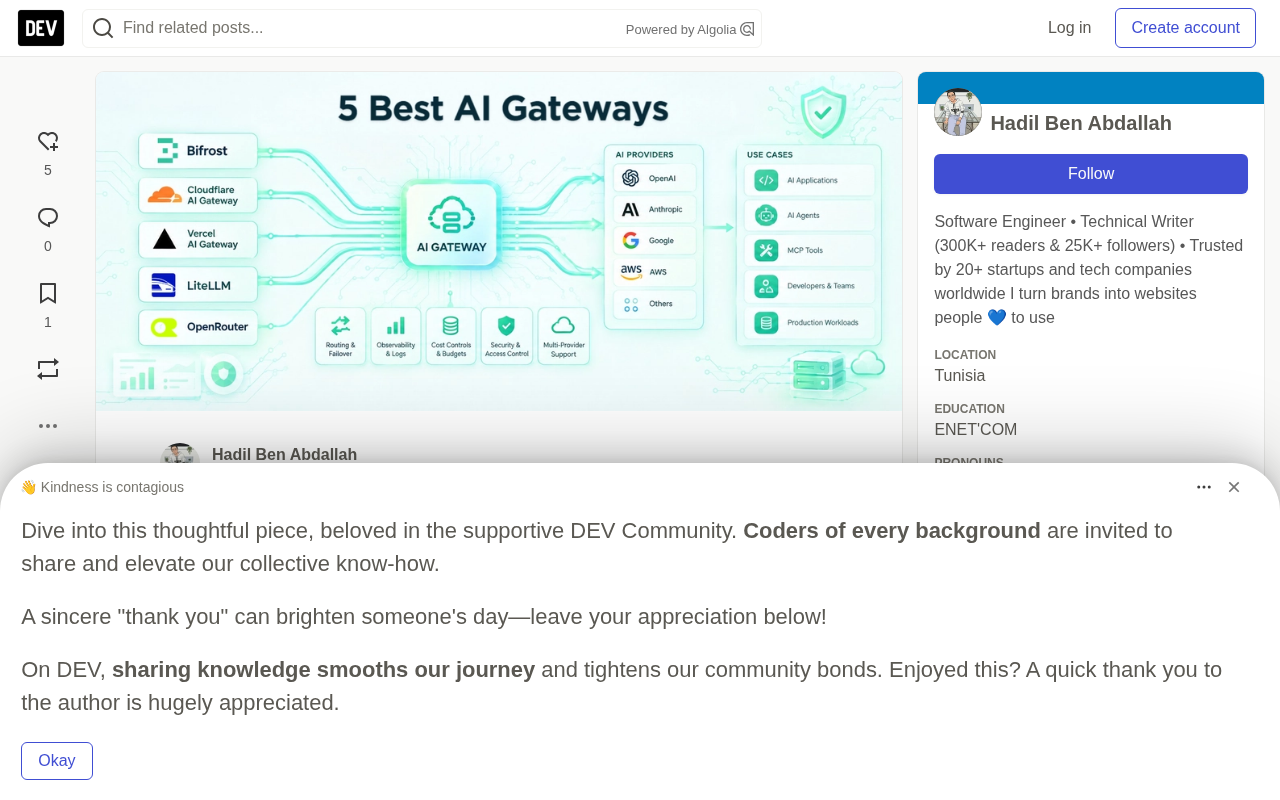
This article systematically compares five leading AI gateways — Bifrost, Cloudflare AI Gateway, Vercel AI Gateway, LiteLLM, and OpenRouter — focusing on performance, routing, reliability, observability, cost control, and deployment flexibility in real production scenarios. As a unified middleware layer between applications and multiple model providers, AI gateways centralize provider routing, failover, token cost tracking, and access control. Each platform has distinct strengths: Bifrost (built in Go) shows dramatically better throughput and latency than LiteLLM in official benchmarks and supports MCP/agent governance and air-gapped deployment; Cloudflare and Vercel serve their respective ecosystems; LiteLLM offers flexible open-source Python-based options; and OpenRouter provides the largest model catalog. Selection should be driven by actual needs — number of models, performance requirements, open-source preference, and data compliance constraints.
Calling LLMs is never as simple as writing a few API requests. In real production environments, an AI application often needs to connect to multiple model providers simultaneously — models get updated constantly, traffic spikes unpredictably, token costs keep climbing, and agent-style workflows grow increasingly complex. When all these moving parts are scattered throughout application code, maintenance costs spiral out of control fast.
AI Gateways exist precisely to consolidate these concerns in one place. By inserting a unified interface between your application and the underlying models/providers, they give engineering teams a single location to manage routing, fault tolerance, cost, and observability — without embedding provider-specific logic throughout business code.
This article compares five leading AI gateways: Bifrost, Cloudflare AI Gateway, Vercel AI Gateway, LiteLLM, and OpenRouter, focusing on their real-world deployment characteristics — speed, provider coverage, reliability, routing, logging, cost control, deployment model, and ease of integration.
What Problems Does an AI Gateway Actually Solve
An AI gateway is an optional middleware layer that sits between your application and the AI models or providers it uses. Rather than having your application connect directly to OpenAI, Anthropic, Google, AWS, and other providers separately, a gateway provides a single unified entry point for sending requests and managing everything that happens around them.
Depending on the platform, an AI gateway typically offers:
- Unified API to reduce per-provider integration work
- Model routing to switch between providers and models
- Automatic retries and failover to handle provider outages
- Observability to monitor requests, latency, errors, tokens, and usage
- Caching to reduce redundant model calls and costs
- Rate limiting and budgets to control AI spend
- Access control for teams, applications, or users
- MCP and agent support for more complex workflows
As applications scale, the value of these capabilities becomes increasingly apparent. At the prototype stage, you might have a single app talking directly to a single model — but production systems can depend on multiple models, multiple providers, and different environments, handling thousands of requests per minute. Without a centralized gateway, provider configuration and reliability logic gets scattered across the entire codebase — swapping models, handling failures, tracking costs, and enforcing usage policies may all require changes in multiple places. A gateway gives engineering teams a clear, single location to manage these concerns, allowing application code to stay focused on the product itself.
Evaluation Criteria
This comparison focuses on how AI gateways perform in real-world production scenarios, not just what appears on their marketing pages. The core evaluation criteria include:
- Performance and scalability
- Model and provider coverage
- Routing and failover
- Observability and cost control
- Ease of integration
- Deployment and infrastructure flexibility
- Open-source availability and enterprise capabilities
The table below provides a quick overview of the differences across all five gateways:
| AI Gateway | Runtime/Model | Open Source | Core Strengths | Pricing Model | Best For |
|---|---|---|---|---|---|
| Bifrost | Go | ✓ Apache 2.0 core | Performance, routing, reliability, governance | Self-hosted free; enterprise custom pricing | High-traffic production AI |
| Cloudflare AI Gateway | Cloudflare Edge | ✗ | Edge integration, analytics, caching | Core free; usage-based billing | Cloudflare-based applications |
| Vercel AI Gateway | Managed | ✗ | Developer experience, routing, web integration | Free tier + paid | Vercel and frontend teams |
| LiteLLM | Python | ✓ | Provider coverage and flexibility | Self-hosted free; managed optional | Multi-provider/Python teams |
| OpenRouter | Managed | ✗ | Massive model catalog and unified API | Usage-based billing | Developers needing broad model access |
Bifrost: Open-Source Control Plane Built for Production
Bifrost (by Maxim AI) is an open-source gateway and control plane designed for production AI infrastructure. It gives engineering and platform teams a unified entry point to route requests across multiple models and providers, while handling reliability, governance, observability, and cost control at the same layer.
Bifrost supports 10,000+ models across 25+ providers and offers an OpenAI-compatible API, so existing applications can integrate by simply changing the API base URL. Beyond traditional LLM routing, it can govern LLM requests, MCP tool calls, and AI agent traffic through the same gateway — and supports deployment within customer-owned infrastructure with identity, access control, and security capabilities.
Performance and Reliability
A gateway adds a layer to every request, so its own performance directly impacts the applications above it. Bifrost is built in Go with a request path optimized for low overhead: configuration is held in memory, memory pools are pre-warmed at startup, and provider connections are maintained to avoid repeated connection or database costs on each request.
In official benchmarks run on AWS EC2 with 500 concurrent users over 60 seconds, Bifrost compared to LiteLLM as follows:
- 424 requests/sec vs 44.84 requests/sec
- 804ms P50 latency vs 38.65 seconds
- 1.68s P99 latency vs 90.72 seconds
- 120MB memory usage vs 372MB
- 100% success rate vs 88.78%
It's worth noting that actual performance depends on infrastructure, workload, provider latency, and configuration — testing with your own traffic is recommended. For larger-scale deployments, Bifrost Enterprise adds cluster mode, adaptive load balancing, circuit breakers, automatic failover, and zero-downtime deployments.
Routing, Governance, and Agent Traffic
Bifrost supports weighted load balancing, retries, and automatic fallback, allowing teams to route across models and providers behind a unified API. Core capabilities include budgets and rate limiting on virtual keys, semantic caching, Prometheus metrics and OpenTelemetry tracing, and integrations with platforms like Datadog, Kafka, BigQuery, Pub/Sub, and Splunk.
It also supports an MCP Gateway, enabling models and agents to discover and invoke tools through the same infrastructure. MCP Code Mode lets models orchestrate tools via sandboxed code rather than stuffing every tool definition into the prompt — reducing input token consumption by up to 92.8% with large tool sets.
Deployment and Pricing
Bifrost can run as a single binary on VMs, Kubernetes, private cloud, VPCs, on-premises environments, and even air-gapped networks. The open-source core is Apache 2.0 licensed and free to self-host permanently. The Enterprise edition uses custom pricing with a 14-day free trial, adding identity governance, fine-grained access control, guardrails, signed audit logs, and high availability.
Best for: Enterprises with high performance, scalability, and reliability requirements that need air-gapped, VPC-isolated, or on-premises deployment in regulated industries.
Cloudflare AI Gateway: Centralized Management Layer for the Edge Ecosystem
Cloudflare AI Gateway provides a centralized layer for managing AI requests across different model providers while keeping requests within the Cloudflare ecosystem. It acts as a proxy between your application and AI providers, offering a consistent endpoint with caching, rate limiting, retries, logging, and analytics capabilities.
The gateway layer itself is free, but underlying AI provider usage and other Cloudflare services incur their own costs — overall cost depends primarily on which Cloudflare products you use and the scale of your AI traffic.
Best for: Teams already using Cloudflare infrastructure who want centralized traffic management, observability, caching, and control without introducing a separate gateway stack.
Vercel AI Gateway: Fast Integration for Frontend Teams
Vercel AI Gateway is designed for teams building AI web applications who want a simple way to connect to multiple model providers. It provides a unified model access interface while handling provider routing, failover, and model selection — reducing the amount of provider-specific logic that needs to live inside your application.
Its biggest selling point is developer experience. Teams already using Vercel, Next.js, and the AI SDK can integrate with almost no additional infrastructure overhead. On pricing, it offers a free starting tier, and BYOK (bring your own key) configuration lets you go straight through provider pricing without additional token markups.
Best for: Frontend and full-stack teams building AI applications on Vercel who prioritize developer experience, rapid integration, and convenient multi-model access.
LiteLLM: Flexible Open-Source Option for Python Teams
LiteLLM is one of the most widely used open-source AI gateways. Built around Python, it provides an OpenAI-compatible API that lets applications connect to hundreds of models and providers without separate integrations for each one.
Its greatest strength is flexibility — broad provider support, plus tools for model routing, fallback, load balancing, retries, spend tracking, rate limiting, and observability. It's particularly practical for teams experimenting with different models or needing to switch providers without rewriting business logic. LiteLLM can be deployed as a self-hosted proxy or used via a managed cloud option.
Best for: Developers and engineering teams that need broad model/provider coverage, flexible routing, and want a customizable, self-hostable open-source gateway.
OpenRouter: One API to Access a Massive Model Catalog
OpenRouter takes a different approach: a unified API providing access to a massive catalog of models from different providers. Developers can switch between models using a single API without separate integrations per provider.
OpenRouter is especially useful when model selection itself is a central part of the development workflow — teams can compare models, experiment with different providers, and route requests through a unified interface while keeping integrations simple. It also offers model routing, provider selection, usage tracking, and fallback. Pricing is typically usage-based per model, with some models free and paid models billed at their respective rates.
Best for: Developers and AI teams who want to access and experiment with a large number of models through a single API without maintaining their own multi-provider integrations.
How to Choose the Right AI Gateway
Choosing a gateway isn't about finding the one with the most features — it's about understanding your application's real needs as it grows. A few key questions are worth clarifying upfront:
- How many models and providers do you need to support? If you rely on multiple providers, prioritize broad coverage, a unified API, and consistent behavior across models.
- How critical are speed and reliability? In user-facing applications, gateway overhead and provider failures directly impact experience — focus on fast processing, automatic retries, availability-aware routing, and high availability. When low latency and production reliability are top priorities, Bifrost is worth evaluating.
- Open source or managed? Open source gives teams more control over deployment, customization, and infrastructure, but requires self-managed operations. Managed reduces maintenance and simplifies onboarding. Choose based on your team's infrastructure capabilities and security requirements.
- How do you track AI costs? Look for budgets, rate limiting, usage reporting, and analytics broken down by model, provider, application, and team.
- Where does it need to deploy? Managed services suit teams who want less infrastructure overhead, while organizations with strict data control requirements may need private cloud, VPC, on-premises, or air-gapped deployment.
A gateway that works perfectly for an early-stage application may not suit a system that has significantly grown in traffic, model usage, and operational requirements. Evaluating these constraints early makes the decision much easier.
Final Thoughts
AI gateways have become a core component of production AI application architecture. As teams work with more models, providers, agents, and tools, managing integrations individually becomes increasingly unsustainable.
The five platforms reviewed here each have distinct strengths, but for production and enterprise-grade workloads, Bifrost stands out as the strongest overall performer in this comparison — combining performance, reliability, routing, governance, and flexible deployment while unifying LLM gateway, MCP gateway, and agent capabilities, with support for self-hosted, VPC, on-premises, and air-gapped deployments. The others each serve clear use cases: Cloudflare for Cloudflare users, Vercel for Next.js teams, LiteLLM for Python teams wanting an open-source solution, and OpenRouter for developers wanting broad model access.
The conclusion is straightforward: choose based on the problem you're trying to solve. A lightweight managed solution is perfectly sufficient for small applications. For large AI platforms that need to handle heavy traffic, model routing, agent workflows, and enterprise policies, a gateway becomes an indispensable part of the architecture.
Related articles

ChatGPT Space Launches: Team Collaboration and New Pages Features Explained
ChatGPT Space is OpenAI's new team collaboration feature with Pages, real-time collaboration, and Slack/Google Drive sync. We break down its privacy design, multi-platform integration, and the full workflow from conversation to document.

Migrating Apache Spark UDFs to GPU Acceleration with AI Agents
NVIDIA developer blog explains how AI Agents rewrite Apache Spark UDFs for GPU acceleration, covering migration criteria, agent rewriting and verification workflows, plus pitfalls like result consistency and CPU-GPU transfer overhead.

Zed Editor v0.40.4-rc2 Released: Usage Credits Now Available Without Upgrading
Zed editor releases v0.40.4-rc2, allowing users to use usage credits for AI features without upgrading to a paid plan, lowering the trial barrier.